
Camera Backup Workflow: Safeguarding Your Visual Assets
Discover a reliable backup workflow to protect your photos and videos from loss. From memory cards to cloud storage, ensure every shot is safe.
EXPLORE ACCESSORIESWhy a Backup Workflow Matters: Losing irreplaceable photos or video footage is a photographer's worst nightmare. Whether you shoot with a DSLR or a mirrorless camera, a solid backup workflow ensures your creative work survives hard drive failures, accidental deletions, and natural disasters. This guide walks you through every step to build a robust system.
1. Understanding the Risks: Why Backup is Non-Negotiable
Every photographer faces potential data loss scenarios. Memory cards can corrupt, hard drives fail, and laptops get stolen. Without a structured backup plan, years of work can vanish in seconds. The first step is acknowledging that no single storage device is infallible. Even high-end memory cards and storage cases are vulnerable. A proactive approach is your best defense.
Consider this: a 128GB SD card might hold thousands of RAW files from a once-in-a-lifetime trip. If that card fails, those moments are gone forever. Similarly, a full-frame sensor captures immense detail, resulting in large files that demand reliable storage. Building redundancy into your workflow is not optional—it's essential.
2. The 3-2-1 Backup Rule: Your Foundation
The gold standard for data protection is the 3-2-1 rule: 3 copies of your data, on 2 different types of media, with 1 copy stored offsite. This strategy minimizes risk from local disasters like fire or theft. Here's how it applies to photography:
- 3 Copies: Keep the original files on your primary working drive, plus two backups.
- 2 Media Types: Use different storage technologies—for example, an SSD and a traditional hard drive, or a hard drive and cloud storage.
- 1 Offsite: Store one backup in a different physical location, such as a cloud service or a safe deposit box.
Pro Tip: When traveling, consider using a portable camera backpack with dedicated compartments for drives, and always carry your memory cards in a protective storage case to prevent physical damage.
3. Building Your Step-by-Step Backup Workflow
A consistent routine is key. Follow these steps after every shoot to ensure your files are safe before you even start editing.
Step 1: Ingest Immediately
As soon as possible, transfer files from your memory card to your computer or primary drive. Avoid formatting the card until files are verified.
Step 2: Create a Second Copy
Immediately copy the same files to a second external hard drive or a fast SSD. Use reliable software to verify the transfer.
Step 3: Upload to Cloud or Offsite
Sync your files to a cloud service or store a drive offsite. This protects against local disasters and theft.
Step 4: Verify and Organize
Check that all files are readable. Organize them into folders by date, project, or client for easy retrieval later.
For video shooters using cinema cameras or action cameras, the volume of data is even larger. Consider using a tethered shooting setup to back up files in real-time during the shoot. This is especially useful for studio work or events where you can't afford to lose a single frame.
4. Choosing the Right Storage Media for Your Workflow
Not all storage is created equal. Your choice depends on your budget, speed requirements, and how much data you generate. Here's a comparison of common options:
| Storage Type | Pros | Cons | Typical Cost |
|---|---|---|---|
| External HDD | Affordable, large capacity | Slower, susceptible to shock | $50–$150 |
| External SSD | Fast, durable, portable | More expensive per GB | $100–$300 |
| Cloud Storage | Offsite, accessible anywhere | Monthly fee, upload time | $10–$20/month |
| NAS (Network Attached Storage) | Centralized, expandable, RAID options | Higher upfront cost, setup complexity | $300–$800+ |
For photographers who frequently travel, a rugged external SSD is a great companion. Pair it with a hard case for extra protection. If you work from a studio, a NAS system can streamline backups across multiple devices. And for ultimate peace of mind, a cloud backup ensures your files survive even if your home or office is compromised.
5. Software and Tools to Automate Your Backup
Manual backups are error-prone. Automation ensures consistency. Here are some tools and strategies to consider:
- Backup Software: Use tools like Carbon Copy Cloner, Acronis, or free options like FreeFileSync to schedule automatic backups.
- Cloud Sync: Services like Backblaze, Google Drive, or Dropbox can sync folders automatically. This is ideal for ongoing projects.
- RAID Arrays: For advanced users, a RAID configuration in a NAS provides redundancy. If one drive fails, your data remains accessible.
- Camera Tethering: When shooting in a studio, tether your camera to a laptop and use software to instantly back up files as they are captured. Learn more in our camera tethering guide.
Remember to regularly update your camera firmware and backup software to ensure compatibility and security. Outdated software can leave your data vulnerable.
6. Long-Term Archiving and Maintenance
Backups aren't just for active projects. Your archived work needs attention too. Hard drives can fail even when not in use, and cloud services can change their terms. Follow these best practices:
- Verify Backups Periodically: Every few months, check that your archived files are still readable. Replace aging drives before they fail.
- Use Multiple Cloud Providers: Don't rely on a single cloud service. Diversify to reduce risk.
- Keep a Catalog: Maintain a spreadsheet or database of what's stored where. This saves time when you need to retrieve a specific file.
- Consider Archival Media: For truly irreplaceable work, consider M-DISC or archival-grade DVDs, which have a longer lifespan than traditional hard drives.
If you shoot in RAW format, your files are larger but offer more flexibility. Ensure your backup strategy accounts for this increased storage demand. And don't forget to back up your edited files and color grading projects as well—they represent hours of creative work.
Important: Never store all your backups in the same location. A single event like a flood or fire could destroy everything. Offsite storage is your safety net.
7. Common Backup Mistakes to Avoid
Even seasoned photographers make these errors. Avoid them to keep your data safe:
- Only Backing Up Occasionally: Make it a habit after every shoot. Waiting weeks increases the risk of loss.
- Relying on a Single Drive: A single external drive is not a backup. It's a single point of failure.
- Not Testing Restores: A backup you can't restore is useless. Periodically try to restore a file to ensure your process works.
- Ignoring Memory Card Health: Format cards in-camera, not on your computer, and replace them every few years. Learn more in our memory cards guide.
- Skipping Metadata: Back up your Lightroom catalog or Capture One session files. Losing edits is as painful as losing originals.
For those using drone cameras or 360 cameras, the file sizes are enormous. Plan for extra storage and faster transfer speeds. A slow backup can become a bottleneck, so invest in USB 3.0 or Thunderbolt drives.
Recommended Storage and Backup Gear
⚠️ AFFILIATE DISCLOSURE: This website contains affiliate links. As an affiliate Associate, we earn from qualifying purchases. If you make a purchase through these links, we may receive a small commission at no additional cost to you. Read our full affiliate policy.

Workflow Governance: Putting Workflow Before Technology into Action
Check price on Amazon
Seagate 8TB Expansion Desktop Hard Drive | MicroB to USB-C (STNP8000400) | New Generation of High-capacity HDD storage for backup & archive, Windows & macOS compatible. 1-Year Warranty + 1-Year Rescue
Check price on Amazon
The AI Workflow and Automation System: Design controlled work. Build reliable automation. (Workflow Lift Professional Series)
Check price on Amazon
UKey NFC Seed Phrase Backup Card, 24-Word BIP39, 2 Pack | Battery-free recovery phrase storage, encoded backup data, compact everyday carry, separate-location backup for self-custody
Check price on Amazon
UKey Fingerprint Cold Wallet Black, Touchscreen, NFC Backup, EAL6+ Chip | Crypto hardware wallet for self-custody, on-device transaction review, USB/Bluetooth/QR workflows, backup card included
Check price on Amazon
TEARMOS 256GB Photo Stick for iPhone Flash Drive, Memory Stick Phone Storage for Photos and Videos Files Backup, Compatible with iPhone iPad Android PC, Plug & Play, No App Required (Dark Red)
Check price on Amazon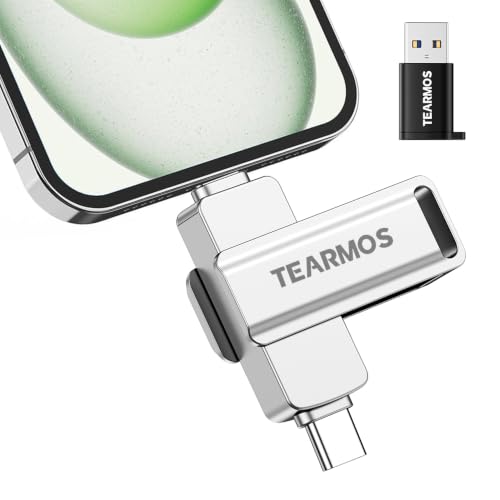
TEARMOS 256GB Photo Stick for iPhone Flash Drive, Memory Stick Phone Storage for Photos and Videos Files Backup, Compatible with iPhone iPad Android PC, Plug & Play, No App Required (Silver)
Check price on Amazon
Workflow Architecture: How to Design Structured Workflows, Execution Pipelines, and Systems for Consistent High-Quality Output (High Performance Architecture Series Book 10)
Check price on AmazonReady to safeguard your photography? Explore our curated selection of storage solutions and build a backup workflow that gives you peace of mind.
Shop Backup EssentialsFinal Thoughts: Consistency is Key
A backup workflow is only as good as your adherence to it. Whether you're a hobbyist with a point-and-shoot camera or a professional using medium format sensors, the principles remain the same: redundancy, automation, and offsite protection. By implementing the 3-2-1 rule and using the right tools, you ensure that your visual legacy endures.
Remember to also maintain your gear. Regular sensor cleaning and proper storage in a dry cabinet prevent physical damage that could lead to data loss. And if you're just starting out, check our first camera checklist to build a solid foundation.
Your photos and videos are irreplaceable. Treat them with the care they deserve by establishing a reliable backup workflow today.