


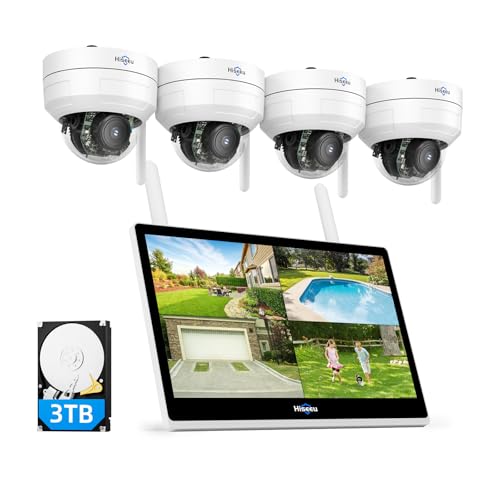


What Exactly Is a Home Surveillance System with Monitor?
A home surveillance system with a monitor is a complete, self-contained security solution. It typically consists of three core components: a set of security cameras, a central recording unit (either a DVR or NVR), and a dedicated display screen. This setup allows you to view live footage from all cameras simultaneously on a single screen, record video for later review, and manage your entire security network from one central hub. It's the modern equivalent of a traditional CCTV system, offering reliability and ease of use.
The key advantage is its independence. Once installed, the system runs continuously, recording and displaying footage without needing a smartphone, tablet, or even an internet connection (though many offer these features as a bonus). This makes it an ideal choice for those who want a robust, always-on security solution, such as an outdoor home security system with cameras that operates independently.
Core Components Explained: DVR vs. NVR and Camera Types
Understanding the technology is key to making the right choice. The main difference lies in the recorder and the cameras it uses.
- DVR (Digital Video Recorder): This is the traditional analog system. Cameras connect to the DVR using coaxial cables (like the ones for old TVs), which also provide power. The DVR then digitizes the analog signal for recording and viewing. These systems are often more affordable and are a great choice if you already have existing coax cabling. If you're looking for a cost-effective option, a wired home security camera system with a DVR is a solid path.
- NVR (Network Video Recorder): This is the modern IP-based system. Each camera is an independent network device. They connect to the NVR (and your network) via a single Ethernet cable, which carries both power (PoE - Power over Ethernet) and data. NVR systems typically offer higher resolution, better scalability, and more advanced features.
Choosing the Right Cameras
When selecting cameras for your system, consider these key features:
- Resolution: 1080p (Full HD) is the current standard, but 4K (8MP) is becoming more common and offers much sharper detail, allowing you to zoom in on footage without losing clarity.
- Night Vision: Essential for 24/7 security. Look for cameras with either IR (infrared) or Color Night Vision. For areas without power, a solar-powered outdoor security camera with night vision can be a great addition, though it may need to connect to your main NVR system.
- Weatherproofing: For outdoor cameras, ensure they have an IP66 or IP67 rating to withstand rain, dust, and extreme temperatures.
Key Features to Look For in a Surveillance Kit
Beyond the basics, these features will significantly impact your experience and the system's effectiveness.
- Storage & Recording: Most systems come with a pre-installed hard drive (1TB to 4TB or more). The size you need depends on the number of cameras, resolution, and how many days of footage you want to store. You can often expand storage or opt for a system with an outdoor security camera with an SD card recorder for redundant, local backup.
- Remote Viewing: Almost all modern systems offer a mobile app for remote viewing. This lets you check in on your home from anywhere, a feature that is crucial for a home security camera system with remote viewing. However, some systems are designed to operate without internet, giving you a truly private and secure network, such as a security system that doesn't need WiFi.
- Motion Detection & Alerts: Look for systems with smart motion detection that can differentiate between people, vehicles, and animals to reduce false alerts. A security camera with long-range motion detection is perfect for large properties.
- Audio: Some cameras come with built-in microphones and speakers, allowing you to hear and speak to visitors. A home security camera system with audio adds another layer of interaction and security.
Installation and Cost: What to Expect
Installing a system can be a DIY project for the handy, but professional installation ensures optimal placement and performance. The cost varies widely based on the number of cameras, resolution, and whether you choose a wired or wireless system. Wired systems are more reliable but require more effort to install. Wireless systems offer more flexibility but can suffer from signal interference.
For those who prefer a professional setup, it's wise to research the average cost of security camera installation or the average cost to install a security system to budget accordingly.
Subscription Fees: Know Before You Buy
While many systems function perfectly without them, some brands push for a monthly subscription for cloud storage and advanced features. If you want to avoid ongoing costs, there are many excellent options. You can find a security camera that does not require a subscription, or a full wireless security camera system with no monthly fee. This is a major factor for many buyers who prefer a one-time purchase.
Final Checklist: Choosing Your Perfect System
Before you buy, ask yourself:
- How many cameras do I need to cover all entry points and blind spots? (4, 8, or 16 channels)
- What resolution do I need? (1080p for general overview, 4K for identifying details)
- Do I want a wired (more reliable) or wireless (easier to install) system?
- What is my budget? (Systems range from $200 for basic kits to $1,500+ for high-end 4K setups).
- Do I want to avoid monthly fees? (Look for systems with local HDD storage).
By answering these questions, you'll be well-equipped to choose a home surveillance system with a monitor that provides the security and peace of mind you deserve.