
Light Bulb Security Camera Without Subscription
Discover how a light bulb security camera can secure your home without monthly fees. This comprehensive guide explains how these clever devices work, what features to look for, and why they are an excellent choice for budget-conscious homeowners.
Tired of paying a monthly cloud storage fee just to review your security footage? A light bulb security camera without subscription might be the solution you have been looking for. These devices screw into a standard E26 or E27 light socket, combining a bright LED light with a high-definition security camera. The best part? You can view live footage and often access recordings locally without paying a recurring fee. This guide will walk you through everything you need to know before making a purchase.
What Is a Light Bulb Security Camera?
A light bulb security camera is a dual-purpose device that fits into your existing light fixture. It contains a camera, a motion sensor, and an LED light in a compact housing. Because it draws power directly from the light socket, you never have to worry about charging batteries or running messy cables. This makes it an incredibly convenient option for porches, garages, hallways, and other areas where installing a traditional wired camera would be difficult or expensive.
When you choose a model that operates without a subscription, you retain full ownership of your footage. Most of these cameras support a microSD card for local storage, and many allow you to view a live stream directly from a mobile app at no extra cost. This is a significant advantage over cloud-dependent cameras, which often lock essential features like playback behind a paywall.
For those who need a camera in areas without Wi-Fi, you might also consider a security system that does not require Wi-Fi. But for most users, a light bulb camera with local storage strikes the perfect balance between convenience, cost, and functionality. If you are specifically looking to avoid monthly fees, you can also explore other security cameras without subscription fees to compare options.
How Does a Light Bulb Camera Work Without a Subscription?
The magic of a subscription-free light bulb camera lies in its storage method. Instead of sending footage to a company's cloud server, the camera saves video directly to a microSD card (usually up to 128GB or 256GB). You can review, download, and delete footage at any time through the companion app or by removing the card and inserting it into a computer.
These cameras typically connect to your home's 2.4GHz Wi-Fi network, allowing you to access the live feed and recorded clips from anywhere using your smartphone. Even without a subscription, you get essential features like motion detection alerts, two-way audio, and night vision. The camera simply records to your own storage, and you keep the footage without paying a monthly fee.
It is worth noting that some light bulb cameras are designed to work entirely offline. If you need a camera that operates without any internet connection, look for a wireless camera that does not require Wi-Fi. However, for remote viewing, a Wi-Fi connection is necessary.
Key Features to Look For
Not all light bulb cameras are created equal. When shopping for a subscription-free model, pay close attention to the following features to ensure you get the best value for your money.
- Local Storage: A microSD card slot is essential for recording without a subscription. Aim for a camera that supports at least 128GB.
- Resolution: Look for 1080p or 2K resolution for clear, detailed footage that can help identify faces or license plates.
- Motion Detection: Advanced PIR motion sensors reduce false alarms and save storage space by only recording when there is activity.
- Night Vision: Infrared LEDs provide clear black-and-white footage in complete darkness.
- Two-Way Audio: A built-in microphone and speaker let you communicate with visitors or deter intruders.
- Easy Installation: Most models screw into a standard light socket, but check for compatibility with your fixture.
- App Control: A reliable mobile app is crucial for viewing live feeds, adjusting settings, and reviewing recordings.
For outdoor use, make sure the camera is weatherproof. A outdoor Wi-Fi security camera with no subscription is ideal for porches and driveways, but light bulb models are particularly well-suited for these locations because they are already protected by the existing light fixture.
Pros and Cons of Subscription-Free Light Bulb Cameras
Like any security solution, light bulb cameras have their strengths and weaknesses. Understanding these will help you decide if this is the right choice for your home.
Pros
- No monthly fees or long-term contracts
- Easy DIY installation with no wiring
- Combines lighting and security in one device
- Local storage gives you full control over footage
- Affordable upfront cost
- Ideal for renters or temporary setups
Cons
- Requires a light socket in the desired location
- May not work with dimmer switches or smart bulbs
- Local storage can be lost if the camera is stolen
- Wi-Fi range can be a limitation for outdoor use
- Some models have limited field of view
Installation and Setup: What to Expect
One of the biggest advantages of a light bulb security camera is how easy it is to install. In most cases, you simply screw the camera into an existing light socket, download the companion app, and connect it to your Wi-Fi network. The entire process usually takes less than 15 minutes.
Before you begin, make sure the light switch is turned off to avoid electrical hazards. Once the camera is securely in place, turn the power back on and follow the app's instructions to pair the device. You will typically need to create an account, scan a QR code, and enter your Wi-Fi password. After that, you can customize motion detection zones, adjust the light brightness, and set up notifications.
If you are installing the camera outdoors, choose a location that is within range of your Wi-Fi router. For areas with weak signal, you might need a Wi-Fi extender. If you are looking for a more comprehensive setup, consider a solar-powered motion sensor light with camera, which offers similar benefits but uses solar power instead of a light socket.
Storage Options: microSD vs. Cloud
When you choose a subscription-free light bulb camera, you are essentially opting for local storage. A microSD card is the most common method, and it offers several advantages. You can record continuously or only when motion is detected, and you can easily review footage without an internet connection. The main drawback is that if the camera is stolen or damaged, the footage may be lost.
Some cameras offer a hybrid approach, allowing you to use a microSD card for local storage while also offering optional cloud storage for a fee. However, if your goal is to avoid monthly costs, you can simply ignore the cloud option and rely on the SD card. For added security, you can also set up a network video recorder (NVR) or use a security camera that records to SD card as a backup.
How to Choose the Right Light Bulb Security Camera
With so many options on the market, it can be overwhelming to choose the right one. Start by determining your primary use case. Are you monitoring your front door, your backyard, or a garage? For outdoor use, prioritize weather resistance and night vision. For indoor use, a smaller, less obtrusive model may be preferable.
Next, consider the resolution. 1080p is sufficient for most homes, but 2K or 4K offers more detail if you need to identify faces or license plates. Check the field of view; a wider angle (around 120-160 degrees) covers more area. Finally, read reviews about the app's reliability and the camera's motion detection accuracy. A good app makes a huge difference in your overall experience.
If you are on a tight budget, there are many cheap and easy-to-install security cameras available, including light bulb models. Just make sure they support local storage and do not require a subscription for basic features. You can also compare with other affordable outdoor security cameras to see which fits your needs best.
Recommended Light Bulb Security Cameras Without Subscription
⚠️ AFFILIATE DISCLOSURE: This website contains affiliate links. As an affiliate Associate, we earn from qualifying purchases. If you make a purchase through these links, we may receive a small commission at no additional cost to you. Read our full affiliate policy.

2K Light Bulb Security Camera 5G&2.4G WiFi Security Cameras Wireless Outdoor Indoor,360°Bulb Cameras for Home Security Outside Indoor,Motion Detection and Alarm,Two-Way Talk,Color Night Vision 2 Pack
Check price on Amazon
DYPCO 2K Light Bulb Security Cameras, 355°Pan & 90°Tilt Light Bulb Camera Outdoor Indoor, 5G&2.4G WiFi PTZ Camera for Home Security with Color Night Vision, Two-Way Talk, SD/Cloud Storage
Check price on Amazon
Poleeye Light Bulb Security Camera Outdoor, 2K 5GHz & 2.4GHz WiFi Bulb Cameras for Home Security, 360° PTZ Wireless Cam with AI Human Detection, Color Night Vision, 2-Way Talk, Screw-in Light Socket
Check price on Amazon
Light Bulb Security Cameras Outdoor Wireless, 2K HD 360° PTZ Bulb Cam with 1000lm Porch Light, 5G&2.4G WiFi Lightbulb Cameras for Home Security with Color Night Vision, Motion Detection, 2-Way Talk
Check price on Amazon
WYZE Bulb Cam - 2K HD Smart Light Bulb Security Camera 2 Pack
Check price on Amazon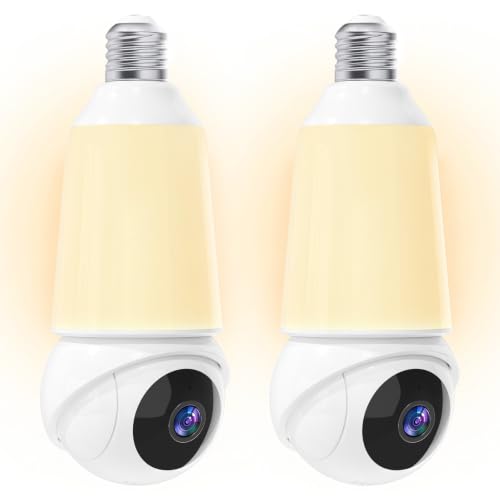
Light Bulb Security Camera -5G& 2.4GHz WiFi 2K Camera for Home Security, 1000-Lumen Dimmable Bulb Camera with Color Night Vision, Two-Way Talk, Motion Detection & Siren, 355°Pan Compatible with Alexa
Check price on AmazonFrequently Asked Questions
Do light bulb security cameras really work without a subscription?
Yes, many models work perfectly without a subscription. They record to a microSD card and allow you to view live footage and playback through a free app. You only pay for the camera itself.
Can I use a light bulb camera without Wi-Fi?
Some models can record to an SD card without Wi-Fi, but you will not be able to view the feed remotely. For remote access, a Wi-Fi connection is required. If you need a camera that works entirely offline, consider a camera that does not need Wi-Fi to record.
Are light bulb cameras good for outdoor use?
Yes, many are weatherproof and designed for outdoor use. They are ideal for porches and entryways. Just ensure the model you choose has an IP65 or higher rating.
How much do light bulb security cameras cost?
Prices vary, but you can find quality models for around $30 to $80. More advanced models with 2K resolution and better features may cost up to $120.
Ready to secure your home without monthly fees? Browse our recommended light bulb security cameras above and take control of your home security today.