
Video Surveillance Cameras for Home
Protect what matters most with the right home security camera system. Our comprehensive guide helps you choose, install, and maximize your home surveillance setup.
START YOUR RESEARCHWhy Home Video Surveillance Matters
Your home is your sanctuary, and protecting it has never been more accessible. Modern video surveillance cameras for home offer high-definition clarity, intelligent motion detection, and seamless smartphone integration—all at prices that fit most budgets.
Whether you're looking for a simple affordable home security camera to monitor your front door or a comprehensive multi-camera system for full property coverage, understanding your options is the first step toward peace of mind.
Statistics consistently show that homes with visible security cameras are significantly less likely to be targeted by burglars. Beyond deterrence, these systems provide invaluable evidence and real-time alerts that keep you connected to your property no matter where you are.
What to Expect in This Guide
We've organized this guide to walk you through every critical decision point. You'll learn about the different types of cameras available, including mini security cameras wireless options that offer discreet protection without complicated wiring.
We'll cover resolution standards, night vision capabilities, storage solutions, and the pros and cons of DIY versus professional installation. You'll also discover how light bulb security cameras and other innovative form factors are changing the home security landscape.
By the end of this guide, you'll have the knowledge to confidently select, install, and maintain a surveillance system that meets your specific needs and budget.
Key Features to Consider
Resolution & Clarity
1080p is the minimum standard today, but 2K and 4K cameras provide the detail needed to identify faces, license plates, and other critical evidence. Higher resolution also enables useful digital zoom without losing clarity.
Night Vision
Most cameras offer infrared night vision up to 30 feet, while premium models extend to 100 feet or more. Color night vision is increasingly common and provides superior identification capabilities after dark.
Smart Detection
Advanced AI-powered detection distinguishes between people, animals, vehicles, and packages. This dramatically reduces false alerts from swaying trees, passing cars, or changing shadows.
Storage Options
Choose between local storage via SD cards or NVR/DVR systems, or cloud-based subscriptions. Many cameras support both, giving you redundancy and flexibility. Local storage eliminates ongoing fees.
Connectivity
Wi-Fi cameras offer easy installation but can suffer from signal issues. PoE (Power over Ethernet) provides reliable wired connectivity. Cellular backup ensures monitoring continues during internet outages.
Weather Resistance
Outdoor cameras need IP65 or higher ratings to withstand rain, dust, and temperature extremes. Indoor cameras can have lower ratings but should still be positioned away from direct moisture.
Wired vs Wireless vs Hybrid Systems
Understanding the fundamental differences between system types will help you make the right choice for your home's layout and your technical comfort level.
| Feature | Wired Systems | Wireless Systems | Hybrid Systems |
|---|---|---|---|
| Installation | Professional recommended; requires drilling and cable routing | DIY-friendly; mount and connect to Wi-Fi | Mixed; critical cameras wired, others wireless |
| Reliability | Excellent; no signal interference | Good; depends on Wi-Fi strength | Very good; balances reliability and flexibility |
| Initial Cost | $800–$2,500+ for full system | $200–$800 for multiple cameras | $500–$1,500 depending on configuration |
| Ongoing Cost | None (local storage) | Optional cloud subscription ($3–$15/month) | Varies by storage choice |
| Best For | Permanent installations, large properties | Renters, easy setup, smaller homes | Homeowners wanting the best of both |
| Expandability | Limited by wiring infrastructure | Easy; add cameras as needed | Moderate; depends on existing setup |
Ready to Secure Your Home?
Explore our top-rated video surveillance cameras for home, carefully selected for performance, reliability, and value.
VIEW RECOMMENDED CAMERASRecommended Video Surveillance Cameras for Home
⚠️ AFFILIATE DISCLOSURE: This website contains affiliate links. As an affiliate Associate, we earn from qualifying purchases. If you make a purchase through these links, we may receive a small commission at no additional cost to you. Read our full affiliate policy.
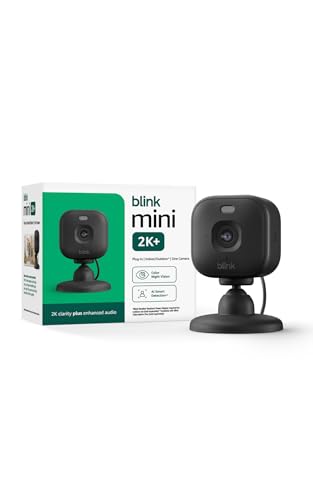
Blink Mini 2K+ (newest model) – Plug-in Home & Pet Indoor Security Camera with 2K video resolution, night vision, enhanced audio, motion detection – 1 camera (Black)
Check price on Amazon
AOQEE 5G Cameras for Home Security Indoor, Pet Monitor w/Phone APP G5 2Pcs | Dual-Band Wi-Fi Indoor Camera with 24/7 TF Card Storage, 360 PTZ Auto-Tracking Pet/Dog/Cat/Puppy/Nanny, Motion Alert, Plug-in
Check price on Amazon
AOQEE 2K Cameras for Home Security, Indoor/Outdoor, Full Color, C1 2Pack | 2.4G Wired Outdoor/Indoor Camera for Dog/Cat/Pet/Baby, Color Night Vision, Home Security with White Light, 24/7 TF Recording
Check price on Amazon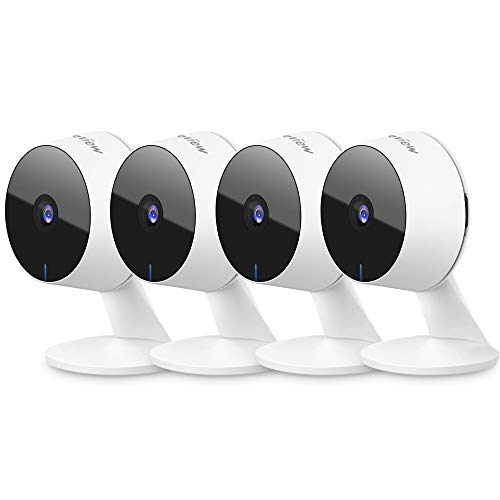
LaView Security Cameras 4pcs, Home Security Camera Indoor 1080P, Wi-Fi Cameras Wired for Pet, Motion Detection, Two-Way Audio, Night Vision, Phone App, Works with Alexa, iOS & Android & Web Access
Check price on Amazon
Blink Mini 2K+ (newest model) – Plug-in Home & Pet Indoor Security Camera with 2K video resolution, night vision, enhanced audio, motion detection – 1 camera (White)
Check price on Amazon
2026 Upgraded 2K Security Cameras Wireless Outdoor, Free Cloud Storage, 1-6 Months Battery Life, Waterproof, 2-Way Talk, AI Motion Detection Spotlight Siren Alarm Cameras for Home Security
Check price on Amazon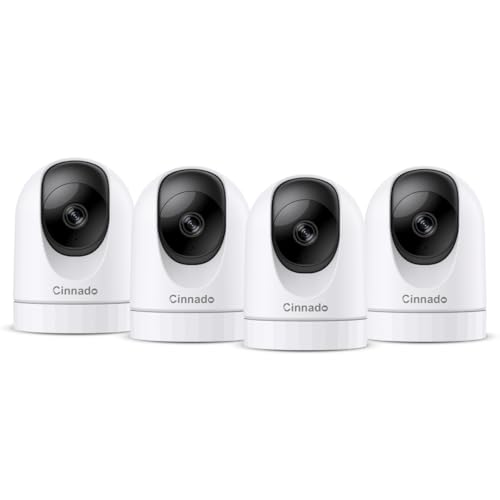
Cinnado 2K Home Security Cameras Indoor with 2.4GHz Wi-Fi & Siren, D1 4Pack | 360° Auto Tracking for Pets/Nanny/Baby/Dog, 2-Way Audio, 24/7 SD Card Storage, Cloud Storage, Works with Alexa & Google Home
Check price on Amazon
Tapo 1080P Indoor Security Camera, Baby Monitor, Dog Camera, C100(4-Pack) | Motion Detection, 2-Way Audio, Siren, Night Vision, Cloud & SD Card Storage, Works w/Alexa & Google Home, Wired
Check price on AmazonInstallation Tips for Optimal Coverage
Strategic Camera Placement
Position cameras at entry points: front door, back door, garage, and ground-floor windows. For comprehensive coverage, consider adding a door spy hole camera for discreet peephole monitoring, or a peep hole camera for apartment dwellers who need to see visitors without opening the door.
Mount cameras 8–10 feet high and angle them downward slightly. This prevents tampering and captures faces rather than the tops of heads. Avoid pointing cameras directly at the sun or bright lights, which can wash out images.
Optimizing Your Network
For wireless systems, ensure your Wi-Fi router can handle the bandwidth. Multiple 4K cameras streaming simultaneously can overwhelm older routers. Consider a mesh network or dedicated VLAN for security cameras.
If you need to extend your surveillance to outbuildings, garages, or gates, explore wireless camera for car solutions that can be adapted for fixed remote locations, or hidden cameras for home when discretion is paramount.
Specialized Surveillance Solutions
Discreet Monitoring
When visible cameras aren't appropriate, secret cameras for home and mini security cameras provide covert surveillance. These are ideal for nanny cams, elder care monitoring, or rental property oversight.
Smart Home Integration
Modern surveillance cameras integrate with Alexa, Google Home, and Apple HomeKit. You can view live feeds on smart displays, receive voice alerts, and automate recording based on other smart home triggers.
Remote Access
All quality systems offer smartphone apps for live viewing, playback, and alert management. Some support recording camera functionality with scheduled or motion-triggered recording to external drives or NAS devices.
Power Backup
Ensure continuous operation during power outages with battery backup or UPS systems. Some cameras include built-in batteries, while others can be paired with battery-powered dash cam style power solutions adapted for home use.
Frequently Asked Questions
How many cameras do I need for my home?
Most homes need 4–6 cameras for comprehensive coverage: one at each main entry point (front door, back door, garage), plus additional cameras for driveways, side yards, or vulnerable windows. Start with the highest-risk areas and expand as needed.
Are wireless cameras secure?
Yes, when properly configured. Use WPA3 encryption, change default passwords, enable two-factor authentication where available, and keep firmware updated. Avoid placing cameras on public Wi-Fi networks.
Do I need professional installation?
Wireless cameras are designed for DIY installation and typically take 15–30 minutes each. Wired systems benefit from professional installation to ensure proper cable routing, weatherproofing, and optimal positioning.
How much storage do I need?
For continuous recording, a 1TB hard drive typically stores 7–14 days of footage from 4 cameras at 1080p. Motion-triggered recording extends this significantly. Cloud storage plans vary but generally offer 7–30 day retention.
What's the best resolution for home surveillance?
1080p is the minimum for useful identification. 2K (4MP) offers a good balance of detail and storage efficiency. 4K (8MP) provides the best evidence quality but requires more bandwidth and storage. Consider 2K for most applications.
Take Control of Your Home Security Today
Browse our curated selection of top-performing video surveillance cameras for home. Compare features, read reviews, and find the perfect system for your needs and budget.
SHOP RECOMMENDED CAMERAS