
Webcam Monitor Mount: The Ultimate Buying Guide
Stop balancing your webcam on books or dealing with awkward angles. Discover the best webcam monitor mounts for a clean, professional desk setup that looks great on every video call.
EXPLORE TOP PICKSWhy a Webcam Monitor Mount Matters: Your webcam is only as good as its position. A dedicated webcam monitor mount eliminates desk clutter, provides stable and adjustable positioning, and ensures you always look your best on camera. Whether you're a remote worker, streamer, or content creator, the right mount transforms your setup from amateur to professional.
Why You Need a Webcam Monitor Mount
If you've ever tried to position a webcam on top of a monitor, you know the struggle. The built-in clip might not fit your screen, the angle is never quite right, and one wrong move sends your camera tumbling. A webcam monitor mount solves all of these problems by providing a secure, adjustable, and aesthetically pleasing way to position your camera exactly where you need it.
From webcams for PC to high-quality webcams used for streaming, the mount you choose directly impacts your video quality. A stable mount prevents vibration and micro-movements that can make your footage look shaky. An adjustable arm lets you find the perfect angle without resorting to propping up your camera with random objects.
Beyond practicality, a well-designed mount keeps your desk organized. Cable management becomes simpler, your monitor stays clean, and your entire workspace looks more professional. For streamers using a webcam for streaming, this polish matters — viewers notice the details.
Types of Webcam Monitor Mounts
Not all mounts are created equal. Understanding the different types helps you choose the one that fits your workspace and workflow.
Clamp-On Mount
The most common type. A C-clamp secures to the edge of your desk or monitor, with an arm extending upward to hold your webcam.
$20–$60- No drilling required
- Adjustable height and angle
- Works with most desks
- Easy to reposition
Wall Mount
A fixed or articulating bracket attached directly to the wall. Ideal for permanent setups where desk space is at a premium.
$15–$50- Frees up desk space completely
- Very stable and secure
- Requires drilling
- Best for permanent installations
Articulating Arm
A multi-jointed arm that offers maximum flexibility. Usually clamps to the desk and extends outward with multiple pivot points.
$30–$100- Maximum positioning flexibility
- Can hold webcam + light + mic
- Premium build quality
- Best for complex setups
Webcam Monitor Mount Comparison
Here's a quick comparison to help you decide which type suits your needs best.
| Feature | Clamp-On | Wall Mount | Articulating Arm |
|---|---|---|---|
| Installation | Tool-free | Requires drilling | Tool-free |
| Adjustability | Moderate | Low (fixed) | High |
| Desk Space | Minimal footprint | Zero footprint | Minimal footprint |
| Stability | Good | Excellent | Very Good |
| Best For | Most users | Permanent setups | Streamers & pros |
| Price Range | $20–$60 | $15–$50 | $30–$100 |
Key Features to Look For
When shopping for a webcam monitor mount, pay attention to these critical features:
1. Weight Capacity
Check the maximum weight your mount can support. A standard webcam weighs between 100g and 300g, but if you plan to mount a heavier camera or add accessories like a flash diffuser, you'll need a mount with a higher capacity. Most quality mounts support 1–2 kg, which is more than enough for typical webcam setups.
2. Mounting Mechanism
Look for mounts with a standard 1/4"-20 screw thread — this is the universal standard for cameras and webcams. Some mounts use proprietary clips, which limits compatibility. A 1/4"-20 thread gives you the flexibility to mount not just webcams but also compact cameras, action cameras, and even a fisheye camera if needed.
3. Adjustability Range
The best mounts offer 360-degree rotation, tilt, and swivel. This lets you position your webcam at eye level, adjust for different seating positions, and even switch to a top-down view for demonstrations. If you use your webcam for document sharing or product showcases, a mount with a wide tilt range is essential.
4. Build Quality
Cheap plastic mounts flex and sag over time. Look for metal construction — aluminum alloy is ideal — with smooth joints that hold their position without needing constant re-tightening. A well-built mount will last for years, even with daily adjustments.
5. Cable Management
Some mounts include integrated cable clips or channels. This keeps your USB cable tidy and prevents it from getting snagged when you adjust the mount. It's a small feature that makes a big difference in maintaining a clean setup.
Setup Tips for Perfect Webcam Positioning
Once you've chosen your mount, follow these tips to get the best results:
- Position at eye level: Your webcam should be level with your eyes or slightly above. This is the most flattering angle and mimics natural eye contact during calls.
- Center it on your monitor: For the most natural look, position the webcam at the top center of your monitor. If your mount clamps to the side, adjust the arm so the camera sits centered.
- Keep it stable: Tighten all joints securely. A wobbling webcam is distracting and unprofessional.
- Manage cables: Route your USB cable along the mount arm and behind your desk. Use cable clips if your mount doesn't have integrated management.
- Test your angle: Before your next call or stream, open your webcam preview and check the framing. Adjust as needed — this takes 30 seconds and prevents awkward angles.
If you're using a laptop as your primary device, a laptop camera for website use can also benefit from an external mount. Laptop webcams are notoriously low-quality and poorly positioned; an external webcam on a proper mount is a significant upgrade.
Pros and Cons of Webcam Monitor Mounts
Advantages
- Eliminates desk clutter and unstable stacking
- Provides consistent, repeatable camera positioning
- Improves video quality by reducing vibration
- Allows for ergonomic eye-level framing
- Makes cable management easier
- Universal 1/4"-20 thread works with many devices
- Professional appearance for work calls and streams
Limitations
- Some clamp mounts may not fit very thick desks
- Wall mounts require drilling and permanent placement
- Articulating arms can be more expensive
- Cheap mounts may sag or lose tension over time
- May require additional adapter for non-standard webcams
Ready to Upgrade Your Webcam Setup?
Browse our top-recommended webcam monitor mounts below. We've selected options for every budget and setup type — from simple clamp mounts to professional articulating arms.
VIEW RECOMMENDED MOUNTSRecommended Webcam Monitor Mounts
⚠️ AFFILIATE DISCLOSURE: This website contains affiliate links. As an affiliate Associate, we earn from qualifying purchases. If you make a purchase through these links, we may receive a small commission at no additional cost to you. Read our full affiliate policy.

Webcam Monitor Mount Webcam Stand on Monitor or Laptop with Phone Holder | Camera Monitor Mount with 1/4 Screw, Webcam Mount for Monitor Compatible with Logitech Webcams, Small Ring Light, Smartphone
Check price on Amazon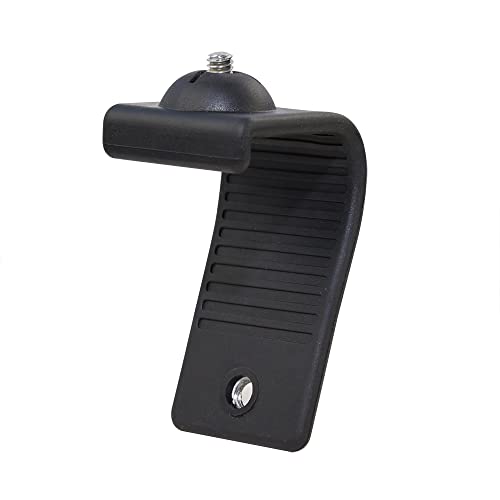
MOKOSE Webcam Stand, Stands Bent 360 Degrees for Mounting on a Monitor or Laptop Mount with 1/4" Thread
Check price on Amazon
30 Inch Webcam Stand Camera Mount, Upgraded Thick Base Flexible Gooseneck Camera Stand Desk Webcam Mount Clamp for Logitech Webcams C930e C930 C920 C922x C922 Brio 4K C925e C615, Gopro Hero 8 7 6 5 4
Check price on Amazon
JCWINY Web cam Accessory ScreenBar Halo, Webcam Stand for Monitor Light Bar Angle Adjustable Computer Light Webcam Mount for BENQ Quntis Monitor Lamp Super Strong Nano Adhesive Mount
Check price on Amazon
JUHARFA M1 Pro Webcam Mount for Monitor | Transparent Acrylic, Adjustable Pan-Tilt Head, Anti-Slip Pads, Assembled Design, For Desktop PC Laptops
Check price on Amazon
SMALLRIG 9.8 Inches Magic Arm Clamp Kit with 1/4" and 3/8" Threaded Holes | Adjustable Friction Power Articulating Magic Arm with 1/4" Thread Screw, Camera Mount for LCD Monitor/LED Lights - KBUM2732B
Check price on Amazon
InnoGear Webcam Stand Arm for Desk Camera Mount Holder for Logitech Webcam | for C922 C930e C920S C920 C615 C960 C920x BRIO 4K NexiGo N60, Heavy Base, Gooseneck, Max Height 20.9", Eye-level Framing
Check price on AmazonFrequently Asked Questions
Most clamp-on and articulating arm mounts attach to your desk, not your monitor, so they fit virtually any monitor setup. Wall mounts attach to the wall behind your desk. The only compatibility concern is the 1/4"-20 screw thread — this is standard on the vast majority of webcams. If your webcam uses a proprietary clip, check whether the mount includes an adapter or whether your webcam has a tripod thread underneath.
Absolutely. In fact, using an external mount with a laptop is one of the best upgrades you can make. Clamp the mount to your desk, position the webcam at eye level, and you'll immediately look more professional on video calls. Your laptop's built-in webcam stays as a backup, but you'll rarely want to use it once you've experienced proper positioning.
Most quality mounts support between 1 kg and 2 kg (2.2–4.4 lbs). A standard webcam weighs only 100–300 grams, so you have plenty of headroom. If you plan to mount a heavier camera — like a compact camera or a small camcorder — check the mount's weight rating before purchasing. For heavier setups, look for mounts with metal construction and sturdy clamps.
Built-in clips work in a pinch, but they have limitations. They may not fit thicker monitors, they offer limited adjustability, and they can scratch your screen bezel. A dedicated mount provides better stability, more positioning options, and protects your monitor. If you use your webcam regularly — for work, streaming, or content creation — a mount is a worthwhile investment.
Many articulating arms support multiple devices. You can often attach a webcam, a small LED light, and even a compact microphone to the same arm using additional 1/4"-20 threads or clamp attachments. This is a popular setup for streamers who want a clean, consolidated rig. Just make sure the arm's weight capacity can handle everything you plan to mount.
Final Thoughts
A webcam monitor mount is one of those small upgrades that makes a surprisingly big difference. It cleans up your desk, improves your video quality, and ensures you always look your best on camera. Whether you choose a simple clamp mount, a space-saving wall mount, or a flexible articulating arm, the key is to get your webcam at eye level and keep it stable.
For most users, a clamp-on mount or articulating arm offers the best balance of flexibility, stability, and value. If you're setting up a permanent studio space, a wall mount might be the cleanest solution. And if you're just getting started with a webcam for PC, even a basic mount will dramatically improve your setup.
Ready to upgrade? Check out our recommended webcam monitor mounts above and take the first step toward a more professional video presence.