
Wired Doorbell Camera Without Subscription: The Ultimate Guide
Secure your home with a reliable wired doorbell camera that never charges monthly fees. Learn how to choose, install, and maximize a subscription-free video doorbell.
VIEW TOP PICKSWhy go subscription-free? A wired doorbell camera without a subscription gives you full control over your footage, eliminates recurring costs, and ensures your security system works even if your internet goes down. With local storage options and PoE technology, you get 24/7 recording without the hassle of monthly bills.
Why Choose a Wired Doorbell Camera Without Subscription?
In an era where monthly fees are the norm, a wired doorbell camera without subscription stands out as a cost-effective and privacy-focused solution. Unlike battery-powered models that often rely on cloud storage plans, wired doorbells can continuously record to a local NVR (Network Video Recorder) or microSD card, giving you instant access to your footage without any ongoing costs.
Whether you're upgrading from a traditional peephole or replacing a wireless video doorbell that charges fees, a wired setup offers reliability and peace of mind. The constant power supply means no downtime, no battery swaps, and no missed events. Plus, with advanced features like AI detection and 2K resolution becoming standard, you're not sacrificing quality for savings.
If you're also considering other security upgrades, pairing your doorbell with a PoE security camera system can create a comprehensive, subscription-free surveillance network.
How Wired Doorbell Cameras Work Without Subscriptions
Understanding the technology behind subscription-free wired doorbells helps you make an informed decision. These devices connect to your home's existing doorbell wiring (typically 16-24 VAC) or use Power over Ethernet (PoE) for both power and data transmission.
Here's what happens when someone rings your doorbell:
- Power: The wired connection provides constant power, eliminating battery concerns.
- Detection: Motion sensors and AI algorithms detect visitors, packages, or suspicious activity.
- Recording: Video is captured and stored locally on a microSD card (up to 128GB or more) or sent to an NVR.
- Notification: You receive instant alerts on your smartphone via the companion app.
- Two-Way Talk: Communicate with visitors through the built-in microphone and speaker.
Because the footage is stored locally, you avoid cloud storage fees entirely. This approach also enhances privacy since your data never leaves your home network. For those who prefer a completely offline solution, a security camera that does not need WiFi can be an excellent complement.
Key Features to Look for in a Wired Doorbell Camera
Not all wired doorbells are created equal. When shopping for a subscription-free model, prioritize these features:
| Feature | Why It Matters | Recommended Spec |
|---|---|---|
| Resolution | Clearer images help identify faces and packages. | 2K (2560x1920) or 4MP minimum |
| Field of View | Wider angles cover more of your porch. | 160° or greater |
| Night Vision | Essential for 24/7 security. | Color night vision or IR up to 30ft |
| Local Storage | Eliminates subscription fees. | microSD slot (128GB+) or NVR support |
| Power Source | Determines installation complexity. | Existing doorbell wiring or PoE |
| AI Detection | Reduces false alerts. | Person, package, vehicle detection |
| Two-Way Audio | Communicate with visitors. | Noise-canceling mic and speaker |
Pro Tip: Look for doorbells that support 128GB micro SD cards for security cameras. This capacity can store weeks of footage, depending on your recording settings. Some models even support continuous recording, ensuring you never miss a moment.
Installation Guide: Setting Up Your Wired Doorbell
Installing a wired doorbell camera is a straightforward DIY project for most homeowners, but it does require basic electrical knowledge. Here's a step-by-step overview:
- Turn Off Power: Locate your doorbell transformer and shut off the power at the breaker box.
- Remove Old Doorbell: Unscrew the existing doorbell button and disconnect the wires.
- Mount the New Bracket: Secure the mounting bracket to your doorframe using the provided screws.
- Connect Wires: Attach the doorbell wires to the terminals on the back of your new camera (polarity usually doesn't matter for AC power).
- Secure the Camera: Snap or screw the doorbell camera onto the bracket.
- Restore Power: Turn the breaker back on and wait for the camera to boot up.
- Configure Settings: Download the companion app, connect to WiFi (for initial setup), and configure motion zones, recording quality, and storage options.
If you're not comfortable working with electrical wiring, consider hiring a professional. Some retailers offer home security camera installation services that can handle the job safely and efficiently.
For advanced users, a PoE doorbell camera simplifies installation by using a single Ethernet cable for both power and data. This is ideal if you already have a hard-wired video surveillance system in place.
Best Wired Doorbell Cameras Without Subscription
⚠️ AFFILIATE DISCLOSURE: This website contains affiliate links. As an affiliate Associate, we earn from qualifying purchases. If you make a purchase through these links, we may receive a small commission at no additional cost to you. Read our full affiliate policy.

WYZE Wired Doorbell Camera v2(Existing Doorbell Wiring Required), 2K HD | Security Video Doorbell, Color Night Vision, 2-Way Audio, Package Monitor, Works with Alexa & Google Assistant
Check price on Amazon
aosu 5MP Ultra HD Wireless & Wired Video Doorbell Camera | No Subscription Required, 8GB Local Storage, Head-to-Toe View, Triple Motion Detection, 2.4/5 GHz WiFi
Check price on Amazon
Tapo 2K+ Wired or Battery Powered Smart Video Doorbell with Chime, D225 | 180° Field of View, Person/Vehicle/Package Detection, Ring Call, 2-Way Audio, Subscription-Free Local Storage or Cloud
Check price on Amazon
BOIFUN Video Doorbell Camera Wireless – No Subscription Required, 2K HD | 166° Wide View, HDR Night Vision, Motion Alerts, Two‑Way Audio & Battery Video Doorbell with Chime, 2.4 GHz Wi‑Fi Only
Check price on Amazon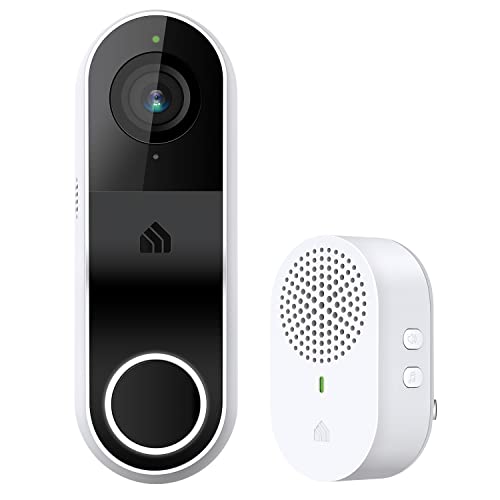
Kasa 2K Smart Video Doorbell Camera Hardwired w/Chime, KD110
Check price on Amazon
REOLINK Video Doorbell WiFi 2K Wired Camera, 4:3 Wide View Outdoor Camera | No Subscription Local Storage, AI Detection, 5G&2.4G WiFi, Two-Way Talk, Front Door Home Security, Customized Reolink Chime
Check price on Amazon
Chamberlain myQ Video Doorbell | 2K Camera, Battery/Wired, Color Night Vision, Live with 2-Way Talk, Motion Detection & Real-Time Alerts, 150 Deg Wide View, Black
Check price on Amazon
Blink Wired Doorbell 2K+ (newest model) — Head-to-Toe 2K video doorbell, continuous hardwired power, pair with Alexa or Blink Chime (sold separately) required for in-home alerts
Check price on AmazonPros and Cons of Subscription-Free Wired Doorbells
✅ Pros
- No monthly or annual fees
- 24/7 continuous recording
- Local storage enhances privacy
- Reliable power source
- Works during internet outages (with local NVR)
- Long-term cost savings
❌ Cons
- Requires existing wiring or PoE setup
- Installation may need professional help
- Local storage can be lost if device is stolen
- No cloud backup unless you add it separately
- Limited remote access if internet is down
Wired vs. Wireless Doorbell Cameras: Which Is Right for You?
Choosing between wired and wireless often comes down to your priorities. A wireless video doorbell offers flexibility and easy installation but typically relies on cloud subscriptions for full functionality. On the other hand, a wired doorbell camera without subscription is ideal for homeowners who want a permanent, cost-effective solution.
If you rent your home or live in an apartment, you might prefer a wireless security camera for apartments that doesn't require drilling or wiring. However, if you own your home and plan to stay long-term, the reliability of a wired system is hard to beat.
For those interested in a battery-powered alternative that still avoids subscriptions, consider a battery-powered home security camera paired with a local NVR. But remember, you'll need to recharge batteries periodically.
Real-World Use Cases for Wired Doorbell Cameras
Wired doorbell cameras excel in various scenarios:
- Package Theft Prevention: Receive alerts when packages are delivered and record porch pirates in action.
- Remote Monitoring: Check on your home from anywhere using the mobile app.
- Two-Way Communication: Talk to delivery drivers or guests even when you're not home.
- Integration with Smart Homes: Connect to Alexa, Google Home, or Home Assistant for voice control.
- Business Security: Protect your storefront or office entrance with a small business video security system.
If you're looking to expand your security coverage, pairing your doorbell with a night CCTV camera or a 4G cellular security camera can provide comprehensive protection, especially in areas without reliable WiFi.
Maintenance Tips for Long-Lasting Performance
To ensure your wired doorbell camera without subscription operates flawlessly for years, follow these maintenance practices:
- Clean the Lens Regularly: Dust, dirt, and spiderwebs can obscure the view. Use a microfiber cloth and mild lens cleaner.
- Check Connections: Periodically inspect wiring for corrosion or loose connections, especially after extreme weather.
- Update Firmware: Manufacturers release updates that improve security and add features. Enable auto-updates if available.
- Manage Storage: If using a microSD card, format it every few months to prevent corruption. Consider a high-endurance card designed for surveillance.
- Test Alerts: Simulate motion and doorbell presses to ensure notifications are working correctly.
- Weatherproofing: Apply silicone caulk around the mounting bracket to prevent water ingress.
If you live in an area with severe weather, you might also want to invest in a wireless outdoor security camera solar-powered as a backup or supplement.
Common Troubleshooting Issues
Even the most reliable devices encounter occasional hiccups. Here are solutions to common problems:
| Issue | Possible Cause | Solution |
|---|---|---|
| No Power | Tripped breaker or faulty transformer | Check breaker box; test transformer with multimeter |
| WiFi Disconnects | Weak signal or interference | Move router closer or add a WiFi extender |
| Poor Video Quality | Dirty lens or low bandwidth | Clean lens; reduce streaming quality |
| False Motion Alerts | Overly sensitive settings | Adjust motion zones and sensitivity in app |
| No Local Recording | Missing or full microSD card | Insert card; format or replace if full |
For persistent issues, consult the manufacturer's support or consider a security systems installation service for professional diagnostics.
Privacy and Security Considerations
One of the biggest advantages of a wired doorbell camera without subscription is enhanced privacy. Since footage is stored locally, you're not relying on third-party servers that could be breached. However, you should still take steps to secure your device:
- Use a strong, unique password for your camera account.
- Enable two-factor authentication if available.
- Keep firmware up to date to patch vulnerabilities.
- Segment your IoT devices on a separate VLAN if possible.
- Encrypt local storage or use a password-protected NVR.
If you're concerned about hidden cameras in your home, a device to detect hidden cameras and microphones can provide additional peace of mind.
Final Thoughts: Is a Subscription-Free Wired Doorbell Right for You?
A wired doorbell camera without subscription is an excellent investment for homeowners who value cost savings, reliability, and privacy. With no monthly fees and the ability to record 24/7 to local storage, you gain complete control over your home security.
While installation requires some effort, the long-term benefits far outweigh the initial setup. Whether you're protecting packages from theft, monitoring your front door, or integrating with a broader smart home system, a subscription-free wired doorbell delivers unmatched value.
Ready to upgrade your home security? Explore our top product picks above and take the first step toward a safer, fee-free future. For those who need more flexibility, consider a rechargeable wireless security camera as a complementary solution.
Remember: Always check local laws regarding video recording. In many jurisdictions, you must disclose that recording is taking place. Consult local regulations before installing any surveillance device.