
Wireless PTZ Camera for Live Streaming: Complete Buying Guide
Discover how a wireless PTZ camera can transform your live streaming setup. Learn about pan-tilt-zoom technology, wireless connectivity, and how to choose the best model for churches, events, and content creation.
VIEW RECOMMENDED MODELSWhy a Wireless PTZ Camera? Unlike fixed cameras, a wireless PTZ (Pan-Tilt-Zoom) camera gives you the freedom to remotely control your viewing angle and zoom level. This makes it an ideal choice for live streaming dynamic events, church services, conference presentations, and any scenario where you need to follow the action without being tethered to a single position. By eliminating cables, you gain flexibility in placement and a cleaner, more professional setup.
What Makes a PTZ Camera Essential for Live Streaming?
A PTZ camera is a motorized camera that can pan (move left and right), tilt (move up and down), and zoom (optically or digitally) via a remote control, joystick, or software interface. When you add wireless connectivity—typically via Wi-Fi or a wireless transmitter—you get the flexibility to position the camera almost anywhere without running long video cables. For live streaming, this is a game-changer. You can mount the camera on a wall, ceiling, or tripod in the back of a room and still capture close-ups of a speaker, performer, or congregation member without a camera operator physically moving the equipment. This level of dynamic shot composition elevates the production quality of any live stream, making it more engaging for viewers. Whether you are live streaming a church service, a corporate webinar, or a sports event, a wireless PTZ camera ensures you never miss a moment.
Key Features to Look for in a Wireless PTZ Camera
Not all PTZ cameras are created equal, and the wireless aspect introduces specific considerations. Here are the critical features to evaluate before making a purchase.
1. Wireless Connectivity Options
The term "wireless" can mean different things. Some PTZ cameras connect directly to your Wi-Fi network (2.4GHz or 5GHz), allowing you to stream via RTSP, RTMP, or NDI protocols. Others use a dedicated wireless transmitter that connects to a base station, which is more common in professional broadcast environments. For most home, church, and small business setups, a Wi-Fi enabled PTZ camera is the most practical. Ensure the camera supports the streaming protocols your platform uses (e.g., RTMP for YouTube, RTMPS for Facebook). If you need to stream in a location without reliable Wi-Fi, consider a model that supports cellular bonding or a security camera with built-in cellular service for a truly independent setup. However, for live streaming, Wi-Fi is usually the primary choice.
2. Pan, Tilt, and Zoom Range
The pan and tilt range determines how much of the room you can cover. A typical PTZ camera offers 340° of pan and 120° of tilt, but some models provide full 360° pan. The zoom range is equally important. Optical zoom (e.g., 10x, 20x, 30x) maintains image quality as you zoom in, while digital zoom degrades quality. For large venues, a 20x optical zoom is a good starting point. For smaller rooms, a 10x or 12x zoom is sufficient. Consider the minimum focusing distance and the camera's ability to focus quickly and accurately.
3. Video Resolution and Frame Rate
For professional-looking live streams, 1080p at 60fps is the current standard. Many newer PTZ cameras offer 4K resolution, which provides extra detail for cropping or digital zoom. However, 4K streaming requires more bandwidth and processing power. If your internet upload speed is limited, 1080p at 30fps or 60fps is a safer bet. Look for cameras that support multiple resolutions and frame rates so you can adapt to different streaming conditions.
4. Low-Light Performance
Live streaming often takes place in challenging lighting conditions—dimly lit churches, evening concerts, or conference halls with uneven lighting. A camera with a large image sensor and good low-light sensitivity is crucial. Look for sensors with a minimum illumination rating (e.g., 0.5 lux or lower) and features like 3D noise reduction. Some PTZ cameras also offer night vision, but for live streaming, you typically want natural color reproduction, so a camera with excellent low-light color performance is preferable to one that switches to black-and-white infrared. For outdoor or extremely dark environments, you might consider a solar-powered night vision security camera, but for indoor live streaming, a dedicated PTZ camera with strong low-light specs is best.
5. Control Methods and Integration
How will you control the camera? Most PTZ cameras come with an IR remote control, but for live streaming, you'll likely want more sophisticated control. Look for cameras that support IP control (via web interface), RS-232/RS-485 serial control, or software like OBS, vMix, or Wirecast. Some cameras integrate with joystick controllers for precise movements. If you plan to use multiple cameras, ensure they can be controlled from a single interface. For church live streaming, a good camera for live streaming church often needs to be operated by a volunteer, so ease of use is paramount. A wireless PTZ camera with preset positions (so the operator can quickly switch between the pulpit, choir, and congregation) is a huge advantage.
6. Audio Input and Output
While video is the focus, audio is half of the live streaming experience. Many PTZ cameras include a built-in microphone, but for professional results, you'll want to connect an external microphone or audio mixer. Check if the camera has a 3.5mm audio input or supports audio embedding over IP (e.g., AAC audio). Some cameras also offer audio output for monitoring. If the camera lacks audio inputs, you'll need to capture audio separately and sync it in your streaming software, which adds complexity.
7. Power and Mounting Options
Wireless cameras still need power. Most PTZ cameras use PoE (Power over Ethernet), which provides both power and data over a single cable. However, true "wireless" PTZ cameras often rely on a standard DC power adapter. If you want to mount the camera in a location without a nearby power outlet, you'll need to run a power cable or consider a battery-powered option. Some PTZ cameras support Power over Ethernet (PoE), which is technically a wired connection but simplifies installation. If you need a completely wire-free solution, look for a battery-powered security camera with night vision, though these are less common for live streaming due to the need for continuous power. For live streaming, a reliable power source is essential, so plan your installation accordingly.
How to Choose the Right Wireless PTZ Camera for Your Needs
With so many options on the market, narrowing down your choice can be overwhelming. Start by defining your use case. Are you live streaming a church service, a corporate event, a sports game, or a personal vlog? Each scenario has different requirements.
For church live streaming, you'll want a camera with smooth pan and tilt, quiet operation (so it doesn't distract the congregation), and the ability to save preset positions. A 20x optical zoom is ideal for capturing the pulpit, choir, and audience. If your church has a traditional building with ornate details, a camera with good low-light performance is essential. You might also consider a video camera for live streaming church as an alternative, but a PTZ camera offers more flexibility for a single operator.
For corporate events and conferences, you need a camera that can seamlessly switch between the speaker, presentation screen, and audience. A wireless PTZ camera with NDI support (Network Device Interface) allows for easy integration with video production software. If you're streaming from a temporary location, a wireless camera that works without Wi-Fi might be necessary, but for most corporate venues, Wi-Fi is available. Just ensure the camera supports the streaming platform you plan to use.
For sports and action, you need a camera with fast pan and tilt speeds and a long zoom range. Weatherproofing is also important if the camera will be mounted outdoors. While a dedicated PTZ camera is ideal, some users opt for a outdoor security camera wireless solar powered for its weather resistance and wireless capabilities, though these are designed for surveillance, not live production. For live sports, a PTZ camera with a high frame rate (60fps) and excellent autofocus is a must.
For budget-conscious creators, there are affordable PTZ cameras that offer 1080p resolution and basic wireless connectivity. These are great for starting a live stream without a huge investment. You might also consider a high-quality point and shoot digital camera with a clean HDMI output, combined with a wireless HDMI transmitter, as a makeshift PTZ solution. However, a true PTZ camera provides motorized control that a point-and-shoot cannot match.
Installation and Setup Tips for Wireless PTZ Cameras
Once you've chosen your camera, proper installation is key to a successful live stream. Start by positioning the camera with a clear line of sight to the stage or area you'll be streaming. Avoid placing it behind obstructions or in areas with heavy foot traffic. For wireless models, ensure the camera is within range of your Wi-Fi router or access point. A strong, stable Wi-Fi signal is critical; consider using a dedicated Wi-Fi network for your streaming equipment to avoid congestion.
Mount the camera securely. Most PTZ cameras come with a wall or ceiling mount, but you can also use a sturdy tripod. If you're mounting it upside down, remember to enable the image flip setting in the camera's menu. Connect the camera to your network and configure its IP address. Use the camera's web interface to set up preset positions, adjust exposure and white balance, and test the zoom range. It's also a good idea to test your live stream at the actual event location before the big day to identify any connectivity or audio issues.
For audio, connect an external microphone or feed audio from your soundboard into the camera if it supports it. If not, you'll need to capture audio separately and mix it in your streaming software. Many streaming platforms, like YouTube and Facebook Live, allow you to use an external audio source. Always monitor your audio levels during the stream to avoid distortion or silence.
Recommended Wireless PTZ Cameras for Live Streaming
⚠️ AFFILIATE DISCLOSURE: This website contains affiliate links. As an affiliate Associate, we earn from qualifying purchases. If you make a purchase through these links, we may receive a small commission at no additional cost to you. Read our full affiliate policy.
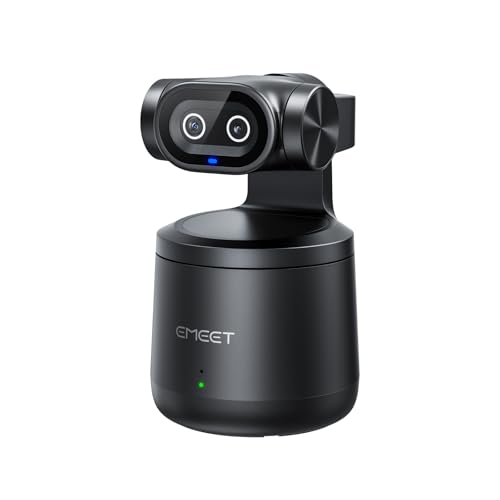
EMEET PIXY Wireless 4K Dual-Lens AI Tracking Streaming Camera | 1/2.55" Sensor, Gesture Control, Multi-Camera Live & Built-in 48kHz Mic, HDR, Live Streaming for YouTube, Facebook, Twitch
Check price on Amazon
TOALLIN 4K Wireless PTZ Conference Camera, 10X Optical Zoom, Auto Tracking | Remote Control, Conference Room Webcam for Church Live Stream, Video Conferencing, Online Education
Check price on AmazonFrequently Asked Questions
Can I use a wireless PTZ camera without an internet connection?
Yes, you can use a wireless PTZ camera on a local network without an internet connection. However, you will need a computer or streaming device to capture the video and stream it to a platform, which typically requires internet. If you need a camera that operates completely offline for recording purposes, you might look for a security camera that does not use internet. For live streaming, internet is required to reach your audience.
What is the best resolution for live streaming?
For most live streaming platforms, 1080p at 30fps or 60fps is the sweet spot. It offers excellent quality without requiring excessive bandwidth. If you have a very fast and stable internet connection and want the highest quality, 4K is an option, but many platforms downscale 4K to 1080p anyway. Prioritize a stable connection and good lighting over resolution.
Do I need a separate microphone for my PTZ camera?
While many PTZ cameras have built-in microphones, they are usually not sufficient for professional live streaming. For clear, balanced audio, you should use an external microphone or connect your camera to an audio mixer. This is especially important for church services and conferences where speech intelligibility is critical.
How many PTZ cameras do I need for live streaming?
For a basic setup, one PTZ camera can work well if operated skillfully. However, for more dynamic productions, two or three cameras are ideal—one for a wide shot, one for a close-up, and one for a different angle. Multiple cameras allow you to switch between shots, creating a more engaging viewing experience. If you're on a budget, start with one camera and add more as you grow.
Are wireless PTZ cameras reliable for live streaming?
Yes, when set up correctly with a strong and stable wireless connection. Wired connections are generally more reliable, but modern wireless PTZ cameras are designed for professional use and can deliver consistent performance. To minimize risk, use a dedicated Wi-Fi network, position the camera within good range, and always have a backup plan (like a wired connection) if possible. For critical streams, a wired connection is always recommended, but wireless offers flexibility that is often worth the trade-off.
Final Thoughts
A wireless PTZ camera is a powerful tool for anyone serious about live streaming. It gives you the freedom to create dynamic, professional-looking broadcasts without a large production crew. By understanding the key features—wireless connectivity, zoom range, low-light performance, and control options—you can choose the right camera for your specific needs. Whether you're streaming a church service, a corporate event, or a sports game, investing in a quality wireless PTZ camera will elevate your production value and engage your audience. Remember to consider your budget, but don't compromise on the features that matter most for your use case. With the right camera and a bit of setup, you'll be ready to go live with confidence.