
16 Channel Wireless Security Camera System: The Ultimate Buyer's Guide
Everything you need to know about choosing, installing, and maximizing a 16-channel wireless security camera system for comprehensive home or business protection.
A 16 channel wireless security camera system is a powerful surveillance solution designed for properties that require extensive coverage. Whether you're protecting a large home, a retail store, a warehouse, or a multi-unit apartment building, a 16-channel system gives you the flexibility to monitor every critical area without the hassle of running miles of video cable. In this comprehensive guide, we'll walk you through everything you need to know—from understanding the technology and key features to installation tips and the best use cases—so you can make an informed purchasing decision.
Unlike traditional wired systems, wireless 16-channel setups use a central NVR (Network Video Recorder) that communicates with cameras over a dedicated wireless signal. This makes them incredibly versatile for retrofitting existing properties or for locations where drilling through walls isn't an option. However, "wireless" doesn't mean zero cables—each camera still needs a power source, typically via an included power adapter or a nearby outlet. The video transmission, however, is cable-free.
💡 Pro Tip: If you're looking for a system that offers both local storage and no monthly fees, a 16-channel wireless NVR kit with a built-in hard drive is your best bet. For those who prefer a truly wire-free experience, consider wireless security camera systems without monthly fees that use battery-powered cameras.
Why Choose a 16-Channel Wireless Security Camera System?
A 16-channel system is ideal for medium to large properties. Here's why it stands out:
- Scalability: You can start with 8 cameras and expand up to 16 as your needs grow. This future-proofs your investment.
- Comprehensive Coverage: Cover every entrance, hallway, parking lot, and blind spot without needing multiple separate systems.
- Centralized Management: View all 16 feeds simultaneously on a single monitor or smartphone app. No more juggling between different apps.
- Cost-Effective: A single 16-channel NVR is often more affordable than purchasing two 8-channel systems.
- Advanced Features: Most 16-channel systems support AI-powered motion detection, person/vehicle alerts, and smart playback.
For businesses, a 16-channel system is often the sweet spot—it's powerful enough for thorough surveillance but not as overwhelming or expensive as a 32-channel enterprise setup. If you're comparing options, you might also want to learn about the difference between NVR and DVR security systems to ensure you choose the right technology.
How Does a 16-Channel Wireless System Work?
A typical 16-channel wireless security camera system consists of:
- Wireless NVR: The brain of the system. It receives video feeds from all cameras, stores footage on a built-in or external hard drive, and provides a user interface for live viewing and playback.
- Wireless Cameras: These are typically IP cameras that connect to the NVR via a proprietary Wi-Fi signal (not your home Wi-Fi). They still require a power source.
- Hard Drive: Most kits include a pre-installed surveillance-grade HDD (often 1TB to 4TB). You can upgrade for longer retention.
- Power Adapters: Each camera comes with a power adapter. Some systems use a single power splitter cable to simplify installation.
- Monitor & Mouse: For local viewing and setup (many kits include these, but not always).
The NVR creates its own secure wireless network. Cameras pair with the NVR out of the box, and you can typically add them one by one. Once paired, the NVR records footage continuously, on motion, or on a schedule. You can access the system remotely via a free app (e.g., Reolink, Lorex, Swann) on your smartphone or tablet.
Wireless vs. Wired: What's the Difference?
"Wireless" in this context means the video signal is transmitted wirelessly. However, each camera still needs power. If you want a truly wire-free experience, you'll need battery-powered cameras. But for 24/7 continuous recording, a 16-channel wireless system with power adapters is more reliable. If you're specifically looking for a system that doesn't require internet, explore camera systems that don't require internet—many NVRs can operate on a local network without an internet connection.
Key Features to Look for in a 16-Channel System
Not all 16-channel systems are created equal. Here are the critical specs to evaluate:
1. Resolution
Look for at least 2K (4MP) or 4K (8MP) resolution. Higher resolution means you can zoom in on footage and still identify faces or license plates. 4K is becoming the standard for new systems.
2. Night Vision
Infrared (IR) night vision is essential. Most cameras offer 30-100 feet of IR range. Color night vision is a premium feature that provides better detail in low light.
3. Storage & Retention
The NVR's hard drive capacity determines how many days of footage you can store. A 2TB drive typically holds about 7-14 days of continuous recording from 16 cameras at 4MP. You can calculate your needs or choose a system with expandable storage. For local storage without cloud fees, a wireless security camera system with local storage is ideal.
4. Smart Motion Detection
Advanced systems use AI to distinguish between people, vehicles, and animals. This reduces false alerts and saves storage space. Look for systems that send security camera alerts to your phone with snapshots.
5. Audio Recording
Some cameras have built-in microphones and speakers for two-way audio. This is useful for communicating with visitors or deterring intruders. Check out indoor security cameras with audio recording if audio is a priority.
6. Weather Resistance
For outdoor cameras, look for IP66 or IP67 ratings. These cameras can withstand rain, dust, and extreme temperatures.
7. Remote Access
Ensure the system offers a free mobile app and desktop client. You should be able to view live feeds, playback recordings, and receive push notifications from anywhere. A security camera you can watch on your phone is a must-have feature.
8. Expandability
Even if you start with 8 cameras, ensure the NVR supports 16 channels so you can add more later.
📊 Feature Comparison: When comparing 16-channel systems, pay attention to the total power output of the NVR. Some cheaper units struggle to power 16 cameras simultaneously. Also, check if the system supports ONVIF for third-party camera compatibility.
Installation Tips for a 16-Channel Wireless System
Installing a 16-channel wireless system is more straightforward than a wired one, but planning is key. Here's a step-by-step overview:
- Plan Camera Locations: Identify entry points, blind spots, and high-traffic areas. For outdoor coverage, mount cameras 8-10 feet high and angle them slightly downward.
- Check Wireless Signal Strength: The NVR's wireless signal has a range (usually 100-300 feet in open space). Walls and metal objects reduce range. If you have a large property, consider a system with a long-range wireless camera transmitter and receiver.
- Mount the NVR: Place it centrally, near a power outlet and your router (if you want internet access). Keep it in a secure, temperature-controlled area.
- Power the Cameras: Run power cables to each camera location. Use cable clips or conduit for a neat installation. If you're not comfortable with this, consider hiring a professional—home video surveillance system installers can handle the job.
- Pair Cameras: Follow the manufacturer's instructions to pair each camera with the NVR. This usually involves pressing a button on the NVR and the camera.
- Configure Settings: Set up motion detection zones, recording schedules, and alerts. Update firmware if needed.
- Test Everything: Walk around and trigger motion to ensure all cameras are recording and sending alerts.
If you're installing cameras outside, be sure to follow best practices for installing security cameras outside your home, including weatherproofing connections and securing cables.
Who Needs a 16-Channel System?
A 16-channel system is versatile and suits various scenarios:
- Large Homes: Cover front yard, backyard, driveway, side gates, and interior hallways.
- Small Businesses: Monitor entrances, cash registers, stockrooms, and parking lots. A top-rated business security camera system often includes 16 channels.
- Apartment Buildings: Secure common areas, laundry rooms, and entryways. For multi-unit properties, wireless security cameras for apartment buildings are a great fit.
- Warehouses & Storage Facilities: Monitor loading docks, aisles, and perimeter fences.
- Construction Sites: Keep an eye on equipment and materials. For remote sites, consider a system with cellular backup or a wireless security camera with cellular connectivity.
- Farm & Ranch: Monitor barns, gates, and livestock. Outdoor cameras with long battery life or solar power are ideal—see wireless outdoor security cameras with long battery life.
Storage Options: Local vs. Cloud
Most 16-channel wireless systems come with a built-in hard drive (local storage). This means no monthly fees and full control over your data. You can typically expand storage by adding a larger HDD (up to 8TB or more).
Cloud storage is optional for some brands. It offers off-site backup but usually requires a subscription. If you want to avoid ongoing costs, choose a system with local storage and no mandatory cloud plan. Many users prefer a security camera without cloud subscription for this reason.
For businesses that need to retain footage for months, a network video recorder with RAID support or a NAS integration might be necessary. Always calculate your retention needs based on resolution, frame rate, and number of cameras.
Common Issues & Troubleshooting
Even the best systems can have hiccups. Here are common problems and solutions:
- Camera Not Pairing: Ensure the camera is powered on and within range. Try resetting the camera and re-pairing.
- Weak Signal: Move the NVR closer or reduce obstacles. Consider a Wi-Fi extender if needed.
- Footage Not Recording: Check the hard drive status and recording schedule. Format the HDD if it's new.
- App Not Connecting: Verify your internet connection and that the NVR is online. Check for firmware updates.
- False Alerts: Adjust motion sensitivity and use person/vehicle detection if available.
If you're not tech-savvy, many brands offer excellent customer support. Alternatively, a local installer can help. For those who want a hassle-free setup, look for a security camera system that's easy to install.
Top Features to Look for in a 16-Channel Wireless System
When shopping, prioritize these features:
| Feature | Why It Matters |
|---|---|
| 4K Resolution | Provides crisp details for identification. |
| AI Motion Detection | Reduces false alerts and saves storage. |
| Two-Way Audio | Allows communication with visitors or intruders. |
| Color Night Vision | Better low-light performance than standard IR. |
| Local Storage (Expandable) | No monthly fees and full control. |
| Mobile App with Push Alerts | Stay informed from anywhere. |
| IP66+ Weatherproofing | Reliable outdoor performance. |
| ONVIF Compatibility | Allows mixing and matching cameras. |
Conclusion: Is a 16-Channel Wireless System Right for You?
A 16 channel wireless security camera system is a robust, scalable, and convenient solution for comprehensive surveillance. It eliminates the complexity of running video cables while offering the flexibility to cover large areas. Whether you're a homeowner looking to protect your family or a business owner safeguarding assets, a 16-channel system provides peace of mind.
Before purchasing, assess your coverage needs, budget, and whether you prefer local or cloud storage. Consider future expansion and choose a brand with good support and a reliable app. With the right system, you can monitor your property 24/7 from anywhere in the world.
Ready to explore top-rated options? Check out our recommended products below to find the perfect 16-channel wireless security camera system for your needs.
Recommended 16 Channel Wireless Security Camera Systems
⚠️ AFFILIATE DISCLOSURE: This website contains affiliate links. As an affiliate Associate, we earn from qualifying purchases. If you make a purchase through these links, we may receive a small commission at no additional cost to you. Read our full affiliate policy.

CAMCAMP 16CH Security Camera System Wireless for Home Business WiFi Outdoor | 355° Full View Auto Human Tracking, Smart Color Night Vision, 2-Way Audio, 500GB HDD No Monthly Fee Commercial& Home CCTV Kit
Check price on Amazon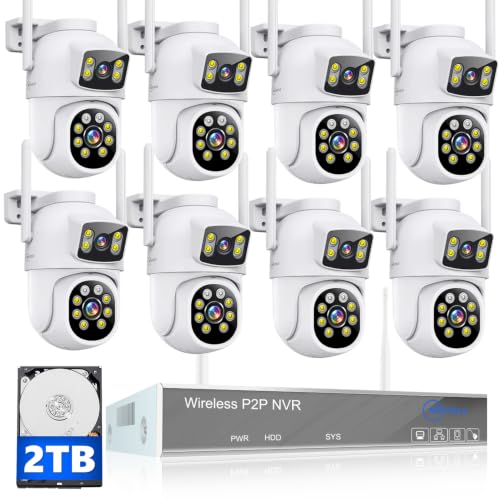
MOVOLS Wireless Security Camera System 5G/2.4G WiFi 8pcs 4MP+4MP Dual Lens Camera System,2K HD PTZ Dome Cameras System with Color Night Version, Motion Detection,2TB HDD, 16CH
Check price on Amazon
16pcs Wireless Cameras for Home Security Camera System with 500GB WiFi Pair | Plug-in Power, HDMI Output, AUTO Human Tracking 1080P HD Color Night Vision IP66 for Big Mall Farm Business CCTV Surveillance
Check price on Amazon
(2026 New) 5MP Wireless Security Camera System, 16CH NVR with 16 Outdoor WiFi Cameras & 3TB HDD, Dual Band 2.4/5.8GHz, 55% Longer Range, 130° Wide Angle, 2-Way Audio, IP66 Waterproof, No Monthly Fee
Check price on Amazon
5MP 12Pcs Wireless Cameras Security Camera System 16CH NVR 3TB HDD | Dual Antennas for 55% Longer Range WiFi, 130° Wide Angle, 2-Way Audio, IP66, Free APP Remote Control
Check price on Amazon