
Indoor Security Camera with Audio Recording: Hear What Matters
Protect your home with smart indoor cameras that capture both video and sound. Learn how audio recording, two-way talk, and sound alerts can transform your home security.
VIEW TOP PICKSWhy Audio Matters: An indoor security camera with audio recording goes beyond simple video surveillance. It lets you hear breaking glass, detect smoke alarms, listen for distress calls, and even communicate with family members or pets while you're away. The right audio-equipped camera gives you complete situational awareness.
Why Choose an Indoor Security Camera with Audio Recording?
When most people think about home security cameras, they focus on video quality, night vision, and field of view. But audio recording is an equally critical feature that often gets overlooked. An indoor security camera with audio recording captures the full picture of what's happening in your home — not just what you can see, but also what you can hear.
Whether you want to check in on a sleeping baby, monitor an elderly parent, or simply deter intruders with the sound of your voice, audio capabilities make your security system dramatically more effective. Modern indoor cameras with built-in microphones and speakers offer features like two-way talk, sound detection alerts, and even AI-powered audio analysis that can distinguish between normal household noises and potential threats.
If you're building a complete home security setup, an indoor camera with audio pairs perfectly with other devices like home security systems with doorbell camera and security cameras that will alert your phone. Together, these tools create a layered defense that keeps you informed no matter where you are.
Key Features to Look For
Not all audio-enabled cameras are created equal. Here's what separates a basic indoor camera from a truly capable one:
1. Two-Way Audio
Two-way audio lets you both listen and speak through the camera. This is invaluable for telling a delivery person where to leave a package, calming a pet during a thunderstorm, or warning off an intruder. Look for cameras with built-in speakers and noise-canceling microphones for clear communication.
2. Sound Detection & Alerts
Advanced indoor cameras can detect specific sounds — like a baby crying, glass breaking, or a smoke alarm going off — and send instant notifications to your phone. This feature is especially useful for parents and caregivers. For those who need continuous monitoring, consider pairing with indoor security cameras that record 24/7.
3. Video Quality & Night Vision
Audio is only half the story. Look for at least 1080p resolution, ideally 2K or 4K for clearer detail. Infrared night vision is essential for round-the-clock protection. If you want to monitor your home after dark without disturbing sleep, a camera with invisible IR LEDs is a smart choice.
4. Smart Home Integration
Many indoor cameras with audio work seamlessly with Amazon Alexa, Google Assistant, and Apple HomeKit. This lets you view live feeds on smart displays and use voice commands to control your camera. Integration with home security WiFi camera with smartphone app functionality ensures you're always connected.
5. Local vs. Cloud Storage
Decide whether you prefer local storage (microSD card) or cloud storage. Local storage eliminates monthly fees, while cloud storage offers off-site backup in case the camera is stolen. Some cameras offer both options. If avoiding subscriptions is important to you, explore WiFi security camera with local storage solutions.
Best Indoor Security Cameras with Audio Recording
⚠️ AFFILIATE DISCLOSURE: This website contains affiliate links. As an affiliate Associate, we earn from qualifying purchases. If you make a purchase through these links, we may receive a small commission at no additional cost to you. Read our full affiliate policy.

2K Security Cameras 4 Pack, Home Cameras Indoor/Outdoor for Baby/Pet
Check price on Amazon
Tapo 1080P Indoor Security Camera, Baby Monitor, Dog Camera, C101 | Motion Detection, 2-Way Audio, Siren, Night Vision, Cloud & SD Card Storage, Works w/Alexa & Google Home, Black
Check price on Amazon
5G&2.4GHz Indoor Security Camera, 2K, Free Cloud, 24/7 TF Recording, Wired | AI Motion Detection, Easy App Setup, 2-Way Audio, Cameras for Home Security, Dog, Cat, Elder, Nanny, Pet Camera
Check price on Amazon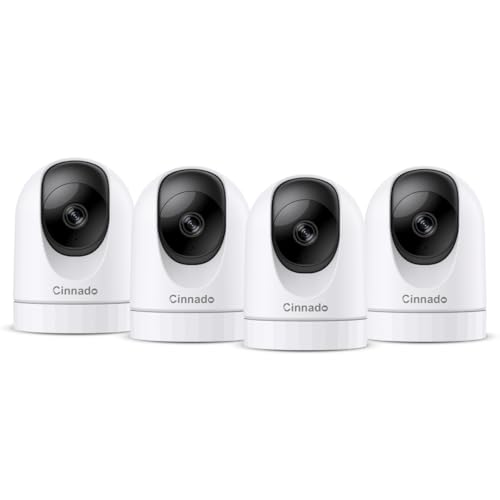
Cinnado 2K Home Security Cameras Indoor with 2.4GHz Wi-Fi & Siren, D1 4Pack | 360° Auto Tracking for Pets/Nanny/Baby/Dog, 2-Way Audio, 24/7 SD Card Storage, Cloud Storage, Works with Alexa & Google Home
Check price on Amazon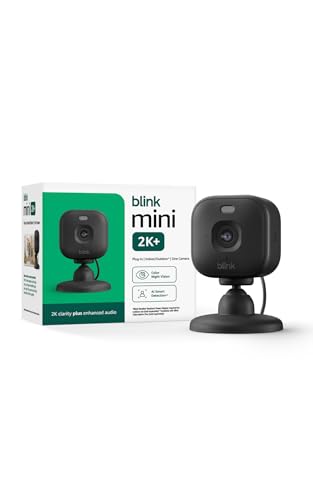
Blink Mini 2K+ (newest model) – Plug-in Home & Pet Indoor Security Camera with 2K video resolution, night vision, enhanced audio, motion detection – 1 camera (Black)
Check price on Amazon
Blink Mini 2K+ (newest model) – Plug-in Home & Pet Indoor Security Camera with 2K video resolution, night vision, enhanced audio, motion detection – 1 camera (White)
Check price on Amazon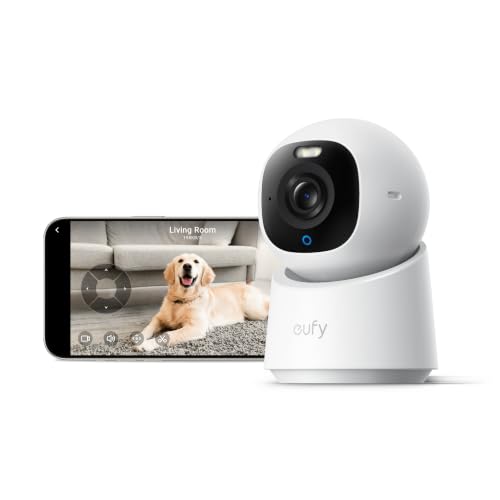
eufy Security 4K Indoor Camera E30, No Subscription, Work as Pet Camera | Nanny/Baby Camera, Pan&Tilt, AI Tracking, AI Detection, 24/7 Recording, Color Night Vision, Two-Way Audio,Works with HomeKit
Check price on Amazon
Armorcope WiFi Cameras for Home Security,2K Indoor Home Camera with AI Motion Detection,Night Vision, 2-Way Audio for/Pet/Dog/Baby Monitor, Cloud & 24/7 SD Recording, Phone App
Check price on AmazonHow to Choose the Right Indoor Camera for Your Needs
With so many options on the market, narrowing down your choice can feel overwhelming. Here's a practical framework to guide your decision:
Consider Your Primary Use Case
Are you monitoring a nursery, keeping an eye on pets, or securing a home office? A baby monitor camera prioritizes sound detection and two-way talk, while a general security camera might emphasize motion tracking and wide-angle coverage. For apartment dwellers, security cameras for apartment renters offer renter-friendly installation options.
Check the Field of View
A wider field of view means fewer cameras needed to cover a room. Look for at least 130 degrees; some models offer 360-degree pan and tilt for complete coverage. If you need to monitor a large space, a security camera with zoom pan and tilt gives you the flexibility to see every corner.
Evaluate Privacy Features
Since indoor cameras with audio recording capture sensitive moments, privacy features matter. Look for physical privacy shutters, customizable privacy zones, and clear data encryption policies. Some cameras also offer local processing so your footage never leaves your home.
Plan for Power
Indoor cameras typically plug into a wall outlet, but battery-powered options offer more placement flexibility. If you want to avoid running cables, a indoor security camera battery powered model might be your best bet. Just remember to recharge regularly.
Installation and Setup Tips
Getting your indoor camera up and running is usually straightforward, but a few strategic decisions can maximize its effectiveness:
- Position for coverage, not just convenience: Place cameras in corners facing entry points, but avoid pointing them directly at windows where glare can ruin night vision.
- Test audio quality: After mounting, test the microphone and speaker from your phone to ensure clear two-way communication.
- Secure your network: Use a strong, unique password for your camera's app and enable two-factor authentication if available.
- Consider a multi-camera system: If you're securing a larger home, a 16 channel wireless security camera system can cover multiple rooms and entry points from a single interface.
For those who want professional installation, home video surveillance system installers can help you design and set up a comprehensive system tailored to your property.
Audio vs. Video-Only Cameras: What's the Difference?
Video-only cameras capture visual evidence, which is undeniably important. But audio adds a layer of context that video alone can't provide. Here's a quick comparison:
| Feature | Video-Only Camera | Camera with Audio Recording |
|---|---|---|
| Visual Evidence | ✅ Yes | ✅ Yes |
| Sound Detection Alerts | ❌ No | ✅ Yes |
| Two-Way Communication | ❌ No | ✅ Yes |
| Baby/Pet Monitoring | Limited | Excellent |
| Deterrent Effect | Moderate | Strong (voice warning) |
For most indoor applications, the added benefits of audio recording far outweigh the modest price difference. If you're also considering outdoor coverage, you might want to explore security cameras for inside and outside that offer consistent features across both environments.
Smart Features That Enhance Audio Recording
Modern indoor cameras leverage AI and machine learning to make audio recording smarter and more useful:
- AI Sound Classification: Cameras can distinguish between a dog barking, a baby crying, and glass breaking, sending you specific alerts based on what they hear.
- Custom Audio Zones: Some cameras let you define areas where audio detection is more sensitive, reducing false alerts from street noise or TVs.
- Integration with Alarm Systems: Pair your camera with home alarm systems that don't require internet for a robust security setup that works even during outages.
- Voice Control: Use Alexa or Google Assistant to pull up live feeds or trigger recording with simple voice commands.
Maintenance and Privacy Best Practices
To get the most from your indoor security camera with audio recording, follow these maintenance and privacy guidelines:
- Clean the microphone regularly: Dust and debris can muffle audio quality. Gently wipe the microphone area with a soft, dry cloth.
- Update firmware: Manufacturers frequently release updates that improve security and add features. Enable automatic updates if possible.
- Review privacy settings: Disable audio recording in sensitive areas like bedrooms or bathrooms, or use privacy mode when you're home.
- Secure your footage: Use strong passwords and consider local storage options like wireless security camera system with local storage to keep recordings private.
- Inform household members: Everyone in your home should know where cameras are located and what they record.
If you're concerned about internet dependency, explore surveillance cameras that don't require internet for offline recording options that still capture audio.
Final Thoughts: Is an Audio-Enabled Indoor Camera Right for You?
An indoor security camera with audio recording is more than just a gadget — it's a powerful tool for peace of mind. Whether you're a parent wanting to hear your baby's breathing, a pet owner checking in during the day, or a homeowner wanting to deter intruders, audio capability adds a dimension of awareness that video alone cannot provide.
When shopping, prioritize two-way audio, reliable sound detection, and strong privacy features. Consider your power options, storage preferences, and whether you want smart home integration. And if you're building a comprehensive system, don't forget to explore complementary devices like home security cameras with audio recording for outdoor coverage or security camera I can watch on my phone for remote monitoring.
The right indoor camera with audio recording empowers you to stay connected to your home and loved ones — no matter where life takes you.
Frequently Asked Questions
Do indoor security cameras with audio recording work without WiFi?
Some models offer local storage and can record without WiFi, but you'll need WiFi for remote viewing and alerts. For fully offline options, look for camera system that doesn't require internet or security camera system that doesn't require internet.
Can I use an indoor camera with audio to monitor my pets?
Absolutely. Two-way audio is perfect for calming anxious pets. You can also set sound detection to alert you if your dog is barking excessively.
Are audio recordings stored securely?
Reputable brands use encryption for both cloud and local storage. Always check the manufacturer's privacy policy and enable two-factor authentication where available.
How much do indoor security cameras with audio recording cost?
Prices range from around $30 for basic models to $200+ for premium cameras with 2K/4K resolution, advanced AI, and pan-tilt-zoom capabilities.
Can I add audio recording to an existing camera?
No, audio recording requires a built-in microphone and speaker. If your current camera lacks these, you'll need to upgrade to an audio-enabled model.