
Camera USB Cable: The Complete Guide to Types, Speeds & Selection
Your camera is only as good as its connection. Learn how to choose the right USB cable for fast transfers, reliable tethering, and safe charging.
VIEW TOP CABLESThe camera USB cable is one of the most overlooked yet essential accessories in any photographer's kit. Whether you are transferring thousands of RAW files, tethering your camera to a laptop for a studio shoot, or simply charging your battery before a big trip, the quality and type of your USB cable directly impact your workflow. A cheap or mismatched cable can cause slow transfers, connection drops, and even damage your camera's port. This guide will walk you through everything you need to know to make an informed decision.
Why the Right Camera USB Cable Matters
Modern cameras, from compact point-and-shoots to professional mirrorless models, rely heavily on USB connectivity. A high-quality cable ensures fast file transfers, stable tethered shooting, and efficient in-camera charging. If you own a mirrorless interchangeable lens camera or a full-frame DSLR, you likely transfer large files regularly. Using a subpar cable can turn a 5-minute transfer into a 30-minute ordeal. Moreover, cables that do not match your camera's USB standard may not support firmware updates or tethered shooting software, limiting your camera's functionality.
Understanding USB Connector Types for Cameras
Cameras use several different USB connector types. Identifying which one your camera uses is the first step in choosing the right cable.
USB-C (USB Type-C)
USB-C is the modern standard, found on most cameras released after 2018. It is reversible, supports high-speed data transfer (up to 10Gbps or more with USB 3.2), and can deliver significant power for charging. Many high-end cameras, such as the latest high-end digital cameras and content creator cameras, use USB-C for both data and power. If your camera has a USB-C port, investing in a high-quality USB-C to USB-C or USB-C to USB-A cable is essential.
Micro-USB (Micro-B)
Micro-USB was the standard for many years and is still found on older DSLRs, action cameras, and budget models. It is smaller than USB-A but not reversible. If you own an entry-level DSLR or a budget action camera, chances are it uses Micro-USB. While it supports data transfer, speeds are generally limited to USB 2.0 (480Mbps), which can be slow for large files.
Mini-USB (Mini-B)
Mini-USB is largely obsolete but can still be found on very old digital cameras. If you have a legacy camera, you may need a Mini-USB cable. However, for most modern photography needs, you won't encounter this connector.
| Connector Type | Common Devices | Data Speed | Reversible |
|---|---|---|---|
| USB-C | Modern mirrorless, high-end DSLRs, vlogging cameras | Up to 10Gbps+ | Yes |
| Micro-USB | Older DSLRs, action cams, budget cameras | Up to 480Mbps | No |
| Mini-USB | Legacy digital cameras | Up to 480Mbps | No |
Data Transfer vs. Charging: What to Look For
Not all USB cables are built for the same purpose. Some are power-only, meaning they can charge your device but cannot transfer data. Others are data-only, and many are capable of both. When shopping for a camera USB cable, always verify that it supports data transfer if you plan to move files or use tethered shooting. For charging, look for cables that support the power delivery your camera requires. For example, a vlogging camera for beginners might charge via USB-C at 5V/2A, while a professional cinema camera may require higher wattage.
USB 2.0 vs. USB 3.0 and Beyond
The USB version determines the maximum data transfer speed. USB 2.0 offers up to 480Mbps, which is sufficient for smaller files but slow for 4K video or high-resolution RAW images. USB 3.0 (USB 3.1 Gen 1) offers up to 5Gbps, while USB 3.1 Gen 2 and USB 3.2 can reach 10Gbps or 20Gbps. If you shoot with a camera for video or a sports photography camera, a USB 3.0 or higher cable is highly recommended to speed up your workflow.
Tethering and Firmware Updates
Tethered shooting allows you to connect your camera directly to a computer, giving you instant access to images as you shoot. This is invaluable for studio work, product photography, and client presentations. A reliable USB cable is critical for tethering; a loose or low-quality cable can cause disconnections mid-shoot. Additionally, camera manufacturers often release firmware updates via USB. Using the correct cable ensures these updates install smoothly, unlocking new features and improving performance. Whether you use a DSLR lens or a prime lens, keeping your camera's firmware up to date is essential.
How to Choose the Best Camera USB Cable
When selecting a USB cable for your camera, consider the following factors:
- Connector Type: Match the cable to your camera's port (USB-C, Micro-USB, etc.).
- Data Speed: Choose USB 3.0 or higher for fast transfers; USB 2.0 is fine for basic needs.
- Cable Length: Longer cables offer flexibility but may reduce signal quality. For tethering, a 1–2 meter cable is usually ideal.
- Build Quality: Look for braided or reinforced cables with gold-plated connectors for durability.
- Brand Reputation: Trusted brands like Anker, Belkin, and Ugreen offer reliable cables.
- Compatibility: Ensure the cable is compatible with your camera model and any software you use.
Common Mistakes to Avoid
Many photographers unknowingly damage their cameras or waste time due to cable-related mistakes. Here are a few to avoid:
- Using a charge-only cable for data transfer: This will not work and can lead to frustration.
- Buying the cheapest cable: Low-quality cables often fail quickly and may not meet safety standards.
- Ignoring USB version: Using a USB 2.0 cable on a USB 3.0 port limits your transfer speed.
- Forcing the connector: Never force a USB plug into a port; it can bend pins and cause permanent damage.
Maintaining Your Camera USB Cable
To extend the life of your USB cable, handle it with care. Avoid sharp bends, do not pull on the cord itself (grip the connector instead), and store it neatly when not in use. Keep the connectors clean and free of dust. If you frequently travel, consider a dedicated cable pouch. Proper maintenance ensures reliable performance and protects your camera's USB port from damage. For more tips on gear care, explore our camera care and maintenance hub.
Frequently Asked Questions About Camera USB Cables
Can I use any USB cable to charge my camera?
Not necessarily. Your camera requires a cable that supports the correct voltage and current. Using an incompatible cable can slow charging or, in rare cases, cause damage. Always use the cable provided by the manufacturer or a certified replacement.
How do I know which USB cable my camera uses?
Check your camera's manual or look at the port on the camera body. USB-C is oval and reversible, Micro-USB is trapezoidal, and Mini-USB is larger and also trapezoidal. If unsure, search your camera model online.
Is a USB-C cable better than Micro-USB for cameras?
Yes, USB-C is generally superior. It supports faster data transfer, higher power delivery, and is reversible. However, the best cable is the one that matches your camera's port.
Can I use a phone charger cable for my camera?
If the connector matches and the cable supports data transfer (if needed), it may work. However, phone cables are often optimized for charging, not data. For reliable performance, use a cable designed for cameras.
What is the best cable length for tethering?
For tethered shooting, a 1-meter to 2-meter cable is usually ideal. Longer cables can introduce signal latency or require active extension. Always use a high-quality cable to avoid connection drops.
Recommended Camera USB Cables
⚠️ AFFILIATE DISCLOSURE: This website contains affiliate links. As an affiliate Associate, we earn from qualifying purchases. If you make a purchase through these links, we may receive a small commission at no additional cost to you. Read our full affiliate policy.

3ft Mini USB Cable, Standard USB 2.0 to Mini B Male Charger Cord Durable USB Mini to USB Charging Cable Compatible with PS3 Controller, MP3 Player, Camera, Dash Cam, Garmin GPS, Hero 3+(Black)
Check price on Amazon
ULIFTUS 6.6FT Mini USB Cable, Standard USB 2.0 Type A Male to Mini B Male Charger Cord Compatible with PS3 Controller, MP3 Player, Camera, Dash Cam, Garmin GPS, Hero 4/3+
Check price on Amazon
JXMOX Mini USB Cable, (3.3ft 2 Pack) USB 2.0 Type A Male to Mini B Charging Cord Compatible with Hero 3+, PS3 Controller, Digital Camera, Dash Cam, MP3 Player, Garmin Nuvi GPS, GPS Receiver
Check price on Amazon
SCOVEE Camera USB Cable Cord for Canon Rebel/PowerShot/EOS/DSLR/ELPH Digital Cameras,Transfer Wire Data Cable for Canon Rebel Camcorder,Vixia PC Computer Interface Replacement Mini B USB (3ft)
Check price on Amazon
2 Pack 20FT Power Extension Cable Compatible with Wyze Cam v4/v3/OG,Wyze Cam Pan v3/v4,Blink,eufy,NestCam Indoor,Amazon Cloud Camera,USB A to USB C (White)
Check price on Amazon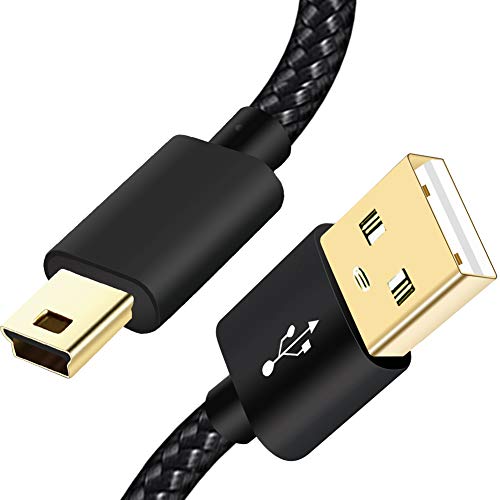
SCOVEE Mini USB Cable Braided 6ft Type A Male to Mini B Cable Data Charging Cord for GoPro Hero 3+,PS3 Controller Cord,MP3 Player,Dash Cam for Garmin Nuvi,Camera Charger for Canon PowerShot Rebel ELPH
Check price on Amazon