
Dash Cam with Parking Mode: Complete Buyer's Guide
Protect your vehicle around the clock. Learn how parking mode dash cams work, what features matter most, and how to choose the right 24/7 surveillance system for your car, truck, or fleet.
View Top RecommendationsWhy Parking Mode Matters: Over 60% of vehicle damage occurs when the car is parked and unattended. A dash cam with parking mode provides continuous surveillance, capturing hit-and-runs, vandalism, and theft attempts even when your engine is off. This guide will help you understand the technology and choose the best system for your needs.
What Is Parking Mode and How Does It Work?
Parking mode is a specialized feature in modern dash cams that allows the device to continue recording or monitoring your vehicle even when the ignition is turned off. Unlike standard dash cams that only record while driving, a parking mode dash cam draws power from your car's battery or an external power source to provide front and rear surveillance 24/7.
There are three primary types of parking mode technology:
1. Motion Detection
The dash cam activates and begins recording when its sensor detects movement in front of the lens. This is ideal for capturing pedestrians, vehicles, or potential thieves approaching your car. The system remains in a low-power standby state until triggered.
2. Impact Detection (G-Sensor)
Using a built-in accelerometer, the dash cam immediately starts recording when it detects a collision, bump, or sudden impact. This is crucial for documenting hit-and-run incidents and parking lot accidents. Most systems buffer the previous 10-30 seconds before the impact.
3. Time-Lapse Recording
The dash cam continuously records at a low frame rate (e.g., 1 frame per second) to create a time-lapse video. This provides comprehensive coverage while consuming minimal storage space and battery power, making it ideal for extended parking sessions.
Key Features to Look For in a Parking Mode Dash Cam
Not all parking mode systems are created equal. When comparing options, prioritize these critical features to ensure reliable performance and peace of mind:
- Buffered Parking Mode: Records 5-15 seconds before an event is triggered, ensuring you capture the entire incident, not just the aftermath.
- Adjustable Sensitivity: Allows you to fine-tune motion and impact detection to avoid false triggers from passing traffic or weather while still capturing genuine threats.
- Low Power Consumption: Essential for preventing battery drain. Look for systems with voltage cutoff settings that shut down the dash cam if your car battery drops below a safe level.
- High-Quality Night Vision: Parking incidents often occur at night. A dash cam with excellent low-light performance and digital night vision ensures clear footage in dark parking garages or unlit streets.
- Dual-Channel Recording: A front and rear camera setup provides complete coverage, protecting against rear-end collisions and vandalism from behind.
- Cloud Connectivity: Some premium dash cams offer Wi-Fi or LTE connectivity to send alerts and footage to your phone in real-time, even when you're away from your vehicle.
- High-Capacity Storage Support: Parking mode generates significant footage. Ensure the dash cam supports large microSD cards (128GB or higher) and offers loop recording with efficient file management.
- Hardwiring Kit Compatibility: For continuous parking mode operation, a hardwiring kit is required to connect the dash cam directly to your car's fuse box. Many brands offer these as separate purchases or bundled kits.
Parking Mode Dash Cam Comparison: What to Expect at Different Price Points
Understanding the market landscape helps you make an informed decision. Here's a breakdown of typical features and price ranges for parking mode dash cams:
| Feature | Entry-Level ($80–$150) | Mid-Range ($150–$300) | Premium ($300–$500+) |
|---|---|---|---|
| Resolution | 1080p Front Only | 1440p Front / 1080p Rear | 4K Front / 1080p Rear |
| Parking Mode Type | Motion or Impact Only | Buffered Motion + Impact | Buffered + Time-Lapse + Cloud |
| Night Vision | Basic | Good (Sony STARVIS) | Excellent (STARVIS 2) |
| Field of View | 120°–140° | 140°–160° | 160°–180° |
| Storage Support | Up to 64GB | Up to 256GB | Up to 512GB or 1TB |
| Connectivity | None or Basic Wi-Fi | Wi-Fi + App | Wi-Fi + LTE Cloud |
| Voltage Cutoff | Basic | Adjustable | Advanced with Battery Monitor |
Installation and Power Considerations
Proper installation is critical for reliable parking mode performance. Unlike standard dash cams that plug into your cigarette lighter, parking mode requires a constant power source. Here's what you need to know:
Hardwiring Kit
A hardwiring kit connects your dash cam directly to your car's fuse box, providing constant power even when the ignition is off. Most kits include a voltage cutoff feature that automatically shuts down the dash cam if your battery voltage drops below a safe threshold (typically 11.8V–12.4V), preventing a dead battery.
External Battery Pack
For extended parking mode sessions without draining your car's battery, an external dash cam battery pack (e.g., Cellink Neo) is an excellent solution. These dedicated batteries can power your dash cam for 12-48 hours and recharge quickly while you drive. This is especially useful for trucks and fleet vehicles.
OBD-II Power Cable
Some dash cams offer an OBD-II power cable that plugs into your car's diagnostic port. This provides constant power and often includes a voltage cutoff, though it may not be compatible with all vehicles. Always check compatibility before purchasing.
For professional installation, especially if you're not comfortable working with your car's electrical system, consider consulting a qualified auto electrician. Improper wiring can damage your vehicle's electronics or create safety hazards. If you need guidance on camera mounting, our guide on overhead camera mounts can provide additional installation insights.
Legal and Privacy Considerations
Before installing a parking mode dash cam, it's essential to understand the legal landscape in your area. While dash cams are legal in most countries, recording in public spaces and capturing audio may have restrictions:
- Audio Recording Laws: Some jurisdictions prohibit recording audio without consent. Check your local laws and consider disabling audio recording if required.
- Privacy Expectations: While recording public spaces is generally permitted, pointing a camera directly into a neighbor's window or private property could raise privacy concerns.
- Data Protection: If you operate a fleet or commercial vehicle, you may need to comply with data protection regulations (e.g., GDPR) regarding the storage and handling of recorded footage.
- Insurance Acceptance: Some insurance companies offer discounts for dash cam installation. Verify whether your insurer accepts parking mode footage as evidence for claims.
Recommended Dash Cams with Parking Mode
⚠️ AFFILIATE DISCLOSURE: This website contains affiliate links. As an affiliate Associate, we earn from qualifying purchases. If you make a purchase through these links, we may receive a small commission at no additional cost to you. Read our full affiliate policy.

ROVE R2-4K Dual Dash Cam Front and Rear, STARVIS 2 Sensor, Free 128GB Card | 4K Upscaled Front + FHD Rear Recording, 5.8GHz WiFi, 20MB/s Download Speed, App, GPS, 3" IPS, 24Hr Parking Mode, Night Vision
Check price on Amazon
Icesky 4K Dash Cam Front and Rear Left Right with GPS, 20MB/s WiFi 6 | Include 128GB SD Card, G-Sensor, 5.8GHz WiFi6, Parking Mode, 8 IR Lights, 4K Front 1080P Rear/Left/Right, 360° 4 Channel
Check price on Amazon
IIWEY N6 360° Dash Cam 4 Channel, Free 128GB Card, 8 IR Lights Night Vision | STARVIS 2K,5.8G WiFi-6 (up to 20MB/s), App, 24/7 Parking Mode, Front & Rear Inside DashCam for Car, 3.16” IPS, GPS, G-Sensor
Check price on Amazon
360 View 4 Channel Dash Cam Front and Rear Left Right Inside Camera for Cars, GPS and 5G Band WiFi, Night Vision, 160 Wide Angle, WDR, 24H Parking Mode, Supercapacitor, Included 128GB Card
Check price on Amazon
galphi 4K Dash Cam Front, 5GHz WiFi, 32GB Card Included, Mini Dashcam | Screen-Free, APP Control, 160° Wide Angle, G-Sensor, Loop Recording, 24H Parking Monitor, Night Vision, Easy Install
Check price on Amazon
REDTIGER F7NP 4K Dash Cam Front Rear, STARVIS 2 Sensor, Free Card Included | 5.8GHz WiFi-20MB/s Download, WDR Night Vision, Wide Angle, G-sensor Incident Detection, 24H Parking Mode(Hardwire kit needed)
Check price on Amazon
Affver 4K+2.5K Dash Cam Front and Rear, Built-in 5G WiFi 6 GPS Dual Dashcam | 64GB Card Included, 3.59" IPS Screen, APP Control, G-Sensor, Loop Recording, 24H Parking Mode, Night Vision, Car Dash Camera
Check price on Amazon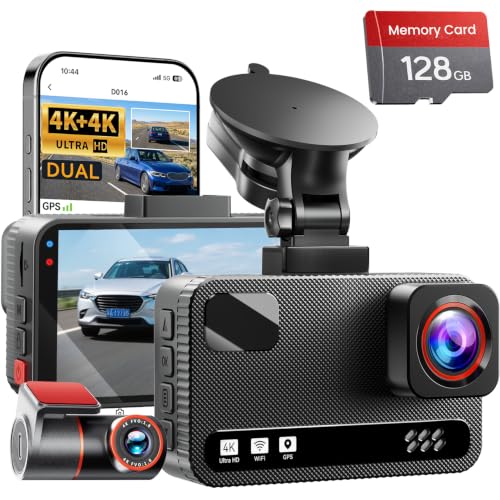
4K+4K Dual Dash Cam Front and Rear, Free 128GB Card, Starlight Night Vision | Dual-Channel Recording, 5.8GHz WiFi, 20MB/s Download Speed, GPS, 3" IPS Screen, Collision Sensor, 24H Parking Mode
Check price on AmazonFinal Buying Advice: Choosing the Right System for Your Needs
Selecting the ideal dash cam with parking mode depends on your specific circumstances. Consider these scenarios to guide your decision:
For Daily Commuters
A mid-range dual-channel dash cam with buffered parking mode and a hardwiring kit offers the best balance of price, performance, and protection. Look for models with reliable voltage cutoff to protect your battery during overnight parking.
For Frequent Travelers
An external battery pack paired with a premium 4K dash cam ensures extended parking mode coverage without draining your car's battery. Cloud connectivity allows you to monitor your vehicle remotely, providing peace of mind when you're away.
For Fleet and Commercial Use
Invest in a high-end multi-channel system with LTE connectivity, GPS tracking, and comprehensive fleet management software. Our guide to dash cams for trucks provides specialized recommendations for commercial vehicles.
For Budget-Conscious Buyers
An entry-level dash cam with impact detection and basic motion sensing can still provide valuable protection. Pair it with a quality hardwiring kit and high-endurance microSD card to maximize performance within your budget.
Regardless of your choice, always verify that your dash cam supports high-endurance microSD cards designed for continuous recording. Standard memory cards may fail prematurely when used in parking mode. For additional guidance on selecting the right recording equipment for your vehicle, explore our resources on car video cameras and rear dash cams to build a comprehensive vehicle security system.
Disclaimer
The information provided on AllCameraGuide is for educational and informational purposes only. We are not professional camera technicians or photographers, and our content should not replace professional advice. Always consult with a qualified expert regarding camera compatibility, safety, or technical concerns. Some content may use AI assistance. Always check product warranties and safety standards before purchasing. If you do not agree, please do not use this website. Read the full disclaimer.