
Easy Install Wireless Outdoor Security Camera: Complete Buying Guide
Everything you need to know about choosing and installing a wireless outdoor security camera without professional help. Save money, protect your home, and gain peace of mind with our expert guidance.
Why Easy Install Wireless Outdoor Security Cameras Are Revolutionizing Home Protection
Gone are the days when installing a home security system meant hiring expensive professionals, drilling through walls, and dealing with a tangled mess of cables. Today's easy install wireless outdoor security cameras have completely transformed how homeowners approach property protection. These remarkable devices combine advanced technology with user-friendly design, allowing virtually anyone to set up a comprehensive surveillance system in under an hour.
The global shift toward DIY home security has been nothing short of revolutionary. According to industry analysts, the DIY security camera market has grown exponentially as homeowners discover that they no longer need to sacrifice quality for convenience. Modern wireless cameras deliver stunning 2K and 4K resolution, sophisticated AI-powered motion detection, and seamless smartphone integration—all without requiring a single professional installation visit.
What makes these cameras truly accessible is their remarkable versatility. Whether you're a tech-savvy millennial or a homeowner who struggles with basic smartphone settings, manufacturers have designed these devices with intuitive setup processes that typically involve nothing more than downloading an app, scanning a QR code, and mounting the camera using included hardware. For those who prefer to avoid WiFi entirely, there are even options like battery operated security cameras without WiFi that offer similar ease of installation.
What Makes a Wireless Outdoor Security Camera Truly Easy to Install?
Not all wireless cameras are created equal when it comes to installation simplicity. Understanding the key features that contribute to a hassle-free setup will help you make an informed purchasing decision. Here's what separates genuinely easy-to-install cameras from those that promise simplicity but deliver frustration.
Wire-Free Power Options
The most significant factor in installation ease is power source. Battery-powered cameras eliminate the need for electrical wiring entirely, allowing you to mount them virtually anywhere. Look for models with rechargeable batteries lasting 3-6 months per charge, or consider solar-powered options with built-in motion sensor lights that never require manual charging.
Simple WiFi Connectivity
Modern cameras should connect to your home network in minutes. The best models support both 2.4GHz and 5GHz bands for optimal flexibility. If you've experienced connectivity issues with older cameras, check out security cameras that work seamlessly with 5GHz WiFi for faster, more reliable performance.
Magnetic Mounts & Tool-Free Brackets
Installation hardware has evolved dramatically. Magnetic mounting bases allow you to snap cameras into position and adjust angles effortlessly. Many premium models include adhesive mounts for renters who can't drill into walls, while traditional screw-in brackets now feature tool-free adjustment mechanisms.
Intuitive Mobile App Setup
The best cameras guide you through setup with step-by-step in-app instructions, QR code scanning, and automatic network detection. Look for apps with high ratings on both iOS and Android platforms, as these typically indicate a smooth user experience from unboxing to full operation.
Step-by-Step: Installing Your Wireless Outdoor Security Camera in Under 30 Minutes
One of the greatest advantages of modern wireless security cameras is the remarkably straightforward installation process. While specific steps may vary slightly between manufacturers, the general process remains consistent across most quality brands. Here's what you can expect when setting up your new camera system.
Charge Your Camera Battery
Before beginning installation, fully charge your camera's battery. Most manufacturers include USB charging cables, and a complete charge typically takes 4-8 hours. Some cameras can operate while charging, but it's best to start with a full battery for uninterrupted performance.
Download the Manufacturer's App
Search for your camera brand's official app on the App Store or Google Play. Create an account if required—this will enable remote viewing from anywhere. The app serves as your control center for live viewing, playback, notifications, and camera settings.
Connect to Your WiFi Network
Follow the in-app prompts to connect your camera to your home WiFi. You'll typically scan a QR code on the camera or enter your network credentials manually. Ensure you're within range of your router during this step. For homes with weak outdoor WiFi signals, consider cameras designed for outdoor use without subscription requirements that often feature enhanced connectivity.
Choose Your Mounting Location
Select a position that provides optimal coverage of entry points, driveways, or yards. Consider factors like height (8-10 feet is ideal), angle, and proximity to WiFi. Avoid pointing cameras directly at the sun or reflective surfaces that can cause glare and false motion alerts.
Mount and Secure Your Camera
Using the included hardware, attach the mounting bracket to your chosen surface. Most cameras simply twist or snap into the bracket. For renters or those uncomfortable with drilling, adhesive mounts offer a damage-free alternative—though these work best on smooth, clean surfaces.
Test and Fine-Tune Settings
Once mounted, use the app to verify your camera's view and adjust motion detection zones, sensitivity, and notification preferences. Many cameras offer customizable activity zones that reduce false alerts from passing cars or swaying trees. Test night vision and two-way audio to ensure everything functions properly.
Essential Features to Look For in an Easy Install Wireless Outdoor Security Camera
When shopping for a wireless outdoor security camera, certain features directly impact both installation ease and long-term satisfaction. Understanding these specifications will help you choose a camera that meets your specific needs without unnecessary complications.
Video Resolution and Image Quality
Resolution determines how much detail your camera captures. While 1080p remains the baseline for acceptable quality, 2K and 4K cameras provide significantly clearer images—especially important for identifying faces, license plates, or other critical details. Higher resolution does consume more bandwidth and storage, so balance quality needs with your internet capabilities. For comprehensive coverage, consider 4K wireless security camera systems with DVR that offer multiple high-resolution cameras with centralized recording.
Night Vision Capabilities
Most outdoor security incidents occur after dark, making night vision essential. Infrared (IR) LEDs provide black-and-white footage in complete darkness, while color night vision models use advanced sensors to capture color images in low light. Some premium cameras incorporate spotlights for full-color recording at night, often combined with siren functionality for active deterrence.
Motion Detection Technology
Basic motion detection triggers recordings whenever anything moves in the camera's field of view—resulting in countless false alerts from pets, shadows, and weather. Advanced AI-powered detection distinguishes between people, vehicles, animals, and packages, sending relevant notifications only. Look for cameras with customizable activity zones and adjustable sensitivity settings. If comprehensive motion detection is your priority, explore outdoor security cameras with advanced motion detection.
Storage Options
Wireless cameras typically offer three storage methods: local storage via microSD card, cloud storage through subscription plans, or a combination of both. Local storage eliminates monthly fees but requires physical access to retrieve footage. Cloud storage provides convenient remote access but adds ongoing costs. Many users prefer hybrid approaches—local storage for continuous recording and cloud backup for critical events. For those seeking no-fee solutions, security cameras that record to SD cards offer excellent value.
Two-Way Audio
Two-way audio transforms your security camera into an interactive communication device. Whether greeting delivery drivers, warning off intruders, or checking in on family members, this feature adds tremendous utility. Cameras with two-way audio capability typically include built-in speakers and microphones with noise cancellation for clear communication.
Weather Resistance
Outdoor cameras must withstand rain, snow, dust, and temperature extremes. Look for IP65 or higher ratings, which indicate protection against water jets and dust ingress. Operating temperature ranges should accommodate your local climate—premium cameras function reliably from -4°F to 122°F (-20°C to 50°C).
Battery-Powered vs. Solar-Powered vs. Wired: Which Easy Install Option Is Right for You?
Understanding the trade-offs between different power sources will help you select the ideal camera for your specific situation. Each option offers distinct advantages depending on your property layout, climate, and maintenance preferences.
Battery-powered cameras offer the ultimate flexibility, allowing placement anywhere within WiFi range without concern for power outlets or sunlight exposure. The trade-off is periodic charging—typically every 3-6 months depending on usage and settings. For those who want to eliminate this task entirely, solar-powered surveillance cameras that don't require WiFi represent the pinnacle of maintenance-free operation.
Solar-powered cameras shine in locations with consistent sunlight, continuously charging themselves through included solar panels. However, prolonged cloudy periods can deplete batteries, and panel placement becomes critical. These cameras work exceptionally well for remote locations where running power would be impractical. Consider solar-powered cameras with cellular connectivity for properties without any internet infrastructure.
Wired cameras provide uninterrupted power and often higher resolution capabilities, but installation requires either professional help or comfort with electrical work. For those willing to make the investment, wired outdoor security cameras for home deliver rock-solid reliability without battery concerns.
Recommended Easy Install Wireless Outdoor Security Cameras
⚠️ AFFILIATE DISCLOSURE: This website contains affiliate links. As an affiliate Associate, we earn from qualifying purchases. If you make a purchase through these links, we may receive a small commission at no additional cost to you. Read our full affiliate policy.

2026 Upgraded 2K Security Cameras Wireless Outdoor, Free Cloud Storage, 1-6 Months Battery Life, Waterproof, 2-Way Talk, AI Motion Detection Spotlight Siren Alarm Cameras for Home Security
Check price on Amazon
SEHMUA 2K Solar Security Cameras Wireless Outdoor, 2 Pack 360° View Pan/Tilt WiFi Security Camera Outside with Color Night Vision,Easy to Install, PIR Alarm, 2-Way Audio
Check price on Amazon
2 Pack 4MP Security Cameras Wireless Outdoor, Color Night Vision Camera | Cameras for Home Security with PIR Motion Detection, SD/Cloud Storage, 2-Way Audio, Siren Alarm, FHD, IP65, Works with Alexa
Check price on Amazon
Security Cameras Wireless Outdoor, 2K Indoor Cameras for Home Security Battery Powered, AI Motion Detection, Color Night Vision, 2-Way Talk, Spotlight Siren Alarm, Cloud & SD Storage-Jet Black Camera
Check price on Amazon
GMK 4 Pack Cameras System, Security Cameras Wireless Outdoor, 2K Video | VicoHome Cam, Motion Detect, Color Night Vision, 2-Way Talk, IP65 Waterproof, Indoor&Outdoor, 2.4GHz WiFi, SD/Cloud Storage
Check price on Amazon
SEHMUA 2K 4G LTE Cellular Solar Security Camera Wireless Outdoor | Easy to Install with One-Press Quick Release Latch, No WiFi Security Cam, Color Night Vision, PIR Alarm, IP65 Weatherproof
Check price on Amazon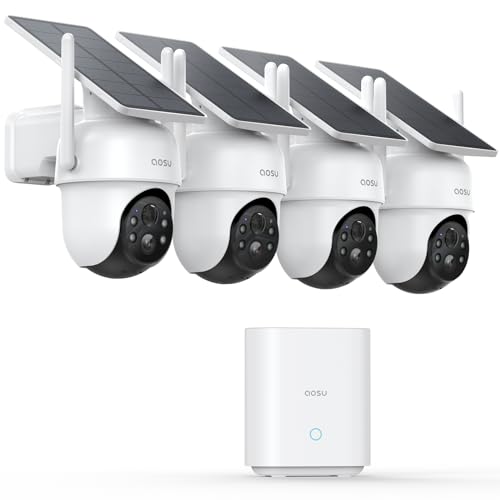
aosu D1 Classic 4-Cam Kit, Security Cameras Wireless Outdoor, Solar Powered | No Subscription Required, 32GB Built-in Storage, 360° Auto Tracking, 2K (3MP) Full-Color Night Vision, Easy Install
Check price on Amazon
2026 Enhanced 2K UHD Security Cameras Wireless Outdoor – Free Cloud & SD Storage, Dual-Band WiFi 2.4G/5G, Full-Color Night Vision, 6-Month Battery, Motion Alerts, IP66 Weatherproof, 2-Way Talk
Check price on AmazonCommon Installation Issues and Quick Solutions
Even the most user-friendly cameras occasionally present challenges during setup. Here are solutions to the most common issues users encounter, helping you get your camera operational quickly.
Camera Won't Connect to WiFi
Ensure you're using the correct WiFi band (most cameras require 2.4GHz). Move the camera closer to your router during initial setup, then relocate after connection. Check that your WiFi password is entered correctly—special characters sometimes cause issues. If problems persist, cameras compatible with 5GHz WiFi may resolve bandwidth congestion issues.
Poor Night Vision Quality
Clean the camera lens and IR sensors with a soft microfiber cloth. Check for obstructions like spiderwebs or debris near the camera. Adjust night vision settings in the app—some cameras allow you to toggle between IR modes or adjust sensitivity. Ensure the camera isn't pointing at reflective surfaces that bounce IR light back.
Excessive False Motion Alerts
Adjust motion sensitivity settings downward and create specific activity zones that exclude areas with frequent irrelevant movement (streets, trees). Enable person detection if available, which filters out animals and vehicles. Some cameras allow scheduling motion detection for specific times when alerts are most valuable.
Battery Draining Too Quickly
Frequent motion triggers, live view sessions, and two-way audio conversations consume significant battery. Reduce sensitivity, limit live viewing, and consider lowering video quality if battery life remains problematic. Extreme cold also reduces battery performance—in winter months, expect shorter intervals between charges or consider solar security cameras without subscription that maintain charge through sunlight.
Keeping Your Wireless Security Camera Running Smoothly
Proper maintenance ensures your investment continues protecting your home effectively. These simple practices extend camera lifespan and maintain optimal performance.
Monthly: Check battery levels through the app and recharge as needed. Wipe camera lenses with a microfiber cloth to remove dust and water spots. Review motion detection logs and adjust settings if false alerts have increased.
Quarterly: Inspect mounting hardware for looseness and tighten as needed. Clean solar panels (if applicable) to maintain charging efficiency. Check for firmware updates and install them promptly—these often include security patches and performance improvements.
Annually: Conduct a comprehensive system review. Test all cameras, review footage quality, and assess whether your coverage still meets your needs. Consider whether additional cameras would fill coverage gaps. If your camera is several years old and showing performance issues, newer models offer significantly improved features at competitive prices.
Final Thoughts: Protecting Your Home Has Never Been Easier
Easy install wireless outdoor security cameras have democratized home security, making professional-grade protection accessible to everyone. Whether you're a first-time homeowner, a renter wanting to protect your space, or someone upgrading an aging system, today's wireless cameras offer unprecedented combination of performance, convenience, and value.
The key to satisfaction lies in matching camera capabilities to your specific situation. Consider your WiFi infrastructure, power availability, coverage requirements, and budget when making your selection. Don't overpay for features you won't use, but don't compromise on essentials like adequate resolution, reliable motion detection, and weather resistance.
Remember that installation—once the domain of professional technicians—now takes less time than assembling a piece of furniture. With intuitive apps, tool-free mounting systems, and comprehensive support resources, you can have a fully operational security system protecting your home in a single afternoon.
For those seeking the absolute easiest installation experience, focus on battery-powered cameras with magnetic mounts and highly-rated companion apps. These represent the current pinnacle of user-friendly security technology. And for properties where WiFi simply isn't practical, explore outdoor security cameras that don't need WiFi—they offer the same easy installation with complete network independence.
Your home deserves protection, and modern technology has eliminated every excuse to delay. Choose your camera, follow our installation guide, and join millions of homeowners enjoying the peace of mind that comes from comprehensive, easy-to-install wireless security coverage.