
Need Someone to Install Security Cameras?
Find professional installers, understand costs, and get your security system up and running without the hassle. Your complete guide to hiring the right expert.
Get StartedWhy Professional Installation Matters
You've done the research and purchased the right security cameras for your home or business. Now you're wondering: "Do I need someone to install security cameras, or can I do it myself?" While some modern wireless systems are designed for DIY setup, professional installation offers significant advantages that can save you time, money, and frustration in the long run.
Proper camera placement is critical for maximum coverage. A professional installer knows exactly where to position each camera to eliminate blind spots, optimize viewing angles, and ensure your system captures the footage you actually need. They also handle the technical aspects—cable routing, power connections, and network configuration—that can be tricky for beginners.
If you're still deciding on the right equipment, our guide on professional outdoor security cameras can help you choose systems that are compatible with professional installation services.
DIY vs. Professional Installation: Which Is Right for You?
Before hiring an installer, assess whether your situation truly requires professional help. Here's a quick breakdown:
When DIY Makes Sense
- You have a wireless security camera system with simple plug-and-play setup
- Your cameras are battery-operated or solar-powered with no wiring needed
- You're comfortable with basic tools and smartphone apps
- You only need 1–2 cameras in easily accessible locations
When to Hire a Professional
- You need multiple cameras wired across a large property
- Your system requires running cables through walls, attics, or crawl spaces
- You want night vision or color night vision cameras that need precise positioning
- You're installing a professional-grade outdoor system with NVR/DVR setup
- You need integration with existing smart home systems
Pro Tip: Even if you choose DIY for a simple setup, consider hiring a professional for the initial camera placement consultation. Many installers offer this as a standalone service for $100–$250.
How Much Does Professional Security Camera Installation Cost?
Installation costs vary based on system complexity, number of cameras, and your location. Here's a general breakdown of what you can expect to pay in the current market:
| Service Type | Estimated Cost | Notes |
|---|---|---|
| Basic installation (1–2 cameras) | $150–$400 | Simple mounting, no complex wiring |
| Standard installation (3–4 cameras) | $400–$800 | Includes cable routing and NVR setup |
| Complex installation (5+ cameras) | $800–$2,500 | Multi-story, outdoor, and long cable runs |
| Wireless system setup | $100–$300 | App configuration and mounting only |
| Commercial installation | $2,500+ | Large-scale systems with multiple NVRs |
Keep in mind that these prices are for labor only. If your installer needs to supply mounting hardware, cables, or power supplies, expect additional costs. Some companies offer bundled packages that include both equipment and installation, which can be more cost-effective than purchasing separately.
For those on a budget, consider cheap indoor wireless security cameras that are easier to install yourself, or explore wireless security cameras with no monthly fee to avoid ongoing costs.
Recommended Security Cameras for Professional Installation
⚠️ AFFILIATE DISCLOSURE: This website contains affiliate links. As an affiliate Associate, we earn from qualifying purchases. If you make a purchase through these links, we may receive a small commission at no additional cost to you. Read our full affiliate policy.

2K Cameras for Home Security Indoor/Outdoor,Inside Cameras for House/Baby/Elder/Pet,Wifi Camera,Plug&Play,Color Night Vision,2-Way Audio 24/7 Record,Support Cloud/Memory Card(Not Included),6.56ft Wire
Check price on Amazon
Anssipo 2K Window Camera, Indoor Window Security Camera for Home Security, Camera for Window to Look Outside, No Subscription 24/7 Recording, Anti-Glare, Time Display, Color Night Vision
Check price on Amazon
VSMAHOME 2K Cameras for Home Security,Indoor/Outdoor for Baby/Elder/Pet Monitoring with Phone app, Plug&Play,Color Night Vision,2-Way Audio&24/7 Recording,Support 128G Card (Not Included),6.56ft Wire
Check price on Amazon
eufy Security Video Doorbell E340, Dual Cameras, 2K FHD, 8GB Local Storage | No Subscription,Head-to-Toe View,Wireless or Wired,Color Night Vision,Two-way talk,AI motion/Package Detection, 2.4 GHz Wi-Fi
Check price on Amazon
2K Cameras for Home Security,Indoor/Outdoor for Baby/Elder/Pet Monitoring with Phone app,Plug&Play,Color Night Vision,2-Way Audio 24/7 Recording,Support 128G Card ( Not Included),4 pcs,6.56ft Wire
Check price on Amazon
2 Pack 2.5K Cameras for Home Security, Non-Subscription AI Human/Pet/Crying Detection, 4MP Dog/Cat/Pet Camera Indoor with Phone App, Pan Tilt 2.4G WiFi Indoor Cameras, IR Night Vision, 2-Way Audio
Check price on Amazon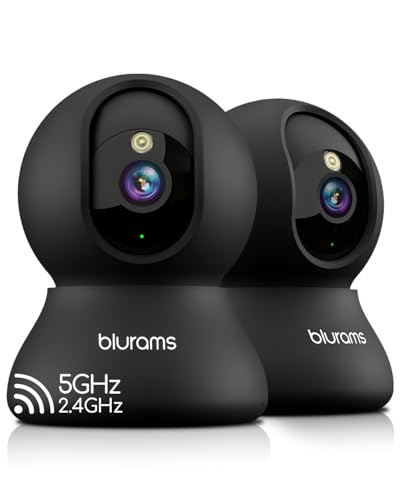
blurams 5G Indoor Cameras for Home Security, 2K Pet Camera with Phone App, 360° PTZ Home Cam w/Dual-Band WiFi6, 2-Way Talk, Free Human/Sound Detection, Motion Tracking, Night Vision, Works with Alexa
Check price on AmazonHow to Find the Right Security Camera Installer
Finding a reliable installer is just as important as choosing the right cameras. Here's a step-by-step approach:
1. Ask for Recommendations
Start with friends, family, and neighbors who have recently installed security systems. Local community groups and online forums are also great resources for unbiased recommendations.
2. Check Credentials
Look for installers who are licensed, insured, and certified by major brands. Companies that specialize in professional outdoor security cameras often have manufacturer certifications that ensure they know the equipment inside and out.
3. Get Multiple Quotes
Contact at least three installers and provide them with details about your property and the system you've purchased (or plan to purchase). A good installer will ask questions about your coverage needs, existing wiring, and whether you want night vision or color night vision capabilities.
4. Review Their Portfolio
Ask for references and photos of previous installations. A reputable installer will be happy to share their work and connect you with satisfied customers.
5. Discuss the Scope of Work
Make sure the quote includes everything: mounting, cable routing, power connections, NVR/DVR configuration, and testing. If you're installing a system with a DVR with hard drive, confirm that the installer will handle the storage setup and remote access configuration.
What to Expect During Professional Installation
Understanding the installation process helps you prepare and ensures everything goes smoothly. Here's a typical timeline:
Pre-Installation Consultation (30–60 minutes)
The installer will walk your property, identify camera locations, and discuss coverage goals. This is when you should mention any specific concerns, such as indoor cameras that don't require WiFi or areas where you need small security cameras with night vision.
Installation Day (2–8 hours depending on complexity)
The installer will mount cameras, run cables, connect power, and configure your NVR or DVR. For wireless systems, they'll pair cameras with your network and set up the mobile app.
Testing and Walkthrough (30–60 minutes)
Before leaving, the installer should test every camera, verify recording and playback, and show you how to access live feeds on your phone. They should also explain how to adjust motion detection zones and alerts.
Important: Always ask for a written warranty on the installation work. Most reputable installers offer at least a 30-day workmanship guarantee.
Types of Security Camera Installers
Not all installers are the same. Depending on your needs, you might work with:
- Security System Integrators: Specialize in comprehensive systems for homes and businesses. They often handle wireless security camera systems for small businesses and large-scale commercial installations.
- Electricians: Best for hardwired systems that require running power to camera locations. They're skilled at fishing cables through walls and connecting to your home's electrical system.
- Low-Voltage Technicians: Experts in data and power cabling. Ideal for IP camera systems and network configuration.
- Handymen: Suitable for simple wireless camera mounting and basic setup. Best for cheap indoor wireless security cameras that don't require complex wiring.
- Retail Installation Services: Companies like Best Buy's Geek Squad offer installation for cameras purchased through their stores.
For specialized needs like solar panel for outdoor security camera setups or battery-operated security cameras without WiFi, choose an installer with specific experience in those technologies.
Common Installation Challenges and How Pros Solve Them
Professional installers encounter these issues regularly and have the tools and expertise to solve them efficiently:
Difficult Cable Routing
Running cables through finished walls, attics, and crawl spaces requires specialized tools and experience. Pros can route cables invisibly, preserving your home's aesthetics.
Power Access
Not every camera location has an existing power source. Installers can tap into nearby outlets, install new ones, or recommend battery-operated outdoor cameras without WiFi that eliminate the need for wiring.
Network Configuration
IP cameras require proper network setup, including static IP addresses and port forwarding for remote access. This is second nature for professional installers but can be a headache for DIYers.
Weatherproofing
Outdoor installations must be weatherproof to prevent water damage and corrosion. Pros use proper housings, seals, and mounting techniques to ensure longevity.
If you're dealing with a particularly challenging installation, consider professional outdoor security cameras that are designed for easy installation and include mounting hardware.
Frequently Asked Questions
Can I install security cameras myself?
Yes, many modern wireless systems are designed for DIY installation. However, if you need multiple cameras, long cable runs, or professional-grade equipment, hiring an installer is worth the investment.
How long does professional installation take?
A simple 2-camera wireless setup can be completed in 1–2 hours. A full 8-camera wired system with NVR configuration typically takes 4–8 hours, sometimes spanning two days for complex installations.
Do I need to buy the cameras before hiring an installer?
You can do either. Some installers prefer to supply equipment to ensure compatibility and warranty coverage. Others will install cameras you've purchased yourself. Discuss this upfront to avoid issues.
Will the installer help me set up remote viewing on my phone?
Yes, a professional installation should include configuring the mobile app so you can view live feeds and recordings from anywhere. If you have home security cameras with cell phone access, make sure the installer sets this up before leaving.
What if I want to add more cameras later?
Inform your installer during the initial consultation. They can install extra cable runs and power sources for future expansion, saving you money on a second installation visit.
Final Thoughts: Making the Right Choice
Hiring someone to install security cameras is a smart investment for most homeowners and business owners. The peace of mind that comes from knowing your system is properly installed, configured, and ready to protect your property is well worth the cost.
Whether you choose a simple wireless security camera system for small business or a comprehensive home security system with night vision, working with a professional ensures you get the most out of your equipment.
Start by getting quotes from at least three installers, ask plenty of questions, and don't be afraid to negotiate. With the right installer and the right equipment, you'll have a security system that protects your property for years to come.
Ready to get started? Browse our recommended security cameras above, then use our tips to find a qualified installer in your area. Your safety is worth it.