
Solar Panel for Outdoor Security Camera: The Complete Guide
Everything you need to know before buying a solar panel for your outdoor security camera — compatibility, power output, installation, weatherproofing, and the best options available today.
View Top PicksWhy Solar Power Your Outdoor Security Camera?
Outdoor security cameras are only as reliable as their power source. Running electrical wiring to a remote gate, barn, or backyard corner can cost hundreds of dollars and require professional installation. Battery-powered cameras solve the wiring problem, but they still need frequent recharging — which means climbing a ladder every few weeks or months. A solar panel for outdoor security camera systems eliminates both problems by continuously topping up the battery using free sunlight.
For homeowners who want true set-and-forget surveillance, solar is the most practical solution. It keeps your camera running through cloudy weeks, removes the need for an outdoor outlet, and works in locations where power simply isn't available. If you are still deciding between power methods, our guide to battery operated security camera without wifi explains how battery and solar compare in real-world use.
How a Solar Panel Powers Your Security Camera
The system is simple but effective. The solar panel converts sunlight into low-voltage DC electricity through photovoltaic cells. That electricity travels down a cable to the camera's built-in rechargeable battery, where it is stored. The camera then draws power from the battery as needed — day or night, rain or shine.
This design means the panel does not need to power the camera directly. It only needs to generate more energy over time than the camera consumes. That is why even a modest 3W panel can keep a low-power camera topped up indefinitely, as long as it receives a few hours of direct sunlight per day. Understanding this distinction is important, because a panel that is "too small" is rarely the problem — poor placement and shading usually are.
Key Components of a Solar Security Camera System
- Solar panel: Converts sunlight to electricity. Monocrystalline panels are more efficient than polycrystalline, especially in low light.
- Rechargeable battery: Stores energy for nighttime and cloudy periods. Lithium-ion is standard; capacity is measured in mAh or Wh.
- Charge controller: Built into most cameras. Prevents overcharging and extends battery life.
- Cable and connector: Usually Micro-USB, USB-C, or a proprietary barrel connector. Must match your camera exactly.
- Mounting bracket: Allows you to angle the panel toward the sun independently of the camera's field of view.
If you prefer a fully integrated setup with no separate panel to mount, a dedicated outdoor smart PTZ solar battery camera combines all of these components in a single weatherproof housing.
Compatibility: Will a Solar Panel Work With Your Camera?
This is the single most common mistake buyers make. Not every outdoor camera accepts a solar panel, and not every panel works with every camera. Before you buy, confirm three things:
- The camera has a rechargeable battery and a charging input. Cameras that run on disposable batteries or require constant AC power are not designed for solar charging.
- The connector matches. Micro-USB, USB-C, and DC barrel plugs are not interchangeable without an adapter.
- The voltage and amperage are compatible. Most cameras accept 5V input, but some use 6V or 12V. Using the wrong voltage can damage the camera or fail to charge it.
Brand matters here. Panels sold by the camera manufacturer are guaranteed to work, but they are often overpriced. Third-party panels are fine — and frequently better value — as long as the specs match. If your camera is a non-subscription model, check our guide to the non subscription outdoor security camera options that pair well with solar.
| Camera Type | Recommended Panel | Typical Price | Notes |
|---|---|---|---|
| 1080p battery camera (low usage) | 3W–5W | $20–$35 | Works well with motion-triggered recording |
| 2K–4K battery camera | 5W–8W | $30–$50 | Needed for higher bitrate and night vision |
| PTZ / pan-tilt camera | 8W–10W | $40–$60 | Motors consume extra power; larger panel required |
| Camera with integrated solar | Built-in (usually 5W–8W) | $80–$200 | Simplest install; no separate panel to mount |
Prices reflect typical market rates and vary by brand, panel efficiency, and included mounting hardware.
Best Solar Panels for Outdoor Security Cameras
⚠️ AFFILIATE DISCLOSURE: This website contains affiliate links. As an affiliate Associate, we earn from qualifying purchases. If you make a purchase through these links, we may receive a small commission at no additional cost to you. Read our full affiliate policy.

Solar Panel for Security Camera, 5W USB Solar Panel for Micro USB and USB-C Port Outdoor Rechargeable Battery Camera, Solar Panels with 9.8ft Cable, Adjustable Wall Mount, IP65 Waterproof, 2 Pack
Check price on Amazon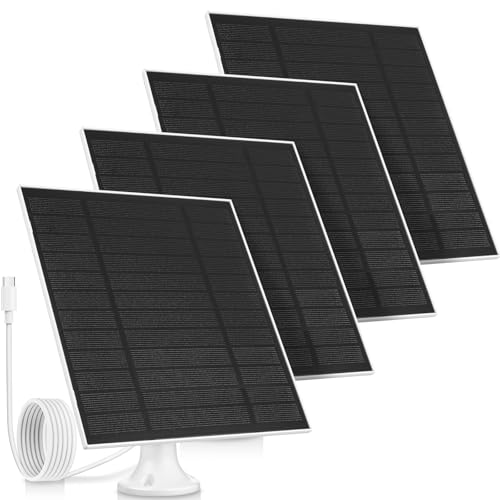
Saysurey 4 Pack 5W Solar Panels for Outdoor Security Cameras Type-C | USB C Solar Panel for Outdoor Camera, Waterproof Solar Panel, Type-C, 360° Adjustable, Safety Bracket Panel Charge Micro
Check price on Amazon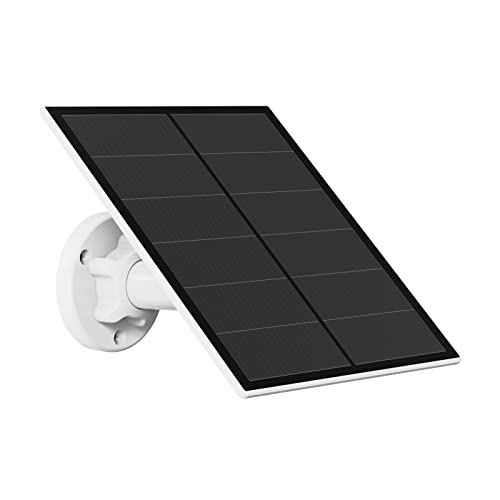
5W Solar Panel for Security Camera Outdoor, 5V USB Solar Panel Charger Compatible with Rechargeable Battery Powered Cam, IP65 Waterproof, 9.8ft Cable, 360° Adjustable Bracket
Check price on Amazon
5W Solar Panel for Security Camera, USB Solar Panel for DC 5V Outdoor Rechargeable Battery Camera, Solar Panels with Micro USB and USB-C Port, Adjustable Security Mount, IP65 Waterproof, 9.8ft Cable
Check price on Amazon
6W Solar Panel Charger,Micro & USB C for DC 5V Outdoor Security Camera | Waterproof ,Easy install,Fast charge,Compatible,for Rechargeable Camera with Battery,Works in cloudy and rainy
Check price on Amazon
Solar Panel for Ring Camera, 2 Pack 4W Solar Charger with 10FT Cable, USB-C to Barrel Plug Adapter, Compatible with Ring Stick Up Cam Battery/Pro, Spotlight Cam Battery/Plus/Pro, Reolink Argus Pro
Check price on Amazon
5W Solar Panel for Security Camera, Solar Panel with Micro USB & USB-C Port for DC 5V Outdoor Rechargeable Battery Camera, IP65 Waterproof, 360° Adjustable Security Mount, 9.8ft Cable(White 1PC)
Check price on Amazon
2 Pack 9W Solar Panels- IP65 Waterproof, High Efficiency Charger with 10FT USB-C Cable and Micro USB Adapter, Works in -4°F~176°F, for Outdoor Cameras, Smartphones and All DC 5V Devices
Check price on AmazonHow to Size a Solar Panel Correctly
Undersizing is the number one reason people think solar "doesn't work" for security cameras. The panel must generate enough energy to cover the camera's daily consumption plus a buffer for cloudy days. Here is a practical way to estimate:
- Find your camera's power draw. This is usually listed in the specs as mA or W. A typical battery camera draws 200–500 mA when active.
- Estimate daily usage. A motion-triggered camera might be active for 10–30 minutes per day. A camera recording continuously is active 24 hours.
- Calculate daily consumption. Multiply draw by active hours. For example, 400 mA × 0.5 hours = 200 mAh per day.
- Match panel output. A 5W panel in good sun produces roughly 800–1,000 mAh per day in ideal conditions — more than enough for most motion-triggered cameras, but marginal for continuous recording.
If you live in a region with long winters or frequent overcast weather, double the panel size. It is far better to have surplus power than to discover your camera died during a critical week. For cameras that record around the clock, consider a solar panel with battery for security camera kit that includes a larger reserve cell.
Installation and Placement Tips
Even the best panel underperforms if it is mounted poorly. Follow these guidelines to get the most from your solar panel:
- Face the panel toward the equator. In the Northern Hemisphere, aim it south. In the Southern Hemisphere, aim it north.
- Tilt for your latitude. A tilt roughly equal to your latitude maximizes year-round output. Many brackets allow 30°–45° adjustment.
- Avoid shade at all costs. A single branch shadow across a panel can cut output by 50% or more. Check the sun's path across all seasons, not just summer.
- Keep the cable run short. Long cables lose voltage. If the panel must be far from the camera, use a thicker gauge wire.
- Seal the connector. Use dielectric grease or a weatherproof boot on the connector to prevent corrosion.
- Angle the panel away from snow and debris. A steeper tilt helps snow slide off in winter.
If you are not comfortable working at height, or if your camera location is difficult to access, it may be worth hiring a professional. Our article on when you need someone to install security cameras covers what to expect and how to choose an installer.
Weather Resistance and Durability
An outdoor solar panel faces rain, snow, UV radiation, and temperature swings. Look for these specifications:
- IP65 or higher rating. IP65 handles rain and dust; IP67 is better for exposed coastal or dusty environments.
- Tempered glass or ETFE coating. Both protect the cells. ETFE is lighter and more flexible; tempered glass is more scratch-resistant.
- UV-stabilized housing. Cheap plastic becomes brittle and cracks within a year or two.
- Operating temperature range. Look for at least −4°F to 140°F (−20°C to 60°C).
- Corrosion-resistant mounting hardware. Stainless steel screws and brackets outlast painted metal.
A quality panel should last 5–10 years with no maintenance beyond occasional wiping. If you are pairing solar with a camera in a harsh location, our guide to professional outdoor security cameras covers models built for extreme conditions.
Common Mistakes to Avoid
- Buying a panel before checking the connector. Always confirm the plug type first. Adapters exist but add a failure point.
- Mounting the panel in the camera's own shadow. The panel must be separate from the camera housing and clear of obstructions.
- Assuming "5W" means 5W all day. Real output depends on sun angle, clouds, and temperature. A 5W panel may deliver only 1–2W in winter.
- Ignoring battery health. A degraded battery will not hold a charge no matter how large the panel is. Replace batteries every 2–3 years.
- Using an indoor-rated panel outdoors. Indoor panels are not sealed and will fail within months.
- Forgetting about Wi-Fi range. Solar solves power, not connectivity. If your camera cannot reach Wi-Fi, consider a battery operated security camera without wifi that records locally.
Solar Panel Buying Checklist
Before you add a panel to your cart, run through this checklist:
- ✅ Camera has a rechargeable battery and charging input
- ✅ Connector type matches (Micro-USB, USB-C, or barrel)
- ✅ Voltage and amperage are within the camera's supported range
- ✅ Panel wattage is appropriate for your camera's daily usage
- ✅ Panel is rated IP65 or higher
- ✅ Mounting bracket allows proper tilt and orientation
- ✅ Cable length is sufficient for your installation
- ✅ Panel is monocrystalline for better low-light performance
- ✅ Warranty covers at least 1 year
- ✅ Reviews confirm real-world performance in your climate
If you are also considering a camera upgrade, our roundup of wireless outdoor security cameras with no monthly fee highlights models that pair seamlessly with solar panels and avoid subscription costs.