
Outdoor Security Cameras That Don't Require WiFi
Protect your property anywhere — even where there's no internet connection. Discover how cellular, local storage, and off-grid cameras keep you covered 24/7.
Traditional WiFi cameras fail the moment your router goes down or your signal can't reach the far corners of your property. For remote cabins, construction sites, farms, or simply homes with weak internet, outdoor security cameras that don't require WiFi are the reliable answer. These cameras use cellular networks, local storage, or direct wired connections to keep recording and alerting you — no router, no problem. In this guide, we'll break down exactly how they work, what to look for, and how to choose the right one for your needs.
Why Choose a Security Camera Without WiFi?
WiFi cameras are convenient, but they have a critical weakness: they depend entirely on a stable internet connection and a nearby router. If your WiFi drops, your camera stops sending alerts and may stop recording to the cloud. For many property owners, that's an unacceptable risk.
A security camera without WiFi connection solves this by using alternative connectivity. The most common options are cellular (4G/LTE) cameras that use a SIM card, local storage cameras that record to an SD card or NVR, and hardwired cameras that transmit data over Ethernet or coax. Each has its own strengths, and the best choice depends on your location, budget, and how you want to access your footage.
If you're specifically looking to avoid recurring fees, you'll want to explore no monthly subscription security camera options, which typically combine local storage with optional cellular connectivity.
How Do No-WiFi Outdoor Cameras Work?
Understanding the technology helps you make a smarter purchase. Here are the three main approaches:
📡 Cellular (4G/LTE) Cameras
These cameras contain a SIM card slot and connect directly to a mobile network — just like a smartphone. They send alerts, live video, and recordings over the cellular network. Ideal for remote locations, construction sites, and anywhere WiFi simply doesn't reach. Many models work with affordable data plans, and some support wireless security camera with cellular functionality for maximum flexibility.
💾 Local Storage Cameras
These cameras record footage to an internal SD card, a USB drive, or a local NVR (Network Video Recorder). No internet is needed for recording — you simply review footage directly on the device or via a local monitor. This is the most private and subscription-free option. A wireless security camera system with local storage is perfect for homeowners who want full control over their data.
🔌 Hardwired / Ethernet Cameras
Wired cameras transmit video and power over a single Ethernet cable (PoE) or coax. They're extremely reliable, immune to wireless interference, and don't need WiFi at all. The trade-off is installation complexity. For professional-grade setups, a hardwired security camera installation offers unmatched stability and uptime.
Pros and Cons of WiFi-Free Security Cameras
✅ Advantages
- Works in areas with no internet or weak WiFi signal
- No dependency on a router — more reliable during outages
- Many models have no monthly fees (especially local storage)
- Ideal for remote properties, farms, and construction sites
- Harder for hackers to access since they're not on your WiFi network
- Cellular models can be moved anywhere with signal coverage
⚠️ Limitations
- Cellular models require a data plan (ongoing cost)
- Local storage cameras may require physical access to retrieve footage
- Wired installation can be labor-intensive
- Some cellular cameras have higher upfront costs
- Remote viewing may be slower than WiFi-based cameras
Comparison: Cellular vs. Local Storage vs. Wired
Not sure which type fits your situation? This table breaks down the key differences at a glance.
| Feature | Cellular (4G/LTE) | Local Storage (SD/NVR) | Wired (PoE/Ethernet) |
|---|---|---|---|
| Internet Required? | No (uses cellular data) | No (records locally) | No (direct wired connection) |
| Monthly Cost | Yes (data plan) | None | None |
| Remote Viewing | Yes (via cellular app) | Limited (local network only) | Yes (if network configured) |
| Installation | Easy (wireless) | Easy (wireless) | Complex (cabling required) |
| Best For | Remote properties, construction sites | Homes with no subscription preference | Businesses, permanent installations |
| Price Range | $150–$500 | $80–$300 | $100–$400 per camera |
Recommended Outdoor Security Cameras Without WiFi
⚠️ AFFILIATE DISCLOSURE: This website contains affiliate links. As an affiliate Associate, we earn from qualifying purchases. If you make a purchase through these links, we may receive a small commission at no additional cost to you. Read our full affiliate policy.

Lifetime Free Data & No Monthly Fee 4G LTE Solar Cellular Security Camera Outdoor Wireless,No WiFi Needed, 360° PTZ, 2K Full Color Night Vision, Human Tracking, 2-Way Audio, 32GB SD Card, IP66-White
Check price on Amazon
ELYSOO No WiFi Security Camera Outdoor, Always-on Video, 4MP 360° Full View | 4G LTE Cellular Security Camera Solar, Built-in SIM Card, 24/7 Recording, Color Night Vision, Instant Alerts for Remote Areas
Check price on Amazon
Tefrio No WiFi Security Camera, 4G LTE Cellular, 4MP 360° Full Live View | Solar Cellular Security Camera Outdoor, Built-in SIM Card/Color Night Vision/Instant Alerts/Remote Control for Off-grid Areas
Check price on Amazon
Tefrio Cellular Security Camera, 4G LTE Signal & Solar Powered for Outdoor | No WiFi Security Camera, Built-in SIM Card, Color Night Vision, Live View, 360° Full View, Smart PIR Detection, Instant Alert
Check price on Amazon
4G LTE Cellular Solar Security Camera Wireless Outdoor, No WiFi | 360° Live View, 2K Color Night Vision, 2-Way Audio, PIR Motion Detection, Built-in SIM Card, Solar Powered for Farm, Cabin
Check price on Amazon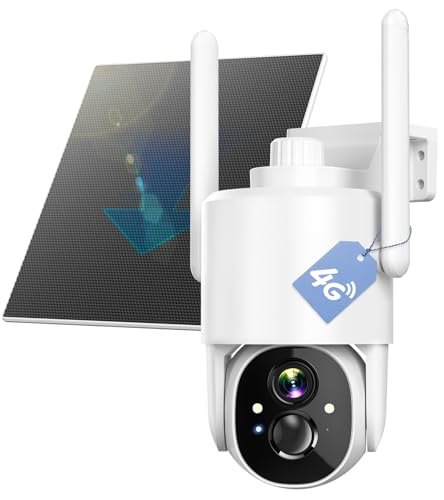
4G LTE Security Camera No WiFi Required: 2K HD, Solar Powered, 360° PTZ | Infrared Night Vision – Wireless Outdoor Surveillance for Remote Home, Farm, Business & Backyard
Check price on Amazon
4G LTE Cellular Security Camera No WiFi Needed, Dual Lens 2K Mini Camera | Magnetic Mount, 20 Days Standby Battery, Night Vision, Human Detect, Off Grid Security Camera for RV, Garage, Cabin, Barn
Check price on Amazon
2K Security Camera System, 5GHz&2.4GHz WiFi Solar Wireless Cameras for Home Security, Wire-free Installation, AI Detection, Two-way Audio, Mobile alerts, SD/Cloud Storage, Color Night Vision, 4 Packs
Check price on AmazonBuying Guide: What to Look For
When shopping for a WiFi-free outdoor camera, focus on these critical factors to ensure you get the right fit for your property.
Installation Tips for Off-Grid Cameras
Installing a WiFi-free camera is often easier than a traditional WiFi setup because you don't need to worry about signal strength. Here are a few practical tips:
- Position for coverage, not signal: Since you don't need WiFi, place the camera where it has the best view of entry points, driveways, or valuable assets.
- Test cellular signal first: For cellular cameras, check the signal strength at your intended location before mounting. A long range wireless camera transmitter and receiver can help if signal is weak.
- Secure your storage: If using local storage, place the NVR or SD card in a locked, hidden location to prevent tampering.
- Consider solar: Solar-powered cameras eliminate battery swaps and wiring — ideal for remote locations.
- Check local regulations: Some areas have laws about recording public spaces. Always ensure your setup complies with local privacy laws.
For homeowners who want professional help, hiring companies that install outdoor security cameras can save time and ensure a clean, secure installation.
Maintenance & Long-Term Reliability
WiFi-free cameras are generally low-maintenance, but a little care goes a long way:
- Clean the lens and IR sensors every few months to maintain image clarity.
- Check battery levels regularly if using battery-powered models.
- Verify your cellular data plan hasn't expired (for cellular cameras).
- Test local storage and backup important footage periodically.
- Update firmware when available to patch security vulnerabilities.
If you're looking for a system that runs entirely off-grid, explore surveillance cameras that don't require internet for more options.
Frequently Asked Questions
Final Thoughts: Choosing the Right No-WiFi Camera
Outdoor security cameras that don't require WiFi give you the freedom to protect any property — whether it's a remote cabin, a busy construction site, or a home with unreliable internet. The key is to match the connectivity method to your specific needs:
- Choose cellular if you need remote viewing and your location has mobile signal.
- Choose local storage if you want zero monthly fees and full privacy.
- Choose wired if you want maximum reliability and have the budget for installation.
Whichever you choose, you'll be investing in a surveillance system that works when WiFi doesn't. For more options, explore our full range of wireless cameras that don't require internet and find the perfect fit for your property.