
Security Camera That Screws Into a Light Socket
Discover the simplest way to upgrade your home security. No wiring, no drilling—just screw it in and you're protected. Learn everything you need to know before you buy.
View Top PicksEffortless Security Installation: If you've been searching for a security camera that screws into a light socket, you're in the right place. This guide will walk you through everything you need to know about these innovative devices—from how they work to what to look for when buying one. Whether you're a renter who can't drill holes or a homeowner looking for a quick setup, these cameras offer a practical solution.
What Is a Light Socket Security Camera?
A security camera that screws into a light socket is exactly what it sounds like: a camera designed to fit into a standard light bulb socket (E26 or E27). It draws power directly from the socket, so you never have to worry about charging batteries or running messy wires. These devices are sometimes called "light bulb cameras" or "bulb cameras."
Unlike traditional security cameras that require mounting brackets, screws, and sometimes professional installation, a light socket camera simply twists into place—just like changing a light bulb. This makes them an excellent choice for apartments, rental properties, or any location where permanent modifications aren't possible. They're also a great option for anyone who wants a outdoor camera that screws into a light socket without the hassle of complex wiring.
How Does It Work?
The technology behind these cameras is surprisingly straightforward. The base of the camera has a standard screw thread that fits into your existing light socket. Once screwed in, the camera draws power from the socket, eliminating the need for batteries or an external power source.
Most models connect to your home's Wi-Fi network and can be controlled through a smartphone app. This allows you to view live footage, receive motion alerts, and even communicate through two-way audio—all from your phone. Some advanced models even include a built-in LED light, so you can use them as regular light bulbs when the camera isn't recording. If you want to explore more options that connect seamlessly to your phone, check out our guide on security cameras that hook up to your phone.
Key Features to Look For
Resolution
Look for at least 1080p HD resolution. Higher resolution means clearer footage, which is crucial for identifying faces or license plates. Many modern models offer 2K or even 4K.
Field of View
A wider field of view (usually 130° to 360°) covers more area. A 360-degree model can eliminate blind spots entirely, making it ideal for corners or ceilings.
Night Vision
Infrared LEDs enable the camera to see in the dark. Look for models with a night vision range of at least 20-30 feet for reliable 24/7 monitoring.
Motion Detection
Smart motion detection can distinguish between people, pets, and vehicles, reducing false alerts. Some models let you customize detection zones.
Two-Way Audio
Built-in microphones and speakers let you listen and talk to visitors—or warn off intruders—directly from your phone.
Storage Options
Choose between cloud storage (often with a subscription) or local storage via a microSD card. Some models support both.
Pros and Cons of Light Socket Cameras
Pros
- Easy Installation: No wiring, no drilling, no professional help needed.
- Continuous Power: Never worry about dead batteries.
- Renter-Friendly: Perfect for apartments and temporary living situations.
- Discreet: Looks like a regular light bulb, so it blends in.
- Affordable: Many models are budget-friendly compared to traditional systems.
Cons
- Limited Placement: You need an existing light socket where you want the camera.
- Dependent on Wi-Fi: Most require a stable internet connection to function fully.
- Power Interruptions: If the light switch is turned off, the camera loses power.
- Less Weatherproofing: Not all models are designed for harsh outdoor conditions.
- Potential for Theft: Since they're easy to unscrew, they can be stolen if easily accessible.
How to Install Your Light Socket Camera
Installation is remarkably simple, but a few steps will ensure everything works correctly:
- Turn Off the Power: Always switch off the light at the wall before installing anything.
- Remove the Existing Bulb: Unscrew the light bulb from the socket.
- Screw in the Camera: Twist the camera into the socket until it's snug. Don't overtighten.
- Turn On the Power: Flip the switch back on. The camera should power up and begin its startup sequence.
- Download the App: Install the manufacturer's app on your smartphone and follow the pairing instructions.
- Connect to Wi-Fi: Enter your Wi-Fi credentials to connect the camera to your network.
- Position and Test: Adjust the camera angle (most models have a flexible neck) and test the live feed and motion detection.
For a more detailed look at outdoor installation considerations, see our guide on where to install security cameras outdoors.
Who Should Buy a Light Socket Security Camera?
These cameras are particularly well-suited for:
- Renters: No permanent modifications mean no landlord issues.
- DIY Enthusiasts: If you want a quick, hassle-free setup.
- Apartment Dwellers: Ideal for entryways, porches, and hallways.
- Those with Limited Outlets: If you lack power outlets in key areas, a light socket camera solves the problem.
- Budget-Conscious Buyers: Many models are affordable and require no additional wiring costs.
If you're looking for a camera system that doesn't rely on Wi-Fi at all, you might want to explore options that work without Wi-Fi. And if you're specifically interested in outdoor models, don't miss our article on outdoor use light bulb security cameras.
Recommended Light Socket Security Cameras
⚠️ AFFILIATE DISCLOSURE: This website contains affiliate links. As an affiliate Associate, we earn from qualifying purchases. If you make a purchase through these links, we may receive a small commission at no additional cost to you. Read our full affiliate policy.

Poleeye Light Bulb Security Camera Outdoor, 2K 5GHz & 2.4GHz WiFi Bulb Cameras for Home Security, 360° PTZ Wireless Cam with AI Human Detection, Color Night Vision, 2-Way Talk, Screw-in Light Socket
Check price on Amazon
2K Light Bulb Security Camera 5G&2.4G WiFi Security Cameras Wireless Outdoor Indoor,360°Bulb Cameras for Home Security Outside Indoor,Motion Detection and Alarm,Two-Way Talk,Color Night Vision 2 Pack
Check price on Amazon
WESECUU Light Bulb Security Camera -5G& 2.4GHz WiFi 2K Camera for Home Security, 1000-Lumen Dimmable Bulb Camera with Color Night Vision, Two-Way Talk, Motion Detection & Siren, 355°Pan (1-Pack)
Check price on Amazon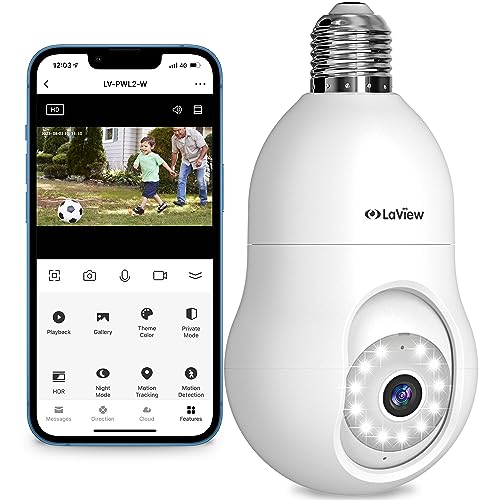
LaView 4MP Bulb Security Camera 2.4GHz,360° 2K Security Cameras Wireless Outdoor Indoor Full Color Day and Night, Motion Detection, Audible Alarm, Easy Installation, Compatible with Alexa
Check price on Amazon
GNCC 2K Light Bulb Security Camera, 360° Outdoor Camera 2.4G WiFi (1-Pack) | Easy Screw-In Setup for Porches, Garages & Driveways; Full-Color Night Vision, Motion Alerts, Local SD or Optional Cloud
Check price on Amazon
Poleeye Light Bulb Security Camera, 5G&2.4GHz 2K Security Cameras Wireless Outdoor 360° PTZ Cameras for Home Security with Color Night Vision, 2 Way Talk, AI Human Detection, Screw in Light Socket
Check price on AmazonTips for Choosing the Right Model
With so many options on the market, here's how to narrow down your choice:
- Check Compatibility: Ensure the camera fits your socket type (E26 is standard in the US).
- Consider Storage: Decide if you prefer cloud storage (convenient but subscription-based) or local storage (one-time cost).
- Look for Smart Features: AI-powered person detection, customizable alerts, and integration with smart home systems like Alexa or Google Assistant add value.
- Read Reviews: Pay attention to real-world experiences regarding reliability, app performance, and customer support.
- Check Weather Ratings: If installing outdoors, look for an IP65 or higher rating for water resistance.
For a broader look at wireless options, you might find our article on light bulb security cameras wireless outdoor helpful.
Final Thoughts
A security camera that screws into a light socket is a brilliant solution for anyone seeking a simple, effective way to monitor their home. It eliminates the most common barriers to entry—complex wiring, drilling, and battery maintenance—making home security accessible to everyone. While they may not replace a full-scale professional system for every application, they are an excellent addition to your security toolkit, especially for targeted areas like entryways, porches, and driveways.
Before you buy, consider your specific needs: Do you need 360-degree coverage? Is night vision a priority? Do you prefer cloud or local storage? By answering these questions, you'll find the perfect light socket camera to fit your lifestyle and budget. Once you've made your choice, you can confidently purchase through the affiliate links above and enjoy peace of mind knowing your home is protected.