
Security Cameras That Hook Up to Your Phone
Monitor your home from anywhere in the world. Discover how phone-connected security cameras work, what features matter most, and which options deliver the best value for remote surveillance.
VIEW TOP PICKSWhy Phone Connectivity Matters: A security camera that hooks up to your phone transforms how you protect your property. Instead of being tied to a monitor or DVR, you get real-time alerts, live video feeds, and recorded footage directly on your smartphone—whether you're in the next room or on another continent. This guide explains exactly how these systems work, what to look for, and how to choose the right one for your home or business.
How Do Security Cameras Connect to Your Phone?
Modern security cameras use three main methods to connect to your smartphone: Wi-Fi, cellular, and Bluetooth. Each has distinct advantages depending on your situation. Wi-Fi cameras are the most common—they connect to your home network and stream video through an app like Ring, Arlo, or Nest. Cellular cameras use a SIM card and mobile data plan, making them ideal for locations without reliable internet. Bluetooth is typically used only for initial setup or short-range monitoring.
If you're unsure whether you need internet at all, read our guide on can you have a security camera without wifi. For those who want to repurpose old devices, check out use old cell phone for security camera.
Key Features to Look For
Not all phone-connected cameras are created equal. Here are the features that matter most when you're researching your purchase:
-
Live View & Two-Way Audio: See what's happening in real time and speak to visitors or intruders through the camera's speaker and microphone. This is essential for outdoor cameras with live feed to phone.
-
Motion Alerts: Get instant push notifications when the camera detects movement. Look for customizable zones to avoid false alarms from passing cars or trees. See our guide on security cameras that alert your phone.
-
Night Vision: Infrared LEDs let you see in complete darkness. For outdoor use, check home security camera wireless night vision.
-
Cloud & Local Storage: Choose between cloud subscription plans or local microSD/HDD storage. Learn more about wireless security camera cloud storage and wireless security cameras with storage.
-
Weather Resistance: For outdoor installation, ensure an IP65 or higher rating. Browse outdoor use wireless home security cameras.
-
Power Options: Battery, solar, or wired. Battery-operated models offer flexibility—see security cameras for home battery operated and small solar panels for security cameras.
Wi-Fi vs. Cellular vs. Bluetooth: Which Is Right for You?
Understanding the differences helps you avoid buying a camera that won't work in your specific situation. Here's a quick comparison:
| Connection Type | Best For | Pros | Cons |
|---|---|---|---|
| Wi-Fi | Homes with reliable internet | No monthly data cost; easy setup; high-quality streaming | Depends on router range; can lag with poor signal |
| Cellular | Remote locations, construction sites, vacation homes | Works anywhere with cell signal; no Wi-Fi needed | Requires data plan; higher monthly cost |
| Bluetooth | Initial setup, short-range monitoring | Low power; simple pairing | Very limited range (30–50 feet); not for remote access |
For areas without internet, consider wireless security cameras that don't need internet or security cameras with cellular service.
Installation and Setup: What to Expect
Most phone-connected cameras are designed for DIY installation. The typical process involves:
- Download the app – Most brands have a dedicated app (e.g., Ring, Arlo, Nest, Eufy).
- Create an account – You'll need an email and password.
- Power the camera – Plug it in, insert batteries, or connect solar panels.
- Connect to Wi-Fi – The app walks you through selecting your network and entering the password.
- Mount the camera – Use the included screws or adhesive mounts. For optimal placement, see where to install security cameras outdoors.
- Configure settings – Set motion zones, notifications, and storage preferences.
If you prefer a professional look, consider professional home security camera installation. For apartments, check wireless security camera system for apartments and security camera for apartment door peephole.
Top Security Cameras That Hook Up to Your Phone
Based on extensive research and user feedback, here are the standout options across different categories. Prices reflect current market rates and may vary by retailer.
Best Overall: Arlo Pro 5S 2K
Price: $250–$300 per camera
The Arlo Pro 5S offers 2K video, color night vision, and dual-band Wi-Fi for a stable connection. It works with Alexa and Google Assistant, and the Arlo app is one of the most polished in the industry. Cloud storage requires a subscription, but local storage via SmartHub is available.
Best Budget: Wyze Cam v4
Price: $35–$50
Wyze continues to dominate the budget segment with the Cam v4. It delivers 2.5K video, color night vision, and free cloud storage for 14 days. The Wyze app is intuitive, and the camera supports microSD local storage up to 256GB. Ideal for inexpensive home video surveillance systems.
Best for Outdoor: Reolink Argus 4 Pro
Price: $180–$220
The Argus 4 Pro features 4K resolution, 180° panoramic view, and dual-band Wi-Fi. It's battery-powered and solar-compatible, making it perfect for outdoor use wireless security cameras for home. The Reolink app supports multiple users and offers flexible storage options.
Best Doorbell: Ring Video Doorbell Pro 2
Price: $200–$250
Ring's Pro 2 offers 1536p HD video, 3D motion detection, and radar-powered bird's-eye view. It integrates seamlessly with the Ring app and works with Alexa. For a bundle option, see video doorbell and security camera bundle.
Best Floodlight Camera: Eufy Floodlight Cam E340
Price: $220–$280
This dual-lens camera provides 3K resolution and a 360° pan-tilt view. The built-in floodlight illuminates driveways and backyards, and local storage means no monthly fees. Learn more about smart wifi flood light security camera and wireless security cameras with flood lights.
Best Light Bulb Camera: Ring Stick Up Cam Pro
Price: $180–$230
For a screw-in solution, the Ring Stick Up Cam Pro works with existing light sockets. It's an excellent choice for renters or anyone who wants a no-drill installation. See light bulb security cameras wireless outdoor and security camera that screws into a light socket.
Best for Business: Nest Cam Outdoor
Price: $180–$200
The Nest Cam Outdoor (battery) offers 1080p video, intelligent alerts, and seamless integration with Google Home. It's a solid choice for small businesses. Explore commercial security surveillance systems and top security camera systems for business.
Best Solar-Powered: Eufy SoloCam S340
Price: $200–$250
This camera combines 3K resolution, 360° pan-tilt, and a built-in solar panel. It's ideal for locations where running power is impractical. See solar wireless security camera system with remote viewing.
Recommended Security Cameras That Hook Up to Your Phone
⚠️ AFFILIATE DISCLOSURE: This website contains affiliate links. As an affiliate Associate, we earn from qualifying purchases. If you make a purchase through these links, we may receive a small commission at no additional cost to you. Read our full affiliate policy.

ZEEPORTE 2K Indoor Cameras for Home Security - Baby Monitor and Dog Pet Camera with Motion Detection, Night Vision, 2-Way Audio, Siren, Wired Security Camera
Check price on Amazon
ZEEPORTE 2K Indoor Cameras for Home Security - Baby Monitor and Dog Pet Camera with Motion Detection, Night Vision, 2-Way Audio, Siren, Wired Security Camera (2-Pack)
Check price on Amazon
ARCCTV Solar Security Cameras Wireless Outdoor 4MP 2.5K HD | 2.4G/5G Dual Band WiFi, 360° View, Battery Powered, Night Vision, 2-Way Audio, PIR Motion Sensor, SD/Cloud Storage
Check price on Amazon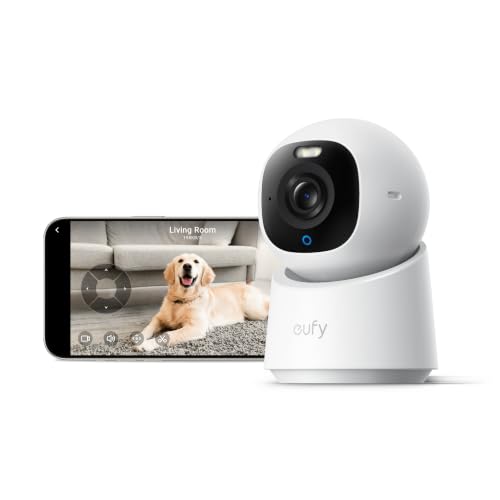
eufy Security 4K Indoor Camera E30, No Subscription, Work as Pet Camera | Nanny/Baby Camera, Pan&Tilt, AI Tracking, AI Detection, 24/7 Recording, Color Night Vision, Two-Way Audio,Works with HomeKit
Check price on Amazon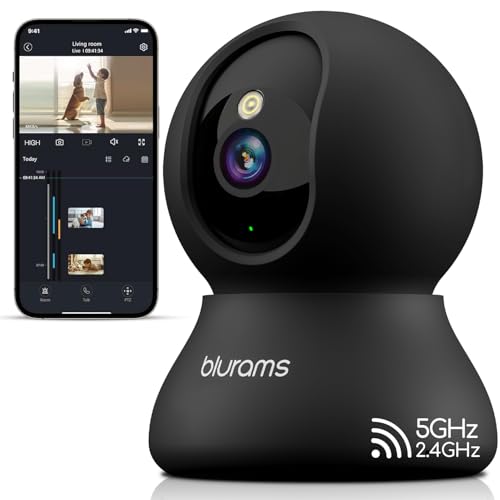
blurams Indoor Camera, 2K Pet Camera 360° Cameras for Home Security with Phone App, Motion Tracking, 2-Way Audio, IR Night Vision, Siren, Compatible with Alexa & Google Assistant
Check price on Amazon
eufy Security Video Doorbell E340, Dual Cameras, 2K FHD, 8GB Local Storage | No Subscription,Head-to-Toe View,Wireless or Wired,Color Night Vision,Two-way talk,AI motion/Package Detection, 2.4 GHz Wi-Fi
Check price on Amazon
Pulpo Safety Industrial Silicone Phone Lanyard with Steel Clasp (Green) | Anti theft security harness grips all four corners. iPhone and Android. Wrist, neck, or crossbody. Commute, concerts, travel.
Check price on Amazon
eufy Security Video Doorbell C31, 2K FHD, Battery or Wired, No Subscription | Wireless, Head-to-toe view, Live video call, 24/7 Recording, Human and Motion detection, HomeBase S380 ready, No monthly fee
Check price on AmazonBuying Guide: How to Choose the Right Camera
With so many options, narrowing down your choice can feel overwhelming. Here's a step-by-step framework:
1. Determine Your Power Source
Do you have an outdoor outlet nearby? If not, battery or solar is your best bet. Battery-powered cameras typically last 3–6 months per charge, depending on usage. Solar models can run indefinitely with adequate sunlight. For more, see battery powered outdoor wifi security camera and wireless home security cameras battery powered.
2. Decide on Storage
Cloud storage offers convenience and off-site backup but usually requires a subscription ($3–$15/month). Local storage (microSD or NVR) has no ongoing fees but is vulnerable to theft. Many cameras support both. Read home security camera with cloud storage and wireless security cameras with storage.
3. Check Compatibility
Will the camera work with your existing smart home system? If you use Alexa or Google Assistant, look for cameras with native support. For Apple users, HomeKit Secure Video is a plus.
4. Consider the App Experience
The app is your primary interface. Look for reviews on app store ratings. A poorly designed app can ruin an otherwise great camera.
5. Plan for Expansion
If you're starting with one camera, consider whether you'll want to add more later. Systems like Ring, Arlo, and Eufy make it easy to expand. For larger properties, see 16 camera wireless surveillance system and wired and wireless security camera system.
Common Mistakes to Avoid
-
Ignoring Wi-Fi Signal Strength: A camera that loses connection is useless. Test your Wi-Fi signal at the installation location before buying. Consider a mesh network if coverage is spotty.
-
Underestimating Storage Needs: High-resolution cameras generate large files. 2K video at 30fps can use 1–2GB per day. Cloud plans often have limits. For continuous recording, see indoor security camera continuous recording and home security camera continuous recording.
-
Skipping Two-Factor Authentication: Your camera feed is sensitive. Always enable 2FA on your camera account to prevent unauthorized access.
-
Mounting Too High or Too Low: For facial recognition, mount at 7–8 feet. For license plates, angle downward. Read where to install security cameras outdoors.
-
Buying Without Checking Subscriptions: Some cameras are cheap upfront but require expensive plans. Compare total cost of ownership over 2–3 years. See wifi cameras that don't need subscription.
Privacy and Security Considerations
Connecting a camera to your phone means your video feed travels over the internet. Protecting that data is critical. Here's what to do:
- Use strong, unique passwords for your camera accounts.
- Enable two-factor authentication (2FA) wherever possible.
- Keep camera firmware updated to patch security vulnerabilities.
- Use a separate Wi-Fi network for IoT devices if your router supports it.
- Review app permissions—does the camera app really need access to your contacts?
- Be cautious with cloud storage providers; read their privacy policies.
For those who want to avoid internet dependency entirely, explore outdoor mini spy camera no wifi needed and home security camera that doesn't require internet.
Ready to Secure Your Home?
Now that you understand how phone-connected security cameras work, you're ready to make an informed decision. Browse our top recommendations above, or explore related guides to refine your choice.
SHOP TOP PICKSRelated Guides You Might Find Helpful
Expand your knowledge with these in-depth articles:
- Security cameras I can see on my phone
- Most user-friendly security camera system
- Mini wireless security camera with smartphone app
- Outdoor security camera that connects to phone
- Wireless outdoor security camera that connects to phone
- Outdoor use security cameras with Wi-Fi
- Outdoor use wireless security cameras for home
- Wireless security cameras for outside home
- Night vision security cameras wireless outdoor
- Wireless security cameras motion activated
- Home security camera system wireless outdoor
- Wireless home security cameras with recording
- DIY wireless home security systems with cameras
- Wireless monitored home security system
- Wireless security system with battery operated cameras
- Security camera system wireless battery powered
- Outdoor video surveillance cameras for home security
- Outdoor use surveillance cameras for home
- Wireless outdoor camera system for home
- Wireless outdoor home security camera system