
Wireless Outdoor Security Camera That Connects to Phone
Monitor your home from anywhere. Discover how to choose the perfect wireless outdoor camera that streams live video directly to your smartphone.
Why Go Wireless? A wireless outdoor security camera that connects to your phone gives you the freedom to check on your property anytime, anywhere. No complicated wiring, no professional installation, and real-time alerts delivered straight to your pocket.
Why a Phone-Connected Outdoor Camera Matters
Home security has evolved dramatically over the past decade. Gone are the days when you needed a bulky DVR system and a dedicated monitor to keep an eye on your property. Today, a wireless outdoor security camera that connects to phone offers unmatched convenience, flexibility, and peace of mind. Whether you are at work, on vacation, or simply in another room, you can see exactly what is happening outside your home with just a tap on your smartphone screen.
The demand for these devices has skyrocketed because they solve real problems. Traditional wired systems are expensive to install and difficult to relocate. In contrast, wireless cameras can be mounted almost anywhere, run on battery or solar power, and communicate over Wi-Fi or cellular networks. If you are exploring the broader category, you may also want to compare options in our guide to security cameras that hook up to your phone, which covers both indoor and outdoor models.
For homeowners who want a hassle-free setup, a wireless home security camera for outdoor use is often the ideal starting point. These devices are designed to withstand rain, dust, and extreme temperatures while delivering crisp video to your mobile device.
Key Features to Look For
📱 Smartphone App Control
The best cameras offer intuitive apps for iOS and Android. You should be able to view live footage, playback recordings, adjust motion zones, and receive push notifications without any technical expertise.
🔋 Battery or Solar Power
Truly wireless cameras run on rechargeable batteries or connect to small solar panels. This eliminates the need for nearby power outlets and makes installation incredibly flexible.
🌙 Night Vision
Infrared or color night vision ensures your camera captures clear footage even in complete darkness. Look for models with a range of at least 30 feet for effective outdoor coverage.
☁️ Cloud & Local Storage
Choose between cloud subscription plans or local storage via microSD cards. Many cameras support both, giving you flexibility and control over your recordings.
🏃 Motion Detection Alerts
Advanced AI-powered motion detection can distinguish between people, animals, and vehicles, reducing false alarms and ensuring you only get alerted when it matters.
💧 Weatherproof Rating
An IP65 or IP66 rating is essential for outdoor cameras. This ensures protection against rain, dust, and snow, allowing year-round operation in various climates.
Wireless Outdoor Camera Comparison
Below is a quick comparison of the most important specifications you should evaluate before making a purchase decision.
| Feature | Entry-Level ($50–$100) | Mid-Range ($100–$200) | Premium ($200–$350) |
|---|---|---|---|
| Resolution | 1080p HD | 2K / 1440p | 4K / 2160p |
| Night Vision | IR Black & White | IR + Color Night Vision | Full Color Starlight |
| Field of View | 110°–130° | 130°–160° | 160°–180° |
| Power Source | Rechargeable Battery | Battery + Solar Compatible | Solar + Battery Backup |
| Storage Options | Cloud Only | Cloud + microSD | Cloud + microSD + Base Station |
| AI Detection | Basic Motion | Person Detection | Person, Vehicle, Animal, Package |
| Two-Way Audio | Yes | Yes | Yes with Noise Cancellation |
Pros and Cons of Wireless Outdoor Cameras
✅ Pros
- Easy DIY installation — no wiring or professional help needed
- Flexible placement anywhere within Wi-Fi range
- Remote access from your smartphone anywhere in the world
- Instant push notifications for motion events
- Expandable — add more cameras as needed
- No monthly fees if you use local storage options
❌ Cons
- Requires a strong Wi-Fi signal at the camera location
- Battery needs periodic recharging (unless solar-powered)
- Cloud storage usually requires a subscription
- Video quality can degrade in poor network conditions
- Some models are vulnerable to Wi-Fi jamming
Recommended Wireless Outdoor Security Camera That Connects to Phone
⚠️ AFFILIATE DISCLOSURE: This website contains affiliate links. As an affiliate Associate, we earn from qualifying purchases. If you make a purchase through these links, we may receive a small commission at no additional cost to you. Read our full affiliate policy.

2.5K Wireless Window Camera 2.4/5G Wifi Indoor Camera for Outdoor Security
Check price on Amazon
2026 Upgraded 2K Security Cameras Wireless Outdoor, Free Cloud Storage, 1-6 Months Battery Life, Waterproof, 2-Way Talk, AI Motion Detection Spotlight Siren Alarm Cameras for Home Security
Check price on Amazon
2026 Enhanced 2K UHD Security Cameras Wireless Outdoor – Free Cloud & SD Storage, Dual-Band WiFi 2.4G/5G, Full-Color Night Vision, 6-Month Battery, Motion Alerts, IP66 Weatherproof, 2-Way Talk
Check price on Amazon
Blink Outdoor 4 – Wireless smart security camera, two-year battery life, 1080p HD day and infrared night live view, two-way talk. Sync Module Core included – 3 camera system
Check price on Amazon
Security Cameras Wireless Outdoor, 2K Indoor Cameras for Home Security Battery Powered, AI Motion Detection, Color Night Vision, 2-Way Talk, Spotlight Siren Alarm, Cloud & SD Storage-Jet Black Camera
Check price on Amazon
Blink Outdoor 4 – Wireless smart security camera, two-year battery life, 1080p HD day and infrared night live view, two-way talk. Sync Module Core included – 2 camera system
Check price on Amazon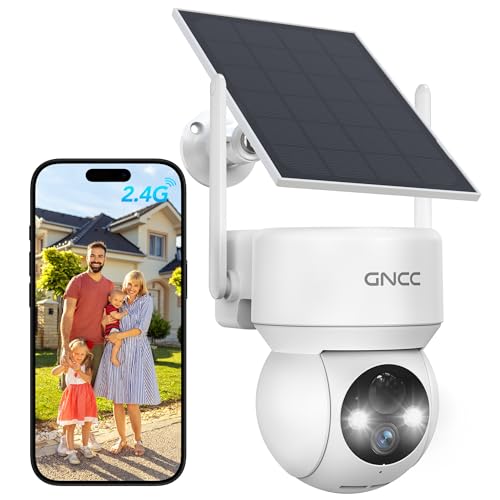
GNCC Solar Security Cameras Wireless Outdoor 2.4G WiFi, SD/Cloud Storage
Check price on Amazon
2 Pack 4MP Security Cameras Wireless Outdoor, Color Night Vision Camera
Check price on AmazonHow to Set Up Your Camera (Step by Step)
Setting up a wireless outdoor security camera is far simpler than most people expect. Here is a straightforward process that works for almost every modern model:
- Charge the battery fully. Most cameras come partially charged, but a full charge ensures uninterrupted setup.
- Download the companion app. Search for the manufacturer's app on the App Store or Google Play.
- Create an account and add the camera. Scan the QR code on the camera or follow the in-app pairing wizard.
- Connect to Wi-Fi. Enter your home network credentials. For best results, ensure the camera is within range of your router.
- Mount the camera. Use the included screws and anchors to secure the camera at your desired location, ideally 8–10 feet high and angled slightly downward.
- Adjust motion zones. Use the app to define specific areas that trigger alerts, reducing false notifications from passing cars or trees.
- Test everything. Walk in front of the camera to confirm motion detection, notifications, and live view are working correctly.
If you prefer a camera that does not rely on your home Wi-Fi at all, consider models that use cellular networks. Our article on security cameras with cellular service explains how these work and when they are the better choice.
Power Options: Battery, Solar, or Wired
One of the biggest decisions you will make is how to power your outdoor camera. Each option has distinct advantages:
Battery-powered cameras are the most flexible. You can mount them literally anywhere, and modern batteries can last anywhere from two to six months on a single charge, depending on usage and settings. If you want a truly wire-free experience, a battery-powered outdoor WiFi security camera is an excellent choice.
Solar-powered cameras combine the freedom of wireless installation with the convenience of continuous charging. A small solar panel keeps the battery topped up as long as it receives a few hours of direct sunlight each day. This is ideal for locations where running wires is impractical. You can explore small solar panels for security cameras to understand how these accessories work.
Wired cameras offer uninterrupted power and are often more reliable for 24/7 continuous recording. However, they require a nearby power source and are less flexible if you want to move the camera later. If you are comparing both approaches, our guide on wired and wireless security camera systems provides a detailed breakdown.
Storage: Cloud vs Local
Where your footage is stored matters for both security and cost. Cloud storage offers the advantage of off-site backup — even if someone steals or destroys the camera, your recordings remain safe. However, most cloud plans require a monthly or annual subscription.
Local storage via microSD card is subscription-free and keeps your data private. The trade-off is that if the camera is stolen, the footage goes with it. Many users opt for a hybrid approach: local storage for everyday recording and cloud storage for critical events. If you want to avoid recurring fees entirely, look for WiFi cameras that don't need a subscription.
For a deeper dive into how cloud storage works with these devices, see our article on wireless security camera cloud storage.
Where to Install Your Outdoor Camera
Proper placement is critical for maximizing coverage and minimizing blind spots. Here are the most effective locations:
- Front door: Captures everyone who approaches your home. Mount at chest height or higher, angled toward the entry path.
- Backyard: Covers patio doors, windows, and blind spots that intruders often target.
- Driveway: Monitors vehicles and captures license plates. Position the camera so it faces the direction of approach.
- Side gates: Often overlooked by homeowners but frequently used by intruders.
- Garage: Protects tools, bikes, and other valuable equipment.
For a comprehensive guide on optimal camera positioning, read our article on where to install security cameras outdoors.
Smart Alerts That Actually Help
One of the biggest advantages of a phone-connected camera is the ability to receive real-time alerts. However, not all alerts are created equal. Basic motion detection will trigger every time a leaf blows by, which quickly leads to notification fatigue.
Modern AI-powered cameras can distinguish between people, vehicles, animals, and packages. This means you only get notified when something truly relevant happens. If timely alerts are your priority, explore security cameras that alert your phone to see how different models handle notification intelligence.
Some advanced models also support activity zones, allowing you to mask out busy streets or swaying trees so they do not trigger false alarms.
Privacy and Data Security
Since your camera streams video over the internet, security should be a top concern. Here are essential practices:
- Always change the default password to a strong, unique one.
- Enable two-factor authentication (2FA) in the camera app if available.
- Keep firmware updated to patch security vulnerabilities.
- Use a separate Wi-Fi network for smart home devices if your router supports it.
- Review the manufacturer's privacy policy to understand how your data is handled.
If you are concerned about internet dependency, you might prefer a camera that works without an internet connection. Our guide on whether you can have a security camera without WiFi covers offline options in detail.
Frequently Asked Questions
Ready to Secure Your Home?
Browse our top-rated wireless outdoor security cameras that connect to your phone. Compare prices, read reviews, and find the perfect fit for your home.
View Recommended CamerasFinal Thoughts
Choosing a wireless outdoor security camera that connects to your phone is one of the smartest investments you can make for your home. It gives you visibility, control, and peace of mind — all from the palm of your hand. Whether you prioritize 4K resolution, AI-powered alerts, solar charging, or subscription-free storage, there is a model that fits your needs and budget.
As you narrow down your options, consider how the camera integrates with your existing smart home setup, how much you are willing to spend on subscriptions, and where you plan to mount it. With the right camera, you will never have to wonder what is happening outside your home again.
For more help navigating the world of home security, explore our related guides on wireless security cameras with storage and outdoor wireless security cameras for home.