
Wireless Security Cameras with Storage: Complete Buying Guide
Discover how local and cloud storage work, compare microSD vs NVR vs cloud options, and find the perfect wireless camera system that keeps your footage safe.
View Recommended CamerasWhy Storage Matters: A security camera is only as good as its ability to save evidence. Whether you choose local microSD, a central NVR, or cloud storage, understanding the trade-offs between capacity, accessibility, and recurring costs is essential before you buy.
Why Wireless Security Cameras with Storage Are Essential
Wireless security cameras have revolutionized home protection by eliminating complex wiring and offering flexible placement. However, the "wireless" label often creates confusion about storage. While the camera transmits video wirelessly, it still needs a place to save footage. Without proper storage, your camera becomes a live-view-only device, useless for reviewing past events.
Modern wireless cameras offer three primary storage methods: built-in microSD cards, centralized NVR (Network Video Recorder) systems, and cloud subscriptions. Each has distinct advantages. Local storage gives you no monthly fees and full ownership, while cloud storage provides off-site backup and remote access. Many users prefer a hybrid approach, using both for redundancy. If you want to avoid monthly fees entirely, consider WiFi cameras that don't need a subscription.
When shopping, pay attention to maximum supported capacity. Many cameras accept up to 256GB microSD cards, while NVR systems can hold multiple terabytes. For cloud plans, check the retention period—typically 7 to 30 days. Understanding these details ensures you don't lose critical footage when you need it most.
Recommended Wireless Security Cameras with Storage
⚠️ AFFILIATE DISCLOSURE: This website contains affiliate links. As an affiliate Associate, we earn from qualifying purchases. If you make a purchase through these links, we may receive a small commission at no additional cost to you. Read our full affiliate policy.
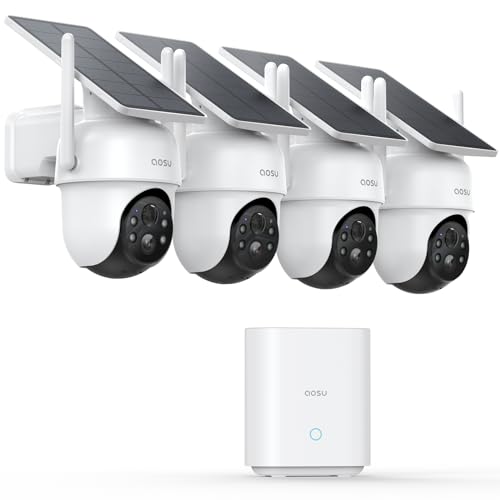
aosu D1 Classic 4-Cam Kit, Security Cameras Wireless Outdoor, Solar Powered | No Subscription Required, 32GB Built-in Storage, 360° Auto Tracking, 2K (3MP) Full-Color Night Vision, Easy Install
Check price on Amazon
2026 Upgraded 2K Security Cameras Wireless Outdoor, Free Cloud Storage, 1-6 Months Battery Life, Waterproof, 2-Way Talk, AI Motion Detection Spotlight Siren Alarm Cameras for Home Security
Check price on Amazon
Tapo 1080P Indoor Security Camera, Baby Monitor, Dog Camera, C100(4-Pack) | Motion Detection, 2-Way Audio, Siren, Night Vision, Cloud & SD Card Storage, Works w/Alexa & Google Home, Wired
Check price on Amazon
2K Security Camera System, 5GHz&2.4GHz WiFi Solar Wireless Cameras for Home Security, Wire-free Installation, AI Detection, Two-way Audio, Mobile alerts, SD/Cloud Storage, Color Night Vision, 4 Packs
Check price on Amazon
2026 Enhanced 2K UHD Security Cameras Wireless Outdoor – Free Cloud & SD Storage, Dual-Band WiFi 2.4G/5G, Full-Color Night Vision, 6-Month Battery, Motion Alerts, IP66 Weatherproof, 2-Way Talk
Check price on Amazon
4MP Security Cameras Wireless Outdoor, No Subscription 128GB Local Storage, Solar Powered Cameras For Home Security, PTZ Auto Tracking, 4Cam-Kit, Color Night Vision Home Security Camera System,5G&2.4G
Check price on Amazon
Tapo 1080P Indoor Security Camera, Baby Monitor, Dog Camera, C101 | Motion Detection, 2-Way Audio, Siren, Night Vision, Cloud & SD Card Storage, Works w/Alexa & Google Home, Black
Check price on Amazon
Security Cameras Wireless Outdoor 5G& 2.4G, No Subscription, 2 Cam-Kit,4MP Solar Powered Home Security Cameras System With 360°PTZ,128GB Local Storage,Color Night Vision WiFi Cameras for Home Security
Check price on AmazonLocal vs Cloud Storage: Which Is Right for You?
Choosing between local and cloud storage depends on your priorities. Local storage, such as microSD cards or NVR hard drives, keeps your data physically in your home. This means no monthly fees and no dependence on internet speed for recording. However, if a thief steals the camera or NVR, the footage is gone. For a deeper dive into cloud-based options, see our guide on wireless security camera cloud storage.
Cloud storage uploads footage to a remote server, protecting it from local theft or damage. You can access recordings from anywhere, and most plans include AI-powered alerts. The downside is recurring costs—typically $3 to $15 per month per camera—and reliance on your upload bandwidth. If you have multiple cameras, costs add up quickly. A wireless security camera system with recorder offers a middle ground, combining local NVR storage with optional cloud backup.
For renters or those who want minimal setup, wireless security cameras for home use with microSD slots are ideal. They record locally without any wiring or subscription. For comprehensive coverage, a wired and wireless security camera system can integrate both types, giving you the best of both worlds.
Storage Options Comparison
| Storage Type | Capacity | Monthly Cost | Best For |
|---|---|---|---|
| MicroSD Card | 32GB – 256GB | $0 | Budget setups, single cameras |
| NVR / DVR | 1TB – 8TB+ | $0 | Multi-camera systems, 24/7 recording |
| Cloud Storage | 7–30 day retention | $3 – $15 per camera | Remote access, off-site backup |
| Hybrid (Local + Cloud) | Varies | $0 – $15 | Maximum reliability and flexibility |
Key Features to Look For
Beyond storage, several features determine whether a wireless camera meets your needs. Resolution is critical—1080p is the minimum for identifying faces, while 2K or 4K provides sharper detail. Night vision ensures round-the-clock protection; look for cameras with IR cut filters or color night vision. Motion detection should be customizable to avoid false alerts from passing cars or trees.
For outdoor installations, weatherproofing (IP65 or higher) is non-negotiable. If you live in an area with frequent power outages, a battery-powered outdoor WiFi security camera keeps recording even when the grid fails. For areas without easy access to power, a solar wireless security camera system with remote viewing is an excellent eco-friendly alternative.
Smart home integration is another consideration. Cameras that work with Alexa, Google Assistant, or IFTTT add convenience. If you want alerts sent directly to your phone, choose a model from our list of security cameras that alert your phone. For apartments, a wireless security camera system for apartments with discreet mounting options is ideal.
Installation and Placement Tips
Proper placement maximizes coverage and minimizes blind spots. Install cameras 8–10 feet high, angled slightly downward. For outdoor use, avoid pointing directly at the sun or reflective surfaces. If you're unsure where to mount them, our guide on where to install security cameras outdoors provides detailed diagrams.
Wireless cameras still need power unless they're battery-operated. If you lack outdoor outlets, consider a light bulb security camera wireless outdoor that screws into existing light sockets. This eliminates the need for new wiring and simplifies installation. For renters, security cameras that screw into a light socket are removable and landlord-friendly.
Before mounting, test your WiFi signal at the intended location. Weak signal causes dropped connections and missed recordings. A mesh WiFi system or a wireless security camera with floodlights that includes a signal booster can help. Always secure your network with a strong password and enable two-factor authentication on the camera app.
Frequently Asked Questions
Do wireless security cameras need WiFi to record?
No. Many wireless cameras record locally to a microSD card even without WiFi. However, you'll need WiFi to view live footage remotely or receive alerts. For a completely offline setup, see can you have a security camera without WiFi.
How much storage do I need for 24/7 recording?
A 1080p camera recording 24/7 uses roughly 15–30GB per day. A 1TB hard drive stores about 30–60 days of footage. For event-based recording, a 128GB microSD card can last several weeks. Cloud plans typically offer 7–30 day retention.
Can I use an old phone as a security camera?
Yes! With the right app, you can repurpose an old smartphone as a WiFi camera. It won't have night vision or weatherproofing, but it's a free option for indoor use. Learn how in our guide on use old cell phone for security camera.
What's the best storage for outdoor cameras?
For outdoor cameras, a weatherproof NVR with a surveillance-grade hard drive offers the most reliable local storage. If you prefer cloud, choose a plan with encrypted uploads. A hybrid approach—local NVR plus cloud backup—provides maximum security.
Are wireless cameras with storage expensive?
Prices range from $30 for a basic microSD camera to $500+ for a multi-camera NVR system. Cloud subscriptions add $3–$15 per camera monthly. Budget-friendly options exist, as highlighted in our guide on the cheapest place to buy security cameras.
Ready to Secure Your Home?
Explore our top-rated wireless security cameras with storage above. Whether you need a single camera or a full system, we've curated options for every budget and need.
View Recommended CamerasAdditional Resources
Protecting your home is a journey. Beyond cameras, consider integrating other smart devices. A video doorbell and security camera bundle covers your front entrance, while a smart WiFi floodlight security camera deters intruders with light and sound. For comprehensive protection, a wireless monitored home security system adds professional monitoring.
If you're setting up a system for a business, our guide on top security camera systems for business covers commercial-grade options. For large properties, a 16-camera wireless surveillance system provides extensive coverage. And for those who want to avoid internet dependency entirely, wireless security cameras that don't need internet are worth exploring.
Lastly, don't overlook installation. A professional home security camera installation ensures optimal placement and configuration, saving you time and frustration.