
Security Cameras That Alert Your Phone
Get instant notifications the moment motion is detected. Discover the best smart security cameras that send real-time alerts directly to your smartphone, keeping you connected to your home or business from anywhere in the world.
View Top PicksWhy Phone Alerts Matter: Traditional security cameras only record footage for later review. Modern smart cameras with phone alerts notify you the moment something happens — whether it's a package delivery, a visitor, or suspicious activity. This real-time awareness transforms your camera from a passive recorder into an active security tool that lets you respond immediately, not just react after the fact.
Why Choose a Security Camera That Alerts Your Phone?
In today's connected world, the ability to receive instant notifications on your smartphone is no longer a luxury — it's a necessity. Whether you're at work, traveling, or simply in another room, phone-alert security cameras give you peace of mind by keeping you informed about what's happening at your property. These cameras use motion detection, AI-powered person recognition, and instant push notifications to ensure you never miss a critical event.
Unlike traditional systems that require you to check footage manually, smart cameras with phone alerts proactively notify you. This means faster response times, better evidence collection, and a more proactive approach to home security. Many models also integrate with smart home ecosystems, allowing you to trigger lights, sirens, or other devices when motion is detected. If you're looking for a comprehensive solution, explore our guide to security cameras that hook up to your phone for seamless connectivity.
Key Features to Look For
📱 Instant Push Notifications
The core feature. Look for cameras that send real-time alerts to your phone via app notifications. The best models offer customizable alert zones, so you only get notified about what matters — not every passing car or swaying tree branch.
🤖 AI-Powered Detection
Advanced cameras use artificial intelligence to distinguish between people, pets, vehicles, and packages. This reduces false alarms and ensures you're only alerted when a genuine event occurs, saving you from notification fatigue.
🎥 2K & 4K Resolution
Higher resolution means clearer details — crucial for identifying faces, license plates, or other important information. Most modern phone-alert cameras offer at least 1080p, with premium models delivering 2K or 4K clarity.
🌙 Night Vision
See in complete darkness with infrared or color night vision. This ensures your camera remains effective 24/7, alerting you to activity even in low-light conditions.
🔋 Battery or Wired Power
Choose between battery-powered models for flexible placement and wired options for continuous power. Battery cameras are ideal for renters or hard-to-reach areas, while wired cameras offer uninterrupted operation.
☁️ Cloud & Local Storage
Store footage securely in the cloud or on a local microSD card. Many cameras offer both options, giving you flexibility and redundancy. Some even provide free cloud storage tiers for basic use.
Best Security Cameras That Alert Your Phone
⚠️ AFFILIATE DISCLOSURE: This website contains affiliate links. As an affiliate Associate, we earn from qualifying purchases. If you make a purchase through these links, we may receive a small commission at no additional cost to you. Read our full affiliate policy.
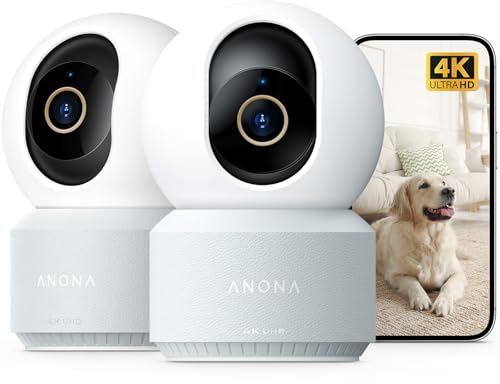
Anona 4K UHD Indoor Camera, Pet/Dog/Baby Security Camera with Phone App, 360°Pan-Tilt, 5G/2.4G Dual-Band Wi-Fi 6, Auto-Tracking, Person/Pet/Baby Crying Detection, Privacy Mode, Two-Way Audio, 2 Pack
Check price on Amazon
Security Cameras Wireless Outdoor, 1080P Battery Powered Security Camera | 2-Way Talk, Color Night Vision, AI Motion Detection, Indoor & Outdoor, Cloud Storage, 2.4G Wi-Fi Cameras for Home Security
Check price on Amazon
ZEEPORTE 2K Indoor Cameras for Home Security - Baby Monitor and Dog Pet Camera with Motion Detection, Night Vision, 2-Way Audio, Siren, Wired Security Camera
Check price on Amazon
2.4GHz/5GHz WiFi Indoor Camera 2K Cameras for Home Security 2-Pack | AI Motion Detect Two-Way Audio 49ft IR Night Vision 24/7 Recording 3-Min Quick Setup SD/Cloud Storage Pet Camera
Check price on Amazon
Mini Nanny Cam Spy Camera WiFi Hidden Home Security Video Recorder, 3 Packs | Hidden Camera Surveillance Phone APP Remote View Baby Monitor Pet Camera Elder Care Night Vision Loop Recording
Check price on Amazon
Cinnado 2K Security Camera Indoor for Pet/Dog/Baby with Phone App, D1 1Pack | 360° 2.4Ghz Wi-Fi Cam as Elderly/Baby Monitor, 2-Way Audio, Night Vision, 24/7 SD Card Storage, Alexa & Google Compatible
Check price on Amazon
Zaiew 2K MiniSmart Hidden HD Cameras Wireless WiFi Camera for Home Security - Night Vision, Motion Detection, Built - in Battery, App Control (iOS & Android) - Ideal Indoor Nanny, Pet & Dog Camera
Check price on Amazon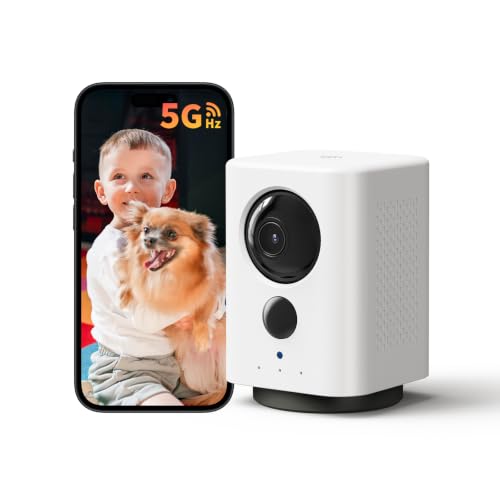
Indoor Camera Wireless, Battery Powered 5G/2.4G WiFi,2K Live View, Portable | Dog/Pet Camera, No Wires, Smart Detection, Instant Alerts, Night Vision, 2-Way Talk, Phone App Control Indoor Security Camera
Check price on AmazonHow to Choose the Right Camera
Quick Comparison: Top Camera Types
| Camera Type | Best For | Price Range | Key Feature |
|---|---|---|---|
| Indoor Smart Camera | Pet monitoring, baby monitoring, apartment security | $30–$100 | Pan/tilt, two-way audio, person detection |
| Outdoor Battery Camera | Renters, flexible placement, hard-to-reach areas | $80–$200 | Wire-free installation, weatherproof, long battery life |
| Floodlight Camera | Driveways, backyards, deterrence | $150–$300 | Built-in spotlight, siren, color night vision |
| Video Doorbell | Front door monitoring, package detection | $50–$250 | Two-way talk, package alerts, porch protection |
| PTZ Camera | Large areas, parking lots, commercial use | $200–$500+ | Pan/tilt/zoom, auto-tracking, long-range night vision |
Pros and Cons of Phone-Alert Cameras
✓ Advantages
- Real-time awareness of events at your property
- Immediate response capability from anywhere
- Reduced need for constant manual monitoring
- Integration with smart home devices and routines
- Evidence capture with timestamps for authorities
- Peace of mind when traveling or away from home
- Many models offer free basic cloud storage
✗ Considerations
- Requires reliable Wi-Fi for notifications
- Some features may require subscription plans
- Battery-powered models need periodic recharging
- False alerts can occur without AI filtering
- Potential privacy concerns with cloud storage
- Initial setup can be technical for some users
- Notification fatigue if not properly configured
Installation & Setup Tips
Smart Home Integration
Modern phone-alert cameras often integrate with popular smart home platforms like Amazon Alexa, Google Home, and Apple HomeKit. This allows you to view live feeds on smart displays, trigger routines when motion is detected, and even use voice commands to check on your property. For example, you can set up a routine that turns on lights and plays a warning sound when your camera detects a person after dark. This level of automation transforms your camera from a standalone device into part of a comprehensive home security ecosystem.
Some cameras also work with IFTTT (If This Then That) for even more customization. You could, for instance, have your camera send a notification to your phone and simultaneously log the event in a spreadsheet or send an email to a family member. The possibilities are extensive, limited only by your imagination and the platforms your camera supports.
Frequently Asked Questions
Ready to Secure Your Home?
Browse our top-rated security cameras with phone alerts and find the perfect fit for your needs. With real-time notifications and advanced features, you can stay connected to your property no matter where you are.
Shop Recommended CamerasFinal Thoughts
Security cameras that alert your phone represent a significant advancement in home security technology. They bridge the gap between passive recording and active monitoring, giving you the ability to respond to events in real time. Whether you're protecting your home, monitoring a business, or keeping an eye on loved ones, a phone-alert camera provides invaluable peace of mind.
When choosing a camera, prioritize features that align with your specific needs — whether that's AI detection, battery-powered flexibility, or seamless smart home integration. Remember that the best camera is one that fits your lifestyle and provides reliable, timely alerts without overwhelming you with unnecessary notifications. With the right setup, you'll wonder how you ever managed without it.
For more guidance on building a comprehensive security system, explore our related articles on wireless security cameras motion activated and home security camera with cloud storage to complete your research.