
WiFi Cameras That Don't Need a Subscription
Stop paying monthly fees. Discover the best subscription-free WiFi security cameras with local storage, no hidden costs, and full control over your footage.
SEE TOP PICKSThe Truth About Subscription Fees: Many WiFi cameras advertise a low upfront price, only to lock essential features like cloud recording and motion alerts behind a monthly paywall. If you want a camera that works fully without recurring costs, you need to know exactly what to look for. This guide breaks down everything you need to make a smart, one-time purchase.
Why Choose a Subscription-Free WiFi Camera?
Full Ownership, Zero Monthly Bills
When you buy a WiFi camera that doesn't require a subscription, you keep 100% of your footage on your own storage device. There are no monthly fees, no contracts, and no risk of price increases down the line. Your camera keeps working exactly as it did on day one — even if the manufacturer changes their cloud pricing.
- No monthly or annual fees — pay once and own it forever
- Local storage — footage stays on a microSD card or local NVR
- Privacy control — your data never leaves your home network
- Reliable during outages — recording continues even if the internet goes down
What Features Can You Expect Without a Subscription?
Modern subscription-free cameras are surprisingly capable. You can still get live viewing, motion detection, night vision, and two-way audio — all without paying a cent after purchase. The key difference is where the footage is stored and how alerts are delivered.
For example, many users combine a subscription-free camera with wireless security cameras with storage to keep everything local. Others prefer security cameras that alert your phone via push notifications, which typically work without any paid plan.
How Do Subscription-Free WiFi Cameras Work?
Local Storage Is the Key
Instead of uploading your video to the cloud, these cameras save recordings directly to a microSD card (usually up to 128GB or 256GB) or to a local network video recorder (NVR). This means you can review footage anytime through the camera's app — no cloud account required.
Some models also support FTP or NAS storage, letting you send recordings to your own server. If you want a camera that works entirely without an internet connection, check out wireless security cameras that don't need internet — many of these also skip subscriptions entirely.
What About Remote Viewing?
Yes, you can still view your camera remotely without a subscription. The camera connects to your home WiFi, and the app relays the live feed through the manufacturer's servers — but this basic remote access is almost always free. You only pay if you want cloud storage or advanced AI features.
If you need a camera that connects directly to your phone without any cloud dependency, look for models that support peer-to-peer (P2P) streaming. These are ideal for security cameras I can see on my phone without extra fees.
Subscription vs. No Subscription: What's the Difference?
| Feature | With Subscription | Without Subscription |
|---|---|---|
| Monthly Cost | $3–$15 per month | $0 |
| Cloud Storage | Included | Not available (local only) |
| Local Storage (microSD/NVR) | Often supported | Primary storage method |
| Motion Alerts | Advanced AI alerts | Basic push notifications |
| Remote Viewing | Yes | Yes (basic, free) |
| Privacy | Footage on vendor servers | Footage stays with you |
Typical Price Range for Subscription-Free WiFi Cameras
$30–$150 per camera (one-time purchase). Multi-camera systems with NVR: $200–$600.
Top Subscription-Free WiFi Cameras to Consider
Recommended WiFi Cameras Without Subscription
⚠️ AFFILIATE DISCLOSURE: This website contains affiliate links. As an affiliate Associate, we earn from qualifying purchases. If you make a purchase through these links, we may receive a small commission at no additional cost to you. Read our full affiliate policy.

BOIFUN Video Doorbell Camera Wireless – No Subscription Required, 2K HD | 166° Wide View, HDR Night Vision, Motion Alerts, Two‑Way Audio & Battery Video Doorbell with Chime, 2.4 GHz Wi‑Fi Only
Check price on Amazon
GNCC 2K Security Camera Indoor, 5G WiFi Cameras for Home Security,Phone App | AI Motion Tracking,Night Vision, Smart detection and alerts,SD Card or Paid Cloud, WiFi Security Camera for Pet/Elderly/Nanny
Check price on Amazon
Mini Portable No Wifi Camera,1080P HD Security Surveillance indoor Camera | with Motion Detection,Night Vision,Loop Record,Gravity Sensor,for Home Office Store Nanny Camera,No APP Needed
Check price on Amazon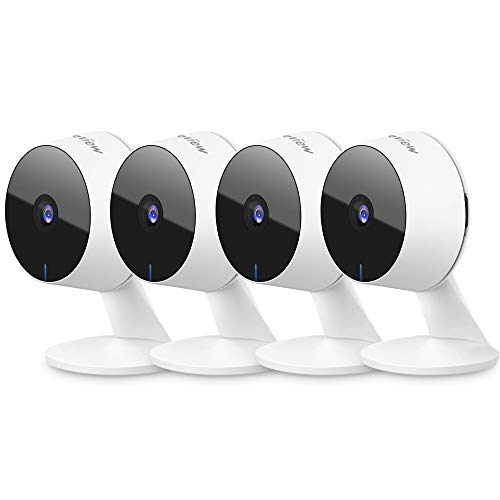
LaView Security Cameras 4pcs, Home Security Camera Indoor 1080P, Wi-Fi Cameras Wired for Pet, Motion Detection, Two-Way Audio, Night Vision, Phone App, Works with Alexa, iOS & Android & Web Access
Check price on Amazon
2K Security Cameras 4 Pack, Home Cameras Indoor/Outdoor for Baby/Pet
Check price on Amazon
Solar Security Cameras Wireless Outdoor, 2K Pan/Tilt 360° View Solar/Battery Powered WiFi Cameras for Home Security with AI Motion Detection, Spotlight, 2-Way Audio, Siren, IP65, SD/Cloud Storage
Check price on Amazon
XTU 2K Wireless Doorbell Camera with Chime, No Subscription, Alexa | 2.4GHz Wi-Fi, Local & Cloud Storage, Security Doorbell Camera, Flexible Viewing Angle
Check price on AmazonWhat to Look For in a No-Subscription WiFi Camera
1. Local Storage Support
This is non-negotiable. The camera must have a microSD card slot (ideally supporting at least 128GB) or support for a local NVR. Without local storage, you'll be forced into a cloud plan. Many wireless security cameras with storage options combine both microSD and NVR compatibility for maximum flexibility.
2. No Paywalled Core Features
Some manufacturers disable motion detection or even live view unless you subscribe. Read the fine print. Look for cameras that explicitly state "no subscription required" for features like motion alerts, two-way audio, and remote access.
3. Reliable WiFi Connectivity
A stable 2.4GHz WiFi connection is essential for uninterrupted streaming and recording. If your camera is placed far from your router, consider a model that supports WiFi extenders or a mesh network. For outdoor installations, check outdoor wireless security cameras with Wi-Fi that are built to handle distance and weather.
4. Night Vision and Weatherproofing
If you're using the camera outdoors, you'll want IP65 or higher weatherproofing and infrared night vision. Many subscription-free models offer both without extra cost. For areas with no power outlets, consider battery-powered outdoor WiFi security camera options that still support local storage.
5. App Quality and Updates
The camera's app is your control center. A good app should let you view live footage, review recordings, adjust motion zones, and receive alerts — all without prompting you to upgrade to a paid plan. Check recent reviews to ensure the app is stable and regularly updated.
Best Use Cases for Subscription-Free Cameras
Home Security on a Budget
If you want to protect your home without adding another monthly bill, a subscription-free WiFi camera is the perfect solution. You can start with one camera and expand later. For a complete setup, pair it with wireless home security cameras with recording to cover multiple angles.
Rental Apartments and Dorms
Renters love subscription-free cameras because they're easy to install and remove without damaging walls. Many models are wireless security camera systems for apartments that use adhesive mounts or simple screws. No long-term contracts, no landlord permission needed for cloud services.
Business and Commercial Use
Small businesses can save significantly by choosing subscription-free cameras. A multi-camera NVR system with local storage can replace expensive cloud plans. For larger operations, explore commercial security surveillance systems that support local recording and remote access without recurring fees.
Frequently Asked Questions
Can I use a WiFi camera without any subscription at all?
Yes. Many WiFi cameras work perfectly without a subscription. They store footage locally on a microSD card or NVR, and you can view live or recorded video through the manufacturer's app for free. You only miss out on cloud backup and advanced AI features.
Do subscription-free cameras still send motion alerts?
Most do. Basic motion detection and push notifications are typically free. You'll receive alerts on your phone when the camera detects movement, though some advanced features like person detection or package detection may require a subscription on certain models.
How much storage do I need for a subscription-free camera?
A 128GB microSD card can hold roughly 1–2 weeks of continuous recording, depending on resolution and motion frequency. If you want more, look for cameras that support 256GB cards or connect to an NVR with a larger hard drive.
Can I access my camera remotely without paying?
Yes. Remote viewing through the camera's app is almost always free. The camera connects to your home WiFi, and the app streams the feed to your phone. You only pay if you want cloud storage or premium AI features.
What happens if the internet goes down?
With local storage, your camera will continue recording to the microSD card or NVR even if the internet is down. You just won't be able to view it remotely until the connection is restored. This is a major advantage over cloud-only cameras.
Are subscription-free cameras less secure?
Not necessarily. Security depends on the manufacturer's implementation. Look for cameras that support encryption, regular firmware updates, and two-factor authentication. Local storage can actually be more secure because your footage isn't stored on a third-party server.
Final Thoughts
Choosing a WiFi camera that doesn't need a subscription is one of the smartest decisions you can make for your home or business security. You get full control over your footage, avoid recurring costs, and enjoy peace of mind knowing your camera will keep working regardless of price changes or policy updates.
When shopping, prioritize local storage, free remote viewing, and reliable motion alerts. With the right camera, you can build a complete security system that costs you nothing after the initial purchase. Whether you need a single camera for your apartment or a multi-camera setup for your business, there's a subscription-free option that fits your needs and budget.
Ready to get started? Check out our top recommendations above and take the first step toward a smarter, subscription-free security setup today.