
Wireless Home Security Cameras with Recording
Everything you need to know about choosing, installing, and maximizing wireless security cameras that record. Compare storage options, resolution, and smart features to protect what matters most.
View Top PicksWhy Recording Matters: A security camera without recording is just a live viewer. The ability to capture, store, and review footage is what transforms a simple webcam into a true security solution. This guide walks you through every recording option—from local SD cards to cloud subscriptions—so you can make an informed decision before buying.
Understanding Recording Options for Wireless Cameras
When shopping for wireless home security cameras with recording, the first decision you'll face is where your footage will be stored. Each method has distinct advantages and trade-offs that affect cost, accessibility, and reliability.
📁 Local Storage (SD Card / NVR)
Footage is saved directly on a microSD card inside the camera or on a Network Video Recorder (NVR) base station. No monthly fees, full ownership of your data, and works even if the internet goes down.
- No subscription costs
- Works offline
- Limited by card capacity
- Risk of theft or damage
☁️ Cloud Storage
Recordings are uploaded to a remote server. Access your footage from anywhere, receive alerts with video clips, and never worry about losing data to a damaged card.
- Access from anywhere
- Automatic backup
- Monthly subscription fees
- Requires stable internet
Many modern cameras offer hybrid recording—combining a local SD card with optional cloud backup. This gives you the best of both worlds: no mandatory subscription, plus remote access when you need it. If you want to avoid ongoing costs entirely, look for WiFi cameras that don't need a subscription.
Key Features to Evaluate Before Buying
Not all wireless cameras are created equal. Beyond recording, here are the specifications that directly impact your security coverage and daily experience.
🎥 Resolution & Video Quality
1080p is the baseline for clear identification. 2K and 4K offer sharper detail for reading license plates or recognizing faces at distance. Higher resolution also means larger file sizes—factor this into your storage calculation.
🌙 Night Vision
Infrared (IR) LEDs provide black-and-white footage in complete darkness. Color night vision uses a spotlight or advanced sensor to capture color details at night. For outdoor coverage, night vision security cameras wireless outdoor are essential.
🔋 Power Source
Battery-powered cameras offer flexible placement but require recharging. Wired cameras provide continuous power but limit installation locations. Solar panels can extend battery life for outdoor units—see our guide on small solar panels for security cameras.
📱 Smart Features
Motion detection zones, person/vehicle/animal AI alerts, two-way audio, and smartphone app control are now standard. Look for security cameras that alert your phone for real-time notifications.
Storage Options Compared
Use this table to quickly compare the most common recording methods available for wireless home security cameras.
| Storage Type | Cost | Access | Best For |
|---|---|---|---|
| MicroSD Card | $10–$50 (one-time) | Local only (unless camera supports remote) | Budget setups, privacy-focused users |
| NVR / Base Station | $100–$300+ | Local network, some remote | Multi-camera systems, large storage needs |
| Cloud (Basic) | $3–$10/month | Anywhere via app | Renters, simple setups, remote monitoring |
| Cloud (Premium) | $10–$20/month | Anywhere, extended history | Businesses, long-term retention |
| Hybrid (SD + Cloud) | $10–$50 + optional subscription | Local + remote | Most homeowners—best balance |
For those who want the flexibility of remote viewing without a mandatory subscription, a hybrid approach is ideal. You can start with local recording and add cloud storage later if needed. Explore wireless security camera cloud storage options to understand the full range of plans available.
Best Wireless Home Security Cameras with Recording
⚠️ AFFILIATE DISCLOSURE: This website contains affiliate links. As an affiliate Associate, we earn from qualifying purchases. If you make a purchase through these links, we may receive a small commission at no additional cost to you. Read our full affiliate policy.

CAMCAMP Home Security Camera System Wireless Outdoor WiFi 5G 24/7 Recording | Auto Human Tracking 355° View 2-Way Audio Color Night Vision Plug-in Powered 1080PHD Video Surveillance System 16CH NVR 500GB
Check price on Amazon
Hiseeu 5MP Home Security Camera System Outdoor, 2.4G/5G Wireless WiFi Pro | 24/7 Recording, 1TB HDD No Subscription, Wired Plug-in Powered Cameras, 4K NVR with 10.1" LCD Monitor, One-Way Audio, IP65
Check price on Amazon
Hiseeu Home Security System, 24/7 Recording 5MP Wired Plug-in Powered Outdoor Bullet Cameras, 2.4G/5G WiFi Pro, 4K NVR with 12" LCD Monitor, 3TB HDD, Night Vision, IP65
Check price on Amazon
2K Security Camera System, 5GHz&2.4GHz WiFi Solar Wireless Cameras for Home Security, Wire-free Installation, AI Detection, Two-way Audio, Mobile alerts, SD/Cloud Storage, Color Night Vision, 4 Packs
Check price on Amazon
4CH Wired Security Camera System, AIWIXEN 4X 1080P Cam, DVR with 512GB HDD | Surveillance Cameras with Human Vehicle Detection, IP68 Waterproof, 24-7 Recording, Remote Access, Home Security CCTV Outdoor
Check price on Amazon
Camcamp Home Security Camera System Wireless Outdoor, 4 Plug-in Cameras | 8 Views; PTZ Auto Tracking; 10CH NVR with 500GB HDD; 24/7 Recording; No Monthly Fee
Check price on Amazon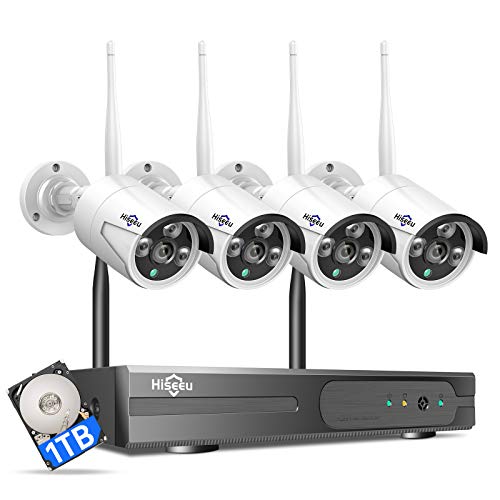
Hiseeu [24/7 Recording Home Security Camera System, No Subscription, 4K NVR with 4pcs 3MP Corded Plug-in Powered Outdoor Bullet Cameras, 2.4G/5G Wireless WiFi Connection, 1TB HDD, Night Vision, IP66
Check price on Amazon
2026 Enhanced 2K UHD Security Cameras Wireless Outdoor – Free Cloud & SD Storage, Dual-Band WiFi 2.4G/5G, Full-Color Night Vision, 6-Month Battery, Motion Alerts, IP66 Weatherproof, 2-Way Talk
Check price on AmazonInstallation Tips for Optimal Recording
Proper placement and setup directly affect the quality and usefulness of your recordings. Follow these guidelines to get the most from your wireless security cameras.
- Height matters: Mount cameras 8–10 feet high to prevent tampering and capture a clear angle of faces.
- Avoid backlight: Don't point cameras directly at the sun or bright lights—this washes out the image and triggers false alerts.
- Check WiFi signal: Wireless cameras need a strong, stable connection. Use a WiFi extender if the signal is weak at the mounting location.
- Angle for identification: Position cameras to capture faces and license plates, not just the top of heads or distant figures.
- Test motion zones: Configure detection zones to exclude busy streets or swaying trees to reduce unnecessary recordings.
- Secure your network: Use WPA3 encryption and a strong password to prevent unauthorized access to your camera feed.
For outdoor installations, consider weatherproofing and cable management. If you're unsure where to start, our guide on where to install security cameras outdoors provides detailed placement diagrams and coverage strategies.
Local vs. Cloud Recording: Which Should You Choose?
The decision between local and cloud recording often comes down to your priorities: cost, privacy, and convenience. Here's a breakdown to help you decide.
Choose Local Storage If:
- You want zero monthly fees
- You prefer full control over your data
- Your internet connection is unreliable
- You need continuous 24/7 recording
Choose Cloud Storage If:
- You want access from anywhere
- You need automatic backup against theft
- You prefer AI-powered alerts with video clips
- You don't want to manage physical storage
Many users find that a combination works best: local recording for continuous coverage, and cloud storage for critical event clips. This hybrid approach ensures you never miss important footage, even if one storage method fails. For a deeper dive into cloud options, see home security camera with cloud storage.
Power and Connectivity Considerations
Wireless cameras are "wireless" in terms of data transmission, but they still need power. Understanding your options helps you plan the installation and avoid downtime.
Battery-Powered
Fully wireless installation—no outlet needed. Battery life ranges from 1–6 months depending on activity and settings. Ideal for renters or hard-to-reach areas.
Battery powered outdoor WiFi security camera options are plentiful and easy to install.
Wired Power
Continuous power means no recharging and unlimited recording. Requires proximity to an outlet or professional installation. Best for permanent setups.
If you have existing wiring, a wired and wireless security camera system can combine the reliability of wired power with the flexibility of wireless data.
Solar-Powered
Solar panels trickle-charge the battery, extending time between manual charges. Perfect for outdoor cameras in sunny locations.
Explore solar wireless security camera system with remote viewing for a sustainable, off-grid solution.
WiFi vs. Cellular
WiFi cameras rely on your home network. Cellular cameras use a mobile data plan and work anywhere with signal—ideal for remote properties or backup connectivity.
See security cameras with cellular service for off-grid and backup options.
Smart Home Integration & App Features
Modern wireless security cameras are more than just recording devices—they're part of your smart home ecosystem. Here's what to look for.
- Voice assistant support: Works with Amazon Alexa, Google Assistant, or Apple HomeKit for voice control and live feed on smart displays.
- Two-way audio: Communicate with visitors, delivery personnel, or intruders through the camera's built-in speaker and microphone.
- AI-powered detection: Distinguishes between people, animals, vehicles, and packages to reduce false alerts and provide meaningful notifications.
- Integration with other devices: Triggers smart lights, sirens, or door locks when motion is detected.
- Multi-user access: Share live views and recordings with family members or trusted neighbors.
If you're building a comprehensive security setup, consider security cameras that hook up to your phone for seamless mobile access, or a video doorbell and security camera bundle for complete front-door coverage.
Maintenance and Troubleshooting Tips
Keep your wireless security cameras recording reliably with these simple maintenance practices.
- Clean lenses regularly: Dust, spiderwebs, and water spots degrade image quality. Use a microfiber cloth and lens cleaner.
- Check storage capacity: SD cards fill up over time. Set up automatic overwrite or periodic backups.
- Update firmware: Manufacturers release updates for security patches and new features. Enable auto-update if available.
- Monitor battery levels: For battery-powered cameras, set low-battery alerts to avoid downtime.
- Test recordings monthly: Verify that motion detection and recording are working as expected.
- Secure your account: Use strong, unique passwords and enable two-factor authentication where supported.
If you're experiencing connectivity issues, check your WiFi signal strength and consider a mesh network. For cameras that don't rely on WiFi at all, explore wireless security cameras that don't need internet—these use local storage and are immune to network outages.
Frequently Asked Questions
Do wireless security cameras record all the time?
It depends on the model and settings. Some cameras record continuously (24/7), while others record only when motion is detected. Continuous recording requires more storage and power, while event-based recording conserves resources and makes it easier to find relevant footage.
How long do wireless security cameras record for?
Recording duration depends on storage capacity and settings. A 128GB SD card can hold roughly 1–2 weeks of continuous 1080p footage, or several months of motion-triggered clips. Cloud plans typically offer 7–30 days of history, with premium plans extending to 60 or 90 days.
Can wireless security cameras work without WiFi?
Yes. Many cameras support local recording to an SD card and can function without an internet connection. However, you won't be able to view live feeds or receive alerts remotely. For a fully offline solution, look for cameras that record to a local NVR or SD card and connect directly to your phone via Bluetooth or local WiFi.
What is the best storage option for wireless security cameras?
The best option depends on your needs. For no monthly fees and full data ownership, local SD card storage is ideal. For remote access and automatic backup, cloud storage is better. Many users choose a hybrid approach: local recording for continuous coverage and cloud storage for critical event clips.
How do I access my wireless security camera recordings?
Recordings are typically accessed through the camera manufacturer's smartphone app or web portal. Local recordings can be viewed by removing the SD card or accessing the NVR. Cloud recordings are accessible from anywhere with an internet connection.
Are wireless security cameras easy to install?
Most wireless cameras are designed for DIY installation. Battery-powered models require no wiring—just mount and connect to WiFi. Wired models may require drilling and running cables, but many come with everything you need. Installation typically takes 15–30 minutes per camera.
Ready to Secure Your Home?
Compare our top-rated wireless home security cameras with recording. Find the perfect balance of features, storage, and price for your needs.
View Recommended CamerasFinal Thoughts
Choosing the right wireless home security cameras with recording is about matching technology to your lifestyle. Consider how much footage you need to store, whether you want remote access, and how much you're willing to spend on subscriptions. For most homeowners, a hybrid approach—local SD card recording combined with optional cloud backup—offers the best balance of cost, convenience, and peace of mind.
Whether you're protecting a small apartment or a large property, there's a wireless camera system that fits your needs. Start with the features that matter most to you, and don't forget to factor in installation, maintenance, and long-term storage costs. With the right setup, you can monitor your home from anywhere and never miss a moment that matters.
For more guidance on related topics, explore our guides on wireless security cameras for home use, outdoor use wireless home security cameras, and wireless security cameras motion activated.