
Commercial Security Surveillance Systems: The Complete Buyer's Guide
Everything business owners need to know before investing in a professional surveillance system — from camera types and storage options to installation and ongoing costs.
Why this guide matters: Choosing a commercial security surveillance system is one of the most important investments you'll make for your business. Unlike residential setups, commercial systems must handle higher traffic, longer recording durations, multiple access points, and stricter compliance requirements. This guide walks you through every decision — so you can buy with confidence.
What Is a Commercial Security Surveillance System?
A commercial security surveillance system is a networked collection of cameras, recording devices, storage solutions, and monitoring software designed specifically for business environments. These systems protect retail stores, offices, warehouses, restaurants, hotels, healthcare facilities, and industrial sites by providing continuous video coverage, real-time alerts, and retrievable evidence when incidents occur.
Unlike a basic home camera setup, commercial systems are engineered for scalability, reliability, and integration with existing business infrastructure — such as access control, alarm systems, and point-of-sale terminals. If you're comparing options, it helps to understand the full spectrum of wired and wireless security camera systems available before deciding which architecture fits your property.
Modern commercial systems increasingly rely on IP (Internet Protocol) technology, which delivers higher resolution, remote access, and advanced analytics. For businesses that need centralized monitoring across multiple locations, a top-tier business security camera system can be managed from a single dashboard — saving time and reducing operational overhead.
Commercial vs. Residential Systems: Key Differences
Understanding what separates commercial-grade surveillance from consumer-grade equipment will help you avoid costly mistakes. Here's how they compare:
| Feature | Residential System | Commercial System |
|---|---|---|
| Camera Count | 1–8 cameras | 8–64+ cameras |
| Resolution | 1080p–2K | 4K–8K per camera |
| Storage | Cloud or 1–2TB local | NVR with 8–64TB RAID |
| Recording Duration | 7–14 days | 30–90+ days |
| Remote Access | Basic smartphone app | Multi-user, role-based access |
| Analytics | Motion alerts | AI people/vehicle detection, heat maps |
| Installation | DIY plug-and-play | Professional structured cabling |
| Typical Cost | $200–$800 | $2,500–$25,000+ |
The price difference reflects not just better hardware, but also the engineering required for 24/7 reliability, redundant storage, and compliance with industry regulations. For businesses that need enterprise-level oversight, a 16-camera wireless surveillance system represents a solid mid-range starting point.
Types of Commercial Security Cameras
Not every camera suits every environment. Here are the primary types you'll encounter when building a commercial surveillance system:
1. Dome Cameras
Dome cameras are the most common choice for indoor commercial spaces — retail floors, offices, and lobbies. Their dome shape makes it difficult to determine which direction the camera is pointing, which acts as a deterrent. They're also less prone to tampering and dust accumulation.
2. Bullet Cameras
Bullet cameras are cylindrical and typically mounted outdoors. They offer long-range viewing and are highly visible, which makes them excellent deterrents. Many models include IR cut filters for night vision. If your business needs to monitor perimeters or parking lots, bullet cameras are a strong choice.
3. PTZ (Pan-Tilt-Zoom) Cameras
PTZ cameras can rotate, tilt, and zoom remotely — covering a wide area with a single unit. They're ideal for large open spaces like warehouses, car dealerships, and stadiums. Operators can track a subject in real time, making them invaluable for active monitoring.
4. Multi-Sensor Cameras
These cameras house multiple sensors in one unit, providing panoramic coverage without blind spots. They're increasingly popular for commercial use because they reduce the number of physical cameras needed. If you're looking at high-quality security cameras that bridge residential and commercial needs, multi-sensor models are worth considering.
5. Thermal Cameras
Thermal cameras detect heat signatures rather than visible light. They're used in industrial settings, cold storage facilities, and high-security areas where detecting intruders in complete darkness is essential. For specialized environments, an intrinsically safe thermal imaging camera may be required to meet safety regulations.
6. Wireless Cameras
Wireless cameras transmit video over Wi-Fi or cellular networks, eliminating the need for extensive cabling. They're ideal for retrofitting older buildings or temporary installations. However, for mission-critical commercial surveillance, wired connections generally offer greater reliability. Many businesses use a hybrid approach — wired cameras for critical zones and wireless outdoor camera systems for supplementary coverage.
Core Components of a Commercial System
A complete commercial surveillance system consists of several interconnected components. Understanding each one helps you specify the right system for your business:
- Cameras: The eyes of your system. Choose resolution (4K is now standard for commercial use), frame rate, and lens type based on coverage needs.
- NVR or DVR: The recorder processes and stores video. NVRs (Network Video Recorders) handle IP cameras, while DVRs (Digital Video Recorders) work with analog cameras. For digital clarity, an NVR is the modern standard.
- Storage: Surveillance footage must be retained for a set period — often 30 to 90 days for commercial compliance. RAID arrays provide redundancy so footage isn't lost if a drive fails. A digital video recorder with hard drive is a straightforward option for smaller operations.
- Monitors & Workstations: Security staff need clear displays to monitor feeds. Multi-monitor setups are common in control rooms.
- Network Infrastructure: PoE (Power over Ethernet) switches deliver both power and data to cameras over a single cable, simplifying installation.
- Software & Analytics: Modern VMS (Video Management Software) platforms offer AI-powered features like people counting, loitering detection, and license plate recognition.
- Cabling & Connectors: Structured cabling (Cat6 or fiber) ensures reliable signal transmission over long distances.
💡 Pro Tip: Don't Overlook Bandwidth
High-resolution commercial cameras generate significant network traffic. Before installing a 32-camera 4K system, verify your network switches and internet uplink can handle the load. A qualified integrator can help you plan bandwidth allocation.
How Much Do Commercial Systems Cost?
Budgeting for commercial surveillance requires looking beyond the camera price tag. Here's a realistic breakdown of costs you should expect:
| Component | Estimated Cost Range |
|---|---|
| Cameras (per unit) | $150–$800 |
| NVR/DVR System | $500–$3,000 |
| Storage (per TB) | $80–$200 |
| Installation (per camera) | $100–$300 |
| Cabling & Infrastructure | $500–$5,000+ |
| Professional Monitoring (per month) | $50–$500 |
| Full System (8–16 cameras) | $3,000–$15,000 |
| Full System (32–64 cameras) | $15,000–$50,000+ |
For businesses exploring cost-effective entry points, inexpensive video surveillance systems can be adapted for small commercial spaces, though they may lack the durability and scalability of true commercial-grade equipment. If you're wondering where to find the cheapest security cameras, be cautious — low-cost cameras often sacrifice reliability, which is unacceptable for business security.
When evaluating total cost of ownership, factor in electricity, maintenance, software subscriptions, and potential insurance discounts. Many insurers offer reduced premiums for businesses with certified surveillance systems — which can offset a significant portion of your investment over time.
How to Choose the Right System for Your Business
Selecting a commercial surveillance system isn't about buying the most expensive option — it's about matching capabilities to your specific risks and operational needs. Use these criteria to guide your decision:
Assess Your Coverage Requirements
Walk your property and identify every area that needs monitoring: entrances, exits, cash handling zones, inventory storage, parking areas, and sensitive equipment rooms. A professional site survey will reveal blind spots you might overlook. For outdoor coverage, proper placement is critical — where you install security cameras outdoors directly impacts their effectiveness.
Determine Your Resolution Needs
4K (8MP) has become the baseline for commercial use. It allows you to zoom in on footage and still identify faces, license plates, or product labels. For wide-area coverage, 4K is essential. For tight spaces like cash registers, 2K may suffice.
Choose Your Storage Strategy
Cloud storage offers remote accessibility and automatic backups but carries recurring fees and bandwidth requirements. Local NVR storage offers faster playback and no monthly costs but requires physical security and maintenance. Many commercial systems use a hybrid approach. If you prefer cloud-based management, look at wireless security cameras with cloud storage options that support business-grade encryption.
Evaluate Remote Access Needs
Can you check your cameras from your phone? For business owners who travel or manage multiple sites, remote access is non-negotiable. Systems that let you see security cameras on your phone provide peace of mind and rapid response capability. Some advanced systems even alert your phone when specific events occur — such as motion after hours or a person entering a restricted zone.
Consider Integration with Existing Systems
If you already have access control, alarm systems, or POS terminals, choose a surveillance platform that integrates with them. Unified systems reduce training time and improve incident response. A wireless monitored home security system architecture can sometimes be scaled for small commercial use, but verify licensing and support terms.
Plan for Growth
Your business will evolve. Choose a system that can expand — add cameras, increase storage, or upgrade analytics — without replacing the entire infrastructure. IP-based systems offer the greatest scalability.
Installation: DIY vs. Professional
Can you install a commercial surveillance system yourself? For a small retail shop with four cameras, a DIY approach is feasible. But for larger commercial spaces with structured cabling, multiple network switches, and compliance requirements, professional installation is strongly recommended.
DIY Installation
Best for: small offices, retail spaces under 2,000 sq ft, and businesses with existing network infrastructure. You'll need basic networking knowledge, cabling tools, and time. Many DIY wireless security systems with cameras are designed for easy setup and can serve as a learning platform before upgrading to commercial-grade equipment.
Professional Installation
Best for: multi-floor buildings, warehouses, outdoor perimeters, and any environment requiring regulatory compliance. Professional installers handle cable routing, weatherproofing, network configuration, and system commissioning. They also provide documentation and warranties. For businesses that need it done right the first time, professional security camera installation services are a worthwhile investment.
⚠️ Compliance Note
In many jurisdictions, commercial surveillance systems must comply with privacy laws (e.g., GDPR, CCPA), signage requirements, and data retention policies. Professional installers are familiar with local regulations and can help you avoid legal pitfalls.
Maintenance and Scalability
A commercial surveillance system is an investment that requires ongoing care. Here's what to plan for:
- Regular Cleaning: Dust, spider webs, and water spots degrade image quality. Clean camera domes and lenses quarterly — or more often in dusty environments.
- Firmware Updates: Manufacturers release security patches and feature updates. Staying current protects against vulnerabilities and improves performance.
- Storage Management: Monitor drive health and replace failing drives before they cause data loss. RAID configurations help, but drives still wear out.
- Health Monitoring: Modern VMS platforms alert you when a camera goes offline or a drive approaches capacity. Don't ignore these alerts.
- Scalability Planning: As your business grows, you may need more cameras, longer retention, or advanced analytics. Choose a platform with a clear upgrade path.
For businesses that want a hands-off approach, managed surveillance services handle maintenance, monitoring, and upgrades for a monthly fee. This model is increasingly popular for multi-location businesses that lack on-site IT staff. If you're starting from scratch and wondering what camera to get for photography versus surveillance, it's important to note these are entirely different tools — surveillance cameras prioritize coverage and reliability over artistic quality.
Frequently Asked Questions
How many cameras does a commercial system typically need?
For a small retail store (1,500–2,500 sq ft), 4–8 cameras usually suffice. A mid-sized office or restaurant may need 8–16 cameras. Large warehouses and multi-floor buildings often require 16–64 cameras. A professional site survey is the best way to determine exact coverage needs.
Can I use wireless cameras for my business?
Yes, wireless cameras work for businesses where running cables is impractical. However, for mission-critical surveillance, wired PoE cameras are generally more reliable and secure. Many businesses use a hybrid approach — wired cameras for critical areas and wireless for supplementary coverage. If you need wireless security cameras with storage, ensure they support local recording as a backup.
How long should I retain commercial surveillance footage?
Industry standards suggest 30–90 days for most commercial applications. Some industries (banking, healthcare) have specific regulatory requirements that may extend to 6 months or more. Check your local regulations and insurance requirements. If you need extended retention without massive local storage, a wireless security camera with cloud storage solution may be more cost-effective.
Do commercial surveillance systems require an internet connection?
Not necessarily. Local NVR-based systems can record and store footage without internet access. Internet is only required for remote viewing and cloud backups. For businesses in areas with unreliable internet, a local-first system is recommended. If you need remote access without internet dependency, look at security cameras with cellular service that use mobile networks instead of Wi-Fi.
What is the most user-friendly commercial surveillance system?
Systems with intuitive mobile apps and web dashboards are easiest to manage. Brands like Reolink, Hikvision, and Dahua offer commercial-grade systems with user-friendly interfaces. For smaller businesses, a most user-friendly security camera system might prioritize simplicity over advanced features — which is often the right trade-off.
Ready to Secure Your Business?
Explore our recommended commercial surveillance systems below — carefully selected for reliability, scalability, and value.
View Recommended Systems ↓Recommended Commercial Security Surveillance Systems
⚠️ AFFILIATE DISCLOSURE: This website contains affiliate links. As an affiliate Associate, we earn from qualifying purchases. If you make a purchase through these links, we may receive a small commission at no additional cost to you. Read our full affiliate policy.

4COVR Commercial Security Camera System 16CH 4K PoE 4TB HDD, LY54AB8M1612 | 12Pcs IK10 Vandal-Proof 8MP Wired Dome IP Camera IP67 AI Human/Vehicle Detection, 16 Channel NVR, Business Surveillance
Check price on Amazon
4COVR 16 Channel PoE Security Camera System for Business, 4TB, LY54AX5M1616 | 16x 5MP IK10 Vandal-Proof IP67 Dome Commercial IP Camera, Night Vision, 16CH NVR, AI Human Vehicle Detection, 24/7 Recording
Check price on Amazon
ONWOTE 32 Channel Security Camera System, 12MP NVR, 20x 5MP PoE IP Cameras | AcuSearch, AI Human Vehicle Detection, 32CH 6K Commercial NVR, 4 Ports Support 40TB, Record 24/7 Audio Video, Business CCTV
Check price on Amazon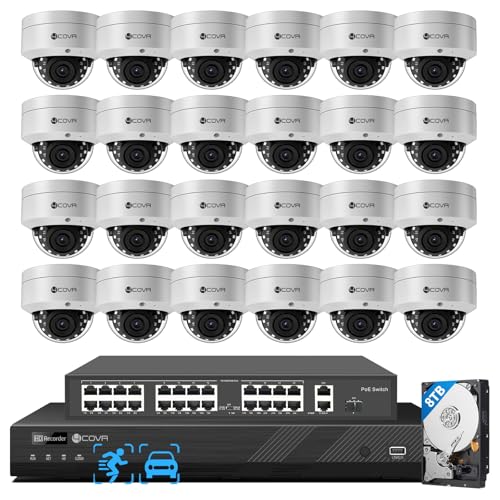
4COVR 32 Channel Security Camera System PoE with 8TB HDD, LY54AX5M3224 | 24Pcs 5MP IK10 Vandal-Proof Dome IP Camera IP67, AI Human Vehicle Detection, 4K UHD NVR, Commercial Surveillance Outdoor
Check price on Amazon
CAMCAMP 16CH Security Camera System Wireless for Home Business WiFi Outdoor | 355° Full View Auto Human Tracking, Smart Color Night Vision, 2-Way Audio, 500GB HDD No Monthly Fee Commercial& Home CCTV Kit
Check price on Amazon
GW 16 Channel 5X Motorized Zoom TAA Compliant 8MP AI Security Camera System | 12MP Commercial NVR, 16 4K Outdoor 2.7-13.5mm 5X Optical Zoom PoE Bullet Camera, LPR & Face Recognition, NDAA & TAA Compliant
Check price on Amazon
ANNKE 32CH 3K Lite Wired Security Camera System with 4TB, 32 x Outdoor Cams | Commercial DVR Kit, 2MP Camera, H.265 pro+, 100ft Night Vision, Human/Vehicle Detection, Instant Alerts, Digital WDR, IP67
Check price on Amazon