
Outdoor Security Cameras with Wi-Fi: Complete Buying Guide
Protect your home with a weatherproof wireless camera that streams live video to your phone. Learn how to choose the right resolution, night vision, storage, and power source before you buy.
SEE TOP PICKSWhy outdoor Wi-Fi cameras matter: A wired system can be expensive and difficult to install. Outdoor Wi-Fi security cameras eliminate long cable runs, connect directly to your home network, and let you monitor your property from anywhere. This guide walks you through every specification that affects real-world performance so you can buy with confidence.
Why Choose a Wi-Fi Outdoor Security Camera?
Wi-Fi cameras are the most flexible option for most homeowners. Unlike traditional wired systems that require a DVR and coaxial cables, a wireless camera transmits footage over your existing wireless network. That means faster installation, fewer holes in your walls, and easier expansion. If you already own a wired and wireless security camera system, adding a Wi-Fi model is a simple way to cover a blind spot.
The main trade-off is dependence on your Wi-Fi signal. A weak connection causes lag, dropped frames, and missed alerts. Before buying, check the distance between your router and the mounting location. If the signal is marginal, consider a wireless security camera system with recorder that uses a dedicated base station for a more stable link.
Key Features to Evaluate Before Buying
Not all outdoor Wi-Fi cameras are equal. The following specifications determine whether a camera performs well in rain, darkness, and everyday use.
Resolution & Clarity
1080p is the minimum for identifying faces and license plates. 2K and 4K models provide sharper detail but consume more bandwidth and storage. For most homes, 2K offers the best balance.
Night Vision
Infrared LEDs deliver black-and-white footage in complete darkness. Color night vision uses a spotlight or advanced sensor to capture color detail after sunset. Check the effective range, usually 30–100 feet.
Weatherproof Rating
Look for IP65 or IP66. The first digit rates dust protection, the second rates water resistance. IP65 handles rain and dust; IP66 adds protection against powerful water jets.
Power Source
Battery-powered cameras are easiest to mount but need recharging. Wired cameras run continuously. Solar panels extend battery life and are ideal for sunny locations.
Storage Options
Local storage uses a microSD card or base station. Cloud storage requires a subscription but protects footage if the camera is stolen. Many cameras support both.
Smart Alerts
Motion detection, person detection, and package detection reduce false alarms. A security camera that alerts your phone keeps you informed in real time.
Resolution, Field of View, and Zoom
Resolution alone does not guarantee a useful image. A 4K camera with a narrow field of view may miss activity at the edges of your yard. A 1080p camera with a 130-degree lens can cover more ground but shows less detail at distance. For driveways and backyards, a 2K camera with a 110–130 degree field of view is a practical starting point.
Digital zoom crops the image and reduces quality. Optical zoom, found on pan-tilt-zoom (PTZ) models, moves the lens physically and preserves detail. If you need to read a license plate at the end of a long driveway, consider a PTZ camera or a separate outdoor security camera with spotlight aimed at the approach.
Night Vision: Infrared vs. Color
Infrared (IR) night vision is the standard. It illuminates the scene with invisible light and records in black and white. The image is clear but lacks color, which can make identifying clothing or vehicle color difficult.
Color night vision uses a built-in spotlight or a highly sensitive sensor. The spotlight acts as a deterrent, but it also draws attention to the camera. If stealth is a priority, choose a model with a low-light sensor rather than a visible light. A home security camera with wireless night vision is a reliable choice for most residential driveways.
Weatherproofing and Placement
An outdoor camera must survive rain, snow, dust, and temperature swings. IP65 is the minimum rating for exposed locations. If the camera is mounted under an eave, IP64 may be sufficient, but IP65 gives more margin for error.
Placement matters as much as the rating. Mount cameras 8–10 feet high, angled slightly downward, to capture faces without being easily reached. Avoid pointing directly at the sun or a bright light source, which can wash out the image. For a detailed walkthrough, see where to install security cameras outdoors.
Important: Wi-Fi range decreases through brick, metal, and concrete. If your camera is far from the router, test the signal before permanent mounting. A wireless security camera with cloud storage still needs a stable connection to upload clips. For locations without Wi-Fi coverage, consider a security camera with cellular service instead.
Power Options: Battery, Wired, and Solar
Battery-powered Wi-Fi cameras are the most popular for outdoor use because they require no electrical wiring. Battery life ranges from one month to six months depending on activity and temperature. Cold weather reduces battery capacity, so a battery-powered outdoor Wi-Fi security camera may need more frequent charging in winter.
Wired Wi-Fi cameras draw continuous power and never need recharging. They are ideal for locations near an outlet. If you want the convenience of wireless with the reliability of continuous power, a smart Wi-Fi flood light security camera combines lighting and surveillance in one unit.
Solar-powered cameras use a small panel to trickle-charge the battery. They work well in sunny climates but may struggle in shaded areas or prolonged overcast weather. A small solar panel for security cameras can extend battery life significantly when positioned correctly.
Storage and Subscription Costs
Every Wi-Fi camera needs a place to store footage. The three main options are:
- Local storage: A microSD card inside the camera or a base station with a hard drive. No monthly fee, but footage can be lost if the camera is stolen.
- Cloud storage: Clips upload to a remote server. Usually requires a subscription. Protects footage even if the camera is destroyed.
- Hybrid: Records locally and backs up to the cloud. Offers the best of both worlds.
If you prefer to avoid subscriptions, look for a Wi-Fi camera that doesn't need a subscription. These models typically rely on microSD cards or a local NVR. For a more comprehensive setup, a wireless security camera with storage built into the base station is a convenient option.
Smart Features: Alerts, Apps, and Integration
Modern Wi-Fi cameras do more than record video. Person detection distinguishes humans from moving trees, reducing false alerts. Package detection tells you when a delivery arrives. Two-way audio lets you speak to visitors or warn intruders.
App quality varies widely. A good app loads live view in under three seconds, allows multiple users, and supports scheduling. If you want to see your camera on your phone, check that the model supports your operating system. For a broader look at phone-connected options, see security cameras I can see on my phone.
Integration with smart home platforms like Amazon Alexa, Google Home, and Apple HomeKit is a bonus. It lets you view the feed on a smart display or trigger routines when motion is detected.
Comparison Table: Popular Outdoor Wi-Fi Camera Types
The table below summarizes the strengths and trade-offs of each camera type. Prices reflect typical market ranges for mid-range models.
| Camera Type | Power | Best For | Typical Price |
|---|---|---|---|
| Battery Wi-Fi Camera | Rechargeable battery | Renters, easy installation, flexible placement | $80–$250 |
| Wired Wi-Fi Camera | AC outlet | Continuous recording, no recharging | $60–$200 |
| Solar Wi-Fi Camera | Solar panel + battery | Sunny locations, remote areas | $120–$350 |
| Floodlight Camera | Wired or battery | Active deterrence, driveway coverage | $150–$400 |
| PTZ Wi-Fi Camera | Wired or battery | Large yards, license plate capture | $200–$600 |
Best Outdoor Wi-Fi Security Cameras
⚠️ AFFILIATE DISCLOSURE: This website contains affiliate links. As an affiliate Associate, we earn from qualifying purchases. If you make a purchase through these links, we may receive a small commission at no additional cost to you. Read our full affiliate policy.

Oculview 4G LTE Cellular Security Camera 2 Pack, Easy to Install, Off Grid Solar Powered, No WiFi Needed for Farm, Ranch, Jobsite, 2K Color Night Vision, 360° View, Built-in SIM Card - Black
Check price on Amazon
HOSAFE.COM 4G LTE Cellular Security Camera No Internet Needed, 2K Solar No WiFi Security Camera Outdoor Wireless with SIM Card Jobsite,360 Live View, Motion Detection,Free Cloud Storage(Need Apply)
Check price on Amazon
GMK 4 Pack Cameras System, Security Cameras Wireless Outdoor, 2K Video | VicoHome Cam, Motion Detect, Color Night Vision, 2-Way Talk, IP65 Waterproof, Indoor&Outdoor, 2.4GHz WiFi, SD/Cloud Storage
Check price on Amazon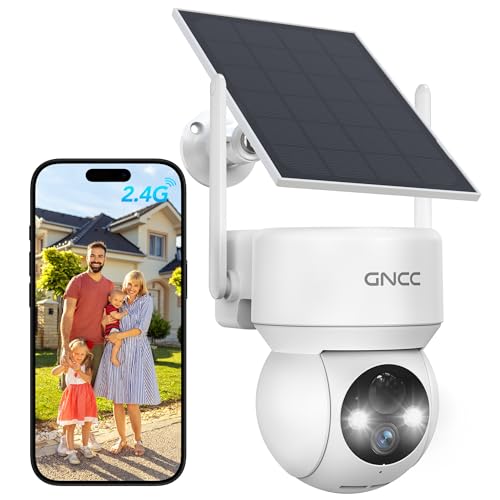
GNCC Solar Security Cameras Wireless Outdoor 2.4G WiFi, SD/Cloud Storage | Solar & Battery 360° Security Cameras, Color Night Vision, PIR Motion Detection, Spotlight & Siren Alarm, IP65 Waterproof
Check price on Amazon
SEHMUA 4G LTE Cellular Solar Security Camera Wireless Outdoor, No Wi-Fi Solar Powered Camera, 360° Live View, 2K Color Night Vision, PIR Motion Sensor, Two-Way Talk, Built-in SIM Card
Check price on Amazon
No WiFi Security Camera Mini Small Body Cam Surveillance Nanny Cameras | No WiFi Needed, Night Vision, 1080P, Indoor/Outdoor, Portable, for Home Security
Check price on Amazon
Blink Outdoor 4 – Wireless smart security camera, two-year battery life, 1080p HD day and infrared night live view, two-way talk. Sync Module Core included – 2 camera system
Check price on Amazon
2026 Enhanced 2K UHD Security Cameras Wireless Outdoor – Free Cloud & SD Storage, Dual-Band WiFi 2.4G/5G, Full-Color Night Vision, 6-Month Battery, Motion Alerts, IP66 Weatherproof, 2-Way Talk
Check price on AmazonInstallation Tips for Outdoor Wi-Fi Cameras
Proper installation prevents frustration and improves performance. Follow these steps for a reliable setup:
Pre-Installation Checklist
- Test Wi-Fi signal strength at the mounting location using your phone.
- Choose a height of 8–10 feet to deter tampering and capture faces.
- Avoid aiming the camera directly at the sun or reflective surfaces.
- Angle the camera slightly downward to reduce glare and improve framing.
- Secure cables with clips or conduit if using a wired model.
- Confirm the camera's IP rating matches your climate.
- Set up motion zones in the app to reduce false alerts.
- Enable two-factor authentication on the camera account.
If you are mounting on a surface without an outlet, a outdoor camera that screws into a light socket is a clever solution. It draws power from an existing fixture and requires no new wiring. For renters or apartment dwellers, a wireless security camera system for apartments offers similar flexibility without permanent modifications.
Common Mistakes to Avoid
Buying an outdoor Wi-Fi camera is straightforward, but a few common errors can undermine its usefulness:
- Ignoring Wi-Fi range: A camera at the edge of your network will drop connections. Use a mesh Wi-Fi system or a camera with a dedicated base station.
- Choosing the wrong field of view: A narrow lens misses peripheral activity. A very wide lens distorts faces. Match the lens to the area you want to cover.
- Underestimating storage needs: 4K footage fills a microSD card quickly. Calculate how many days of recording you need before choosing a storage plan.
- Skipping weatherproofing checks: An indoor camera placed outside will fail. Always confirm the IP rating.
- Forgetting about power: Battery cameras need recharging. If the camera is high on a wall, consider a solar panel or a wired model.
Frequently Asked Questions
Do outdoor Wi-Fi cameras need electricity?
Battery-powered models do not need an outlet, but they require periodic recharging. Wired models plug into an outlet and run continuously. Solar models use a panel to charge the battery, reducing the need for manual charging.
Can I use an outdoor Wi-Fi camera without the internet?
Some cameras can record locally to a microSD card without an internet connection, but you lose remote viewing and phone alerts. For a fully offline setup, a wireless security camera that doesn't need internet is a better choice.
How far can a Wi-Fi security camera be from the router?
In open air, most Wi-Fi cameras work up to 150–300 feet from the router. Walls, floors, and metal objects reduce this range significantly. For distances beyond 100 feet with obstacles, use a mesh network or a camera with a dedicated base station.
What is the best resolution for an outdoor security camera?
1080p is the minimum for useful identification. 2K (2560x1440) is the sweet spot for most homes, offering sharp detail without excessive storage demands. 4K is best for large properties or when you need to read license plates at a distance.
Are outdoor Wi-Fi cameras easy to hack?
Any internet-connected device carries some risk. Reduce it by using a strong, unique password, enabling two-factor authentication, keeping firmware updated, and placing cameras on a separate Wi-Fi network if your router supports guest networks.
Can I mix Wi-Fi cameras from different brands?
Yes, but they will use separate apps. For a unified experience, choose cameras from the same brand or a system that supports multiple brands through a single app or platform like Matter.
Final Thoughts: Choosing the Right Camera for Your Home
The best outdoor Wi-Fi security camera is the one that fits your specific environment, power availability, and budget. Start by identifying the area you want to monitor. Then choose a resolution, night vision type, and power source that match your conditions. Prioritize a stable Wi-Fi connection and reliable storage. With the right camera, you gain peace of mind and a clear record of activity around your property.
If you are still exploring options, our guide to outdoor wireless home security cameras covers additional models and setups. For a complete system that includes a doorbell, consider a video doorbell and security camera bundle for seamless coverage at your front door and beyond.
Ready to Secure Your Home?
Browse our top-rated outdoor Wi-Fi security cameras and find the perfect model for your property. Compare features, read reviews, and buy with confidence.
VIEW RECOMMENDED CAMERAS