
Wireless Outdoor Camera System for Home
Everything you need to know before buying a wireless outdoor camera system. Compare features, understand installation, and protect your home with confidence.
View Recommended SystemsWhy a wireless outdoor camera system? Unlike traditional wired setups, a wireless outdoor camera system for home installs in hours, not days. No drilling through walls, no running cables across your yard, and no professional electrician required. You get flexible placement, easy expansion, and remote monitoring from your phone — all without the mess of a wired installation.
What Is a Wireless Outdoor Camera System?
A wireless outdoor camera system for home is a set of cameras that transmit video and receive power without the need for extensive cabling. Most modern systems connect to your home Wi-Fi network and send footage to a cloud server or a local base station. Some models are battery powered, while others use solar panels or plug into a standard outdoor outlet.
The key difference from traditional CCTV is simplicity. You can mount a wireless camera on a fence, under an eave, or beside a door in minutes. If you need to move it later, you simply unmount and reposition. That flexibility is why wireless systems have become the first choice for homeowners who want outdoor use wireless home security cameras without the complexity of a wired infrastructure.
Understanding the basics helps you avoid common mistakes. The right system depends on your home layout, Wi-Fi coverage, power access, and how you want to store recordings. This guide walks you through each decision so you can buy with confidence.
Why Choose a Wireless Outdoor Camera System?
Homeowners choose wireless systems for practical reasons. Installation is faster, placement is more flexible, and the overall cost is often lower because you skip professional wiring. But the benefits go beyond convenience.
⚡ Quick Installation
Mount, connect to Wi-Fi, and start monitoring. No electrician, no cable runs, no wall damage.
📍 Flexible Placement
Put cameras exactly where you need them — gates, driveways, backyards, or blind spots.
📱 Remote Monitoring
View live feeds and recordings from your smartphone anywhere in the world.
🔋 Battery & Solar Options
No outlet nearby? Battery and solar models keep running without wiring.
📈 Easy Expansion
Add cameras one at a time as your needs grow, without redoing the whole system.
💰 Lower Upfront Cost
Skip installation fees and expensive cabling. Most systems pay for themselves in convenience.
If you are still deciding between wired and wireless, the guide on wired and wireless security camera system compares both approaches in detail. For most homes, a wireless setup offers the best balance of cost, flexibility, and performance.
Key Features to Look For
Not all wireless outdoor cameras are equal. Before you buy, check these critical specifications:
- Resolution: 1080p is the minimum. 2K and 4K models provide clearer detail for identifying faces and license plates.
- Night Vision: Infrared or color night vision is essential for 24/7 protection. Look for models with wireless night vision that perform well in complete darkness.
- Field of View: 130° to 160° covers more area per camera. Wider angles mean fewer cameras needed.
- Power Source: Battery, solar, or plug-in. Battery models offer the most placement freedom, while solar panels reduce maintenance.
- Storage: Local (microSD or base station) or cloud. Some systems offer both. Check cloud storage plans if you want off-site backup.
- Weather Resistance: IP65 or higher ensures the camera survives rain, snow, and dust.
- Smart Detection: AI-powered person, vehicle, and pet detection reduces false alerts.
- Two-Way Audio: Speak to visitors or deter intruders directly through the camera.
- App Quality: A reliable app with live view, playback, and notifications is essential.
If you want to avoid monthly fees, look for Wi-Fi cameras that don't need a subscription. Many brands now offer free local storage while still providing remote access.
Power Options: Battery, Solar, or Plug-In
Power is the most important practical decision for a wireless outdoor camera system. Each option has trade-offs:
| Power Type | Best For | Pros | Cons |
|---|---|---|---|
| Battery | Renters, flexible placement | No wiring, mount anywhere | Recharge every 1–6 months |
| Solar | Sunny locations, low maintenance | Continuous power, no recharging | Needs direct sunlight |
| Plug-In | Permanent setups near outlets | Never runs out of power | Limited by outlet location |
For most homeowners, a hybrid approach works best: battery or solar cameras for remote areas, and plug-in models where outlets are available. If you want to avoid recharging entirely, consider adding small solar panels for security cameras to keep batteries topped off.
Storage: Local vs. Cloud
Where your footage lives matters for both security and cost. There are two main options:
Local Storage
Footage is saved to a microSD card inside the camera or to a base station hard drive. No monthly fees, and you own the data. The downside is that if a thief steals the camera or base station, the footage is gone. Some systems store video locally while still offering remote viewing through an app.
Cloud Storage
Footage uploads to a secure server. Even if the camera is destroyed or stolen, recordings remain accessible. Most brands offer free basic plans with limited history and paid plans for more. If you want the convenience of cloud backup, look for wireless security cameras with storage that support both local and cloud options.
Many homeowners choose a system with home security camera with cloud storage for the peace of mind that comes with off-site backup. Others prefer local storage to avoid subscriptions. The best choice depends on your budget and risk tolerance.
Installation: What to Expect
One of the biggest advantages of wireless cameras is easy installation. Here is the typical process:
- Step 1: Check Wi-Fi Coverage. Walk around your property with your phone and note where the signal is strong. Cameras need at least two bars to stream reliably. If coverage is weak, consider a Wi-Fi extender or a system with a dedicated base station.
- Step 2: Choose Mounting Locations. Aim for 8–10 feet high, angled slightly downward. Avoid pointing directly at the sun or into bright lights. For guidance, see where to install security cameras outdoors.
- Step 3: Mount the Cameras. Most systems include screws and anchors. Battery and solar models require no wiring. Plug-in models need an outdoor outlet or an extension cable.
- Step 4: Connect to the App. Download the manufacturer's app, create an account, and scan the QR code on each camera. The app guides you through Wi-Fi setup.
- Step 5: Configure Settings. Set motion zones, notifications, and recording schedules. Test each camera to ensure it covers the intended area.
If you prefer professional installation, many brands offer it as an add-on. But for most homeowners, DIY installation takes less than an hour per camera. For apartment dwellers, a wireless security camera system for apartments offers similar benefits without permanent modifications.
Top Wireless Outdoor Camera Systems Compared
The market offers several excellent systems. Here is a quick comparison of the most popular options:
| System | Resolution | Power | Storage | Price Range |
|---|---|---|---|---|
| Arlo Pro 5S | 2K HDR | Battery / Solar | Cloud / Local | $200–$250 per camera |
| Ring Spotlight Cam Pro | 1080p HDR | Battery / Solar / Plug-in | Cloud | $180–$230 |
| EufyCam 3 | 4K | Solar / Battery | Local (1TB) | $400–$500 (2-cam kit) |
| Reolink Argus 4 Pro | 4K | Battery / Solar | Local (microSD) | $150–$200 |
| Blink Outdoor 4 | 1080p | Battery | Cloud / Local | $100–$150 |
Prices vary by retailer and promotions. For a complete system with multiple cameras, expect to spend $400–$1,000 depending on resolution, storage, and brand. If you are on a tight budget, cheapest place to buy security cameras can help you find deals without sacrificing quality.
Pros and Cons of Wireless Outdoor Camera Systems
✅ Pros
- Fast, DIY installation
- Flexible camera placement
- Remote viewing from anywhere
- Easy to expand
- No expensive cabling
- Battery and solar options
❌ Cons
- Relies on Wi-Fi signal
- Battery models need recharging
- Cloud plans add monthly cost
- Potential Wi-Fi interference
- Lower resolution than some wired systems
- Can be stolen if not secured
For most homeowners, the pros far outweigh the cons. The convenience and flexibility of wireless systems make them the preferred choice for modern home security. If you are concerned about Wi-Fi reliability, consider a system with a dedicated base station or security cameras with cellular service as a backup.
Recommended Wireless Outdoor Camera Systems
Best Wireless Outdoor Camera Systems for Home
⚠️ AFFILIATE DISCLOSURE: This website contains affiliate links. As an affiliate Associate, we earn from qualifying purchases. If you make a purchase through these links, we may receive a small commission at no additional cost to you. Read our full affiliate policy.

2K Security Camera System, 5GHz&2.4GHz WiFi Solar Wireless Cameras for Home Security, Wire-free Installation, AI Detection, Two-way Audio, Mobile alerts, SD/Cloud Storage, Color Night Vision, 4 Packs
Check price on Amazon
SimpliSafe 7 Piece Wireless Outdoor Camera Home Security System - Optional 24/7 Professional Monitoring - No Contract - Compatible with Alexa and Google Assistant
Check price on Amazon
GMK 4 Pack Cameras System, Security Cameras Wireless Outdoor, 2K Video | VicoHome Cam, Motion Detect, Color Night Vision, 2-Way Talk, IP65 Waterproof, Indoor&Outdoor, 2.4GHz WiFi, SD/Cloud Storage
Check price on Amazon
4MP Security Cameras Wireless Outdoor, No Subscription 128GB Local Storage, Solar Powered Cameras For Home Security, PTZ Auto Tracking, 4Cam-Kit, Color Night Vision Home Security Camera System,5G&2.4G
Check price on Amazon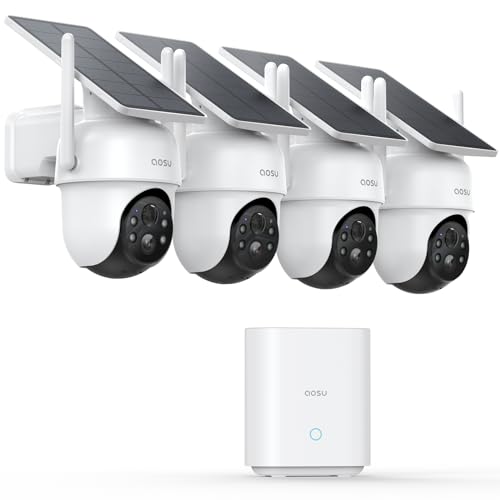
aosu D1 Classic 4-Cam Kit, Security Cameras Wireless Outdoor, Solar Powered | No Subscription Required, 32GB Built-in Storage, 360° Auto Tracking, 2K (3MP) Full-Color Night Vision, Easy Install
Check price on Amazon
CAMCAMP Home Security Camera System Wireless Outdoor WiFi 5G 24/7 Recording | Auto Human Tracking 355° View 2-Way Audio Color Night Vision Plug-in Powered 1080PHD Video Surveillance System 16CH NVR 500GB
Check price on Amazon
Rraycom 5G/2.4G Security Cameras Wireless Outdoor,4Pack Cameras System | 2K Battery Powered AI Motion Detection Siren Alarm, Color Night Vision, 2-Way Talk, Waterproof, Works w/Alexa, Cloud/SD
Check price on Amazon
ANNKE 3K Lite Wired Security Camera System Outdoor, 8x 2MP Cameras, 1TB HDD | AI Human/Vehicle Detection, 8CH H.265+ Surveillance DVR and IP67-Rated Home CCTV Camera, IR Night Vision, 24/7 Recording
Check price on AmazonHow to Choose the Right System for Your Home
Every home is different. Use this checklist to narrow down your options:
- How many cameras do you need? Most homes need 2–4 cameras to cover entry points, driveway, backyard, and side gates. Larger properties may need 6–8. For a comprehensive setup, consider a 16-camera wireless surveillance system if you need full coverage.
- Where will you mount them? If you have outlets nearby, plug-in models are reliable. If not, battery or solar is the way to go. For hard-to-reach spots, a solar wireless security camera system with remote viewing eliminates recharging.
- Do you want professional monitoring? Some systems offer optional monitoring for a monthly fee. Others are self-monitored. If you want a service that alerts you to emergencies, look for a wireless monitored home security system.
- What is your budget? Entry-level systems start around $100–$200 per camera. Premium 4K systems with local storage run $300–$500 per camera. A complete 4-camera system typically costs $400–$1,000.
- Do you rent or own? Renters should choose battery-powered cameras that leave no permanent marks. Homeowners can use any type. For renters, a wireless security camera system for apartments is ideal.
- Do you need night vision? Yes, for 24/7 protection. Look for models with color night vision or strong IR. If your camera lacks built-in IR, you can add outdoor IR lights for security cameras.
- Do you want smart home integration? Many systems work with Alexa, Google Assistant, and IFTTT. Check compatibility before buying.
Installation Tips for Best Performance
Proper installation makes a huge difference in video quality and reliability. Follow these tips:
- Height matters: Mount cameras 8–10 feet high. Too low and they are easy to tamper with; too high and facial details are lost.
- Angle for identification: Position cameras so they capture faces, not just the tops of heads. A slight downward angle works best.
- Avoid backlight: Do not point cameras directly at the sun or bright lights. This causes glare and washes out the image.
- Test Wi-Fi before mounting: Bring the camera to the intended location and check the signal strength in the app. If it is weak, move the camera or add a Wi-Fi extender.
- Secure the camera: Use security screws or mounts that require special tools. This deters theft. For added security, consider a wireless hidden outdoor security camera that blends into the environment.
- Weatherproof connections: If using plug-in models, ensure all connections are protected from rain. Use drip loops and outdoor-rated extension cords.
- Regular maintenance: Clean lenses monthly, check batteries, and review footage to ensure cameras are working. For more, see our camera care and maintenance hub.
Frequently Asked Questions
Do wireless outdoor cameras need Wi-Fi?
Most wireless cameras connect to your home Wi-Fi network to stream video and send notifications. However, some models can record locally to a microSD card without Wi-Fi and only need it for remote viewing. If you have no Wi-Fi, look for security cameras with cellular service or wireless security cameras that don't need internet.
How long do wireless camera batteries last?
Battery life depends on usage, motion events, and temperature. Most cameras last 1–6 months on a charge. Solar models can run indefinitely with adequate sunlight. If you want to minimize recharging, add small solar panels for security cameras.
Can I view my cameras from my phone?
Yes. Virtually all modern wireless cameras have a smartphone app for live viewing, playback, and notifications. You can see your cameras from anywhere with an internet connection. For more details, see security cameras that hook up to your phone.
Are wireless cameras secure?
Reputable brands use encryption and secure cloud servers. To maximize security, use strong passwords, enable two-factor authentication, and keep firmware updated. Avoid cheap no-name cameras that may lack security features. If you are concerned about privacy, choose a system with local storage and no cloud dependency, such as wireless security cameras with storage.
What is the best wireless outdoor camera system for home?
There is no single "best" system — it depends on your needs. For most homeowners, systems like Arlo, Ring, Eufy, and Reolink offer excellent balance of price, features, and reliability. Consider resolution, power source, storage, and budget. For a full comparison, see our camera shopping and reviews hub.
Can I mix different brands of cameras?
Generally, no. Most systems require all cameras to be from the same brand to work with the same app and base station. However, you can run multiple systems side by side if needed. For simplicity, stick with one ecosystem.
Do wireless cameras work in cold weather?
Most quality cameras are rated for temperatures as low as -4°F (-20°C). Battery life may decrease in extreme cold, but the camera will still function. Check the operating temperature range before buying if you live in a harsh climate.
How many cameras do I need for my home?
A typical single-family home needs 2–4 cameras: one at the front door, one covering the driveway, one in the backyard, and one for side access. Larger homes or those with multiple entry points may need 6–8. Walk your property and identify blind spots. For professional-grade coverage, consider a commercial security surveillance system.
Ready to Protect Your Home?
Browse our recommended wireless outdoor camera systems above. Whether you need a single camera or a full home setup, there is a system that fits your budget and needs.
See Recommended SystemsRelated Topics
Explore more guides to build a complete home security setup:
- Wireless outdoor home security camera system — Complete systems for full property coverage.
- Outdoor use wireless security cameras for home — Weatherproof cameras built for the elements.
- Wireless security cameras for home use — General buying guide for home security.
- Home security camera system wireless outdoor — Systems designed specifically for outdoor use.
- Outdoor wireless security cameras with Wi-Fi — Wi-Fi connected cameras for remote viewing.
- Wireless security cameras for outside home — Cameras designed for exterior walls and roofs.
- Outdoor use wireless home security cameras — Rugged cameras for year-round outdoor use.
- Security cameras I can see on my phone — Remote viewing from anywhere.
- Most user-friendly security camera system — Easy setup and intuitive apps.
- Wireless home security cameras with recording — Cameras that record and store footage.