
Outdoor Video Surveillance Cameras for Home Security
Everything you need to know before buying an outdoor security camera: resolution, night vision, weatherproofing, storage options, and smart features that protect your home around the clock.
View Recommended CamerasWhy Outdoor Surveillance Matters: Your home's exterior is the first line of defense against intruders, package thieves, and vandalism. A well-placed outdoor video surveillance camera doesn't just record evidence — it actively deters crime. Studies consistently show that visible cameras reduce burglary attempts. But with hundreds of models flooding the market, choosing the right one requires understanding a few critical specifications. This guide walks you through every decision point, from resolution and night vision to power source and storage, so you can invest confidently.
What to Look for in an Outdoor Security Camera
Before comparing brands and prices, you need to understand the core specifications that determine whether a camera will actually perform when it matters most. Outdoor environments are unforgiving — rain, dust, extreme temperatures, and darkness all test a camera's limits. The most important factors are resolution, night vision capability, weatherproof rating, field of view, and power source. Each one affects how much detail you capture and how reliably the system operates over time.
Resolution is measured in megapixels or video quality tiers. A 1080p camera captures adequate detail for identifying a person at close range, but if you need to read a license plate or recognize a face from across the street, 2K or 4K resolution is worth the investment. Most modern outdoor cameras now offer at least 2K, and prices have dropped significantly — you can find capable 2K models starting around $40–$80, while premium 4K systems with advanced AI detection typically range from $150–$400 per camera.
Night vision is equally critical. Infrared (IR) LEDs provide black-and-white footage in complete darkness, while color night vision — found on cameras with larger sensors and spotlights — can capture color detail at night. If your camera will be mounted in an area with ambient light (street lamps, porch lights), color night vision offers a significant advantage. For truly dark rural areas, IR range matters more; look for cameras rated for at least 30 feet of night vision range.
Weatherproofing is non-negotiable for outdoor installations. Look for an IP65 or IP66 rating at minimum, which ensures protection against dust and water spray. IP67 offers even better resistance to heavy rain and temporary submersion. Without proper sealing, moisture will eventually corrode internal components and fog the lens. If you live in an area with extreme heat or cold, check the camera's operating temperature range — most quality cameras handle -4°F to 122°F (-20°C to 50°C), but cheaper models may fail in extreme conditions. When planning your installation, read our guide on where to install security cameras outdoors to maximize coverage and minimize environmental exposure.
Resolution & Clarity
1080p is the minimum for home use. 2K (2560×1440) provides sharper detail for identifying faces and license plates. 4K delivers the highest level of forensic detail but requires more storage and bandwidth.
Night Vision Range
IR night vision typically ranges from 20–100 feet. Color night vision works best with some ambient light. Look for cameras with IR cut filters and smart IR to avoid overexposure at close range.
Weather Resistance
IP65 or higher is essential. IP66 handles heavy rain, IP67 tolerates brief submersion. Metal housings dissipate heat better than plastic but cost more.
Field of View
Most outdoor cameras offer 90°–130° horizontal FOV. Wider angles cover more area but reduce pixel density per foot. A 110° FOV is a solid balance for most homes.
Power Source
Wired cameras are reliable but require drilling. Battery-powered models offer flexibility but need recharging. Solar panels extend battery life significantly in sunny climates.
Storage Options
Local storage (SD card, NVR) has no monthly fees. Cloud storage offers off-site backup but usually requires a subscription. Many cameras support both simultaneously.
Wired vs Wireless Outdoor Cameras: Which Is Right for You?
The wired versus wireless decision is the most consequential choice you'll make. Wired cameras (PoE or traditional analog) offer uninterrupted power, stable video transmission, and typically higher resolution without the need to recharge batteries. They're ideal for permanent installations where you can run cables through walls or attics. Wireless cameras (Wi-Fi or cellular) are easier to install and can be placed almost anywhere, but they depend on battery life and signal strength. Battery-powered models typically last one to six months per charge, depending on usage and weather.
If you're renting or simply don't want to drill holes, wireless is the practical choice. Modern wireless security cameras for home outdoor use have improved dramatically — many now offer 2K resolution, AI person detection, and solar charging options that eliminate battery anxiety. For those who want the best of both worlds, hybrid wired and wireless security camera systems let you mix and match: wired cameras for critical entry points and wireless for hard-to-reach areas.
One common misconception is that wireless cameras need Wi-Fi to function. In reality, some models record locally to an SD card and only need Wi-Fi for remote viewing. If your Wi-Fi doesn't reach your backyard, consider a camera that supports wireless security cameras that don't need internet for recording — you can still access footage by removing the SD card. Alternatively, a wireless security camera system with a recorder uses a dedicated base station that creates its own network, eliminating Wi-Fi dead zones entirely.
| Feature | Wired Cameras | Wireless Cameras |
|---|---|---|
| Installation | Requires drilling and cable routing | DIY-friendly, no cables needed |
| Power | Continuous, no recharging | Battery or solar; needs periodic recharge |
| Reliability | Very stable, no signal loss | Depends on Wi-Fi strength and battery |
| Resolution | Up to 4K and beyond | Typically 1080p–2K, some 4K |
| Price Range | $50–$300 per camera | $40–$250 per camera |
| Best For | Permanent, high-security installations | Renters, flexible placement, quick setup |
Smart Features That Make a Difference
Modern outdoor cameras are far more than passive recorders. Motion detection with AI filtering can distinguish between people, vehicles, animals, and general motion — reducing false alerts from swaying trees or passing cars. Two-way audio lets you communicate with visitors or warn off intruders through your phone. Spotlights and sirens add an active deterrent layer; a camera with a built-in spotlight can startle a would-be thief before they even approach your door.
For comprehensive coverage, consider outdoor security cameras with spotlights that illuminate your driveway or backyard while recording. If you want alerts sent directly to your phone, look for security cameras that alert your phone with customizable push notifications. And if you prefer not to pay monthly fees, Wi-Fi cameras that don't need a subscription offer local storage and basic remote access without recurring costs.
Integration with smart home ecosystems is another consideration. Cameras that work with Amazon Alexa, Google Assistant, or Apple HomeKit can display live feeds on smart displays and trigger routines. A video doorbell and security camera bundle often provides better value than buying separate devices, and bundles typically share the same app for unified control. If you have existing smart lighting, a LED bulb light camera with 360-degree Wi-Fi can screw into an existing light socket and provide panoramic coverage without additional wiring.
💡 Pro Tip: Look for cameras with person detection rather than simple motion detection. Person detection uses AI to ignore moving branches, shadows, and small animals, so you only get alerts when it truly matters. This feature alone can reduce false notifications by 80% or more.
Storage and Connectivity: Local vs Cloud
Where your footage lives matters as much as the camera itself. Local storage — via microSD card or a network video recorder (NVR) — keeps your data in your home and eliminates monthly fees. A 128GB microSD card can store roughly 1–2 weeks of continuous 1080p footage, depending on compression. For longer retention, an NVR with a dedicated hard drive offers weeks or months of storage. Cloud storage provides off-site backup in case your camera is stolen or damaged, but most brands charge $3–$15 per month per camera for extended history.
For a balanced approach, many cameras support both local and cloud recording simultaneously. If you're concerned about internet outages, a wireless security camera with storage that records locally ensures you never miss a moment — even when the Wi-Fi goes down. If you already have a large collection of footage and want centralized management, a digital video recorder with hard drive lets you archive and review footage from multiple cameras in one place.
Connectivity also affects remote viewing. Most outdoor cameras connect via 2.4GHz Wi-Fi, which has better range than 5GHz but lower bandwidth. For outdoor cameras with live feed to phone, ensure your Wi-Fi signal reaches the camera location. If not, consider a mesh Wi-Fi system or a camera that supports cellular connectivity. A security camera with cellular service uses a SIM card to transmit alerts and video without relying on your home internet — ideal for remote properties or areas with unreliable broadband.
Installation Tips for Optimal Coverage
Placement determines whether your camera captures a useful image or a useless angle of the sky. Mount cameras 8–10 feet above the ground, angled slightly downward. This height prevents easy tampering while still capturing facial detail. Cover entry points first: front door, back door, driveway, and any ground-floor windows. For driveways, position the camera to capture both the vehicle and the person approaching it — a license plate is less useful than a clear face.
If you're not comfortable running cables or mounting hardware, professional installation is an option. Our guide to professional home security camera installation covers what to expect and how to prepare. For renters or those who want the simplest possible setup, a outdoor camera that screws into a light socket requires no drilling and no wiring — it uses your existing light fixture for power. Similarly, a light bulb security camera wireless outdoor model can be installed in minutes and provides both illumination and surveillance.
Don't forget about coverage gaps. A single camera rarely covers everything. For a typical single-family home, three to four cameras provide comprehensive coverage: one at the front door, one covering the driveway, one at the back door, and one covering a side yard or garage. If you need more extensive coverage, a 16-camera wireless surveillance system can monitor large properties, though most homes will find 4–8 cameras sufficient.
Best Outdoor Video Surveillance Cameras for Home Security
⚠️ AFFILIATE DISCLOSURE: This website contains affiliate links. As an affiliate Associate, we earn from qualifying purchases. If you make a purchase through these links, we may receive a small commission at no additional cost to you. Read our full affiliate policy.

GMK 4 Pack Cameras System, Security Cameras Wireless Outdoor, 2K Video | VicoHome Cam, Motion Detect, Color Night Vision, 2-Way Talk, IP65 Waterproof, Indoor&Outdoor, 2.4GHz WiFi, SD/Cloud Storage
Check price on Amazon
2026 Upgraded 2K Security Cameras Wireless Outdoor, Free Cloud Storage, 1-6 Months Battery Life, Waterproof, 2-Way Talk, AI Motion Detection Spotlight Siren Alarm Cameras for Home Security
Check price on Amazon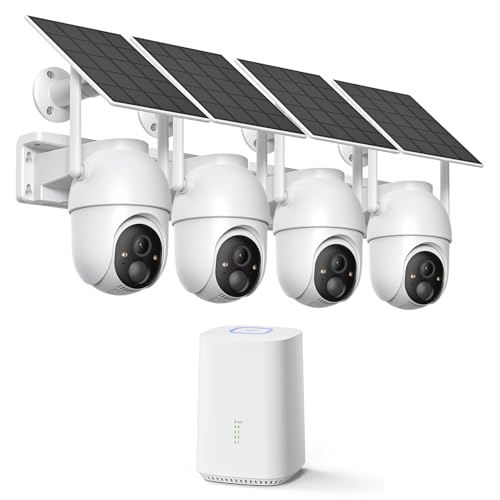
ELYSOO 2K/4MP Home Security Camera System, 2.4G & 5GHz Wi-Fi Connected | Local Storage Included, Solar Security Cameras Wireless Outdoor, IP65, Instant APP Alerts, Color Night Vision
Check price on Amazon
TP-Link Tapo 1080P Outdoor Wired Pan/Tilt Security Camera, C500 | 360° View, Motion Tracking, Works with Alexa & Google Home, Night Vision, Free AI Detection, Cloud & SD Card Storage
Check price on Amazon
Security Cameras Wireless Outdoor, 2K Indoor Cameras for Home Security Battery Powered, AI Motion Detection, Color Night Vision, 2-Way Talk, Spotlight Siren Alarm, Cloud & SD Storage-Jet Black Camera
Check price on Amazon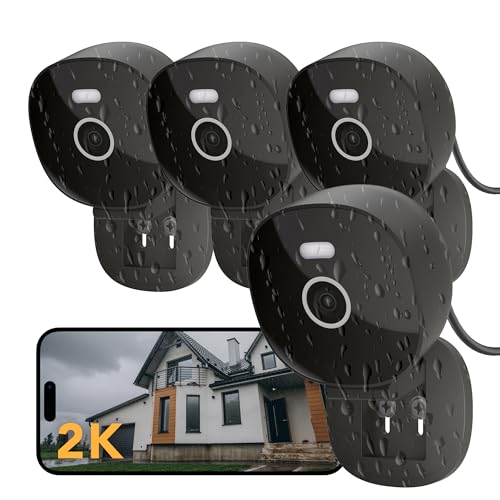
FAMVIVA 2K Wired Security Camera, Indoor/Outdoor for Home, Pet, Baby, Nanny, IP65 Waterproof Color Night Vision, White Light & Siren, Recording, Motion Detection, Works with Alexa,Pulg in, Black-4P
Check price on Amazon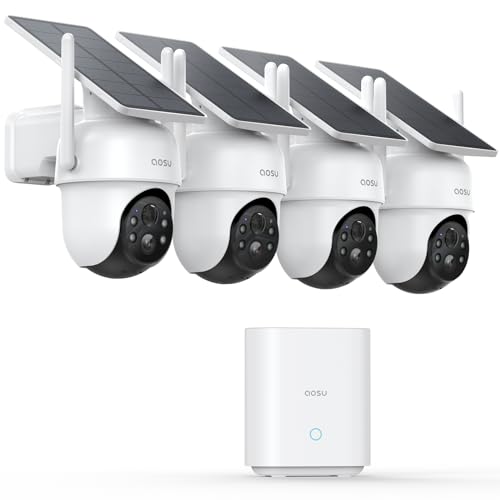
aosu D1 Classic 4-Cam Kit, Security Cameras Wireless Outdoor, Solar Powered | No Subscription Required, 32GB Built-in Storage, 360° Auto Tracking, 2K (3MP) Full-Color Night Vision, Easy Install
Check price on Amazon
SEHMUA 2K Solar Security Cameras Wireless Outdoor, 2 Pack 360° View Pan/Tilt WiFi Security Camera Outside with Color Night Vision,Easy to Install, PIR Alarm, 2-Way Audio
Check price on AmazonFrequently Asked Questions
Can I install an outdoor security camera without professional help?
Absolutely. Most wireless cameras are designed for DIY installation and come with mounting hardware and a mobile app that guides you through setup. Battery-powered and solar models require no wiring at all — just mount and connect to Wi-Fi. Wired cameras are more involved since you need to run cables, but even those are manageable with basic tools. If you're unsure, our guide on DIY wireless home security systems with cameras walks you through the process step by step.
How long do wireless outdoor camera batteries last?
Battery life varies widely based on usage, temperature, and camera settings. Most quality wireless cameras last 1–3 months per charge with average use (10–20 events per day). In cold weather, battery life decreases by 20–40%. To extend battery life, reduce motion sensitivity, use activity zones, and consider a small solar panel for security cameras — a 3-watt panel can keep a camera charged indefinitely in sunny climates.
Do outdoor security cameras work without Wi-Fi?
Yes. Many cameras record to a local microSD card and don't require Wi-Fi for basic recording. You can also use a wireless security camera system with a recorder that creates its own dedicated network. For remote viewing without home internet, a security camera with cellular service uses a mobile data plan. If you want to use an old phone as a camera, our guide on using an old cell phone for a security camera covers that option too.
What's the best resolution for an outdoor security camera?
For most homes, 2K (2560×1440) offers the best balance of detail, storage efficiency, and price. 1080p is acceptable for close-range identification but struggles with license plates or faces at distance. 4K provides the highest detail but requires more storage and bandwidth. If you need to identify people at 30+ feet, invest in 4K. Otherwise, 2K is more than sufficient for typical residential use.
How many cameras do I need for my home?
Most single-family homes need 3–4 cameras: one at the front door, one covering the driveway, one at the back door, and one covering a side or garage area. Larger properties or homes with multiple entry points may need 6–8 cameras. Start with the most vulnerable areas and expand as needed. A wireless outdoor home security camera system makes it easy to add cameras later without running new cables.
Are outdoor cameras worth the investment?
Yes — for most homeowners, outdoor cameras pay for themselves in peace of mind and potential insurance discounts. Beyond deterring crime, they help monitor deliveries, keep an eye on pets or children playing outside, and provide evidence if an incident occurs. A basic single-camera setup starts around $40, while a comprehensive 4-camera system with 2K resolution and local storage costs $200–$500. Compared to the cost of a break-in or stolen package, it's a small price for continuous protection.
Final Thoughts
Choosing the right outdoor video surveillance camera for your home comes down to understanding your specific needs: how much area you need to cover, whether you have power access, how much you're willing to spend, and whether you prefer local or cloud storage. Start with the entry points that matter most — front door, back door, and driveway — and choose a camera that balances resolution, night vision, and weatherproofing. Wireless models offer flexibility and easy installation; wired models provide reliability and higher resolutions. Many homeowners find that a hybrid approach works best.
Whichever direction you choose, prioritize cameras with person detection, solid night vision, and at least 2K resolution. These three features make the biggest difference in real-world performance. And if you're still exploring options, our guide to wireless outdoor camera systems for home covers additional configurations and setups that might fit your property. With the right camera in the right place, you gain not just footage, but genuine peace of mind.