
The Ultimate Guide to Solar Powered Security Cameras with SD Card
Secure your property with the power of the sun. Discover how a solar-powered security camera with an SD card offers a completely wire-free, subscription-free, and reliable surveillance solution.
SEE OUR TOP PICKSImagine a security system that never needs its batteries changed, doesn't require a nearby power outlet, and works even when your Wi-Fi goes down. This is the reality of a modern solar-powered security camera with an SD card. By combining a continuous solar power source with local, on-device storage, these devices offer an unparalleled level of autonomy and privacy. This guide will walk you through everything you need to know to choose the perfect system for your home or business.
Why Choose a Solar-Powered Camera with SD Card?
This combination of features addresses the biggest pain points of traditional security systems: power access and recurring fees. Here’s a closer look at the key benefits:
- Unmatched Autonomy: With a dedicated solar panel, the camera is constantly charged, eliminating the hassle of climbing ladders to swap batteries. This is ideal for remote or high-mounted locations. If you're comparing power options, you might also consider a battery-operated security camera with SD card, but solar offers a "set and forget" advantage.
- Zero Monthly Fees: The integrated SD card provides local storage for your video recordings. You get complete access to your footage without being locked into a costly cloud subscription plan. This is perfect for those seeking security cameras without a monthly fee.
- Total Wireless Freedom: No power cords, no network cables. This makes for a clean, easy installation in places where running wires is difficult or impossible. If you need a camera in an area without an electrical supply, this is the definitive solution for a security camera that doesn't need Wi-Fi to record.
- Reliable Off-Grid Operation: Many models are designed to work completely independently of the internet. They record to the SD card continuously or on motion, providing a robust solution for security cameras that do not require internet to function.
- Privacy and Control: Your footage is stored physically on the device, not on a third-party server. You retain full ownership and control of your video data.
Key Features to Look For
When evaluating different models, pay close attention to these critical specifications to ensure you get a system that meets your needs.
- Solar Panel Efficiency: A larger, high-efficiency panel will ensure the camera stays charged even during shorter winter days or overcast weather. The capacity of the integrated battery is equally important for storing that energy overnight.
- Video Resolution: Look for at least 1080p Full HD. For greater detail, such as identifying a license plate or a face, consider a 2K or 4K model. Clarity is crucial, especially when paired with night vision capabilities.
- SD Card Support & Capacity: This is your storage hub. Most cameras support microSD cards up to 128GB or 256GB. A higher capacity card means you can store more days (or even weeks) of footage before it overwrites the oldest files.
- Local vs. Cloud Storage: While the SD card is the primary storage, many cameras offer optional cloud storage as a backup or for extra features. Ensure the camera's core functions (recording, live view) work without the cloud if you want to avoid fees.
- Motion Detection & Alerts: Advanced AI-powered motion detection can differentiate between people, animals, and vehicles, reducing false alerts. You'll want a security camera with motion notification that sends smart alerts to your phone.
- Durability and Weatherproofing: An outdoor camera needs to withstand rain, dust, and extreme temperatures. Look for an IP65 or IP66 rating to ensure it's built for the elements. A solar-powered outdoor security camera is designed for this.
Recommended Solar Security Cameras
⚠️ AFFILIATE DISCLOSURE: This website contains affiliate links. As an affiliate Associate, we earn from qualifying purchases. If you make a purchase through these links, we may receive a small commission at no additional cost to you. Read our full affiliate policy.

SEHMUA 2K Solar Security Cameras Wireless Outdoor, 2 Pack 360° View Pan/Tilt WiFi Security Camera Outside with Color Night Vision,Easy to Install, PIR Alarm, 2-Way Audio
Check price on Amazon
Solar Security Cameras Wireless Outdoor, 2K Pan/Tilt 360° View Solar/Battery Powered WiFi Cameras for Home Security with AI Motion Detection, Spotlight, 2-Way Audio, Siren, IP65, SD/Cloud Storage
Check price on Amazon
Fazoxo 2K Security Camera Wireless Outdoor, WiFi Cameras for Home Security | Solar Powered,Motion Detection,Color Night Vision(Spotlight),Instant Alert,2-Way Audio,Siren&SD/Cloud Storage,IP65,2.4GHz
Check price on Amazon
SEHMUA 4G LTE Cellular Solar Security Camera Wireless Outdoor, No Wi-Fi Solar Powered Camera, 360° Live View, 2K Color Night Vision, PIR Motion Sensor, Two-Way Talk, Built-in SIM Card
Check price on Amazon
GALAYOU Solar Camera Outdoor Wireless for Home Security 2.4GWiFi, R6 1Pack | 2K Cameras for Home Security/Garage/Farm/Outside Surveillance, Detachable Solar Panel, Color Night Vision, SD/Paid Cloud
Check price on Amazon
aosu Solar Camera Outdoor Wireless for Home Surveillance,Fixed Solar Panel | 360° Coverage,Smart Tracking,2K (3 MP) Color Night Vision,2-Way Talk,Supports microSD/Cloud,2.4GHz WiFi only,Easy Setup
Check price on Amazon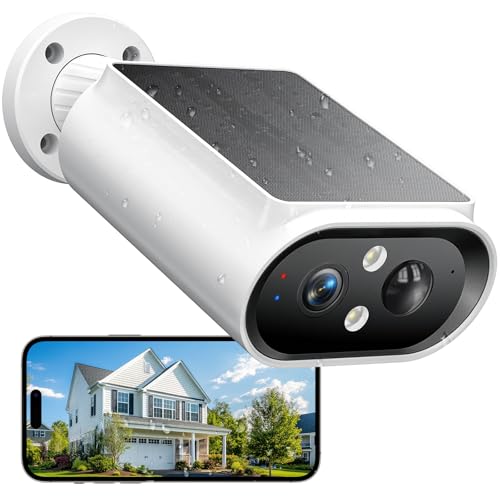
AlkiVision Solar Security Cameras Wireless Outdoor - 2K Night Color Vision Cameras for Home Security, AI Motion Detection, 360° View, Spotlight, 2-Way Audio, Siren, IP67 Waterproof, SD/Cloud Storage
Check price on Amazon
Hiseeu 2K 4MP Solar Security Cameras Wireless Outdoor, 2.4G/5G Home WiFi | Solar/Battery Powered, PIR/AI Motion Detection, Waterproof, Color Night Vision, 2-Way Audio, Cloud/SD Storage, 2 Pack
Check price on AmazonInstallation and Setup Tips
One of the biggest advantages of these cameras is the straightforward installation. The process is often described as one of the easiest security camera systems to install.
Here's a quick overview:
- 1. Find the Optimal Location: The most critical step is finding a spot that has direct sunlight for several hours a day and a clear view of the area you want to monitor. Avoid locations shadowed by trees or buildings for most of the day.
- 2. Mount the Camera: Use the provided screws and anchors to securely mount the camera bracket to a wall, fence post, or tree.
- 3. Insert the SD Card: Before powering on, insert a compatible microSD card (check the camera's specs for type and max capacity).
- 4. Connect to the App: Download the manufacturer's app, and follow the on-screen instructions to connect the camera to your Wi-Fi network (if applicable) and pair it with your phone.
- 5. Adjust the Angle: Use the live view in the app to fine-tune the camera's angle and positioning for the best coverage. You may need help if it's a wireless outdoor security camera system that requires precise aiming.
Frequently Asked Questions
How long does the battery last on a solar camera?
The goal of a solar camera is to stay charged indefinitely. With adequate sunlight (a few hours of direct sun per day), the battery should remain topped off. In periods of extended bad weather, the battery can last for several days to a few weeks, depending on the camera's activity level.
Can I view the camera live if the internet is down?
No, live viewing from your phone requires an internet connection. However, the camera will continue to record to its SD card. This is a key feature, making it a reliable security camera that works without internet for recording purposes. You'll be able to review the footage once the connection is restored.
What is the best SD card for a security camera?
You should use a high-endurance microSD card specifically designed for continuous writing in security cameras. Brands like SanDisk, Samsung, and Lexar offer "High Endurance" or "Max Endurance" cards that are more reliable and last longer than standard cards.
Do I need a subscription to use a solar-powered SD card camera?
No. The primary benefit of this setup is that it functions fully without a subscription. You can access recorded footage directly from the SD card via the app. Cloud storage is usually optional and offers extra convenience like off-site backup. For more options, see our guide to security cameras without a subscription.