
Security Camera with Motion Notification
Get instant alerts the moment something happens. Learn how motion notification cameras work, what features matter, and how to choose the best one for your home or business.
VIEW RECOMMENDED CAMERASWhy Motion Notifications Matter for Your Security
A security camera with motion notification is more than just a recording device—it's an active part of your home or business defense system. Instead of passively storing footage that you might review hours or days later, these cameras proactively alert you the moment motion is detected. This real-time awareness can mean the difference between catching a potential intruder in the act and discovering a break-in after the fact.
Whether you're looking for a wireless security camera with motion detection for your living room or an outdoor security camera with night vision for your driveway, understanding how motion alerts work is essential. Modern systems can send push notifications to your smartphone, email alerts, or even trigger a loud siren—all within seconds of detecting movement.
In this guide, we'll break down everything you need to know about motion notification cameras, from the technology behind them to the key features that separate a good camera from a great one. By the end, you'll have the confidence to choose the perfect camera for your specific needs.
How Do Motion Notification Cameras Work?
At their core, motion notification cameras use one of three detection technologies: passive infrared (PIR), pixel-based motion detection, or a combination of both. Each has its strengths and weaknesses, and understanding them will help you make an informed decision.
Passive Infrared (PIR) Sensors
PIR sensors detect changes in infrared energy—essentially body heat. When a warm object (like a person or animal) moves across the sensor's field of view, it triggers an alert. This technology is highly effective at reducing false alarms caused by moving trees or shadows. Many outdoor security cameras with no subscription use PIR sensors because they're reliable and energy-efficient.
Pixel-Based Motion Detection
This method analyzes the video feed itself, looking for changes in pixels between frames. While it can detect motion from any source (including cars, animals, and even rain), it's more prone to false alerts. However, advances in AI and machine learning have made pixel-based detection much smarter, allowing cameras to distinguish between people, vehicles, and pets.
AI-Powered Detection
The latest generation of cameras combines both technologies with on-device AI. These cameras can differentiate between a person walking up your driveway and a raccoon rummaging through your trash. This level of intelligence is especially valuable if you want to avoid notification fatigue. For those who need reliable alerts without monthly fees, a security camera without a subscription that includes AI detection is an excellent choice.
Key Features to Look For in a Motion Notification Camera
Not all motion notification cameras are created equal. When comparing models, pay close attention to these critical features:
⚡ Instant Alerts
The best cameras send push notifications to your phone within 1–3 seconds of detection. Look for cameras that support customizable alert schedules and zones.
🎯 Smart Detection Zones
Define specific areas where motion triggers alerts, ignoring busy streets or swaying trees. This dramatically reduces false notifications.
🔔 Two-Way Audio
Speak to visitors or scare off intruders directly from your phone. A security camera with 2-way audio adds a powerful layer of interaction.
🌙 Night Vision
Motion detection is useless in the dark if your camera can't see. Choose a model with infrared or color night vision for 24/7 protection.
☁️ Local & Cloud Storage
Decide where your footage lives. Local storage (SD card or NVR) avoids monthly fees, while cloud storage offers off-site backup.
🔋 Power Options
Battery-powered, wired, or solar? Your choice affects installation flexibility and maintenance. Solar-powered security cameras are great for remote locations.
Best Security Cameras with Motion Notification
⚠️ AFFILIATE DISCLOSURE: This website contains affiliate links. As an affiliate Associate, we earn from qualifying purchases. If you make a purchase through these links, we may receive a small commission at no additional cost to you. Read our full affiliate policy.

Tapo 1080P Indoor Security Camera, Baby Monitor, Dog Camera, C101 | Motion Detection, 2-Way Audio, Siren, Night Vision, Cloud & SD Card Storage, Works w/Alexa & Google Home, Black
Check price on Amazon
Blink Mini 2K+ (newest model) – Plug-in Home & Pet Indoor Security Camera with 2K video resolution, night vision, enhanced audio, motion detection – 1 camera (Black)
Check price on Amazon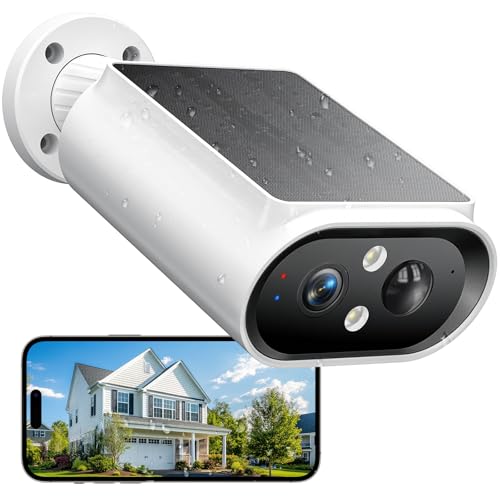
AlkiVision Solar Security Cameras Wireless Outdoor - 2K Night Color Vision Cameras for Home Security, AI Motion Detection, 360° View, Spotlight, 2-Way Audio, Siren, IP67 Waterproof, SD/Cloud Storage
Check price on Amazon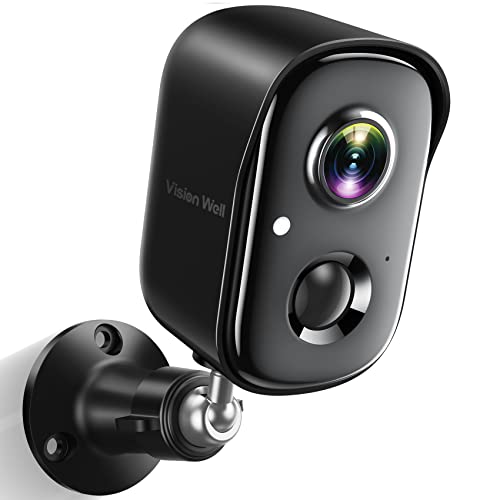
Security Cameras Wireless Outdoor, 2K Battery Powered AI Motion Detection Spotlight Siren Alarm WiFi Surveillance Indoor Home Camera, Color Night Vision, 2-Way Talk, Waterproof, Cloud/SD Storage
Check price on Amazon
Tapo 1080P Indoor Security Camera, Baby Monitor, Dog Camera, Wired, C100 | Motion Detection, 2-Way Audio, Siren, Night Vision, Cloud & SD Card Storage, Works w/Alexa & Google Home
Check price on Amazon
Security Cameras Wireless Outdoor, 2K Indoor Cameras for Home Security Battery Powered, AI Motion Detection, Color Night Vision, 2-Way Talk, Spotlight Siren Alarm, Cloud & SD Storage-Jet Black Camera
Check price on Amazon
VIMTAG 2.5K Cameras for Home Security Outdoor/Indoor, Color Night Vision Security Camera for Baby/Pet/Dog/Nanny, Light/Siren, Motion Detection, 2-Way Audio, Work with Alexa, Cloud/Card Storage, 2Pcs
Check price on Amazon
GALAYOU Solar Camera Outdoor Wireless for Home Security 2.4GWiFi, R6 1Pack | 2K Cameras for Home Security/Garage/Farm/Outside Surveillance, Detachable Solar Panel, Color Night Vision, SD/Paid Cloud
Check price on AmazonMotion Notification Camera Comparison
Here's a quick comparison of the different types of motion notification cameras available on the market today:
| Camera Type | Best For | Power Source | Price Range |
|---|---|---|---|
| Wireless Outdoor Camera | Renters, flexible installation | Battery / Solar | $100–$300 |
| Wired Outdoor Camera | Permanent installations, 24/7 recording | Hardwired | $150–$500 |
| Indoor Camera | Baby monitoring, pet watching | Plug-in | $30–$150 |
| Video Doorbell | Front door security, package detection | Battery / Wired | $100–$250 |
| Cellular Security Camera | Remote locations without Wi-Fi | Battery / Solar | $200–$600 |
How to Choose the Right Motion Notification Camera
With so many options available, narrowing down your choice can feel overwhelming. Here's a step-by-step approach to finding the perfect camera for your needs:
1. Identify Your Primary Use Case
Are you monitoring a front door, a backyard, a warehouse, or a parking lot? Each scenario has different requirements. For a front door, a video doorbell camera with motion alerts is ideal. For a large outdoor area, consider a wireless outdoor security camera with a wide field of view.
2. Decide on Power and Connectivity
If you have existing wiring, a wired camera offers reliable 24/7 recording. If not, battery or solar-powered options give you flexibility. For areas without Wi-Fi, a security camera with cellular connectivity is your best bet.
3. Choose Your Storage Method
Do you want to pay a monthly fee for cloud storage, or would you prefer local storage? A wireless security camera with local storage is a great no-subscription option. Many cameras support both, giving you the best of both worlds.
4. Evaluate Smart Features
Look for AI-powered person detection, customizable motion zones, and two-way audio. If you want a camera that integrates with your existing smart home ecosystem, check for compatibility with Alexa, Google Assistant, or Apple HomeKit.
5. Consider the Environment
For outdoor use, ensure the camera is weatherproof (IP65 or higher). If you need night vision, look for models with infrared LEDs or color night vision. A outdoor security camera with floodlights can both illuminate and deter intruders.
Installation and Setup Tips
Proper installation is key to getting the most out of your motion notification camera. Here are some practical tips:
- Position for optimal coverage: Mount cameras 8–10 feet high and angle them slightly downward to capture faces, not just the tops of heads.
- Avoid false triggers: Keep cameras away from direct sunlight, heat sources, and busy roads. Use motion zones to mask out irrelevant areas.
- Test your Wi-Fi signal: For wireless cameras, ensure a strong signal at the installation point. A weak signal can delay notifications.
- Secure your network: Use strong passwords and enable two-factor authentication on your camera app to prevent unauthorized access.
- Regular maintenance: Clean lenses and check batteries periodically. Refer to our camera repair guide for troubleshooting tips.
If you're installing a full system, consider the wireless security camera system installation cost to budget appropriately. For DIY enthusiasts, most modern cameras can be set up in under 30 minutes.
Frequently Asked Questions
Do motion notification cameras require a subscription?
Not necessarily. Many cameras offer free motion alerts and local storage without a subscription. However, cloud storage and advanced AI features often require a monthly plan. Look for a security camera without a subscription if you want to avoid recurring fees.
Can I get motion notifications without Wi-Fi?
Yes, some cameras use cellular networks to send alerts. A security camera that runs off cell phone towers is perfect for remote locations. Alternatively, a security camera that does not require Wi-Fi can store footage locally and send alerts via other means.
How do I reduce false motion alerts?
Use customizable motion zones, adjust sensitivity settings, and choose cameras with AI-powered person detection. Positioning your camera away from trees and roads also helps. Many wireless security cameras for home offer these features out of the box.
What's the best camera for outdoor motion alerts?
It depends on your needs. For a no-subscription option, consider a battery-operated outdoor security camera with no subscription. For comprehensive coverage, a wireless security camera outdoor with night vision and two-way audio is ideal.
Can motion alerts be sent to multiple phones?
Yes, most camera apps allow multiple users to receive notifications. This is especially useful for families or businesses where several people need to monitor activity. Check the app's user management features before purchasing.
Final Thoughts: Take Control of Your Security Today
A security camera with motion notification is one of the most effective ways to protect what matters most. By alerting you the moment something happens, these cameras give you the power to respond quickly—whether that means calling the police, warning off an intruder, or simply checking in on your pets.
When choosing a camera, focus on the features that matter most to you: reliable alerts, smart detection, storage options, and ease of use. Whether you need a cheap security camera for basic monitoring or a good security camera with advanced AI, there's a solution for every budget and need.
Ready to upgrade your security? Explore our recommended cameras above and take the first step toward peace of mind today.
Find Your Perfect Motion Notification Camera
Browse our top picks and compare features, prices, and reviews—all in one place.
VIEW RECOMMENDED CAMERAS