
Security Camera with Cellular: Complete Guide & Top Picks
Discover how cellular security cameras work, where they excel, and which models deliver reliable off-grid surveillance without relying on Wi-Fi or wired internet.
See Top RecommendationsWhy Cellular? A security camera with cellular connectivity uses a mobile network (4G LTE or 5G) to transmit alerts and video. This makes it ideal for remote locations, construction sites, farms, and any property where Wi-Fi or Ethernet is unavailable or unreliable.
What Is a Security Camera with Cellular Connectivity?
A security camera with cellular is a surveillance device that connects to the internet via a cellular network instead of Wi-Fi or a wired connection. It contains a SIM card slot (or built-in eSIM) and communicates directly with cell towers, just like a smartphone. This means you can place the camera virtually anywhere with cellular reception—no router, no Ethernet cable, and no technical networking knowledge required.
These cameras are particularly valuable for properties that lack traditional internet infrastructure. If you need a camera that operates completely independently of your home network, a security camera without WiFi is the right category to explore. For situations where you want the flexibility of cellular plus the option of local storage, many models also support a wireless security camera with local storage.
How Cellular Security Cameras Work
Understanding the technology helps you choose the right model for your needs. Here's the basic workflow:
- Capture: The camera lens and sensor record video, often in high definition (1080p, 2K, or 4K).
- Processing: On-device AI may detect motion, people, vehicles, or animals to reduce false alerts.
- Transmission: The camera uses its built-in cellular modem to send alerts, live views, and recordings over the mobile network.
- Storage: Footage can be stored locally (microSD card), in the cloud, or both, depending on the model.
- Access: You view and control the camera through a mobile app or web portal from anywhere in the world.
Some models are designed to run entirely off-grid using a solar panel and rechargeable battery. This combination—cellular plus solar—is the ultimate solution for remote surveillance. You can explore options like a solar-powered security camera with solar charger for a fully self-sustaining setup.
Key Features to Look For in a Cellular Security Camera
Not all cellular cameras are created equal. Here are the most important specifications to evaluate before buying:
1. Cellular Network Compatibility
Check which carriers and bands the camera supports. Most models work with major GSM/LTE networks, but coverage varies by region. Some cameras are carrier-locked, while others accept any SIM. If you need a camera that works with a specific provider, verify compatibility before purchasing.
2. Resolution and Video Quality
1080p is the baseline for clear identification. 2K and 4K models offer sharper detail but consume more data and storage. For most residential and small business applications, 1080p or 2K is sufficient. If you need the highest clarity for large areas, consider a best HD camera with cellular capabilities.
3. Power Source
Cellular cameras can be battery-powered, solar-powered, or hardwired. Battery models offer the most placement flexibility but require periodic charging. Solar models are ideal for permanent outdoor installations with adequate sunlight. For a truly wire-free experience, look for a battery-powered wireless outdoor camera that supports cellular.
4. Local vs. Cloud Storage
Local storage (microSD) avoids monthly fees and keeps footage private. Cloud storage provides off-site backup but usually requires a subscription. Many users prefer a security camera without subscription to avoid ongoing costs. If you want the best of both worlds, choose a model that supports both local and cloud storage.
5. Motion Detection and Alerts
Look for cameras with PIR (passive infrared) motion sensors and AI-powered person/vehicle detection. This reduces false alerts from moving trees or animals. Instant push notifications to your phone are essential—see our guide to a security camera that sends alerts to cell phone for more details.
6. Weather Resistance
For outdoor use, the camera should have an IP65 or higher rating. This ensures it withstands rain, dust, and extreme temperatures. If you're installing in an area with heavy rain or snow, consider a model specifically designed as an outdoor security camera with robust weatherproofing.
7. Two-Way Audio
Two-way audio lets you listen and speak through the camera, which is useful for warning off intruders or communicating with visitors. Many modern cellular cameras include this feature—see our list of security cameras with 2-way audio for options.
8. Night Vision
Infrared or color night vision is critical for 24/7 surveillance. Check the night vision range and whether it's black-and-white or full-color. For low-light environments, a home security camera with night vision is a must-have.
Pros and Cons of Cellular Security Cameras
✅ Advantages
- Works anywhere with cellular signal—no Wi-Fi needed
- Ideal for remote locations, construction sites, farms, and RVs
- Quick installation—no networking or cabling required
- Unaffected by local power outages (if battery/solar powered)
- Can be monitored from anywhere via mobile app
- No dependency on home internet reliability
❌ Disadvantages
- Requires a cellular data plan (monthly cost)
- Data usage can be high with constant streaming
- Cellular coverage may be limited in some rural areas
- Generally more expensive than Wi-Fi-only cameras
- Battery models need periodic recharging
Best Use Cases for Cellular Security Cameras
Cellular cameras shine in scenarios where traditional internet access is impractical or impossible:
- Remote Properties: Cabins, farms, and vacation homes without broadband.
- Construction Sites: Temporary surveillance where no infrastructure exists.
- Warehouses and Storage Yards: Large outdoor areas needing independent monitoring—see our guide to warehouse security.
- Parking Lots: Remote lots without power or network access—a parking lot camera with cellular is ideal.
- RVs and Boats: Mobile surveillance for vehicles and vessels.
- Backup Surveillance: A secondary camera that keeps working if your main internet goes down.
If you need a camera that operates completely independently of any internet connection—cellular or otherwise—consider a security camera that does not require internet. These typically record to a local SD card and can be accessed physically.
Ready to find the perfect cellular security camera for your property?
View Top Picks BelowRecommended Security Cameras with Cellular
⚠️ AFFILIATE DISCLOSURE: This website contains affiliate links. As an affiliate Associate, we earn from qualifying purchases. If you make a purchase through these links, we may receive a small commission at no additional cost to you. Read our full affiliate policy.

Lifetime Free Data & No Monthly Fee 4G LTE Solar Cellular Security Camera Outdoor Wireless,No WiFi Needed, 360° PTZ, 2K Full Color Night Vision, Human Tracking, 2-Way Audio, 32GB SD Card, IP66-White
Check price on Amazon
SEHMUA 4G LTE Cellular Solar Security Camera Wireless Outdoor, No Wi-Fi Solar Powered Camera, 360° Live View, 2K Color Night Vision, PIR Motion Sensor, Two-Way Talk, Built-in SIM Card
Check price on Amazon
eufy Security 4G LTE Cam S330, 4K Cellular Solar Security Cameras Wireless Outdoor, Pan and Tilt, 4G and Wi-Fi Duo-Mode, AI Tracking, with SIM Card and 32GB SD Card, No WiFi, No Problem
Check price on Amazon
Oculview 4G LTE Cellular Security Camera 2 Pack, Easy to Install, Off Grid Solar Powered, No WiFi Needed for Farm, Ranch, Jobsite, 2K Color Night Vision, 360° View, Built-in SIM Card - Black
Check price on Amazon
REOLINK 4K Solar Security Cameras Wireless Outdoor, 4G LTE Cellular Camera | Smart Auto Tracking & Pan Tilt without Blind Spots, Spotlight Color Night Vision, Local/Optional Cloud Storage, Easy Setup
Check price on Amazon
Tefrio Cellular Security Camera, 4G LTE Signal & Solar Powered for Outdoor | No WiFi Security Camera, Built-in SIM Card, Color Night Vision, Live View, 360° Full View, Smart PIR Detection, Instant Alert
Check price on Amazon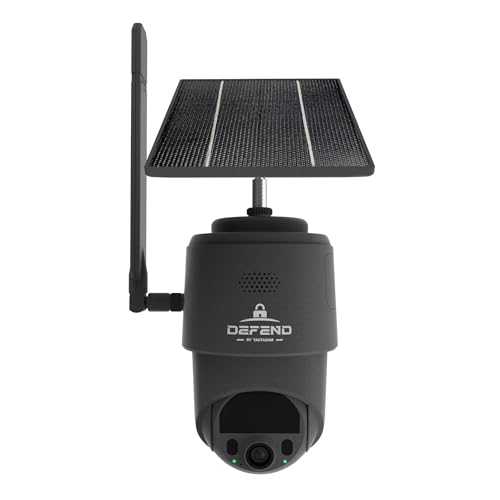
TACTACAM Defend 360 Cellular Security Camera, Solar Power, No WiFi | Rechargeable battery, 4K photo, 1080p video, 360° Pan/Tilt/Zoom,instant alerts, weatherproof, app control trail camera
Check price on Amazon
SANSCO 4G LTE Cellular Solar Security Camera, No WiFi, No Monthly Fee, 64GB | Lifetime Free Data, 2K Wireless Outdoor CCTV Surveillance, Color Night Vision, 2-Way Audio, PIR Detect, PTZ 360°, TUYA APP
Check price on AmazonHow to Choose the Right Cellular Security Camera
With so many options available, narrowing down your choice can be overwhelming. Follow this step-by-step approach to make the best decision:
Step 1: Determine Your Coverage Area
Is the camera for a small entryway, a large backyard, or an expansive commercial lot? For wide areas, you may need a camera with pan-tilt-zoom (PTZ) capabilities or multiple cameras. If you're covering a large outdoor space, an outdoor security camera with night vision and a wide field of view is essential.
Step 2: Check Cellular Coverage
Before buying, verify that your intended location has strong cellular reception from at least one major carrier. You can check coverage maps or use a temporary SIM in a phone to test signal strength. If coverage is weak, consider a camera with an external antenna or a different carrier.
Step 3: Decide on Power
Battery-powered cameras offer flexibility but require charging every few weeks or months (depending on usage). Solar-powered models are self-sustaining in sunny climates. Hardwired models provide continuous power but limit placement. For most users, a wireless outdoor security camera with cellular and battery is the best balance of convenience and reliability.
Step 4: Choose Storage and Subscription Preferences
If you want to avoid monthly fees, prioritize models with microSD local storage. If you need cloud backup for off-site security, check subscription costs and features. Many users prefer a security camera battery powered no subscription to keep ongoing costs at zero.
Step 5: Evaluate Smart Features
AI-powered detection, two-way audio, and mobile app integration are now standard in quality cellular cameras. Look for features that match your lifestyle—for example, a security camera with motion notification is essential if you want instant alerts when someone approaches.
Installation Tips for Cellular Security Cameras
Installing a cellular camera is generally straightforward, but these tips will help you get the best performance:
- Test Before Mounting: Activate the camera and SIM card indoors first to ensure everything works.
- Optimize Signal: Mount the camera where cellular reception is strongest—often higher up and away from metal structures.
- Angle for Coverage: Position the camera to cover entry points, driveways, or valuable assets. Avoid pointing directly at the sun.
- Secure the Camera: Use tamper-resistant mounts and consider a hard case for added protection in harsh environments.
- Configure Alerts: Set motion sensitivity and detection zones to avoid false alerts from passing cars or animals.
- Monitor Data Usage: If your plan has data caps, adjust video quality and alert frequency to stay within limits.
For cameras that need to operate completely off-grid, pairing a cellular camera with a solar-powered outdoor security camera setup ensures continuous operation without manual charging.
Maintaining Your Cellular Security Camera
To keep your camera running smoothly for years, follow these maintenance practices:
- Clean the Lens: Dust, dirt, and water spots can degrade image quality. Wipe the lens gently with a microfiber cloth.
- Check Power: For battery models, monitor charge levels and recharge or replace batteries as needed. Solar models should be checked for debris on the panel.
- Update Firmware: Manufacturers release firmware updates to improve security and performance. Enable auto-updates if available.
- Verify Connectivity: Periodically test the live view and alerts to ensure the camera is still communicating with the cellular network.
- Review Footage: Check recordings regularly to confirm the camera is capturing what you expect.
If your camera malfunctions, consult our camera repair guide for troubleshooting steps before contacting support.
Frequently Asked Questions About Cellular Security Cameras
Do cellular security cameras need Wi-Fi?
No. A cellular security camera connects to the internet via a mobile network (4G LTE or 5G), not Wi-Fi. This makes it ideal for locations without traditional internet access. However, you will need an active cellular data plan for the camera to send alerts and video.
How much does a cellular security camera cost?
Prices vary widely based on features. Basic 1080p cellular cameras start around $100–$200, while advanced 2K/4K models with AI detection and solar power can range from $250–$500 or more. Monthly data plans typically cost $10–$30 depending on data allowance.
Can I use a cellular security camera without a monthly fee?
Some cameras allow you to use a prepaid SIM or a low-cost data plan, but virtually all cellular cameras require some form of data plan to transmit video. If you want zero monthly fees, consider a security camera that does not require WiFi that records locally to an SD card.
Are cellular security cameras good for home use?
Yes, especially if your home has unreliable internet or you want a backup camera that works during outages. For general home security, a wireless home security camera with cellular backup is an excellent choice.
How long do batteries last in a cellular security camera?
Battery life depends on usage, video quality, and alert frequency. Typical battery-powered cellular cameras last from one to six months on a single charge. Solar-powered models can run indefinitely with adequate sunlight.
What happens if cellular coverage is poor?
If coverage is weak, the camera may struggle to send alerts or stream video. Solutions include mounting the camera higher, using an external antenna, or choosing a carrier with better coverage in your area. In extreme cases, a security camera that runs off cell phone towers with a high-gain antenna may be necessary.
Final Thoughts: Is a Cellular Security Camera Right for You?
A security camera with cellular connectivity is the ultimate solution for surveillance in locations where Wi-Fi or wired internet is unavailable, unreliable, or impractical. Whether you're protecting a remote cabin, a construction site, a farm, or simply want a backup camera that works when your home internet goes down, cellular cameras offer unmatched flexibility and independence.
When choosing a model, prioritize cellular compatibility, power source, storage options, and smart features like AI detection and two-way audio. With the right camera and a suitable data plan, you can enjoy peace of mind knowing your property is monitored 24/7—no matter where you are.
Ready to explore top-rated options? Check out our recommended security cameras above, and don't forget to review our guide to wireless security camera systems with cellular for multi-camera setups.