
Wireless Security Camera System with Cellular: The Ultimate Off-Grid Surveillance Guide
Discover how cellular-connected security cameras keep your property protected even without Wi-Fi or internet. Learn everything you need to choose, install, and maintain a reliable wireless system.
VIEW TOP RECOMMENDATIONSWhy Go Cellular? Traditional wireless security cameras depend on your home Wi-Fi network. If the internet goes down or you need coverage in a remote location, they simply stop working. A wireless security camera system with cellular uses a built-in 4G LTE or 5G SIM card to transmit footage and alerts directly to your phone — no router, no landline, no problem. This guide walks you through everything you need to know before buying.
What Is a Wireless Security Camera System with Cellular?
A wireless security camera system with cellular is a surveillance setup where each camera connects to the internet through a cellular network (4G LTE or 5G) instead of a traditional Wi-Fi router. Think of it as a smartphone for your property — it communicates independently over cell towers, which means it works virtually anywhere there is cellular coverage.
These systems are ideal for remote cabins, construction sites, farms, rental properties, and any location where running Ethernet cables or relying on Wi-Fi is impractical. Many models also support local storage via SD cards, so you can keep recording even if the cellular signal drops. If you need a camera that works completely independently, you may want to explore a security camera with cellular that offers similar standalone functionality.
Unlike a standard wireless security camera that requires a stable Wi-Fi connection, cellular models give you true location flexibility. You can place them in a barn, on a dock, or at a job site miles from the nearest router.
How Does Cellular Connectivity Work in Security Cameras?
Understanding the technology helps you make a smarter purchase. Here is the basic workflow:
- SIM Card & Data Plan: Each camera (or the system hub) contains a SIM card linked to a cellular data plan. This is what enables the camera to send video, images, and alerts over the mobile network.
- Motion Detection & Recording: When the camera detects motion, it wakes up, records a clip, and transmits it to the cloud or your phone app via the cellular connection.
- Cloud or Local Storage: Footage can be stored on a cloud server (often with a subscription) or locally on a microSD card inside the camera. Some systems support both.
- Remote Access: You view live feeds and recordings through a mobile app or web portal from anywhere in the world.
This architecture means the camera is not dependent on your home network. Even if your power or internet goes out, a battery-powered cellular camera with a charged battery will continue to operate. For situations where internet is completely unavailable, consider a security camera that does not require internet — though keep in mind that cellular cameras still need a cell signal.
Key Features to Look For
1. Cellular Bands and Carrier Compatibility
Not all cellular cameras support all carriers. Check that the camera works with major networks like AT&T, T-Mobile, or Verizon in your area. Some systems come with a pre-installed SIM and a data plan, while others require you to bring your own. A security camera with cellular service bundled in can simplify setup significantly.
2. Battery Life and Power Options
Most cellular cameras are battery-powered, which is what makes them truly wireless. Look for models with long battery life (months, not days) or support for solar charging. A solar-powered security camera with solar charger can keep your camera running indefinitely in sunny locations. If you prefer a pure battery solution, check out options for a battery-powered wireless outdoor camera.
3. Video Quality and Night Vision
1080p is the minimum these days; 2K and 4K models are increasingly common. Good night vision (infrared or color night vision) is essential for 24/7 protection. For more on this, see our guide to a home security camera with night vision.
4. Local Storage vs. Cloud Storage
Cloud storage is convenient but often requires a monthly fee. Local storage via microSD card (up to 256GB) lets you avoid subscriptions. Some users prefer a wireless security camera with local storage for privacy and cost savings. If you want to avoid recurring fees entirely, look for a security camera without subscription.
5. Motion Detection and Alerts
Advanced motion detection with person/vehicle recognition reduces false alerts. You want a camera that sends timely notifications to your phone. Learn more about a security camera with motion notification and how it can improve your situational awareness.
Pros and Cons of Cellular Security Cameras
✅ Advantages
- Works anywhere with cellular signal
- No Wi-Fi or router needed
- Unaffected by home internet outages
- Easy to install — truly wireless
- Ideal for remote locations and job sites
- Can be moved easily as needs change
❌ Disadvantages
- Requires a cellular data plan (monthly cost)
- Data limits can restrict streaming quality
- Battery life may require recharging
- Initial cost is often higher
- Signal strength depends on location
Cellular vs. Wi-Fi vs. Wired: Which Is Right for You?
| Feature | Cellular Camera | Wi-Fi Camera | Wired Camera |
|---|---|---|---|
| Internet Requirement | Cellular signal only | Wi-Fi network | Ethernet cable |
| Installation Difficulty | Very easy | Easy | Difficult |
| Monthly Cost | Data plan required | None (uses existing internet) | None |
| Reliability During Outages | High (independent) | Low | Medium |
| Best For | Remote areas, rentals, job sites | Homes with good Wi-Fi | Permanent business installations |
If you are still deciding between a Wi-Fi and cellular setup, our article on wireless security camera without Wi-Fi dives deeper into the differences. You might also find our guide to wireless security cameras without monthly fee helpful if you want to minimize ongoing costs.
Installation Tips for a Cellular Security Camera System
One of the biggest advantages of a cellular system is how easy it is to install. Here is a step-by-step overview:
- Step 1 — Check Cellular Signal: Before mounting anything, test the signal strength at your intended location using your phone. If the signal is weak, consider an external antenna or a different mounting spot.
- Step 2 — Activate Your SIM/Data Plan: Follow the manufacturer's instructions to activate the camera's cellular service. Some brands include a trial data plan.
- Step 3 — Mount the Camera: Use the included mounting hardware. For outdoor use, aim for a height of 8–10 feet and angle it slightly downward to capture faces.
- Step 4 — Configure Settings: Download the companion app, scan the QR code, and adjust motion zones, sensitivity, and notification preferences.
- Step 5 — Test Everything: Walk in front of the camera to trigger motion, verify alerts arrive on your phone, and check video quality day and night.
If you are installing multiple cameras, you may want to look into the overall wireless security camera system installation cost to budget appropriately. For outdoor-specific advice, see our guide on outdoor use wireless security camera.
Understanding Cellular Data Plans for Security Cameras
Data plans are the single most important ongoing cost of a cellular camera system. Here is what to expect:
- Plan Types: Most manufacturers offer tiered plans based on the amount of data and cloud storage. Entry-level plans may include 1GB of data per month, while premium plans offer unlimited data and longer video history.
- Typical Costs: Expect to pay $5–$15 per month per camera for a basic plan. Unlimited plans can range from $10–$30 per month per camera.
- Prepaid vs. Contract: Many brands offer prepaid annual plans that reduce the monthly cost. Avoid long-term contracts if you are unsure about the system.
- Data Usage: Live viewing uses more data than motion-triggered clips. If you have a data cap, set the camera to record short clips and avoid continuous live streaming.
Some systems are designed to work without any monthly fee if you use local storage only. Check out our list of wireless security cameras without monthly fee for options that minimize ongoing expenses.
Top Wireless Security Camera Systems with Cellular
⚠️ AFFILIATE DISCLOSURE: This website contains affiliate links. As an affiliate Associate, we earn from qualifying purchases. If you make a purchase through these links, we may receive a small commission at no additional cost to you. Read our full affiliate policy.

4G LTE Cellular Solar Security Cameras Wireless Outdoor, No WiFi Needed & 25W Solar Panel, 4 Cam Kit, 2K Color Night Vision, Human Tracking, 2-Way Talk, Ideal for Farm, Ranch, Jobsite, Vacation Home
Check price on Amazon
REOLINK 4K Solar Security Cameras Wireless Outdoor, 4G LTE Cellular Camera | Smart Auto Tracking & Pan Tilt without Blind Spots, Spotlight Color Night Vision, Local/Optional Cloud Storage, Easy Setup
Check price on Amazon
2K Security Camera System, 5GHz&2.4GHz WiFi Solar Wireless Cameras for Home Security, Wire-free Installation, AI Detection, Two-way Audio, Mobile alerts, SD/Cloud Storage, Color Night Vision, 4 Packs
Check price on Amazon
Hiseeu Solar Security Cameras Wireless Outdoor System, 8 Cam-Kit, Expandable to 10CH, No Monthly Fee, Solar-Powered, Home Security Cameras System with 4MP Color Night Vision, 2.4G & 5G WiFi, 1TB HDD
Check price on Amazon
SEHMUA 4G LTE Cellular Solar Security Camera Wireless Outdoor, No Wi-Fi Solar Powered Camera, 360° Live View, 2K Color Night Vision, PIR Motion Sensor, Two-Way Talk, Built-in SIM Card
Check price on Amazon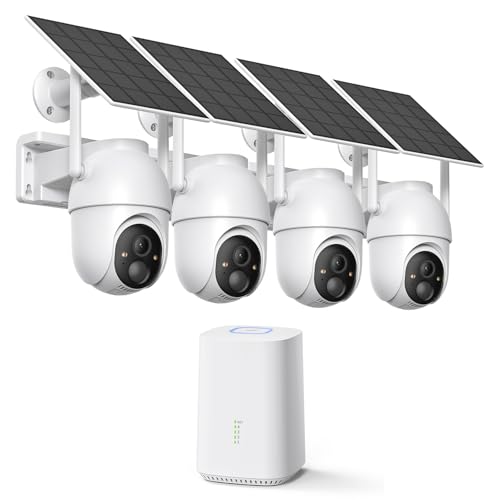
ELYSOO 2K/4MP Home Security Camera System, 2.4G & 5GHz Wi-Fi Connected | Local Storage Included, Solar Security Cameras Wireless Outdoor, IP65, Instant APP Alerts, Color Night Vision
Check price on Amazon
Solar Security Cameras Wireless Outdoor No Subscription with 128GB SD Home Hub, 4 Cam Kit 8 Views Dual-Len Solar Powered Camera Home Security System, 5GHz & 2.4GHz Wifi, 4MP Color Night Vision IP66
Check price on Amazon
CAMCAMP Home Security Camera System Wireless Outdoor WiFi 5G 24/7 Recording | Auto Human Tracking 355° View 2-Way Audio Color Night Vision Plug-in Powered 1080PHD Video Surveillance System 16CH NVR 500GB
Check price on AmazonMaintenance and Troubleshooting
To keep your cellular security camera system running smoothly, follow these maintenance tips:
- Keep the Lens Clean: Dust, rain, and spiderwebs can degrade image quality. Wipe the lens with a microfiber cloth every few weeks.
- Monitor Battery Levels: Set a reminder to check battery status in the app. Recharge or replace batteries before they die completely.
- Update Firmware: Manufacturers release firmware updates that improve security and performance. Enable auto-updates if available.
- Check Cellular Signal: Signal strength can change with weather or new construction. Periodically verify the camera is still connected.
- Review Storage: If using local storage, format the SD card periodically to prevent corruption. For cloud storage, clean out old footage you no longer need.
If you encounter hardware issues, our general camera repair guide may offer helpful diagnostic steps.
Best Use Cases for Cellular Security Cameras
Remote Properties and Cabins
If you own a vacation home or cabin in a rural area without internet, a cellular camera is often the only viable option. It lets you monitor for intruders, wildlife, or weather damage from anywhere.
Construction Sites and Warehouses
Construction sites rarely have Wi-Fi, but they are prime targets for theft. A cellular camera system provides immediate surveillance without waiting for infrastructure. See our warehouse security guide for more ideas.
Rental Properties
Landlords can use cellular cameras to monitor shared spaces, parking lots, or entryways without relying on a tenant's internet. A parking lot camera with cellular connectivity is a popular choice.
Agricultural and Farm Security
Farms and ranches often span large areas with no network coverage. Cellular cameras can be placed at gates, barns, and equipment sheds to deter theft and monitor livestock.
Event and Temporary Security
For temporary events, festivals, or job sites, cellular cameras can be deployed quickly and removed just as easily. No wiring, no internet setup, no hassle.
Frequently Asked Questions
Ready to Secure Your Property with Cellular Technology?
Explore our top-rated wireless security camera systems with cellular connectivity and find the perfect solution for your needs.
SHOP TOP PICKSFinal Thoughts
A wireless security camera system with cellular is one of the most versatile and reliable surveillance solutions available today. Whether you are protecting a remote cabin, a construction site, or a rental property, cellular cameras give you the freedom to monitor your assets without being tethered to Wi-Fi or Ethernet.
When choosing a system, focus on cellular coverage in your area, battery life, video quality, and data plan costs. With the right setup, you can enjoy peace of mind knowing your property is protected 24/7 — even when the internet goes down.
For more information on related topics, explore our guides on security camera without Wi-Fi, wireless outdoor security camera no subscription, and best wireless security cameras for home reviews.