
Wireless Security Camera with Local Storage: The Complete Guide
Discover how to protect your home without monthly fees. Learn everything about wireless security cameras that record directly to local storage — from SD cards to NVR systems — and find the perfect setup for your needs.
View Recommended CamerasWhy Local Storage Matters: A wireless security camera with local storage gives you full control over your footage without recurring subscription costs. Whether you choose a camera with a built-in SD card slot or a system with a dedicated NVR, local storage ensures your data stays private and accessible even when the internet goes down.
What Is a Wireless Security Camera with Local Storage?
A wireless security camera with local storage is a surveillance device that connects to your network wirelessly but saves recorded video directly to a physical storage medium on your property — such as a microSD card inside the camera, a USB drive, or a network video recorder (NVR) hard drive. Unlike cloud-based cameras that require a monthly subscription to access recordings, local storage cameras give you complete ownership of your footage. This makes them an excellent choice for homeowners who want reliable security without ongoing fees. If you're looking for a system that operates entirely without internet dependency, explore our guide on security cameras without internet.
These cameras are particularly popular among users who value privacy, have unreliable internet connections, or simply want to avoid the long-term cost of cloud storage plans. Many models also support remote viewing through a mobile app when connected to Wi-Fi, giving you the best of both worlds: local recording and remote access. For those who need a completely wire-free experience, a battery-operated outdoor security camera with no subscription paired with local storage is an ideal solution.
How Local Storage Works in Wireless Cameras
Understanding the storage mechanism helps you choose the right camera for your needs. Here are the most common local storage options:
Key Benefits of Local Storage Security Cameras
Choosing a wireless camera with local storage offers several advantages over cloud-only alternatives. Here's why more homeowners are making the switch:
💰 No Monthly Fees
The most obvious benefit: you buy the camera and storage once, and you're done. No subscription means no recurring costs, making it a budget-friendly option in the long run. Compare this to cloud plans that can cost $3–$15 per month per camera.
🔒 Complete Privacy
Your footage never leaves your property. With local storage, you're not trusting a third-party server with sensitive video of your home and family. This is a major advantage for privacy-conscious users.
📶 Works Without Internet
Many local storage cameras continue recording even when your internet goes down. The camera may lose remote access, but local recording continues uninterrupted. This is crucial for reliable security.
⚡ Faster Playback
Accessing footage from a local SD card or NVR is often faster than streaming from the cloud, especially when your internet connection is slow or congested.
🎯 No Bandwidth Limits
Cloud cameras consume upload bandwidth continuously. Local storage cameras don't tax your internet connection, which is important if you have data caps or limited bandwidth.
🔄 Full Ownership
You own the footage and the storage medium. There's no risk of a company changing its terms, increasing prices, or shutting down its cloud service and leaving you without access.
Pros and Cons: What to Consider
✅ Advantages
- No monthly or annual subscription fees
- Complete privacy — footage stays on your property
- Works during internet outages
- No bandwidth consumption for recording
- Full ownership and control of footage
- Easy to expand storage with larger cards or drives
- Often more affordable long-term
❌ Limitations
- Storage capacity is limited by the card or drive size
- Physical theft of camera means loss of footage
- Remote access may require additional setup
- No automatic off-site backup (unless you add it)
- Some cameras limit remote viewing features
- Manual retrieval needed for legal evidence
Best Wireless Security Cameras with Local Storage
⚠️ AFFILIATE DISCLOSURE: This website contains affiliate links. As an affiliate Associate, we earn from qualifying purchases. If you make a purchase through these links, we may receive a small commission at no additional cost to you. Read our full affiliate policy.

4MP Security Cameras Wireless Outdoor, No Subscription 128GB Local Storage, Solar Powered Cameras For Home Security, PTZ Auto Tracking, 4Cam-Kit, Color Night Vision Home Security Camera System,5G&2.4G
Check price on Amazon
Security Cameras Wireless Outdoor 5G& 2.4G, No Subscription, 2 Cam-Kit,4MP Solar Powered Home Security Cameras System With 360°PTZ,128GB Local Storage,Color Night Vision WiFi Cameras for Home Security
Check price on Amazon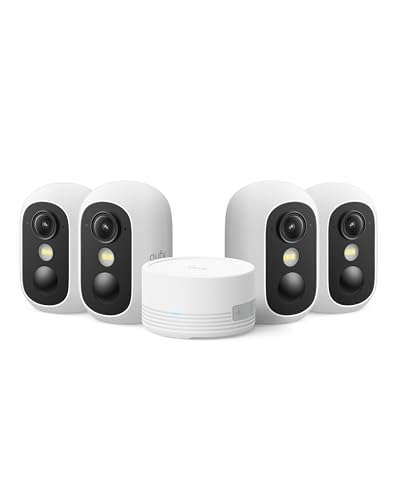
eufy Security eufyCam C35 4-Cam Kit, Wireless Indoor/Outdoor Camera | Magnetic Mount, Color Night Vision, Local Storage, No Monthly Fee, IP67, Facial Recognition, Solar Panel Compatible, White
Check price on Amazon
BOTSLAB 4K Security Camera Wireless Outdoor, 4 Cam-Kit, 32GB Local Storage | No Subscription, Full Color Night Vision, 360° PTZ, Solar Powered, AI Human&Motion Recognition, 2.4GHz WiFi
Check price on Amazon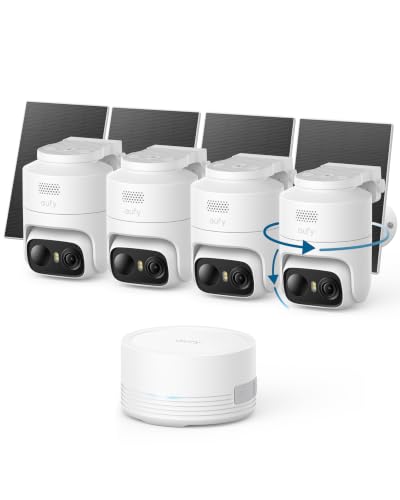
eufy Security eufyCam C37 4-Cam Kit, 360° Pan&Tilt Auto Tracking | Wireless Outdoor Camera, 2K Solar Powered, Human/Vehicle/Pet/Face AI Detection, No Subscription, Built-in 64GB Local Storage
Check price on Amazon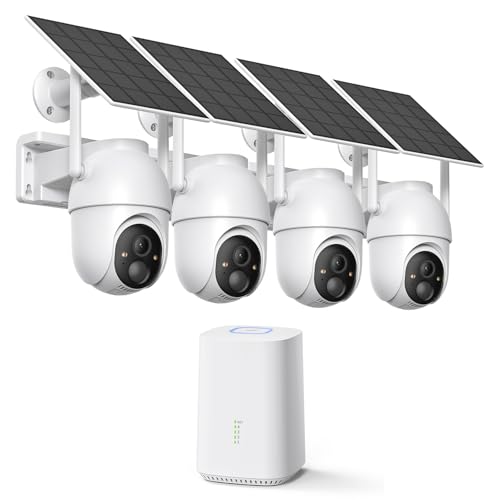
ELYSOO 2K/4MP Home Security Camera System, 2.4G & 5GHz Wi-Fi Connected | Local Storage Included, Solar Security Cameras Wireless Outdoor, IP65, Instant APP Alerts, Color Night Vision
Check price on Amazon
2026 Upgraded 2K Security Cameras Wireless Outdoor, Free Cloud Storage, 1-6 Months Battery Life, Waterproof, 2-Way Talk, AI Motion Detection Spotlight Siren Alarm Cameras for Home Security
Check price on AmazonHow to Choose the Right Camera
Not all wireless security cameras with local storage are created equal. Here are the key factors to evaluate before making a purchase:
| Feature | What to Look For | Why It Matters |
|---|---|---|
| Resolution | 1080p minimum; 2K or 4K preferred | Higher resolution means clearer details for identifying faces, license plates, and events. 4K uses more storage but provides superior evidence quality. |
| Storage Capacity | Supports 128GB+ microSD or 1TB+ NVR | Determines how many days of footage you can retain. A 256GB card at 1080p can hold roughly 2–4 weeks of continuous recording. |
| Night Vision | Infrared or color night vision up to 30ft+ | Most incidents happen at night. Good night vision is essential for 24/7 protection. Check our guide on home security cameras with night vision. |
| Power Source | Battery, solar, or wired | Battery cameras offer flexible placement; solar-powered models never need recharging. Wired cameras provide continuous power but require outlets. |
| Weather Resistance | IP65 or higher for outdoor use | Ensures the camera survives rain, snow, and extreme temperatures. Essential for any outdoor installation. |
| Motion Detection | PIR sensor + customizable zones | Reduces false alerts and saves storage space by recording only when needed. Look for AI-powered person/vehicle detection. |
| Two-Way Audio | Built-in microphone and speaker | Allows you to communicate with visitors, delivery drivers, or deter intruders remotely. See our security cameras with 2-way audio. |
| App & Remote Access | iOS/Android app with live view | Even with local storage, you'll want to check in remotely. Ensure the app is well-reviewed and offers reliable notifications. |
Installation and Setup Tips
Setting up a wireless security camera with local storage is generally straightforward, but a few best practices ensure optimal performance:
📍 Strategic Placement
Mount cameras 8–10 feet high, angled slightly downward. Cover entry points like doors, windows, and driveways. Avoid pointing directly at the sun or reflective surfaces. For outdoor use, consider a wireless outdoor security camera designed for the elements.
📶 Strong Wi-Fi Signal
Ensure your camera is within range of your router. Weak signals cause dropped connections and missed recordings. Consider a Wi-Fi extender or mesh system for larger properties. If Wi-Fi is unreliable, look at wireless security cameras without Wi-Fi.
💾 Storage Maintenance
Regularly check your SD card or NVR health. Most systems overwrite the oldest footage automatically, but cards can wear out over time. Use high-endurance microSD cards designed for continuous recording. Format cards every few months for optimal performance.
🔋 Power Management
For battery-powered cameras, adjust motion sensitivity and recording length to maximize battery life. Solar panels can keep cameras charged indefinitely in sunny locations. See our guide on solar-powered security cameras with solar chargers.
🔐 Secure Your System
Change default passwords, enable two-factor authentication on the app, and keep firmware updated. Even local storage cameras can be vulnerable if not properly secured. Use WPA3 encryption on your Wi-Fi network.
📱 Test Remote Access
Before relying on your system, test remote viewing from outside your home network. Ensure notifications work and that you can access recordings when away. This confirms your setup is truly protecting your home.
Local Storage vs. Cloud Storage: Which Is Better?
The choice between local and cloud storage depends on your priorities. Here's a direct comparison to help you decide:
| Factor | Local Storage | Cloud Storage |
|---|---|---|
| Monthly Cost | None (one-time purchase) | $3–$15+ per camera/month |
| Privacy | Complete — footage stays on-site | Footage stored on third-party servers |
| Internet Dependency | Works without internet | Requires internet to upload |
| Storage Capacity | Limited by card/drive size | Scalable with subscription tier |
| Theft Risk | Footage lost if device stolen | Footage safe off-site |
| Remote Access | Via app (when online) | Always available |
| Best For | Budget-conscious, privacy-focused users | Users wanting automatic off-site backup |
Frequently Asked Questions
How long can a wireless security camera record with local storage?
Recording duration depends on resolution, frame rate, and storage capacity. A 128GB microSD card at 1080p typically holds 1–2 weeks of continuous recording or 3–4 weeks with motion-activated recording. An NVR with a 2TB hard drive can store months of footage from multiple cameras. Most systems automatically overwrite the oldest files when storage is full.
Can I access my local storage camera remotely?
Yes, most modern wireless cameras with local storage offer remote access through a mobile app when the camera is connected to the internet via Wi-Fi. You can view live footage and playback recordings from anywhere. However, if the internet goes down, remote access is lost, but local recording continues.
What happens if someone steals my camera?
If a camera is stolen, the footage on its internal SD card is lost with it. To mitigate this risk, choose a camera that uploads clips to a secure cloud backup (even if only for events), or use an NVR system where the recorder is hidden securely inside your home. Some cameras also offer encrypted off-site backup as a secondary option.
Do I need Wi-Fi for a local storage security camera to work?
Not necessarily. Many wireless cameras can record to local storage without any internet connection — they simply won't offer remote viewing. For a completely offline solution, look for cameras that support direct Wi-Fi hotspot connection or models designed to work without internet. Learn more in our guide on security cameras that do not require internet.
What size microSD card should I use?
For most home users, a 128GB or 256GB high-endurance microSD card offers a good balance of capacity and cost. High-endurance cards are designed for continuous writing and last longer than standard cards. Avoid cards larger than what your camera officially supports, as compatibility issues can occur.
Are wireless cameras with local storage secure?
Yes, when properly configured. Use strong, unique passwords, enable two-factor authentication, keep firmware updated, and use WPA3 encryption on your Wi-Fi network. Local storage is actually more secure than cloud storage in terms of privacy since your footage never leaves your property. However, physical security of the camera and storage device is important.
Final Thoughts
A wireless security camera with local storage is an excellent choice for homeowners who want reliable, private, and cost-effective surveillance. By eliminating monthly fees and keeping your footage on-site, you gain full control over your security system without ongoing commitments. Whether you choose a simple camera with a microSD card or a comprehensive NVR system, the key is to match the solution to your specific needs — considering factors like resolution, night vision, power source, and storage capacity.
As you evaluate your options, remember that the best camera is one that fits your lifestyle and budget while providing the coverage you need. For those who want to explore more options, our guide on best wireless security cameras for home offers additional recommendations. And if you're looking for a system that works entirely without monthly fees, don't miss our article on wireless security cameras without monthly fees.
Investing in a quality local storage security camera today means peace of mind tomorrow — without the worry of subscription price hikes or service changes. Take your time, compare features, and choose the system that protects what matters most to you.