
Wireless Security Camera System Installation Cost
Everything you need to know about budgeting for a wireless security camera system. Compare DIY vs professional installation costs, understand hidden fees, and make an informed decision for your home or business.
Installing a wireless security camera system is one of the most effective ways to protect your property, but understanding the true wireless security camera system installation cost can be confusing. Prices vary widely based on whether you choose a DIY approach or hire a professional, the number of cameras you need, and the features you require.
This comprehensive guide breaks down every cost component so you can plan your budget with confidence. Whether you are looking for a simple wireless security camera setup for a small apartment or a full-scale wireless outdoor security camera system for a large property, we have you covered.
Average Installation Cost Breakdown
The total cost of installing a wireless security camera system depends on several factors. Here is a detailed breakdown of what you can expect to pay in today's market:
| Cost Component | DIY Installation | Professional Installation |
|---|---|---|
| Camera Equipment (4 cameras) | $200 – $800 | $200 – $800 |
| Installation Labor | $0 | $100 – $350 per camera |
| Mounting Hardware & Cables | $30 – $100 | Included in labor |
| DVR/NVR or Hub | $80 – $300 | $80 – $300 |
| Setup & Configuration | $0 | $50 – $150 |
| Total Estimated Cost | $310 – $1,200 | $630 – $2,400 |
For a typical home with four cameras, most homeowners spend between $500 and $1,500 for a complete wireless security camera system with DVR and audio. If you choose premium features like 4K resolution or advanced motion detection, expect to pay closer to the higher end of that range.
DIY vs Professional Installation: Which Is Right for You?
DIY Installation
Installing your own wireless security cameras can save you hundreds of dollars. Modern wireless security cameras with motion detection are designed for easy setup, often requiring nothing more than mounting the camera and connecting it to your Wi-Fi network.
- Pros: Significant cost savings, full control over placement, no scheduling hassles.
- Cons: Requires basic technical skills, potential for improper placement, no professional warranty on installation.
If you are comfortable using a drill and a smartphone app, DIY installation is a great option. Many brands like Arlo, Ring, and Eufy provide step-by-step guides that make the process straightforward.
Professional Installation
Hiring a professional ensures your system is installed correctly and optimally. This is especially important for outdoor security cameras with night vision that need precise aiming for maximum coverage.
- Pros: Expert placement, proper wiring, warranty on labor, time savings.
- Cons: Higher upfront cost, scheduling delays, less flexibility if you want to move cameras later.
Professional installation typically costs $100 to $350 per camera, depending on the complexity of the job. For a full system with 6-8 cameras, labor alone can range from $600 to $2,800.
Hidden Costs to Watch Out For
Many homeowners are surprised by additional expenses that are not included in the initial quote. Here are common hidden costs associated with wireless security camera system installation:
- Subscription Fees: Cloud storage plans can cost $3 to $15 per camera per month. If you want to avoid this, look for a wireless security camera with local storage or a security camera without subscription.
- Additional Cabling: While wireless cameras don't need video cables, they still require power. Running electrical outlets to camera locations can cost $150 to $500 per outlet.
- Network Upgrades: A reliable Wi-Fi network is essential. If your router is outdated, you may need a mesh system, costing $100 to $400.
- Mounting Accessories: Specialty mounts, poles, and vandal-proof housings can add $20 to $100 per camera.
- Permits: Some municipalities require permits for security camera installation, costing $50 to $200.
Pro Tip: To avoid monthly fees, consider a wireless security camera without monthly fee that records to a local SD card or NVR. This is a popular option for budget-conscious homeowners who still want reliable security.
Factors That Affect Installation Cost
Several variables can significantly impact your total installation cost. Understanding these factors helps you budget more accurately:
1. Number of Cameras
The more cameras you need, the higher the cost. A basic setup with 2 cameras might cost $300 to $600, while an 8-camera system can range from $1,200 to $3,500 installed.
2. Camera Features
Basic 1080p cameras are affordable, but premium features add up:
- 4K Resolution: Adds $50 – $150 per camera
- Night Vision: Standard on most models, but advanced color night vision costs more
- Two-Way Audio: Adds $20 – $50 per camera
- Pan-Tilt-Zoom (PTZ): Adds $100 – $300 per camera
- Solar Power: A solar-powered security camera with solar charger eliminates wiring but costs $50 – $100 more per unit
3. Property Size and Layout
Larger properties require more cameras and potentially signal boosters. A multi-story home or a warehouse security setup will cost more than a single-story house.
4. Installation Complexity
Hard-to-reach locations, masonry walls, and long cable runs increase labor costs. If you need cameras in a parking lot camera setup, expect higher installation fees due to distance and power requirements.
Best Wireless Security Cameras for Your Budget
⚠️ AFFILIATE DISCLOSURE: This website contains affiliate links. As an affiliate Associate, we earn from qualifying purchases. If you make a purchase through these links, we may receive a small commission at no additional cost to you. Read our full affiliate policy.

2K Security Camera System, 5GHz&2.4GHz WiFi Solar Wireless Cameras for Home Security, Wire-free Installation, AI Detection, Two-way Audio, Mobile alerts, SD/Cloud Storage, Color Night Vision, 4 Packs
Check price on Amazon
4CH Wired Security Camera System, AIWIXEN 4X 1080P Cam, DVR with 512GB HDD | Surveillance Cameras with Human Vehicle Detection, IP68 Waterproof, 24-7 Recording, Remote Access, Home Security CCTV Outdoor
Check price on Amazon
GMK 4 Pack Cameras System, Security Cameras Wireless Outdoor, 2K Video | VicoHome Cam, Motion Detect, Color Night Vision, 2-Way Talk, IP65 Waterproof, Indoor&Outdoor, 2.4GHz WiFi, SD/Cloud Storage
Check price on Amazon
CAMCAMP Home Security Camera System Wireless Outdoor WiFi 5G 24/7 Recording | Auto Human Tracking 355° View 2-Way Audio Color Night Vision Plug-in Powered 1080PHD Video Surveillance System 16CH NVR 500GB
Check price on Amazon
CAMCAMP Wireless Security Camera System with Monitor 8 Outdoor WiFi Cameras | 10inch Screen 10CH NVR video surveillance system, Pan&Tilt AUTO Human Tracking, Color Night Vision, Two-Way Audio, IP66 500GB
Check price on Amazon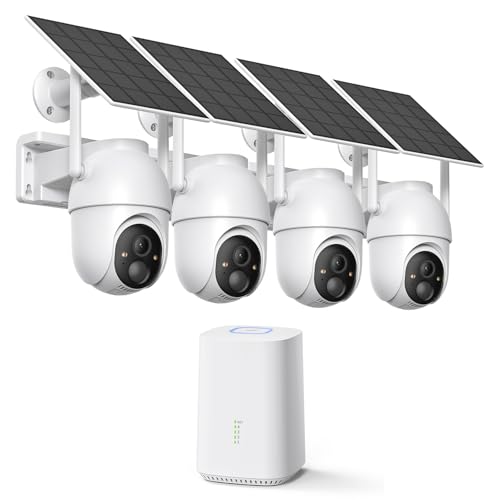
ELYSOO 2K/4MP Home Security Camera System, 2.4G & 5GHz Wi-Fi Connected | Local Storage Included, Solar Security Cameras Wireless Outdoor, IP65, Instant APP Alerts, Color Night Vision
Check price on Amazon
Hiseeu 5MP Home Security Camera System Outdoor, 2.4G/5G Wireless WiFi Pro | 24/7 Recording, 1TB HDD No Subscription, Wired Plug-in Powered Cameras, 4K NVR with 10.1" LCD Monitor, One-Way Audio, IP65
Check price on Amazon
Hiseeu 4K Security Cameras Wireless Outdoor, 8MP 4-Cam Kit, 1T HDD | 5G&2.4G WiFi System for Home Security, Auto Tracking, Pan Tilt, Color Night Vision, Two-Way Audio, 16CH NVR, No Subscription
Check price on AmazonHow to Save Money on Installation
You don't have to break the bank to secure your home. Here are practical tips to reduce your wireless security camera system installation cost:
- Start Small: Begin with a cheap security camera or a good security camera for your main entry points, then expand later.
- Choose Battery-Powered Models: A battery-operated outdoor security camera with no subscription eliminates the need for electrical work.
- Bundle Your Purchase: Many brands offer multi-camera kits at a discount compared to buying individually.
- Use Existing Outlets: Place cameras near existing power sources to avoid electrician costs.
- Look for No-Subscription Options: A security camera without subscription saves you money month after month.
- Consider Refurbished Equipment: Manufacturer-refurbished cameras come with warranties and cost 20-40% less.
Frequently Asked Questions
How much does it cost to install a wireless security camera system?
For a typical 4-camera wireless system, DIY installation costs $300 to $1,200 including equipment. Professional installation adds $400 to $1,400 in labor, bringing the total to $700 to $2,600.
Do wireless security cameras need professional installation?
No, most wireless cameras are designed for DIY installation. However, professional installation is recommended for complex setups, high locations, or if you want optimal camera placement and warranty coverage.
Are there monthly fees for wireless security cameras?
It depends on the model. Many cameras offer free local storage via SD card or NVR. Cloud storage plans typically cost $3 to $15 per camera per month. For a no-fee option, consider a wireless security camera without monthly fee.
How many cameras do I need for my home?
Most homes need 4-6 cameras to cover main entry points, driveways, and backyards. A wireless outdoor security camera at each entry point is a good starting point. Larger properties may need 8 or more.
Can I install wireless security cameras myself?
Yes, if you are comfortable with basic tools and smartphone apps. Many brands provide detailed instructions. If you are unsure, professional installation ensures proper setup and optimal performance.
What is the cheapest way to install a security camera system?
The cheapest option is a DIY installation with a cheap security camera or a security camera without subscription. Battery-powered models like a battery-powered wireless outdoor camera eliminate wiring costs entirely.
Final Thoughts
Understanding the wireless security camera system installation cost helps you make a smart investment in your home's safety. Whether you choose a DIY approach or hire a professional, the key is to balance upfront costs with long-term value.
For most homeowners, a budget of $500 to $1,500 is sufficient for a reliable 4-camera wireless system with DIY installation. If you prefer professional installation or need advanced features, budget $1,500 to $3,000.
Ready to get started? Explore our recommended wireless security camera systems above, and take the first step toward protecting what matters most.