
Security Camera That Runs Off Cell Phone Towers
Discover how cellular security cameras use 4G and 5G networks to keep your property safe without Wi-Fi or internet. The complete guide to choosing, installing, and understanding cell tower-powered security cameras.
VIEW TOP RECOMMENDATIONSFor many homeowners, renters, and business owners, traditional security cameras have a major weakness: they depend on a Wi-Fi network or wired internet connection. This dependency creates blind spots in remote areas, construction sites, farms, and even in urban locations where Wi-Fi signals are unreliable. A security camera that runs off cell phone towers solves this problem by connecting directly to cellular networks like 4G LTE and 5G, just like your smartphone does.
These cameras are also known as cellular security cameras or 4G security cameras. They are designed for people who need reliable surveillance in locations where running Ethernet cables is impractical, expensive, or simply impossible. In this comprehensive guide, we will explain everything you need to know about cellular security cameras, from how they work to what features matter most and how to choose the right one for your specific needs.
Quick Summary: A security camera that runs off cell phone towers uses a built-in SIM card to transmit video and alerts over a cellular network. This means no Wi-Fi, no router, and no internet cable is required. These cameras are perfect for remote locations, construction sites, vacation homes, and any area with poor or unreliable Wi-Fi coverage.
How Does a Security Camera That Runs Off Cell Phone Towers Work?
A cellular security camera functions very similarly to a standard IP camera, but with one major difference: instead of connecting to a local Wi-Fi network, it uses a cellular modem and a SIM card to connect to the internet via cell phone towers. Here is a breakdown of the key components:
- Cellular Module: This is the heart of the camera. It supports 4G LTE or 5G networks and communicates with nearby cell towers.
- SIM Card: The camera requires a data-only SIM card, which can be purchased from major carriers like AT&T, Verizon, T-Mobile, or specialized providers like FreedomPop or Ting.
- Antenna: Most cellular cameras have internal or external antennas to boost signal reception, especially in rural areas.
- Battery or Power Source: Many cellular cameras are battery-powered, while others can be wired to a power source or use solar panels.
- Cloud or Local Storage: Video footage can be stored on a local microSD card, in the cloud, or both.
When the camera detects motion, it records a clip and sends a notification to your smartphone via the cellular network. You can then view live footage or recorded clips from anywhere in the world using a mobile app. Because the camera does not rely on Wi-Fi, it can be installed in areas with no internet infrastructure whatsoever.
Key Benefits of Cellular Security Cameras
Why choose a camera that runs off cell phone towers instead of a traditional Wi-Fi camera? Here are the most significant advantages:
- No Wi-Fi Required: This is the most obvious benefit. You can install the camera in a remote location, a barn, a construction site, or a vacation home without any internet service.
- Easy Installation: Since there are no cables to run for internet, installation is fast and flexible. You can mount the camera almost anywhere within cellular coverage.
- Reliable Connectivity: Cellular networks are often more reliable than Wi-Fi, especially over long distances. You do not have to worry about the camera losing connection because it is too far from the router.
- Portability: Battery-powered cellular cameras can be moved from one location to another with ease. This is ideal for renters or for temporary surveillance needs.
- Independent Operation: Even if your home Wi-Fi goes down or your power goes out, the camera can continue to operate as long as the cell tower has power and the camera has battery life. This is a critical advantage for security cameras that do not require internet.
- Remote Monitoring: You can access live and recorded video from your smartphone, tablet, or computer from anywhere with a cellular or internet connection.
Who Needs a Security Camera That Uses Cell Towers?
Cellular security cameras are not for everyone, but for certain situations, they are the best and sometimes the only viable option. Here are the most common use cases:
- Construction Sites: Construction sites rarely have Wi-Fi or power. A battery-powered cellular camera with a solar panel can provide 24/7 surveillance and deter theft.
- Farms and Ranches: These areas are often far from any internet infrastructure. Cellular cameras can monitor livestock, equipment, and property.
- Vacation Homes and Cabins: If you own a second home that you do not visit frequently, a cellular camera lets you check in from anywhere without maintaining a separate internet plan.
- Rental Properties: Landlords can use cellular cameras to monitor common areas or vacant units without relying on tenants' Wi-Fi.
- Remote Gates and Driveways: A cellular camera can monitor a long driveway or gate where Wi-Fi signals cannot reach.
- Warehouses and Storage Yards: These locations may have Wi-Fi inside, but the outdoor perimeter is often a dead zone. A warehouse security setup can be enhanced with cellular cameras.
- Parking Lots: A parking lot camera that uses cellular connectivity can be installed without trenching cables.
Key Features to Look for in a Cellular Security Camera
Not all cellular security cameras are created equal. When shopping for one, pay close attention to the following features:
1. Cellular Network Support (4G LTE vs. 5G)
Most cellular cameras today support 4G LTE, which is fast enough for HD and even 2K video. 5G cameras are emerging but are still relatively rare and expensive. For most users, 4G LTE is perfectly adequate. Make sure the camera supports the frequency bands used by your chosen carrier.
2. Data Plan and Costs
You will need a data plan for your camera's SIM card. Some cameras come with a pre-installed SIM and a bundled data plan, while others require you to purchase your own. Data plans can range from $10 to $30 per month, depending on the amount of data and the carrier. Be sure to check if the plan is contract-free or if there are activation fees.
3. Battery Life and Power Options
Battery-powered cellular cameras are the most flexible, but battery life varies widely. Some cameras last only a few weeks, while others can last for months on a single charge. If you plan to install the camera in a location with ample sunlight, a solar-powered security camera with solar charger can provide virtually unlimited power. For locations with a power outlet, a wired camera is always an option.
4. Video Resolution and Night Vision
Look for at least 1080p resolution. Many modern cellular cameras offer 2K or even 4K resolution. Night vision is also essential. Most cameras use infrared LEDs for black-and-white night vision, while some higher-end models offer color night vision. A home security camera with night vision is a must for 24/7 protection.
5. Local and Cloud Storage
Some cellular cameras support local storage via a microSD card, which means you can record continuously without using cellular data. Cloud storage is convenient but requires a subscription and uses data. A camera with local storage is a great choice if you want to avoid recurring fees.
6. Motion Detection and Alerts
Advanced motion detection is crucial for battery life and data usage. Look for cameras with PIR (passive infrared) sensors, which are more accurate than simple pixel-based motion detection. You also want a camera that can send motion notifications to your phone.
7. Weatherproofing
If you are installing the camera outdoors, it must be weatherproof. Look for an IP65 or IP66 rating, which indicates resistance to dust and water. An outdoor security camera that is not weatherproof will not last long.
8. Two-Way Audio
Some cellular cameras include a microphone and speaker, allowing you to listen and talk through the camera. This is useful for warning off intruders or communicating with visitors. A security camera with 2-way audio adds an extra layer of security.
Cellular vs. Wi-Fi vs. Wired Security Cameras
To help you decide if a cellular camera is right for you, here is a comparison of the three main types of security cameras:
| Feature | Cellular Camera | Wi-Fi Camera | Wired Camera |
|---|---|---|---|
| Internet Requirement | None (uses cell towers) | Wi-Fi network | Ethernet cable |
| Installation | Very easy (no cables) | Easy (plug and play) | Difficult (requires cabling) |
| Reliability | High (cellular network) | Medium (depends on router) | Very high (physical connection) |
| Monthly Cost | Yes (data plan) | No (uses existing internet) | No |
| Best For | Remote locations, construction sites | Homes with good Wi-Fi | Businesses with existing infrastructure |
How to Choose the Best Cellular Security Camera
With so many options on the market, choosing the right cellular security camera can be overwhelming. Here is a step-by-step guide to help you make the best decision:
- Determine Your Coverage Needs: Check the cellular coverage in your area. You can use coverage maps from carriers like AT&T, Verizon, and T-Mobile. If coverage is weak, look for a camera with an external antenna or consider a different carrier.
- Decide on a Power Source: Will you use battery, solar, or wired power? Battery-powered cameras offer the most flexibility but require recharging. Solar-powered cameras are ideal for sunny locations. Wired cameras are best if you have a power outlet nearby.
- Choose a Data Plan: Compare data plans from different carriers. Some cameras come with a bundled plan, which can be convenient. Look for plans that are contract-free and offer a reasonable amount of data for your needs.
- Evaluate Video Quality: For most residential and small business applications, 1080p is sufficient. If you need to read license plates or identify faces from a distance, consider a 2K or 4K camera.
- Check Storage Options: Decide if you want local storage (microSD card) or cloud storage. Local storage is more private and does not require a subscription, but cloud storage is more secure against theft.
- Read Reviews and Compare: Look for reviews from real users. Pay attention to comments about battery life, signal strength, and app usability. Websites like ours provide detailed reviews of the best wireless security cameras for home.
- Consider a No-Subscription Option: If you want to avoid monthly fees, look for a security camera without subscription. These cameras typically store footage locally on a microSD card.
Installation Tips for Cellular Security Cameras
Installing a cellular security camera is generally straightforward, but here are some tips to ensure optimal performance:
- Test the Signal: Before mounting the camera, test the cellular signal strength at the installation location using your phone or the camera's app. A weak signal will result in poor video quality and slow notifications.
- Mount High: Install the camera at least 8-10 feet above the ground to prevent tampering and to get a better view.
- Angle for Coverage: Aim the camera at the area you want to monitor. Avoid pointing it directly at the sun or at reflective surfaces, which can cause glare.
- Secure the Camera: Use tamper-resistant screws and mounts to prevent theft. A hard case or security housing can add extra protection.
- Optimize Battery Life: If using a battery-powered camera, adjust motion detection sensitivity and recording length to conserve battery. You can also add a solar panel to keep the battery charged.
- Update Firmware: Always update the camera's firmware to the latest version to ensure security and performance.
Common Misconceptions About Cellular Security Cameras
There are several myths and misconceptions about cameras that run off cell phone towers. Let's clear them up:
- Myth: You need a phone line. Fact: Cellular cameras do not need a phone line. They use a SIM card and a data plan, just like a smartphone.
- Myth: They are too expensive. Fact: While cellular cameras may have a higher upfront cost than Wi-Fi cameras, they are often comparable in price. The main ongoing cost is the data plan, which can be as low as $10 per month.
- Myth: They are difficult to set up. Fact: Most cellular cameras are designed for DIY installation. You simply insert a SIM card, download the app, and follow the on-screen instructions.
- Myth: They only work in cities. Fact: Cellular coverage is widespread, but it is always a good idea to check coverage maps for your specific location. Rural areas may have weaker signals, but an external antenna can help.
- Myth: You can't record continuously. Fact: Many cellular cameras support continuous recording, but it will use more data and battery. For most users, motion-triggered recording is sufficient.
Final Thoughts: Is a Cellular Security Camera Right for You?
A security camera that runs off cell phone towers is a powerful and flexible solution for anyone who needs reliable surveillance without the constraints of Wi-Fi or wired internet. Whether you are protecting a construction site, a remote cabin, or a rental property, a cellular camera can provide peace of mind and deter criminal activity.
When choosing a cellular security camera, consider your coverage needs, power options, data plan, and desired features. With the right camera and a little planning, you can set up a robust security system that works anywhere there is a cell signal. If you are still unsure, you might also consider a security camera without WiFi that uses a different technology, such as a local hotspot.
We hope this guide has been helpful. If you are ready to explore specific models, check out our recommended products below. They are selected based on performance, reliability, and value.
Best Security Cameras That Run Off Cell Phone Towers
⚠️ AFFILIATE DISCLOSURE: This website contains affiliate links. As an affiliate Associate, we earn from qualifying purchases. If you make a purchase through these links, we may receive a small commission at no additional cost to you. Read our full affiliate policy.

4G LTE Cellular Solar Security Camera with 360-Day Free Unlimited Data | No Subscription No WiFi Security Camera Solar Powered, Phone Alert, PIR Motion Sensor, 2K Color Night Vision, 360° Live View
Check price on Amazon
4G LTE Cellular Security Camera No WiFi Needed, Dual Lens 2K Mini Camera | Magnetic Mount, 20 Days Standby Battery, Night Vision, Human Detect, Off Grid Security Camera for RV, Garage, Cabin, Barn
Check price on Amazon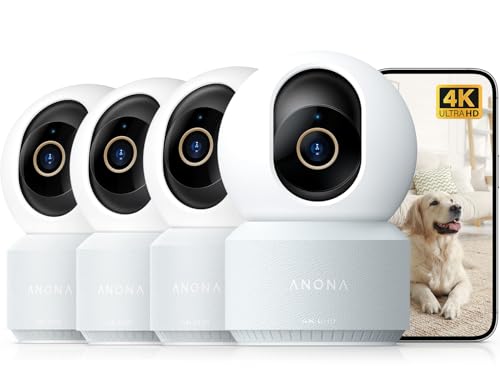
Anona 4K UHD Indoor Camera, Pet/Dog/Baby Security Camera with Phone App, 360°Pan-Tilt, 2.4G/5G Dual-Band Wi-Fi 6, Auto-Tracking, Person/Pet/Baby Crying Detection, Privacy Mode, Two-Way Audio, 4 Pack
Check price on Amazon
4G LTE Security Cameras Wireless Outdoor, 2K Solar Cellular Security Camera, No WiFi Security Camera, Off Grid With 360° Live View, Color Night Vision, PIR Motion Alerts, 2 Way Talk, Built-In SIM Card
Check price on Amazon
4K Indoor Cameras for Home Security, Pet Camera with Phone App, Indoor Security Camera with AI Human & Pet Detection, 360° Pan Tilt, Auto Tracking, Night Vision, Two-Way Audio, Compatible with Alexa
Check price on Amazon