


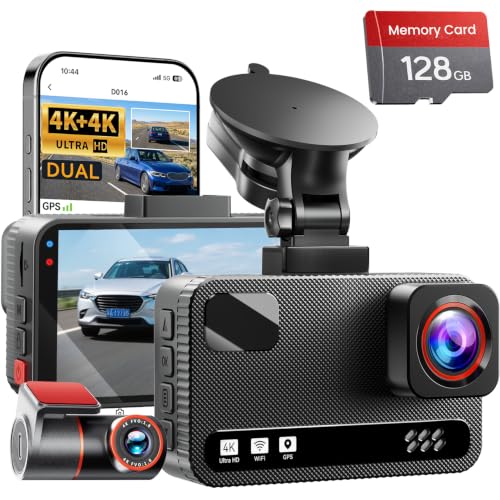


What Is a Wireless Dash Cam for Car?
A wireless dash cam for car use is a dashboard camera that transmits video and data without relying on a permanent physical cable connection to the vehicle's power source or display. While these devices still need power to operate, the term "wireless" typically refers to one of three setups:
- Wi-Fi-enabled dash cams — The camera records to a local memory card but connects wirelessly to your smartphone for live view, file transfer, and settings adjustment.
- Battery-powered dash cams — These run on an internal rechargeable battery, eliminating the need for a constant power cable during short trips.
- Wireless rear camera systems — The rear camera transmits footage to the front unit without a long cable running through the vehicle.
If you want to explore how a rear unit pairs with a front camera, see our guide on a wireless rear camera for car. For vehicles that need a constant power source without cluttering the cabin, a hardwire kit dashcam is a practical companion.
How Does a Wireless Dash Cam Work?
Understanding the technology helps you choose the right model. Here is how the main components interact:
1. Power Source
Most wireless dash cams draw power from a 12V cigarette lighter socket, a USB port, or an internal battery. Battery-powered units are convenient for short trips, while capacitor-based models are more heat-resistant and better suited for hot climates.
2. Video Transmission
Wi-Fi modules (typically 2.4GHz or 5GHz) handle communication between the dash cam and your phone. Some premium models use Bluetooth for initial setup and Wi-Fi for high-bandwidth video transfer.
3. Storage
Footage is recorded to a microSD card inside the camera. Wireless connectivity lets you download clips to your phone without removing the card. Cloud-connected models can upload footage automatically when connected to a hotspot.
4. Parking Mode
Many wireless dash cams support parking mode, which uses motion detection or time-lapse recording to capture incidents while your car is parked. A hardwire kit is often required for continuous parking surveillance.
Key Features to Look For
Not all wireless dash cams are created equal. Use this checklist to evaluate your options:
| Feature | Why It Matters | Recommended Spec |
|---|---|---|
| Resolution | Higher resolution captures clearer license plates and road details. | 1080p minimum; 2K or 4K preferred |
| Field of View | Wider angles cover more lanes and reduce blind spots. | 140°–170° |
| Night Vision | Critical for low-light and nighttime driving. | Infrared or large aperture (f/1.8 or lower) |
| Parking Mode | Protects your car when parked and unattended. | Motion detection + time-lapse |
| GPS | Adds speed and location data to footage. | Built-in GPS or GPS module |
| App Connectivity | Enables wireless viewing and file management. | iOS and Android support |
| Storage Capacity | Determines how much footage you can store. | Supports 128GB+ microSD |
Benefits of Going Wireless
A wireless dash cam for car use offers several practical advantages over traditional wired models:
- Cleaner installation — No need to tuck long cables behind trim panels or under floor mats.
- Faster setup — Most wireless units can be mounted and running in under 10 minutes.
- Flexible placement — Battery-powered models can be moved between vehicles.
- Easy file access — Transfer footage to your phone without removing the memory card.
- Fewer failure points — Less wiring means fewer chances of loose connections or damaged cables.
For drivers who want a simple, low-maintenance setup, a battery powered dash cam is an excellent starting point. If you also want coverage behind your vehicle, pair it with a wireless camera for car or a Bluetooth reverse camera for car.
Wireless vs. Wired Dash Cams: Which Should You Choose?
The right choice depends on your priorities. Here is a side-by-side comparison:
| Factor | Wireless Dash Cam | Wired Dash Cam |
|---|---|---|
| Installation | Quick and simple | Requires cable routing |
| Interior Cleanliness | Minimal cable clutter | Cables may be visible |
| Power Source | Battery or USB | Hardwired to fuse box |
| Parking Mode | Limited on battery models | Continuous with hardwire kit |
| Reliability | Depends on battery and signal | Consistent power supply |
| Best For | Daily drivers, rideshare, quick setup | Fleet vehicles, 24/7 monitoring |
If you need round-the-clock surveillance, a wired setup with a hardwire kit dashcam is more reliable. For everyday driving and easy installation, a wireless model is usually the better fit.
Installation Tips for Wireless Dash Cams
Getting the most out of your wireless dash cam starts with proper installation:
- Mount the camera behind the rearview mirror — This keeps it out of your line of sight and protects it from direct sunlight.
- Clean the windshield first — Use an alcohol wipe to remove dust and oil before attaching the adhesive mount.
- Route the power cable neatly — Even wireless models need power; tuck the cable along the headliner and down the A-pillar.
- Test the Wi-Fi connection — Make sure your phone connects reliably before you start driving.
- Format the microSD card — Use the camera's built-in formatting tool to avoid compatibility issues.
- Adjust the angle — Aim for a view that includes the hood and a clear view of the road ahead.
For a complete overview of essential accessories, visit our camera accessories hub.
How Much Should You Expect to Pay?
Budget wireless dash cams: $40–$80
Mid-range models with 2K and GPS: $80–$180
Premium 4K wireless dash cams: $180–$350
Dual-channel wireless systems: $250–$500
Prices vary based on resolution, brand, and additional features like cloud connectivity and dual-channel recording. For a broader look at in-car camera options, see our wireless dash cam for car buying guide.
Frequently Asked Questions
Do wireless dash cams need Wi-Fi to work?
No. A wireless dash cam records to its internal memory card regardless of Wi-Fi availability. Wi-Fi is only needed for live viewing, file transfer, and over-the-air updates.
How long do battery-powered dash cams last?
Most battery-powered dash cams provide 30 minutes to 2 hours of recording per charge. Capacitor-based models are better for hot climates because they are more heat-resistant.
Can I use a wireless dash cam without a phone?
Yes. The camera will still record to its memory card. However, you will need a phone or computer to view and transfer footage unless the model has a built-in screen.
Is a wireless dash cam legal in all states?
Dash cam laws vary by state and country. Generally, mounting a camera on your windshield is legal as long as it does not obstruct the driver's view. Check your local regulations before installing.
What is the best resolution for a wireless dash cam?
1080p is the minimum for clear license plate capture. 2K and 4K offer better detail but require more storage and faster memory cards.
Final Thoughts
A wireless dash cam for car use is an excellent choice for drivers who value clean installation, quick setup, and easy file access. While wired models still offer advantages for continuous parking surveillance, wireless technology has advanced enough to deliver reliable performance for most everyday driving needs.
Before you buy, confirm that your chosen model supports the resolution, night vision, and parking mode features you need. If you are also considering a rear-facing solution, explore our guide on a wireless rear camera for car to build a complete coverage system.
Note: This guide is for informational purposes only. Product availability and pricing may change. Always verify compatibility with your vehicle before purchasing.