
Wireless DIY Home Security Systems: Complete Guide & Reviews
Take control of your home security without monthly fees or professional installers. Learn how to build a reliable wireless DIY system with cameras, sensors, and smart hubs that fit your budget and lifestyle.
SHOP TOP SYSTEMSWhy Go DIY? Wireless DIY home security systems have exploded in popularity because they offer professional-grade protection at a fraction of the cost. No drilling, no long-term contracts, and no waiting for a technician. Whether you rent an apartment or own a house, you can install a system in under an hour and monitor everything from your phone. This guide breaks down everything you need to know before buying.
Best Wireless DIY Home Security Systems & Cameras
⚠️ AFFILIATE DISCLOSURE: This website contains affiliate links. As an affiliate Associate, we earn from qualifying purchases. If you make a purchase through these links, we may receive a small commission at no additional cost to you. Read our full affiliate policy.

15-Piece WiFi Home Security System, DIY Wireless Alarm Kit, No Subscription | 120dB Loud Alarm, 8-Hour Backup Battery, Instant App Alerts, DIY Installation, No Monthly Fee, Expandable Home Protection
Check price on Amazon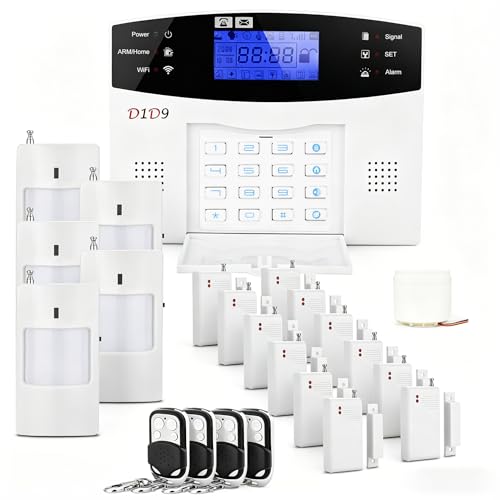
D1D9 24pcs Wireless DIY Home Burglar Alarm System, 4G WiFi GSM, No Monthly Fee,Home Security with App Alert
Check price on Amazon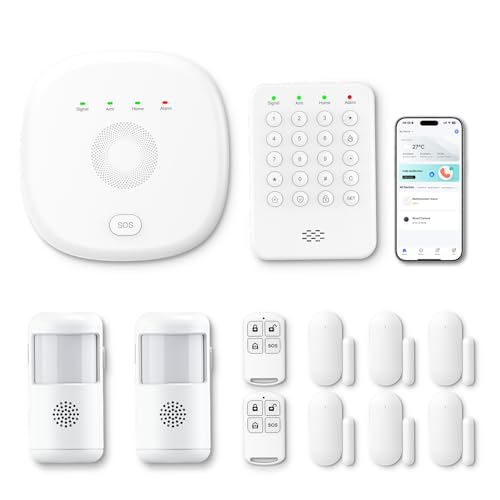
PGST Home Security Systems 12-Piece Kit (Newest Model),WiFi+GSM/4G with Mobile App Control and Alerts Wireless Smart Home or Business Security System,No Monthly Fees,Works with Alexa, Smart Life/Tuya
Check price on Amazon
Hapippofa GEN 2 Wireless Home Security System, 16-Piece DIY Alarm Kit for House & Apartment, WiFi & 4G Touchscreen Hub, Door Sensors, Motion Detectors, App Alerts, 120dB Wired Siren, No Monthly Fee
Check price on Amazon
PGST Home Security System, Home Alarm System Wireless Touch Screen Motion Detection, Door and Window Alarms for Home, Wireless Siren, Remotes, Phone App, for Villa Home Apartment
Check price on AmazonWhat Exactly Is a Wireless DIY Home Security System?
A wireless DIY home security system is a set of connected devices—cameras, motion sensors, door/window contacts, and a hub—that communicate over Wi-Fi, Z-Wave, Zigbee, or proprietary RF. You install everything yourself, and you manage it through a smartphone app. Unlike traditional wired systems, there's no drilling through walls or running cables. Most systems are expandable, so you can start with one camera and add sensors later.
The "DIY" label doesn't mean low quality. Many modern systems offer 2K or 4K video, AI person detection, color night vision, and local storage. The key difference is who installs and monitors it: you. If you want to avoid monthly fees, look for systems that support local storage via microSD or a base station. For a deeper dive into camera types, see our guide to wireless security cameras without subscription.
Core Components of a DIY Wireless Security System
📡 Hub or Base Station
The brain of your system. It connects all devices, stores recordings locally, and sends alerts. Some hubs support Z-Wave and Zigbee for smart home integration. If you prefer a hub-free setup, look for cameras that connect directly to Wi-Fi.
📷 Security Cameras
Indoor, outdoor, or both. Battery-powered models are easiest to install, while wired options offer continuous recording. For outdoor coverage, check out wirefree outdoor security cameras and battery-powered outdoor security cameras.
🚪 Entry Sensors
Door and window contacts trigger alerts when opened. They're inexpensive and easy to stick on. Most hubs support dozens of sensors, so you can secure every entry point.
👁️ Motion Detectors
PIR sensors detect movement and can trigger cameras or sirens. Look for pet-immune models if you have animals. Many cameras have built-in motion detection, reducing the need for separate sensors.
🔔 Sirens & Alarms
A loud siren (105dB+) can scare off intruders. Some hubs include a built-in siren; others support add-on sirens. You can also trigger alerts through your phone.
📱 Smartphone App
Your control center. Live view, playback, arm/disarm, and notifications all happen here. Make sure the app supports multiple users and has a good track record for reliability.
How to Choose the Right Wireless DIY System
Before you buy, answer these questions: Do you rent or own? How many entry points do you need to cover? Do you want local storage or cloud? Are you comfortable with a monthly fee? Here's a quick breakdown:
| Factor | What to Look For |
|---|---|
| Installation | Adhesive mounts and battery power for renters. Screw mounts and wired power for permanent setups. |
| Storage | Local microSD (no fees) vs. cloud (convenient but usually subscription-based). Hybrid systems offer both. |
| Video Quality | 1080p is fine for basic monitoring; 2K or 4K for identifying faces and license plates. Check night vision type (IR vs. color). |
| Power | Battery (months of life), solar (continuous), or wired (reliable). Solar options like solar security cameras are great for hard-to-reach spots. |
| Smart Home | Alexa, Google Assistant, and Apple HomeKit compatibility. Z-Wave/Zigbee for sensors and lights. |
| Subscription | No-subscription systems store locally. If you want cloud backup and AI alerts, expect $3–$15/month. |
Pros and Cons of Wireless DIY Security
✅ Advantages
- No long-term contracts or professional installation fees
- Easy to relocate—perfect for renters
- Scalable: start small and add devices anytime
- Often cheaper than professional monitoring
- Full control over your data with local storage
- Works during power outages if battery-backed
❌ Disadvantages
- You are responsible for setup and troubleshooting
- Wireless signals can be blocked by thick walls
- Battery maintenance (recharging/replacing)
- Some systems have limited automation without a hub
- Cloud storage usually requires a subscription
- Not ideal for very large properties without mesh Wi-Fi
Installation Tips for Best Performance
Place cameras 8–10 feet high and angle them slightly downward. Avoid pointing directly at the sun or reflective surfaces. For outdoor cameras, keep them within Wi-Fi range—or use a mesh system. Test motion detection zones before final mounting. If you're using battery cameras, note that cold weather can reduce battery life. For areas without power, consider a solar camera or a wireless security system with long battery life.
Entry sensors should be placed on the frame, not the door itself. Clean surfaces before applying adhesive. If you need to cover a large yard or driveway, a PoE camera might be more reliable than wireless, but it requires running Ethernet. For most DIYers, a mix of wireless cameras and a few wired ones works best.
No-Subscription and Local Storage Options
One of the biggest draws of DIY security is avoiding monthly fees. Many cameras support microSD cards up to 256GB, giving you weeks of recordings. Some hubs include a built-in hard drive. If you want cloud backup without a contract, look for cameras that offer free basic cloud storage (usually 24–48 hours of clips). For a full list, see our guide to security cameras without subscription and non-subscription security cameras.
If you prefer a completely offline system, consider non-WiFi security cameras that record to a local NVR. These are immune to Wi-Fi jamming and internet outages. For apartment dwellers, indoor cameras wireless with local storage are a great starting point.
Frequently Asked Questions
Ready to Build Your Wireless DIY Security System?
Start with a camera or a full kit—either way, you'll save money and gain peace of mind. Check our top recommended systems above and read our full DIY guide for more tips.
VIEW TOP PICKSFinal Thoughts
A wireless DIY home security system puts you in control. You don't need to be a tech expert—modern systems are designed for easy setup and daily use. Whether you want a single indoor wireless camera or a full perimeter system with sensors and sirens, there's a solution that fits your budget. Just remember: the best system is the one that's installed, tested, and monitored regularly. Start small, expand as needed, and enjoy the peace of mind that comes with protecting your home on your own terms.