
Camera Sensor Cleaning Kit: Complete Buying Guide & Tips
Protect your investment and ensure spotless images. Learn how to choose the right sensor cleaning kit, master safe cleaning techniques, and keep your camera performing at its best.
VIEW RECOMMENDED KITSWhy Sensor Cleaning Matters: Dust, oil, and debris on your camera sensor can ruin otherwise perfect shots. A single speck can create dark spots that are difficult to remove in post-processing. Investing in a quality camera sensor cleaning kit is essential for any serious photographer who wants to maintain image quality and protect their gear.
Understanding Camera Sensor Contamination
Camera sensors accumulate dust and debris over time, especially when you frequently change lenses in the field. Every time you swap a lens, microscopic particles can enter the camera body and settle on the sensor or the low-pass filter that sits in front of it. While some cameras have built-in sensor cleaning systems that shake off dust, these mechanisms are not foolproof and cannot remove stubborn oil or sticky particles.
The symptoms of a dirty sensor are easy to spot once you know what to look for. Dark spots or smudges that appear in the same location across multiple images, particularly visible against uniform backgrounds like clear skies or plain walls, are the classic signs. These artifacts become more noticeable when you stop down your lens to smaller apertures like f/11 or f/16. If you notice these issues, it may be time to invest in a proper cleaning solution or consider whether your current camera systems maintenance routine is adequate.
Wet Cleaning vs. Dry Cleaning: Which Method Do You Need?
There are two primary approaches to sensor cleaning, and understanding the difference is crucial for choosing the right kit. Dry cleaning uses blowers, brushes, or specialized dry swabs to remove loose dust particles. This method is safe for routine maintenance and should be your first line of defense. Wet cleaning, on the other hand, uses sensor swabs moistened with a specialized cleaning solution to dissolve and remove oil, grease, and stubborn particles that dry methods cannot address.
🔵 Dry Cleaning
- Best for: Loose dust, dry particles
- Tools: Air blower, sensor brush, dry swabs
- Frequency: Routine maintenance, after every few shoots
- Risk level: Very low when done correctly
- Cost: Lower — typically $15–$40 for basic tools
🟢 Wet Cleaning
- Best for: Oil spots, sticky particles, stubborn debris
- Tools: Sensor swabs, cleaning solution, blower
- Frequency: Every few months or when dry cleaning fails
- Risk level: Moderate — requires careful technique
- Cost: Higher — typically $30–$80 for complete kits
For most photographers, a complete kit that includes both dry and wet cleaning tools offers the best value. You can start with dry cleaning to remove loose particles, then escalate to wet cleaning only when necessary. This approach minimizes the risk of damaging your sensor while ensuring you can handle any contamination scenario. If you also use other camera accessories like a camera lens filters or circular PL filter, keeping your sensor clean ensures these tools perform at their best.
What to Look for in a Camera Sensor Cleaning Kit
Not all sensor cleaning kits are created equal. The quality of the swabs, the purity of the solution, and the appropriateness of the tools for your specific sensor size all matter. A kit designed for a full-frame sensor will not work properly on an APS-C or Micro Four Thirds sensor, and using the wrong size swab can leave streaks or fail to clean the edges effectively.
Correct Swab Size
Match the swab width to your sensor size. Full-frame swabs are typically 24mm wide, APS-C swabs are 16mm, and Micro Four Thirds swabs are 12mm. Using the wrong size can leave streaks or damage the sensor edges.
High-Purity Solution
Look for cleaning solutions that are specifically formulated for sensor cleaning. They should be free of impurities, evaporate quickly, and leave no residue. Avoid household alcohol or generic cleaners.
Lint-Free Swabs
Sensor swabs must be completely lint-free. Any fibers left behind will create new problems. Quality swabs are sealed individually to prevent contamination before use.
Air Blower Included
A good kit includes a manual air blower for removing loose dust before wet cleaning. This step is critical — never apply wet cleaning to a sensor covered in loose grit.
Illuminated Loupe
Some premium kits include a sensor loupe with LED illumination. This helps you see exactly where contamination is located and verify your cleaning results.
Storage Case
A organized storage case keeps your tools clean and ready for use. It also prevents contamination from dust or moisture between cleaning sessions.
Recommended Camera Sensor Cleaning Kits
⚠️ AFFILIATE DISCLOSURE: This website contains affiliate links. As an affiliate Associate, we earn from qualifying purchases. If you make a purchase through these links, we may receive a small commission at no additional cost to you. Read our full affiliate policy.
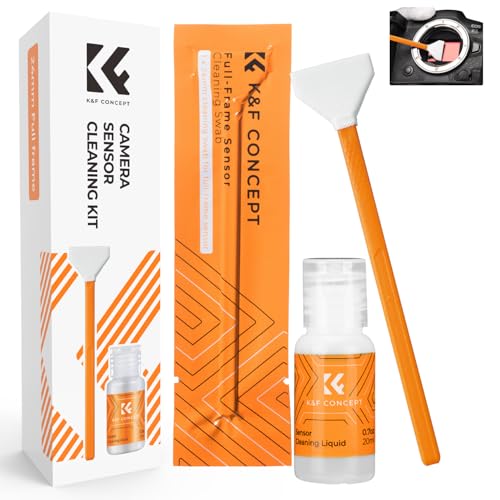
K&F CONCEPT 24mm Full Frame Sensor Cleaning Kits, with 20ml Sensor Cleaner | Sensor SwabsX6, Vacuum Sealed, Gentle Cleaner, Multi-Device Use, Precision Cleaning,for Nikon Sony Canon Camera Clean,MA01
Check price on Amazon
14-in-1 Camera Lens Cleaning Kit - Mirrorless & DSLR Sensor Cleaning Kit for Canon, Sony, Nikon Including Lens Blower, Detergent, Swabs, Cloth, Pen, Brush
Check price on Amazon
UES Full-Frame Camera Sensor Cleaning Kit (14pcs Swabs and 15ml Cleaner) | Includes 14pcs 24mm swabs and 15ml alcohol-free cleaning solution. Compatible with DSLR & Mirrorless Camera CCD&CMOS
Check price on Amazon
K&F CONCEPT APS-C Sensor Cleaning Kit, with Sensor Cleaner, Camera Cleaning | 16mm Sensor SwabX6, Vacuum Sealed, Gentle Cleaner, Multi-Device Use,Precision Cleaning,for Nikon Sony Canon Camera Clean,MA02
Check price on Amazon
Camera Lens Cleaning kit,Camera Accessories,Camera Sensor and Lens Cleaning kit,Lens Pen
Check price on Amazon
VSGO DKL-20F Sensor Cleaning Kit for Full Frame Cameras (24mm) | 69-in-1, for Canon, Nikon, Sony, Pentax & DSLR, All-in-One Camera Cleaning Kit Including Swabs, Lens Pen, Air Blower, Etc.
Check price on Amazon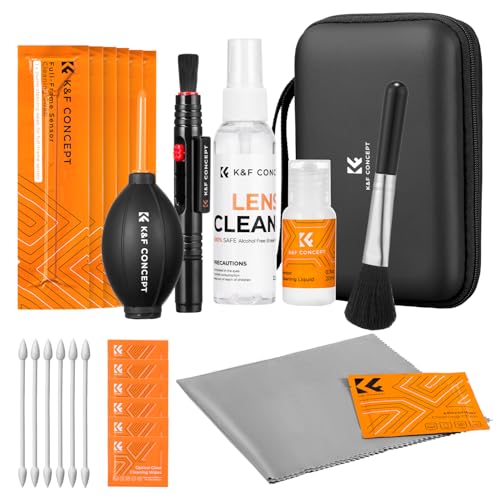
K&F CONCEPT 25 in 1 Camera Cleaning Kit, Full Frame Lens and Sensor Cleaner | 24mm Vac-Sealed Swabs,Lens Pen,60 and 20ML Lens Cleaner,Cloth,Blower,Hard Case, for Canon Nikon Sony DSLR Mirrorless,MK02
Check price on Amazon
VSGO Full Frame Camera Sensor Cleaning Kit VS-S03-12 | for Nikon Sony Canon DSLR Full-Frame Sensor Cleaning, 12Pcs 24mm Full Frame Sensor Cleaning Swabs & 10ml Sensor Cleaner
Check price on AmazonStep-by-Step: How to Safely Clean Your Camera Sensor
Cleaning your sensor can seem intimidating, but with the right tools and technique, it is a straightforward process. The key is to work methodically, avoid rushing, and never apply excessive pressure. Before you begin, ensure your camera battery is fully charged — if the mirror or shutter closes mid-clean, you could damage the sensor or the mechanical components.
- Step 1 — Prepare Your Workspace: Work in a clean, well-lit, dust-free environment. Avoid rooms with carpets or pets. Use a clean table and wear lint-free gloves if possible.
- Step 2 — Remove the Lens: Turn off the camera, remove the lens, and immediately place the camera body face-down or use the "sensor cleaning" mode if your camera has one. This locks the mirror up and exposes the sensor safely.
- Step 3 — Blow Away Loose Dust: Use a manual air blower to gently remove loose particles. Hold the camera at an angle so dust falls out rather than settling back in. Never use compressed air from a can — the propellant can spray onto the sensor.
- Step 4 — Inspect with a Loupe: Use a sensor loupe to locate remaining contamination. If you only see loose dust, repeat the blower step. If you see smudges or stuck particles, proceed to wet cleaning.
- Step 5 — Wet Clean if Necessary: Apply 2–3 drops of cleaning solution to a fresh swab. Gently drag the swab across the sensor in one direction, then use the other side of the swab to drag back in the opposite direction. Use light, even pressure.
- Step 6 — Verify and Repeat if Needed: Re-inspect with the loupe. If streaks or spots remain, use a new swab and repeat. Never reuse a swab — it may contain particles that could scratch the sensor.
- Step 7 — Reattach the Lens: Once the sensor is clean, turn off the camera, reattach your lens, and take a test shot of a plain surface at f/16 to confirm the results.
Common Mistakes to Avoid When Cleaning Your Sensor
Even experienced photographers can make mistakes during sensor cleaning. Being aware of these pitfalls will help you avoid costly damage and ensure a successful cleaning session every time.
- Using Compressed Air: Canned air can spray propellant onto the sensor, creating permanent damage. Always use a manual air blower designed for camera use.
- Reusing Swabs: A used swab may contain abrasive particles that can scratch the sensor or the low-pass filter. Always use a fresh swab for each pass.
- Applying Too Much Solution: Excess liquid can seep into the camera body and damage electronics. Two to three drops on the swab is sufficient.
- Using the Wrong Size Swab: A swab that is too large can damage the sensor edges, while one that is too small won't clean effectively. Match the swab to your sensor size.
- Cleaning in a Dusty Environment: Cleaning your sensor in a dusty room defeats the purpose. Work in a clean, controlled space.
- Ignoring the Battery Level: If your camera dies during cleaning, the mirror or shutter could close on your swab, causing severe damage. Always charge your battery first.
- Skipping the Blower Step: Applying wet cleaning directly to a sensor covered in loose dust can drag abrasive particles across the surface, causing scratches.
How Often Should You Clean Your Camera Sensor?
The frequency of sensor cleaning depends on your shooting habits and environment. If you shoot primarily in controlled studio environments and rarely change lenses, you may only need to clean your sensor once or twice a year. However, if you frequently shoot outdoors, change lenses in the field, or work in dusty or humid conditions, you may need to clean your sensor every few months.
Pay attention to your images. If you notice dark spots appearing consistently in the same location, it is time to clean. Some photographers perform a routine check before important shoots, especially weddings, commercial work, or any situation where reshoots are not possible. If you use your camera for specialized applications like astrophotography or wildlife trail camera setups, clean sensors are even more critical because post-processing may not be an option.
Protecting Your Sensor Between Cleanings
Prevention is always better than cure. By taking simple precautions, you can reduce the frequency of sensor cleaning and extend the life of your camera. Always change lenses in a clean environment when possible, and keep your camera body facing downward during lens changes to prevent dust from settling inside. Use body caps and lens caps when your gear is not in use, and store your camera in a clean, dry place.
If you frequently shoot in harsh environments, consider using a camera backpack for travel or a waterproof camera bag to protect your gear from dust and moisture. For cameras used in security applications, such as a WiFi security camera outdoor or solar security camera, sensor maintenance is equally important but often overlooked. Regular cleaning ensures clear footage and reliable performance.
Final Verdict: Invest in a Quality Sensor Cleaning Kit
A camera sensor cleaning kit is not just an accessory — it is an essential part of your camera maintenance toolkit. Whether you shoot with a DSLR, mirrorless, or specialized camera, keeping your sensor clean ensures sharp, spot-free images and protects your investment. Choose a kit that matches your sensor size, includes both dry and wet cleaning tools, and comes from a reputable brand. With proper technique and regular maintenance, your camera will continue to deliver professional-quality results for years to come.