
Camera WiFi Indoor: Complete Buying Guide
Discover the best WiFi indoor cameras for home security, pet monitoring, and baby care. Learn how to choose the right wireless camera for your needs.
VIEW TOP RECOMMENDATIONSWhy WiFi Indoor Cameras Matter: A reliable WiFi camera gives you peace of mind whether you're at work, traveling, or just in another room. Modern indoor cameras offer HD/2K resolution, night vision, two-way audio, and smart motion detection — all accessible from your smartphone. This guide will help you understand every feature and choose the perfect model for your home.
Why You Need a WiFi Indoor Camera
Home security has evolved dramatically over the past decade. Gone are the days when you needed a professional installation team and expensive wiring to protect your home. Today, a wireless indoor security camera can be set up in minutes and delivers professional-grade surveillance directly to your smartphone.
Whether you want to check on your pets, monitor a baby's nursery, keep an eye on elderly family members, or simply deter intruders, an indoor camera is one of the most affordable and effective solutions available. According to industry data, homes with visible security cameras are significantly less likely to be targeted by burglars.
The best part? Modern smart security cameras integrate seamlessly with your existing smart home ecosystem. You can connect them to Amazon Alexa, Google Assistant, or Apple HomeKit for voice control and automated routines.
Key Features to Look For
📹 Video Resolution
Look for at least 1080p Full HD. For better detail, choose 2K security camera models that let you zoom in on faces and license plates without losing clarity.
🌙 Night Vision
Infrared LEDs provide clear footage in complete darkness. Premium models offer color night vision using built-in spotlights or starlight sensors.
🔔 Two-Way Audio
Communicate with family members, pets, or visitors remotely. Essential for baby monitors and pet cameras.
🤖 Smart Detection
AI-powered person detection reduces false alerts from pets or moving shadows. Some models distinguish between people, animals, and vehicles.
💾 Storage Options
Choose between local microSD storage, cloud subscription plans, or NVR systems. Many cameras support both for redundancy.
📶 WiFi Connectivity
Dual-band WiFi (2.4GHz and 5GHz) ensures stable connections. Some models support 4G LTE security camera backup for areas with weak WiFi.
Types of WiFi Indoor Cameras
Not all indoor cameras are created equal. Understanding the different form factors will help you choose the right one for your space.
Dome Cameras: A dome camera is discreet and difficult for intruders to determine which direction it's pointing. Ideal for ceiling mounting in living rooms and offices.
Pan-Tilt-Zoom (PTZ) Cameras: These cameras can rotate 360 degrees and tilt vertically, covering an entire room with a single unit. Perfect for large open spaces.
Fixed Cameras: Simple, affordable, and reliable. Best for monitoring a specific area like a doorway or crib.
Battery-Powered Cameras: A battery-powered outdoor camera is designed for outdoor use, but some indoor models also offer battery operation for flexible placement.
Pros and Cons of WiFi Indoor Cameras
✅ Advantages
- Easy DIY installation — no professional needed
- Remote viewing from anywhere via smartphone
- Affordable compared to traditional CCTV systems
- Smart home integration (Alexa, Google, HomeKit)
- Instant alerts for motion detection
- Two-way audio for communication
- Cloud storage options for backup
❌ Disadvantages
- Requires stable WiFi connection
- Cloud storage may require monthly fees
- Potential privacy concerns if hacked
- Limited by power outlet access (for non-battery models)
- Video quality can degrade with poor signal
Best WiFi Indoor Cameras for Home Security
⚠️ AFFILIATE DISCLOSURE: This website contains affiliate links. As an affiliate Associate, we earn from qualifying purchases. If you make a purchase through these links, we may receive a small commission at no additional cost to you. Read our full affiliate policy.

Blink Mini 2K+ (newest model) – Plug-in Home & Pet Indoor Security Camera with 2K video resolution, night vision, enhanced audio, motion detection – 1 camera (Black)
Check price on Amazon
Tapo 1080P Indoor Security Camera, Baby Monitor, Dog Camera, Wired, C100 | Motion Detection, 2-Way Audio, Siren, Night Vision, Cloud & SD Card Storage, Works w/Alexa & Google Home
Check price on Amazon
Anona 4K UHD Indoor Camera, Pet/Dog/Baby Security Camera with Phone App, 360°Pan-Tilt, 5G/2.4G Dual-Band Wi-Fi 6, Auto-Tracking, Person/Pet/Baby Crying Detection, Privacy Mode, Two-Way Audio, 2 Pack
Check price on Amazon
Tapo 2K Pan Tilt Security Camera for Baby Monitor, Dog Camera,C211(2-Pack) | Motion Detection, 2-Way Audio Siren, Night Vision, Cloud &SD Card Storage, Works with Alexa & Google Home, Black
Check price on Amazon
AOQEE 5G Cameras for Home Security Indoor, Pet Monitor w/Phone APP G5 2Pcs | Dual-Band Wi-Fi Indoor Camera with 24/7 TF Card Storage, 360 PTZ Auto-Tracking Pet/Dog/Cat/Puppy/Nanny, Motion Alert, Plug-in
Check price on Amazon
Cinnado 2K Security Camera Indoor for Pet/Dog/Baby with Phone App, D1 1Pack | 360° 2.4Ghz Wi-Fi Cam as Elderly/Baby Monitor, 2-Way Audio, Night Vision, 24/7 SD Card Storage, Alexa & Google Compatible
Check price on Amazon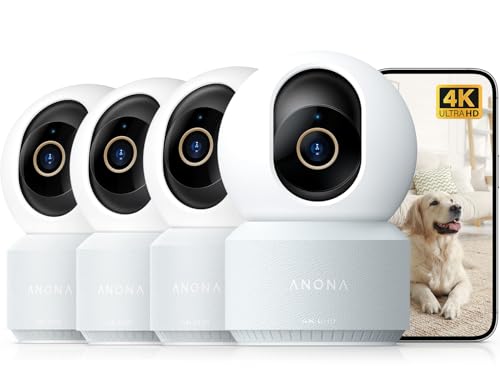
Anona 4K UHD Indoor Camera, Pet/Dog/Baby Security Camera with Phone App, 360°Pan-Tilt, 2.4G/5G Dual-Band Wi-Fi 6, Auto-Tracking, Person/Pet/Baby Crying Detection, Privacy Mode, Two-Way Audio, 4 Pack
Check price on Amazon
Tapo 1080P Indoor Security Camera, Baby Monitor, Dog Camera, C101 | Motion Detection, 2-Way Audio, Siren, Night Vision, Cloud & SD Card Storage, Works w/Alexa & Google Home, Black
Check price on AmazonQuick Comparison: What Matters Most
| Feature | Budget ($30–$60) | Mid-Range ($60–$120) | Premium ($120–$250) |
|---|---|---|---|
| Resolution | 1080p HD | 1080p–2K | 2K–4K Ultra HD |
| Night Vision | Black & White IR | Enhanced IR | Color Night Vision |
| Field of View | 110°–130° | 130°–160° | 360° PTZ |
| AI Detection | Basic Motion | Person Detection | Person/Pet/Vehicle |
| Storage | MicroSD only | MicroSD + Cloud | MicroSD + Cloud + NVR |
| Audio | One-way | Two-way | Two-way + Siren |
How to Set Up Your WiFi Indoor Camera
Setting up a modern camera WiFi indoor is surprisingly simple. Here's a step-by-step guide:
Step 1: Choose the Right Location. Place your camera at least 7 feet high for a good viewing angle. Avoid pointing it directly at windows, as glare can ruin night vision.
Step 2: Download the App. Most manufacturers provide a dedicated app (e.g., TP-Link Tapo, Wyze, Ring, Arlo). Create an account and follow the in-app setup wizard.
Step 3: Connect to WiFi. Ensure your phone is connected to a 2.4GHz network during setup. Most cameras don't support 5GHz during initial pairing.
Step 4: Mount the Camera. Use the included screws and anchors. For renters, adhesive mounts are available for many models.
Step 5: Configure Settings. Set up motion detection zones, notification preferences, and storage options. Consider enabling two-factor authentication for security.
Privacy & Security Best Practices
WiFi cameras are only as secure as their configuration. Follow these tips to protect your privacy:
• Change Default Passwords: Always replace the default admin password with a strong, unique one.
• Enable Two-Factor Authentication: Most reputable brands now offer 2FA for account access.
• Keep Firmware Updated: Manufacturers regularly release security patches. Enable auto-updates when available.
• Use a Separate Network: Consider putting your cameras on a guest WiFi network to isolate them from your main devices.
• Check for Hidden Cameras: If you're staying in a rental or hotel, learn how to find hidden cameras to protect your privacy.
Frequently Asked Questions
Do WiFi indoor cameras work without the internet?
Most WiFi cameras require an internet connection for remote viewing and cloud features. However, some models can record to a local microSD card even when offline. For full functionality, a stable internet connection is recommended.
How much do WiFi indoor cameras cost?
Budget models start around $30, mid-range options range from $60 to $120, and premium cameras with 2K/4K resolution and advanced AI features cost $120 to $250. Professional-grade models can exceed $300.
Can I use a WiFi indoor camera outdoors?
Standard indoor cameras are not weatherproof. If you need outdoor coverage, consider a WiFi camera outdoor model specifically designed to withstand rain, dust, and temperature extremes. For comprehensive home protection, many homeowners combine indoor and outdoor camera systems.
How many WiFi cameras can I connect to one network?
Most home routers can handle 10–20 connected devices. If you plan to install multiple cameras, consider a mesh WiFi system or a dedicated security network. For larger properties, a wireless home security system with a central hub may be more efficient.
What's the difference between WiFi and IP cameras?
A WiFi camera connects wirelessly to your network, while an IP camera uses a wired Ethernet connection. WiFi cameras are easier to install, but wired IP cameras offer more stable connections and are preferred for critical surveillance.
Are indoor cameras worth it if I already have a security system?
Yes. Indoor cameras provide visibility into your home's interior that outdoor cameras cannot. They're invaluable for monitoring pets, children, elderly family members, and detecting issues like water leaks or equipment failures. Many homeowners use cameras for home as a complement to their existing security setup.
Ready to Protect Your Home?
Browse our top-rated WiFi indoor cameras and find the perfect balance of features, price, and performance for your needs.
SHOP RECOMMENDED CAMERASFinal Thoughts
Choosing the right camera WiFi indoor is about matching features to your specific needs. A pet owner might prioritize two-way audio and treat dispensers, while a security-conscious homeowner needs AI person detection and robust cloud storage.
Regardless of your budget, there's never been a better time to invest in home security. Prices have dropped dramatically while features have improved. A $50 camera today outperforms $300 models from just five years ago.
Start with our recommended products above, read the reviews, and consider your specific use case. With the right wireless camera, you'll gain peace of mind knowing your home and loved ones are always protected.
Pro Tip: Before purchasing, check whether the camera supports local storage (microSD) so you're not locked into a monthly cloud subscription. Many top brands now offer both options, giving you flexibility to switch as your needs change.