
Continuous Recording Wireless Security Camera: The Complete Guide
Capture every moment without gaps. Learn how to choose a wireless camera that records 24/7, the power and storage options available, and the best models for round-the-clock protection.
VIEW TOP RECOMMENDATIONSWhy Continuous Recording Matters: Motion-triggered cameras only capture clips when they detect activity, which can miss critical seconds before an event. A continuous recording wireless security camera records non-stop, ensuring you have a complete record of everything that happens. This guide explains how these systems work, their power and storage requirements, and how to choose the right one for your home or business.
What Is a Continuous Recording Wireless Security Camera?
A continuous recording wireless security camera is a surveillance device that captures video 24 hours a day, 7 days a week, without relying on motion detection to start recording. Unlike traditional motion-activated cameras that only save clips when movement is detected, these cameras maintain a constant video stream, which is either stored locally (on an SD card or NVR) or in the cloud. The "wireless" aspect refers to the camera's ability to transmit video over Wi-Fi or a proprietary wireless signal, though it still requires a power source. This combination of constant recording and wireless connectivity offers unparalleled peace of mind, as you never have to worry about missing a crucial moment due to a missed trigger.
For homeowners who need a reliable record of all activity, a continuous recording wireless security camera is the gold standard. It is particularly useful for monitoring entryways, driveways, and commercial spaces where even a few seconds of missing footage could be critical. When selecting a model, consider how it will be powered and where the footage will be stored, as these are the two main factors that determine long-term reliability and cost.
How Continuous Recording Works: Power, Storage, and Connectivity
Understanding the three pillars of a continuous recording system—power, storage, and connectivity—is essential before you buy. Each plays a vital role in ensuring your camera never stops recording.
🔌 Power Source
Continuous recording drains battery quickly, so most wireless cameras of this type require a constant power source. Options include plugging into a standard indoor outlet with a long USB cable, using a solar panel for outdoor locations, or hardwiring to an existing doorbell or light fixture. Battery-powered models exist but usually require frequent recharging or a large external battery, making them less ideal for true 24/7 operation.
💾 Storage Options
Continuous recording generates massive amounts of data. You need either a large local storage solution (like a 128GB or 256GB microSD card, or a network video recorder with a hard drive) or a cloud subscription plan. Local storage via SD card is often the most cost-effective and private, while cloud storage offers off-site backup and easier remote access. Many cameras support both, giving you flexibility.
📶 Wireless Connectivity
Wireless cameras connect to your home Wi-Fi network to stream video to your phone and upload to the cloud. For continuous recording, a strong and stable Wi-Fi signal is crucial, especially if you plan to stream live video or access footage remotely. Some systems use a dedicated wireless receiver or base station to avoid congesting your home network. If your Wi-Fi is unreliable, consider a camera that supports a cellular backup or local recording to an SD card.
When planning your setup, think about the trade-offs. A camera that records continuously to a local SD card is great for privacy and has no ongoing fees, but if the camera is stolen, the footage is gone. A cloud-based system offers off-site backup but typically requires a monthly subscription. Many users opt for a hybrid approach: continuous recording to a local NVR for everyday use, with cloud backup for critical events.
Continuous vs. Motion-Activated Recording: Which Is Right for You?
Before committing to a continuous recording wireless security camera, it's helpful to compare it with the more common motion-activated type. The table below outlines the key differences to help you decide.
| Feature | Continuous Recording | Motion-Activated Recording |
|---|---|---|
| Coverage | 24/7, no gaps | Only when motion is detected |
| Power Needs | Constant power required (outlet, solar, hardwired) | Battery can last months |
| Storage Usage | High; requires large SD card or cloud plan | Low; saves clips only when triggered |
| Best For | Critical monitoring, evidence collection, busy areas | Casual monitoring, low-traffic areas, battery convenience |
| Cost | Higher upfront (camera + storage) and possible subscription | Lower upfront; may still need subscription for cloud clips |
If you need an affordable, easy-to-install camera for a low-traffic area, a motion-activated model might suffice. However, if you require a complete record with no missing moments, a continuous recording wireless security camera is worth the investment. For those concerned about internet reliability, you might also consider a security camera that does not require a subscription to avoid monthly fees while still recording continuously to a local card.
Key Features to Look For in a Continuous Recording Camera
Not all continuous recording cameras are created equal. Here are the features that matter most when choosing a model for round-the-clock surveillance.
📹 Resolution & Frame Rate
Look for at least 1080p Full HD, but 2K or 4K is preferable for clear identification of faces and license plates. A higher frame rate (e.g., 30fps) ensures smooth video, which is important for continuous recording. 4K cameras generate more data, so you'll need a larger SD card or a cloud plan with sufficient storage.
🌙 Night Vision
Since continuous recording happens 24/7, night vision is non-negotiable. Look for cameras with infrared (IR) LEDs or color night vision. Some models offer both, switching to color in low light when a spotlight is activated. For outdoor use, ensure the night vision range is adequate for your space.
💾 Local Storage Capacity
If you plan to record continuously to a microSD card, check the maximum supported capacity. Many cameras support up to 256GB, which can hold several days of 1080p footage. For longer retention, consider a camera that works with a network video recorder (NVR) or offers cloud storage. A camera with an SD card slot gives you the option of outdoor security camera with SD card recorder functionality without ongoing costs.
📡 Wi-Fi & Connectivity
Ensure the camera supports your Wi-Fi band (2.4GHz is more common for security cameras, but 5GHz offers faster speeds). If you have a mesh network or multiple access points, look for cameras that can connect to the strongest signal. For areas with weak Wi-Fi, consider a model that uses a dedicated receiver or supports indoor cameras that work with 5GHz WiFi for smoother streaming.
🔋 Power Flexibility
Continuous recording requires constant power. Choose a camera that matches your installation location. For outdoor use without an outlet, a solar-powered outdoor security camera with night vision can keep recording as long as it gets enough sunlight. For indoor use, a simple USB power adapter works well. Some cameras can be hardwired to a doorbell or light fixture for a clean installation.
📱 Remote Access & App
A good companion app lets you view live footage, playback recordings, and adjust settings from anywhere. Look for apps with intuitive timelines and the ability to download clips. Some systems support home security camera systems with remote viewing across multiple cameras, which is ideal if you plan to expand your setup.
Installation and Setup: What to Expect
Setting up a continuous recording wireless security camera is generally straightforward, but planning ahead can save you time and frustration. Start by identifying a location with a strong Wi-Fi signal and access to a power source. If you're mounting outdoors, you may need a weatherproof outlet or a solar panel. For indoor cameras, a shelf or wall mount near an outlet is sufficient.
Once mounted, you'll need to connect the camera to your Wi-Fi network via the companion app. This usually involves scanning a QR code or entering your network credentials. After connecting, format the SD card (if using local storage) and configure recording settings. Most cameras default to motion-activated recording, so you'll need to switch to continuous mode in the app. Be aware that continuous recording will consume more storage and may require a larger SD card or a cloud subscription.
If you prefer a professional installation, especially for multiple cameras or hardwired setups, it's worth understanding the average cost of security camera installation to budget accordingly. For DIY enthusiasts, the process is usually manageable with basic tools and a bit of patience.
Recommended Continuous Recording Wireless Security Cameras
⚠️ AFFILIATE DISCLOSURE: This website contains affiliate links. As an affiliate Associate, we earn from qualifying purchases. If you make a purchase through these links, we may receive a small commission at no additional cost to you. Read our full affiliate policy.

SEHMUA 2K Solar Security Cameras Wireless Outdoor, 24/7 Recording, 2 Pack | 2.4GHz & 5GHz WiFi Connected, 24-Hour Continuous Recording, Instant APP Alerts, 2K Color Night Vision, PTZ View
Check price on Amazon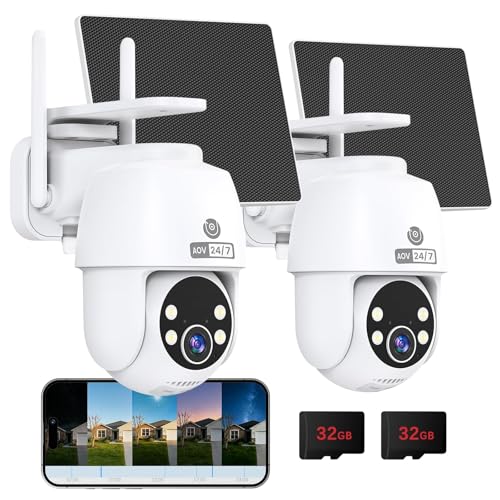
MUBVIEW 24/7 Continuous Recording Wireless Outdoor Security Camera | No Monthly Fee, 2.4G WiFi, 8X Zoom, 4MP 10W Solar Powered, 360° PTZ, Auto Tracking, SD Included, Charges Even Below 32°F
Check price on Amazon
TKENPRO 2K Solar Camera Outdoor Wireless, 2.4GHz Wi-Fi Connected | 24/7 Continuous Recording, Human Auto Tracking, 2K Color Night Vision, 360° Panoramic View, IP65
Check price on Amazon
MUBVIEW 24/7 Continuous Recording Wireless Outdoor Security Camera | No Monthly Fee, 2.4G WiFi, 8X Zoom, 4MP 10W Solar Powered, 360° PTZ, Auto Tracking, SD Included, Charges Even Below 32°F
Check price on Amazon
Tical Solar Security Cameras Wireless Outdoor 2 Pack, 4MP, 24/7 Recording | Solar Powered Security Camera Outdoor, Color Night Vision, 360° View Pan/Tilt, AI Human Detection, 2-Way Audio, 2.4GHz, White
Check price on Amazon
4K 12MP Solar Security Cameras Wireless Outdoor, Four Lens & 360° PTZ Linkage Camera with Solar Panel, 24/7 AOV Recording, Auto Motion Tracking, Color Night Vision, 2.4G/5G WiFi, IP66 Waterproof
Check price on Amazon
HXVIEW 4G LTE Cellular Solar Security Camera Outdoor Wireless, No WiFi | 24/7 Continuous Recording, 15000mAh Battery and 8W Solar Panel, Auto Tracking, AI Detection, with SIM Card and 32GB SD Card
Check price on Amazon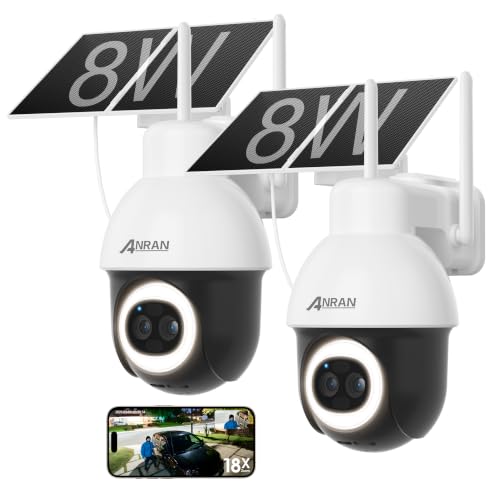
ANRAN 24/7 Recording Solar Security Camera Outdoor,AI Auto Tracking,2PCS | 5MP AOV WiFi Wireless Cameras,360° View, 230FT Detection Distance, 18X Optical Zoom, Color Night Vision,Work with Alexa
Check price on AmazonStorage and Subscription: Understanding the Costs
One of the biggest decisions when choosing a continuous recording wireless security camera is how to store the footage. The two main options are local storage (microSD card or NVR) and cloud storage (subscription-based). Each has its own advantages and drawbacks.
Local Storage: Recording to a microSD card is the most cost-effective method in the long run. You buy a high-capacity card once, and there are no monthly fees. However, if the camera is stolen, the footage goes with it. Additionally, SD cards can wear out over time with constant writing, so you'll need to replace them periodically. For a more robust local solution, an NVR with a hard drive offers larger capacity and is less likely to be stolen if kept in a secure location. If you want to avoid subscriptions entirely, a no subscription wireless outdoor security camera that supports local storage is an excellent choice.
Cloud Storage: Cloud plans offer off-site backup, so even if your camera is destroyed or stolen, your footage is safe. Most cloud plans charge a monthly or annual fee based on the number of cameras and the length of video history you want to keep. For continuous recording, you'll need a plan that supports 24/7 recording, which can be more expensive. However, the convenience of remote access and the security of off-site backup are worth it for many users. Some cameras offer a hybrid approach, recording continuously to an SD card while uploading motion-triggered clips to the cloud. This balances cost and security effectively.
When budgeting, consider both the upfront cost of the camera and the ongoing cost of storage. A camera that seems affordable might require an expensive subscription to unlock its full potential. Conversely, a higher-end camera with local storage might save you money over time. If you're concerned about internet outages, look for a camera that can record locally to an SD card even when the Wi-Fi is down, ensuring you never miss a moment.
Final Verdict: Is a Continuous Recording Wireless Security Camera Right for You?
A continuous recording wireless security camera is an excellent investment for anyone who needs a complete, uninterrupted record of their property. It eliminates the risk of missed events that can occur with motion-activated cameras, providing peace of mind and valuable evidence if an incident occurs.
Choose a continuous recording camera if:
- You want 24/7 coverage without gaps.
- You have a reliable power source and strong Wi-Fi.
- You are willing to invest in a large SD card or a cloud subscription.
- You are monitoring a critical area like a front door, driveway, or business entrance.
Consider a motion-activated camera instead if:
- You rely on battery power and cannot run a cable.
- You only need occasional clips and want to minimize storage costs.
- Your Wi-Fi is unstable and you cannot guarantee a constant connection.
Whichever you choose, always prioritize a strong Wi-Fi signal and a reliable power source. With the right setup, a continuous recording wireless security camera can be the cornerstone of a robust home security system. For those who prefer a fully wireless experience without internet dependency, exploring options like a wireless security camera that does not require internet can provide similar continuous recording capabilities using a local hotspot or receiver. No matter your specific needs, there is a continuous recording solution available to fit your budget and installation scenario.
For more specific needs, you might also be interested in a wireless security camera with receiver for a dedicated signal, or a security camera with long range motion detection if you need to cover a large area. Those looking for a completely wire-free experience might consider a wireless battery outdoor security camera paired with a solar panel for continuous power.