
Doorbell Camera & Home Security System
Your complete guide to choosing, installing, and maximizing a smart doorbell camera and integrated home security system. Protect your home with confidence.
View Recommended SystemsWhy a Doorbell Camera Is the Cornerstone of Home Security
A doorbell camera is no longer a luxury—it's a practical first line of defense for any home. Unlike traditional security cameras that monitor the perimeter, a video doorbell captures activity exactly where intruders and package thieves are most likely to approach: your front door. When integrated into a broader home security system, it becomes part of an intelligent network that can alert you, record evidence, and even trigger lights or alarms.
Modern doorbell cameras combine high-definition video, two-way audio, motion detection, and night vision into a single device. They connect to your smartphone, allowing you to see and speak to visitors from anywhere. Whether you're at work, on vacation, or simply in the backyard, you remain in control of your front door.
For homeowners who want a comprehensive solution, pairing a doorbell camera with a full professional home surveillance system creates layered protection. This guide will walk you through every consideration, from features and installation to costs and integration, so you can make an informed decision.
Essential Features to Look For in a Doorbell Camera
Not all doorbell cameras are created equal. Understanding the key specifications will help you choose a model that fits your home, lifestyle, and budget.
Video Resolution
1080p is the standard, but 2K and 4K models offer sharper detail for identifying faces and license plates. Higher resolution means better evidence if an incident occurs.
Field of View
A 160-degree field of view covers most porches. Wider angles (180 degrees) reduce blind spots but may distort the image slightly.
Night Vision
Infrared or color night vision ensures clear footage after dark. Color night vision is superior for identifying clothing and vehicle colors.
Two-Way Audio
Speak to delivery drivers, guests, or intruders in real time. Noise cancellation and echo suppression improve clarity.
Motion Detection
Adjustable sensitivity and zones prevent false alerts from passing cars or swaying trees. AI-powered detection can distinguish people from animals.
Power Source
Wired models are reliable but require existing doorbell wiring. Battery-powered models offer flexibility but need periodic charging. Solar options are emerging.
Storage Options
Local storage (microSD or base station) avoids monthly fees. Cloud storage offers off-site backup but typically requires a subscription.
Smart Home Integration
Compatibility with Amazon Alexa, Google Assistant, and Apple HomeKit enables voice control and automation with other smart devices.
Wired vs. Wireless Doorbell Cameras: Which Is Right for You?
The choice between wired and wireless depends on your home's existing infrastructure, your comfort with installation, and your long-term maintenance preferences.
Wired Doorbell Cameras
- Continuous power—no battery recharging
- Reliable connection (no Wi-Fi dropouts for power)
- Often supports higher resolution and advanced features
- Cleaner installation if existing doorbell wiring is present
Wired Doorbell Cameras (Drawbacks)
- Requires existing doorbell wiring or professional installation
- Limited placement options
- May need a transformer upgrade
- Higher upfront cost if wiring is absent
Wireless Doorbell Cameras
- Easy DIY installation—no wiring needed
- Flexible placement (can be moved as needed)
- Battery-powered models last 3–6 months per charge
- Ideal for renters or homes without existing wiring
Wireless Doorbell Cameras (Drawbacks)
- Battery recharging is a recurring task
- May reduce features to conserve battery
- Wi-Fi signal strength can affect performance
- Batteries degrade over time and need replacement
If you have existing doorbell wiring, a wired model is generally the better choice for reliability. If not, a battery-powered wireless model—especially one compatible with solar-powered motion sensor lights with cameras—offers excellent flexibility. For homes where running wires is impractical, consider a no-wifi battery-operated security camera that can operate independently.
Integrating Your Doorbell Camera with a Home Security System
A doorbell camera is most powerful when it's part of a larger security ecosystem. Integration allows your devices to work together, creating automations that enhance safety and convenience.
How Integration Works
Most smart doorbell cameras connect to a central hub or app that also manages other cameras, sensors, and smart locks. When your doorbell detects motion, it can trigger your outdoor security cameras with motion detection to start recording. If someone rings the bell, your smart lights can flash or your indoor camera can begin recording.
Benefits of an Integrated System
- Unified Control: Manage all devices from a single app.
- Automated Responses: Set rules like "when doorbell detects motion after 10 PM, turn on porch lights and send alert."
- Comprehensive Coverage: Combine doorbell, outdoor, and indoor cameras for full-property awareness.
- Simplified Monitoring: Professional monitoring services can watch all cameras, including your doorbell.
For a fully integrated setup, consider a wireless home security system with doorbell camera that includes multiple cameras and a central hub. If you prefer a system without monthly fees, explore security cameras without subscription fees that still offer integration.
Installation: What to Expect
Installation difficulty varies by model and your home's existing infrastructure. Here's a breakdown of what's involved.
DIY Installation (Wireless Models)
Most battery-powered doorbell cameras can be installed in under 30 minutes with just a screwdriver and drill. The typical process involves:
- Choosing a mounting location (usually 4 feet above the ground, near your door).
- Mounting the bracket with screws or adhesive.
- Snapping the camera into the bracket.
- Connecting to your Wi-Fi via the manufacturer's app.
- Configuring motion zones and alerts.
If you're renting or uncomfortable drilling, some models offer adhesive mounts. For a completely wire-free experience, look for a wireless camera that doesn't require Wi-Fi and uses cellular or local storage.
Wired Installation
If you're replacing an existing doorbell, wiring is straightforward: turn off power at the breaker, connect the new doorbell's wires to your home's existing chime wiring, and mount the device. If you don't have existing wiring, you'll need to run new wires from a transformer, which is best left to a professional electrician.
For homes without any wiring, a battery-operated CCTV camera with SD card can serve as a doorbell alternative, recording locally without the need for power cables.
Cost Breakdown: Doorbell Cameras and Security Systems
Understanding the total cost of ownership helps you budget effectively. Here's a realistic breakdown of what you can expect to spend.
| Component | Typical Price Range |
|---|---|
| Basic 1080p Wireless Doorbell Camera | $50–$150 |
| Premium 2K/4K Doorbell Camera (wired) | $150–$300 |
| Battery-Powered Doorbell Camera (no wiring) | $100–$250 |
| Professional Installation (if needed) | $100–$250 |
| Cloud Storage Subscription (per camera/month) | $3–$10 |
| Complete Home Security System (4 cameras + hub) | $300–$800 |
| Professional Monitoring (per month) | $10–$30 |
For budget-conscious buyers, there are excellent affordable wireless home security systems that include a doorbell camera and additional sensors. If you want to avoid monthly fees entirely, consider a security camera that doesn't require a subscription and stores footage locally on a microSD card or NVR.
Recommended Doorbell Cameras & Home Security Systems
⚠️ AFFILIATE DISCLOSURE: This website contains affiliate links. As an affiliate Associate, we earn from qualifying purchases. If you make a purchase through these links, we may receive a small commission at no additional cost to you. Read our full affiliate policy.

Blink Video Doorbell + Outdoor 4 – Wireless smart security cameras, head-to-toe HD view, two-year battery life. Sync Module Core included – 5 camera system + Video Doorbell
Check price on Amazon
Ring Battery Doorbell 2K (newest model) Retinal 2K with wide-angle video, up to 6x Enhanced Zoom, Two-Way Talk, and Built-In Battery, Speckled Gray
Check price on Amazon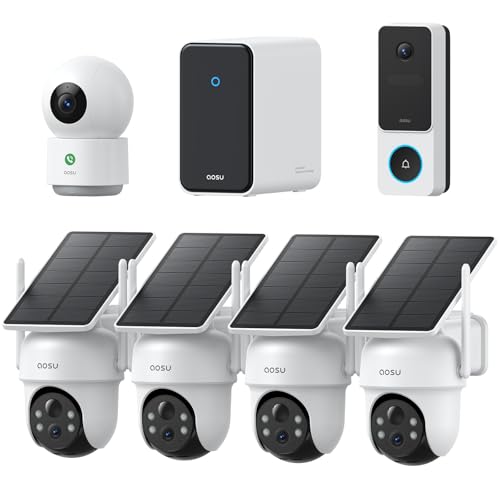
aosu Total-Watch Classic AI Suite, 3K Solar Security Camera Outdoor System | 3K / 5MP, AI Human+Vehicle+Pet, Expandable to 16TB, Works with Alexa & Google Assistant, 170° Wide, Outdoor PTZ 360°
Check price on Amazon
Ring Alarm 14-Piece Kit (newest model), Wireless smart home or business security system, expandable, easy setup, Mobile App Control, 24/7 Professional Monitoring, Alexa Compatible
Check price on Amazon
Orbitell 1080p Wireless Wi-Fi Video Doorbell Camera with Two Way Audio, Night Vision, Cloud Storage, Smart AI Motion Detection, Support 2.4GHz Wi-Fi only
Check price on Amazon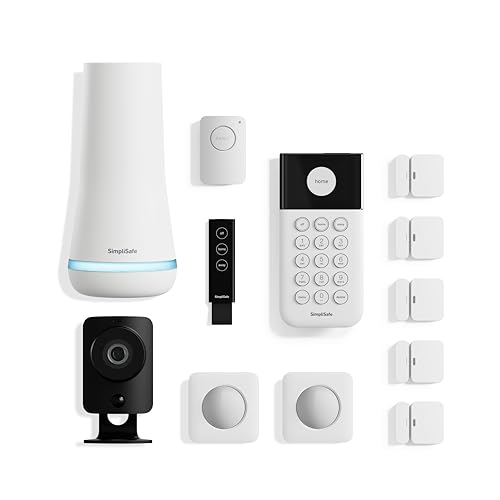
SimpliSafe 12 Piece Wireless Home Security System w/HD Camera - Optional 24/7 Professional Monitoring - No Contract - Compatible with Alexa and Google Assistant, White
Check price on Amazon
2K Security Camera System, 5GHz&2.4GHz WiFi Solar Wireless Cameras for Home Security, Wire-free Installation, AI Detection, Two-way Audio, Mobile alerts, SD/Cloud Storage, Color Night Vision, 4 Packs
Check price on Amazon
eufy Security Video Doorbell E340, Dual Cameras, 2K FHD, 8GB Local Storage | No Subscription,Head-to-Toe View,Wireless or Wired,Color Night Vision,Two-way talk,AI motion/Package Detection, 2.4 GHz Wi-Fi
Check price on AmazonChoosing the Right System for Your Home
Your specific situation—home size, existing infrastructure, budget, and technical comfort—will determine the best doorbell camera and security system for you. Here are some common scenarios and recommendations.
For Renters or Apartments
Choose a battery-powered, wireless doorbell camera with easy adhesive mounting. Avoid permanent modifications. A cheap and easy-to-install security camera can provide peace of mind without violating lease agreements.
For Homeowners with Existing Wiring
A wired doorbell camera offers the most reliable performance. Pair it with an NVR-based system for comprehensive coverage. Learn about the difference between DVR and NVR security cameras to make the right choice.
For Remote or Off-Grid Properties
If you lack reliable Wi-Fi or power, consider cellular or solar-powered options. A solar-powered wireless security camera with 4G LTE can operate completely independently. Alternatively, a security camera not connected to the internet records locally for later review.
For Maximum Security Without Monthly Fees
Look for systems with local storage (NVR or microSD) and no mandatory cloud subscription. A wireless outdoor security camera with local storage gives you full control over your footage.
Ready to protect your home? Explore our top-rated wireless security cameras for home to find the perfect match for your needs and budget.
Maintenance Tips for Long-Lasting Performance
Once installed, a few simple habits will keep your doorbell camera and security system running smoothly for years.
- Clean the lens regularly: Dust, spiderwebs, and water spots degrade image quality. Use a microfiber cloth.
- Check Wi-Fi signal strength: A weak signal causes lag and dropped recordings. Consider a Wi-Fi extender if needed.
- Update firmware: Manufacturers release updates that improve security and add features.
- Test motion alerts: Periodically verify that alerts are working and adjust zones as seasons change (e.g., tree branches).
- Monitor battery levels: For wireless models, recharge before the battery dies completely to avoid downtime.
- Review footage storage: If using local storage, ensure the SD card or NVR has sufficient space and is functioning properly.
For more comprehensive care, refer to our guide on camera care and maintenance.
Frequently Asked Questions
Not necessarily. Many doorbell cameras offer local storage via microSD card or a base station, allowing you to record and review footage without a monthly fee. However, cloud storage—which provides off-site backup and easier access—typically requires a subscription. If you want to avoid ongoing costs, look for a security camera that doesn't require a subscription.
Yes. Battery-powered wireless doorbell cameras are designed for easy DIY installation without any wiring. They mount with screws or adhesive and connect to your Wi-Fi. Some models offer solar charging options for even greater convenience. For a completely wire-free setup, consider a battery-operated CCTV camera with SD card.
Integration depends on the ecosystem. If you choose cameras from the same brand (e.g., Ring, Arlo, Google Nest), they typically work together seamlessly in one app. For mixed brands, you may need a smart home hub like Samsung SmartThings or Apple HomeKit. A wireless home security system with doorbell camera is a good starting point for full integration.
1080p is sufficient for most homes, providing clear video for identifying visitors. However, if you want to read license plates or identify faces at a distance, 2K or 4K resolution is better. Keep in mind that higher resolution requires more bandwidth and storage space.
Some models can operate without Wi-Fi by using cellular connectivity or local storage. A security camera not connected to the internet records footage locally, which you can review later. However, you lose remote viewing and instant alerts. For areas with no Wi-Fi, a wireless camera that doesn't require Wi-Fi is the best option.
A basic DIY system with a doorbell camera and two outdoor cameras typically costs between $300 and $600. Professional-grade systems with multiple cameras, a hub, and professional monitoring can range from $800 to $2,500 or more. For budget options, explore affordable wireless home security systems.
Final Thoughts: Taking the First Step Toward a Safer Home
Investing in a doorbell camera and home security system is one of the most effective ways to protect your property and loved ones. The technology has never been more accessible, with options ranging from budget-friendly DIY cameras to comprehensive professional systems.
Start by assessing your needs: Do you rent or own? Is there existing wiring? What's your budget? Once you have clarity, use the recommendations in this guide—and the curated product selections above—to choose a system that fits your life. Remember, the best security system is one that's properly installed, well-maintained, and integrated into your daily routine.
For more in-depth guides on specific security topics, explore our resources on professional home surveillance systems and outdoor security cameras with motion detection. Your safety is worth the investment.