Why Choose a Wireless Outdoor Camera with Local Storage?
When you invest in a wireless outdoor security camera with local storage, you're choosing a solution that prioritizes both affordability and data privacy. Unlike cloud-dependent cameras, local storage means your footage is saved directly on a microSD card or a network video recorder (NVR) inside your home. This eliminates the need for a monthly subscription and ensures that even if your internet goes down, your camera continues recording.
One of the biggest advantages is the cost savings. Many popular security cameras require a monthly plan to access recorded footage. With local storage, you pay once for the camera and a memory card, then nothing more. For homeowners looking for a security camera that doesn't require a subscription, this is a game-changer.
Privacy is another major factor. Cloud storage means your video travels through third-party servers. Local storage keeps your footage on your property, giving you full control. If you're concerned about security cameras not connected to the internet, a local-storage model is the right choice.
How Local Storage Works on Wireless Outdoor Cameras
Local storage typically comes in two forms: microSD cards and NVRs. MicroSD cards are ideal for standalone cameras. You simply insert a card into the camera, and it records continuously or when motion is detected. Most cameras support cards up to 256GB, which can hold weeks of footage depending on resolution and settings. For a detailed look at this type, see our guide on a security camera that records to SD card.
NVR systems, on the other hand, use a central recorder that connects to multiple cameras. This is a better option for whole-home coverage. If you're comparing systems, understanding the difference between DVR and NVR security cameras will help you choose. Wireless NVR systems often use a dedicated Wi-Fi network to communicate with cameras, keeping your main network free.
When selecting a camera, pay attention to the storage capacity, whether it supports continuous or event-based recording, and how easy it is to access footage remotely. Some cameras allow you to view live feeds and recordings from your phone even without a cloud plan, as long as you're on the same network or use a secure peer-to-peer connection.
Key Features to Look For in a Wireless Outdoor Camera
Not all wireless outdoor cameras are created equal. To get the most out of your investment, look for these features:
- Resolution: At least 1080p; 2K or 4K is better for identifying faces and license plates.
- Night Vision: Infrared or color night vision ensures 24/7 coverage. Some models use an infrared light bulb for security camera to enhance visibility.
- Weather Resistance: IP65 or higher rating for durability against rain, dust, and extreme temperatures.
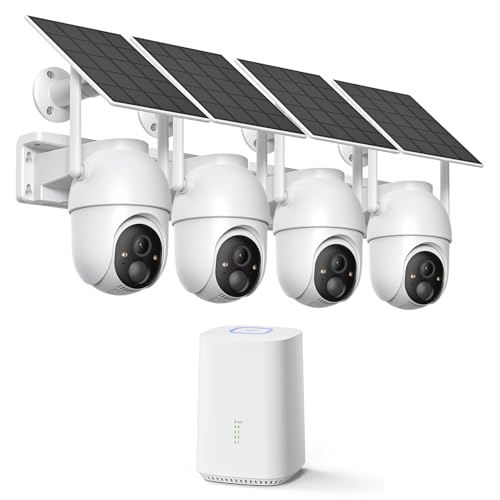
- Power Source: Battery-powered models offer flexibility, while solar-powered options like an outdoor wireless security camera system solar powered provide continuous power without wiring.
- Local Storage Slot: Ensure it supports microSD cards or connects to an NVR.
- Two-Way Audio: Useful for communicating with visitors or deterring intruders. Check out outdoor security camera with 2-way audio.
- Motion Detection: Customizable zones and alerts reduce false notifications. See outdoor security cameras with motion detection.
Installation Tips for Wireless Outdoor Cameras
Installing a wireless camera is easier than running Ethernet cables, but placement is critical. Mount cameras 8–10 feet high, angled slightly downward to capture faces. Avoid pointing directly at the sun or reflective surfaces. For battery-powered models, keep them within range of your Wi-Fi router. If you need help, our guide on an easy install wireless outdoor security camera walks you through the process.
If you prefer a completely wire-free setup, consider a wireless camera that doesn't require WiFi (using cellular or local recording). For areas with strong sunlight, a solar-powered motion sensor light with camera can be a dual-purpose solution.
Top Use Cases for Local-Storage Wireless Cameras
These cameras are versatile. They work well for:
- Home Perimeter: Monitor driveways, backyards, and entryways. For a full system, explore outdoor use home camera system wireless.
- Rental Properties: A cheap easy to install security camera is perfect for landlords who want to keep an eye on their property without complex wiring.
- Construction Sites: Construction site security cameras rentals often use local storage to avoid dependency on site internet.
- Remote Locations: If you have a cabin or barn, a security camera that doesn't require subscription with local storage is ideal.
- Wildlife Monitoring: Some users adapt trail cameras with night vision motion activated waterproof for security purposes.
Common Mistakes to Avoid
Many buyers overlook storage limits. A 64GB card may only hold a few days of 4K footage. Always calculate your needs. Another mistake is poor Wi-Fi coverage; wireless cameras need a strong signal. If your router is far, consider a mesh system. Also, don't forget to secure your camera with a strong password and enable encryption. For more pitfalls, read our camera buying mistakes guide.
Finally, verify that the camera's app allows local playback without a subscription. Some brands lock features behind a paywall even with local storage. Look for cameras that offer full functionality out of the box, such as those in our wireless security cameras for home reviews.
Frequently Asked Questions
Q: Can I access my camera remotely without a subscription?
A: Yes, most local-storage cameras offer free remote viewing via a mobile app as long as the camera is connected to your Wi-Fi.
Q: What happens if the SD card fills up?
A: Most cameras overwrite the oldest footage automatically. You can also set motion-only recording to extend storage.
Q: Are wireless cameras with local storage hackable?
A: Any connected device carries some risk. Use strong passwords, enable two-factor authentication, and keep firmware updated.
Q: Do I need a special router?
A: No, but a dual-band router with a dedicated 2.4GHz band for IoT devices improves reliability. Check if your camera works with 5GHz WiFi if you prefer that band.