
Security Cameras Not Connected To Internet
Discover how offline security cameras work, why they are a smart choice for privacy-focused monitoring, and how to choose the right local storage system for your home or business.
In an era where almost every device is connected to the cloud, a growing number of homeowners and business owners are intentionally choosing security cameras not connected to the internet. Whether you are concerned about privacy, want to eliminate monthly subscription fees, or simply live in an area with unreliable internet service, offline security cameras offer a dependable alternative that keeps your footage secure and accessible.
This comprehensive guide explains everything you need to know about offline surveillance systems. We will walk you through how these cameras function, the different types available, their advantages and limitations, and how to select the best model for your specific needs. If you have been searching for a security system that doesn't require WiFi, this article will give you the clarity you need to make an informed decision.
What Does "Not Connected to the Internet" Really Mean?
When we talk about security cameras not connected to the internet, we mean devices that do not transmit video footage to remote cloud servers or require an active internet connection to record and store data. These cameras operate entirely on a local network or as standalone units, storing footage on physical media such as SD cards, internal hard drives, or network video recorders (NVRs).
It is important to understand that "not connected to the internet" does not necessarily mean "no network at all." Many offline cameras still connect to your local area network (LAN) via Ethernet cables, allowing you to view footage on a monitor or computer within your home. The key distinction is that your video data never leaves your premises and is never uploaded to an external server.
For users who want complete independence from internet service providers, there are also wireless cameras that don't require WiFi at all, using alternative technologies such as cellular networks, local radio frequencies, or direct peer-to-peer connections.
Key Point: A security camera that is not connected to the internet can still be part of a sophisticated surveillance system. It simply means the recording and storage happen locally, giving you full ownership and control over your footage.
How Do Offline Security Cameras Work?
Understanding the mechanics of offline cameras helps you appreciate their value. Here is how they typically operate:
1. Local Recording and Storage
The most common configuration for an offline camera is to record directly to an on-board SD card. When the storage fills up, the camera automatically overwrites the oldest footage, ensuring continuous recording without manual intervention. Many models support high-capacity cards that can hold weeks of footage. For example, a battery-operated CCTV camera with SD card offers complete independence from both power outlets and internet connections.
2. Closed-Circuit Television (CCTV) Systems
Traditional CCTV setups use a dedicated monitor and a DVR (Digital Video Recorder) to manage multiple cameras. All video feeds run through physical cables to the DVR, which stores the footage on a built-in hard drive. This is one of the most reliable ways to keep cameras that don't need WiFi to record functioning around the clock.
3. NVR Systems with Local Network
Network Video Recorders (NVRs) connect to IP cameras through a local router. While the router may have internet access, the NVR itself stores footage locally. You can view live feeds and playback recordings on a monitor connected directly to the NVR or through a smartphone app when you are on the same network. To understand the difference between these systems, see our guide on the difference between DVR and NVR security cameras.
4. Standalone Battery-Powered Cameras
Some modern cameras are entirely self-contained. They record to internal memory or SD cards, run on rechargeable batteries, and require no internet or power cables. These are ideal for renters, temporary installations, or remote locations. A rechargeable battery-powered security camera can be placed almost anywhere and will keep recording regardless of your internet status.
Types of Security Cameras Not Connected to Internet
Not all offline cameras are the same. Here are the main categories to consider:
Wired CCTV Cameras with DVR
These are the classic security cameras that many people are familiar with. They connect via coaxial or Ethernet cables to a DVR unit that stores all footage. The system is entirely self-contained and does not need an internet connection to function. Many businesses and homeowners prefer this setup for its reliability and the ability to view footage on a dedicated monitor. For those who want a complete package, a closed-circuit camera system with monitor provides everything needed for immediate installation.
Wireless Cameras with Local Storage
These cameras connect wirelessly to a base station or NVR that stores footage locally. While they use wireless technology for convenience, they do not rely on the internet for recording. A wireless outdoor security camera with local storage gives you the flexibility of wireless installation with the security of local data ownership.
Battery-Powered Standalone Cameras
These are the most independent type of security camera. They operate on batteries, record to SD cards, and require no wiring or internet at all. They are perfect for locations where running cables is impractical. Many people search for a wireless camera that doesn't require WiFi for exactly this reason.
Solar-Powered Offline Cameras
Combining the benefits of solar power and offline operation, these cameras are completely self-sufficient. They generate their own electricity and store footage locally. They are ideal for remote areas, farms, and construction sites. A solar-powered surveillance camera with no WiFi offers unparalleled independence from infrastructure.
Cellular Security Cameras
While these cameras technically use a cellular network to transmit data, they do not require a traditional internet connection. They are excellent for locations without broadband service. If you are considering this route, you might look at a solar-powered wireless security camera with 4G LTE network capability.
Advantages of Security Cameras Not Connected to Internet
Choosing an offline security camera comes with several compelling benefits:
✅ Pros
- Enhanced Privacy: Your footage never leaves your property, eliminating the risk of third-party access or data breaches.
- No Monthly Fees: You avoid subscription costs associated with cloud storage plans. Many users specifically look for a security camera that doesn't require a subscription.
- Reliability: Your cameras keep working even when your internet goes down.
- Hacking Protection: Without an internet connection, remote hackers cannot access your camera feeds.
- Full Ownership: You own and control all your recorded data.
- Simple Setup: Many offline cameras are easier to install because they don't require network configuration.
❌ Cons
- No Remote Viewing: You cannot check your cameras from a different location unless you have a cellular model.
- Manual Footage Retrieval: To view footage, you may need to physically access the SD card or DVR.
- Storage Limits: Local storage can fill up, and you may need to manage recordings manually.
- Physical Security Risk: If a thief steals the camera or DVR, they take the footage with them.
- No Smart Home Integration: You cannot integrate these cameras with Alexa, Google Home, or other cloud-based platforms.
How to Choose the Best Offline Security Camera
Selecting the right camera for your needs requires careful consideration of several factors. Here is what you should evaluate:
Resolution and Image Quality
Look for at least 1080p resolution, though 4K is increasingly common and affordable. Higher resolution means you can zoom in on footage and still identify faces, license plates, or other important details. For comprehensive coverage, a 4K wireless security camera system with DVR offers exceptional clarity and local storage.
Storage Capacity
Consider how long you want to retain footage. A 128GB SD card might hold a week or two of continuous recording at 1080p, while a 2TB hard drive in a DVR can store months of footage. Think about your specific needs and choose accordingly.
Power Source
Do you have access to power outlets where you want to install the camera? If not, battery-powered or solar-powered models are your best bet. A battery-operated indoor security camera is a great option for indoor areas without convenient outlets.
Weather Resistance
If you are installing cameras outdoors, look for an IP65 or higher rating. This ensures the camera can withstand rain, dust, and extreme temperatures. For example, outdoor security cameras with motion detection should be built to handle the elements.
Field of View
A wider field of view means fewer cameras are needed to cover an area. Look for cameras with at least 90 degrees, though 130 degrees or more is better for comprehensive coverage.
Night Vision
Most security cameras offer infrared night vision, but the quality and range vary. Check the specifications for the night vision distance and clarity.
Motion Detection
This feature conserves storage space by only recording when movement is detected. It also helps you quickly find relevant footage. Many security cameras I can watch from my phone offer customizable motion zones and alerts, even if they record locally.
Comparison: Internet-Connected vs. Offline Security Cameras
| Feature | Internet-Connected Camera | Offline Camera |
|---|---|---|
| Remote Viewing | Yes, from anywhere | No (unless cellular) |
| Monthly Fees | Often required | None |
| Privacy | Data stored in cloud | Data stored locally |
| Reliability During Outages | Stops working | Continues recording |
| Hacking Risk | Higher | Very low |
| Setup Complexity | Moderate | Simple |
| Storage Management | Automatic | Manual (SD card/DVR) |
Popular Use Cases for Offline Security Cameras
Offline security cameras are not just for the privacy-obsessed. They serve a variety of practical purposes:
Rental Properties
If you rent your home or apartment, you may not be able to run cables or modify the network infrastructure. A standalone battery-powered camera or a cheap outdoor camera that connects to phone (via local WiFi when you are home) can provide security without permanent installation.
Remote Locations
Cabins, farms, and construction sites often lack reliable internet. A solar security camera without subscription can monitor these locations effectively without any infrastructure.
Privacy-Sensitive Areas
Inside your home, you may want cameras that record locally and never transmit data externally. An indoor hidden security camera with audio that stores footage on an SD card is ideal for monitoring nannies, elderly relatives, or pets without compromising privacy.
Business Security
Small businesses often prefer local storage to avoid recurring cloud costs. A hard-wired security camera system with remote viewing can provide local recording while still allowing the owner to check in remotely via a secure VPN or local network connection.
Setting Up Your Offline Security Camera System
Installing a security camera that is not connected to the internet is generally straightforward. Here is a step-by-step overview:
- Choose Your Camera: Select a model that fits your needs based on the factors discussed above.
- Determine Placement: Identify locations that provide optimal coverage. For outdoor cameras, ensure they are within WiFi range if you plan to view footage on a local device, or choose completely standalone models.
- Mount the Camera: Use the included hardware to securely mount your camera. For outdoor use home camera system wireless models, ensure the mounting location is protected from direct weather where possible.
- Insert Storage: If your camera uses an SD card, format and insert it according to the manufacturer's instructions.
- Power the Camera: Connect to power or insert batteries. For solar models, ensure the panel receives adequate sunlight.
- Configure Settings: Use the camera's local interface (often a mobile app when on the same network) to set motion detection zones, recording schedules, and other preferences.
- Test the System: Walk around the coverage area to trigger motion detection and verify that recording works as expected.
For those who want a simpler solution, many cheap easy to install security cameras are designed for DIY installation and can be set up in under an hour.
Maintaining Your Offline Security System
To keep your system running smoothly, regular maintenance is essential:
- Check Storage: Periodically review your SD card or DVR storage to ensure it is not full or corrupted.
- Clean Lenses: Dust and debris can degrade image quality. Clean lenses gently with a microfiber cloth.
- Replace Batteries: For battery-powered cameras, establish a schedule for recharging or replacing batteries.
- Update Firmware: Even offline cameras may have firmware updates that improve performance or security. Check the manufacturer's website periodically.
- Test Recording: Occasionally verify that your camera is still recording properly by reviewing recent footage.
Frequently Asked Questions
Yes, absolutely. Many security cameras are designed to work entirely offline, recording to local storage such as SD cards or DVRs. These cameras do not require an internet connection to capture and store footage. You can learn more in our guide on whether you can get a security camera without WiFi.
You can view footage by removing the SD card and inserting it into a computer, connecting a monitor directly to a DVR, or accessing the camera through your local network if it supports LAN connectivity. Some models allow you to connect via a direct WiFi hotspot created by the camera itself.
Not necessarily cheaper to purchase, but they eliminate monthly subscription fees. Over time, an offline camera can be significantly more cost-effective. Many security cameras without a monthly fee are available at various price points.
Battery-powered cameras will continue to operate. Wired cameras will stop recording unless connected to a UPS (Uninterruptible Power Supply). Consider a battery backup for critical installations.
They are extremely difficult to hack remotely because they have no internet connection. A hacker would need physical access to the device or its local network. This makes them a much safer choice for privacy-conscious users.
Conclusion
Security cameras not connected to the internet offer a compelling combination of privacy, reliability, and cost savings. Whether you are concerned about cloud data breaches, tired of monthly subscription fees, or simply live in an area with unreliable internet, an offline security camera system can provide the peace of mind you deserve.
From battery-powered standalone cameras to comprehensive CCTV systems with DVRs, there is an offline solution for virtually every need and budget. By understanding how these systems work and what features to look for, you can make an informed decision that protects your property without compromising your privacy.
Explore our other guides on wireless security cameras outdoor with no WiFi and outdoor security cameras that don't need WiFi to find the perfect solution for your home or business.
Recommended Security Cameras Not Connected to Internet
⚠️ AFFILIATE DISCLOSURE: This website contains affiliate links. As an affiliate Associate, we earn from qualifying purchases. If you make a purchase through these links, we may receive a small commission at no additional cost to you. Read our full affiliate policy.

HOSAFE.COM 4G LTE Cellular Security Camera No Internet Needed, 2K Solar No WiFi Security Camera Outdoor Wireless with SIM Card Jobsite,360 Live View, Motion Detection,Free Cloud Storage(Need Apply)
Check price on Amazon
Oculview 4G LTE Cellular Security Camera 2 Pack, Easy to Install, Off Grid Solar Powered, No WiFi Needed for Farm, Ranch, Jobsite, 2K Color Night Vision, 360° View, Built-in SIM Card - Black
Check price on Amazon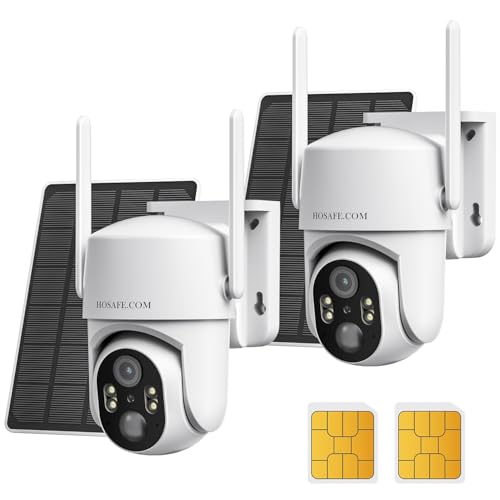
No WIFI Security Camera No Internet Needed, 2Packs, 2K Color Night Vision | 4G LTE Cellular Security Camera Outdoor Wireless Solar, PIR Motion Detection, Phone Alerts, Two Way Talk, IP66
Check price on Amazon
4G LTE Cellular Security Camera No Internet Needed, 2K Solar No wifi Security Camera Outdoor Wireless With SIM Card Jobsite,360 Live View, Motion Detection,Free Cloud Storage(Need Apply), 2 Packs
Check price on Amazon
2.4GHz/5GHz WiFi Indoor Camera 2K Cameras for Home Security 2-Pack | AI Motion Detect Two-Way Audio 49ft IR Night Vision 24/7 Recording 3-Min Quick Setup SD/Cloud Storage Pet Camera
Check price on Amazon
4G LTE Security Camera No Internet Needed, Free Cloud Storage, 2K HD Video | 360° PTZ Outdoor Camera, Solar Camera Outdoor Wireless, PIR Motion Detection, 2-Way Talk, Wall/Ceiling Mount, Waterproof
Check price on Amazon
AOQEE 5G Cameras for Home Security Indoor, Pet Monitor w/Phone APP G5 2Pcs | Dual-Band Wi-Fi Indoor Camera with 24/7 TF Card Storage, 360 PTZ Auto-Tracking Pet/Dog/Cat/Puppy/Nanny, Motion Alert, Plug-in
Check price on Amazon