
Security Cameras I Can Watch From My Phone
Your complete guide to choosing, installing, and using security cameras with seamless smartphone integration for peace of mind anywhere.
VIEW TOP PICKSThe Power of Remote Monitoring: Imagine checking on your home, pets, or business from anywhere in the world. With a phone-compatible security camera, you can receive real-time alerts, view live footage, and even communicate with visitors—all from your smartphone. This guide will walk you through everything you need to know.
Why Phone-Accessible Security Cameras Are Essential
In today's fast-paced world, the ability to monitor your property remotely isn't just a luxury—it's a necessity. Whether you're at work, on vacation, or simply in another room, a security camera that connects to your phone gives you instant visibility and control. These devices have evolved from simple webcams to sophisticated systems with high-definition video, night vision, motion detection, and two-way audio. For homeowners seeking a professional home surveillance system, phone integration is now a standard feature, offering unparalleled convenience and security.
The core appeal lies in the immediacy: a motion alert pops up on your phone, you tap it, and you're viewing a live feed. This real-time capability can deter intruders, help you manage deliveries, or simply check that your pet is safe. As you research, you'll find a vast ecosystem of options, from simple plug-and-play models to comprehensive smart professional surveillance systems that integrate with your entire smart home.
Key Features to Look for in a Phone-Connected Camera
Not all security cameras are created equal. When you want to watch from your phone, certain specifications become paramount. First, consider connectivity: most cameras use Wi-Fi, but if your home has dead zones, a security camera that uses an Ethernet cable for a wired connection might be more reliable. For areas without internet, a security system that doesn't require Wi-Fi (using cellular or local storage) is an excellent alternative.
Video quality is crucial. Look for at least 1080p resolution; many modern cameras offer 2K or even 4K for crystal-clear detail. Night vision, motion detection zones, and two-way audio are also highly desirable. If you're concerned about ongoing costs, search for a security camera that doesn't require a subscription—these typically store footage locally on a microSD card or a base station.
Power source is another consideration. While wired cameras are reliable, wireless models offer flexibility. A battery-operated CCTV camera with an SD card can be mounted almost anywhere, and a solar-powered motion sensor light with camera combines lighting and security without needing an electrician. For indoor use, a battery-operated indoor security camera is perfect for renters or temporary setups.
Top Security Cameras You Can Watch From Your Phone
⚠️ AFFILIATE DISCLOSURE: This website contains affiliate links. As an affiliate Associate, we earn from qualifying purchases. If you make a purchase through these links, we may receive a small commission at no additional cost to you. Read our full affiliate policy.
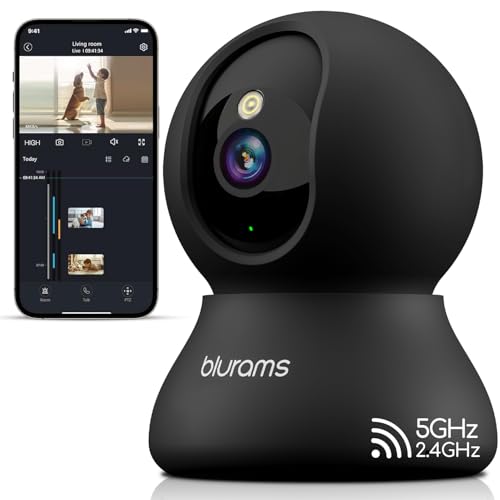
blurams Indoor Camera, 2K Pet Camera 360° Cameras for Home Security with Phone App, Motion Tracking, 2-Way Audio, IR Night Vision, Siren, Compatible with Alexa & Google Assistant
Check price on Amazon
Vaelthyr Security Camera WiFi Wireless Phone Charger, Security Cam Motion Activated,HD1080P(Rotate Lens) with 250°Viewing Angle, camaras espias ocultas for Home Office Security(2.4/5G)
Check price on Amazon
Nanny Cam Clock WiFi 1080P-Night Vision & Motion Detection, Indoor Wireless Security Camera for Home, Baby, Pet
Check price on Amazon
blurams 2.4G/5G Cameras for Home Security, 2K Pet Camera Indoor with Phone App, Window Security Camera w/Motion Detection, 2-Way Talk, IR Night Vision
Check price on AmazonInstallation Tips for Remote-Access Cameras
Installing a phone-connected camera is usually a straightforward DIY project. Most manufacturers provide a mobile app that guides you through setup, from connecting to Wi-Fi to mounting the device. For outdoor cameras, ensure they are weatherproof and mounted within range of your Wi-Fi signal. If your router doesn't reach the desired location, consider a wireless security camera outdoor no Wi-Fi model that uses a cellular network, or a solar-powered outdoor wireless security camera system for completely wire-free operation.
If you prefer a hardwired solution for maximum reliability, a hard-wired security camera system with remote viewing is an excellent choice. For those who want an all-in-one package, a 4K wireless security camera system with DVR offers high-resolution recording and a central hub. And for a simple, affordable entry point, a cheap outdoor camera that connects to your phone can provide surprising value. Always check the app's user reviews—a wireless security camera for home reviews section can reveal real-world performance.
Maximizing Your Camera's Potential
Once your camera is up and running, explore its advanced features. Many cameras allow you to set motion detection zones, so you only get alerts for specific areas. Two-way audio lets you talk to delivery drivers or scare off intruders. Some systems even integrate with smart lights or a porch light with camera and motion sensor for automated deterrence. If you have a large property, a outdoor wireless PTZ security camera system lets you pan, tilt, and zoom from your phone, covering a wide area with a single unit.
For comprehensive home protection, consider a wireless home security system with doorbell camera. This bundles a video doorbell with other cameras, all manageable from one app. If you're on a budget, an affordable wireless home security system can still deliver the core features you need. And for those who want zero monthly fees, a security camera that records to an SD card is a cost-effective, private solution.
Finally, don't overlook the importance of a stable internet connection. A security camera that works with 5GHz Wi-Fi will benefit from faster speeds and less interference. If you're unsure whether a camera can work without internet, the answer is yes—a security camera not connected to the internet can still record locally, though you won't have remote viewing. For remote viewing, a camera for inside home that connects to phone is the perfect starting point.
Frequently Asked Questions
Can I watch my security camera on my phone without Wi-Fi? Yes, if the camera uses a cellular connection or if you're on the same local network. However, for true remote viewing from anywhere, an internet connection is required. A wireless camera that doesn't require Wi-Fi often uses a 4G LTE network.
Do I need a subscription to view my camera on my phone? Not necessarily. Many cameras offer free live viewing and local storage. A security camera without subscription fees is widely available. You can also find a light bulb security camera without subscription for a discreet, screw-in solution.
What is the best camera for watching my phone from anywhere? The best camera depends on your needs. For outdoor use, a outdoor Wi-Fi security camera no subscription is a popular choice. For indoor use, an indoor wireless security camera without subscription offers great value. And for a complete system, a closed-circuit camera system with monitor provides a dedicated display in addition to phone access.