
Battery Operated Indoor Security Camera: Complete Buying Guide
Discover how wire-free indoor cameras can protect your home without the hassle of cables. Learn about battery life, smart features, placement tips, and the best options for every budget.
VIEW TOP RECOMMENDATIONSSetting up a home security system used to mean drilling holes, running cables, and dealing with complicated installations. Not anymore. A battery operated indoor security camera changes everything—it's wire-free, easy to mount anywhere, and delivers reliable monitoring without the mess. Whether you're a renter who can't drill into walls or a homeowner who wants a flexible setup, these cameras offer a practical solution that fits modern lifestyles.
But with so many options on the market, how do you choose the right one? This guide breaks down everything you need to know: battery life expectations, essential features, placement strategies, and how to avoid common pitfalls. By the end, you'll have a clear picture of what to look for and which models deliver the best value.
Why Choose a Battery Operated Indoor Security Camera?
Traditional wired cameras offer constant power, but they limit where you can place them. Battery-powered models free you from outlets and cables, making them ideal for apartments, temporary setups, or spots where wiring is impractical. Here's why they've become increasingly popular:
- Flexible Placement: Mount them on shelves, walls, or ceilings—anywhere with a good view. No need to be near a power source.
- Easy Installation: Most models use adhesive mounts or simple screws. You can set one up in minutes without professional help.
- Renter-Friendly: No permanent changes to your home. Perfect for apartments or short-term rentals.
- Backup During Outages: If the power goes out, battery cameras often keep recording, unlike wired systems that shut down.
- Clean Aesthetics: No visible wires means a tidier look that blends into your home decor.
If you're exploring broader options, our guide to indoor use wireless surveillance cameras covers additional wire-free solutions that might suit your needs.
Key Features to Consider Before Buying
Not all battery cameras are created equal. Understanding the specs helps you avoid disappointment. Here's what matters most:
1. Battery Life and Power Management
Battery life varies dramatically based on usage. A camera that records constantly might last days, while one that only activates on motion can last months. Look for models with rechargeable batteries and smart power-saving modes. Some cameras let you adjust sensitivity or set activity zones to reduce unnecessary wake-ups, extending battery life significantly.
For those who prefer not to deal with charging, consider a rechargeable battery powered security camera that balances convenience and performance. If you want to eliminate charging entirely, a solar-powered motion sensor light with camera can work for well-lit indoor areas near windows.
2. Video Quality and Night Vision
1080p is the minimum standard today; 2K or 4K offers sharper details. For indoor use, 1080p is often sufficient, but higher resolution helps if you need to identify faces or read text. Night vision is equally important—look for infrared LEDs that provide clear black-and-white footage in complete darkness.
3. Smart Features and Connectivity
Most modern cameras connect via Wi-Fi and offer mobile apps for live viewing and playback. Key features include:
- Two-way audio: Communicate with family or pets, or deter intruders.
- Motion detection alerts: Get notified on your phone when activity is detected.
- Local storage: Some cameras support microSD cards, avoiding cloud fees. Check our guide on a battery operated CCTV camera with SD card for options that store footage locally.
- Cloud storage: Convenient but often requires a subscription. If you prefer no ongoing costs, look for a security camera that doesn't require subscription.
4. Placement and Field of View
Indoor cameras typically offer 100–130 degrees field of view. Wider angles cover more area but may distort edges. Consider where you'll place the camera—corner mounting gives broader coverage. For discreet monitoring, an indoor hidden security camera with audio might be preferable.
5. Privacy and Data Security
Since these cameras connect to your network, security matters. Choose brands with strong encryption, regular firmware updates, and transparent privacy policies. Always change default passwords and enable two-factor authentication where available.
Battery Operated vs. Wired Indoor Cameras
To help you decide, here's a quick comparison:
| Feature | Battery Operated | Wired |
|---|---|---|
| Installation | Easy, DIY-friendly | Requires drilling, wiring |
| Placement Flexibility | High—anywhere | Limited to outlet proximity |
| Maintenance | Battery charging/replacement | Minimal |
| Initial Cost | $50–$250 | $30–$150 (plus installation) |
| Reliability | Depends on battery | Constant power |
| Best For | Renters, flexible setups | Permanent installations |
For a deeper dive into alternatives, explore our article on cameras for inside home that connect to phone, which covers both wired and wireless options.
Installation and Placement Tips
Getting the most out of your battery camera starts with smart placement. Here are practical tips:
- Height Matters: Mount cameras 7–10 feet high for a good vantage point that's hard to reach.
- Avoid Backlight: Don't point cameras directly at windows—backlight ruins exposure.
- Cover Entry Points: Focus on doors, hallways, and valuables.
- Test Before Mounting: Use the app to check the view and adjust angles.
- Secure the Camera: Use tamper-resistant mounts if available.
If you need help choosing a camera that works without internet, see our guide on security cameras not connected to internet for offline options.
Maintenance and Battery Care
To keep your camera running smoothly:
- Recharge batteries before they fully drain to prolong lifespan.
- Clean the lens regularly with a microfiber cloth.
- Update firmware to patch security vulnerabilities.
- Check the app for low-battery alerts.
- Store spare batteries if you live in extreme temperatures.
For cameras that use standard batteries, consider a battery operated indoor security camera with rechargeable cells to reduce waste.
Best Battery Operated Indoor Security Cameras
⚠️ AFFILIATE DISCLOSURE: This website contains affiliate links. As an affiliate Associate, we earn from qualifying purchases. If you make a purchase through these links, we may receive a small commission at no additional cost to you. Read our full affiliate policy.
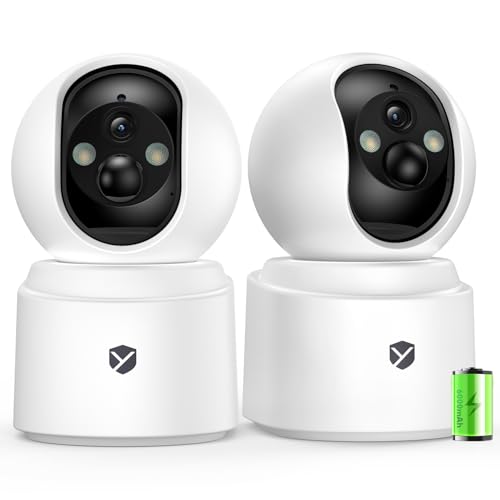
Battery Powered Indoor Camera Wireless 2 Pack with 2.5K Color Night Vision | PTZ Pet Camera with 6000mAh Rechargeable, Dual-Band WiFi, SD/Cloud Storage, 2-Way Audio, APP Remote, Cat/Dog/Home Monitoring
Check price on Amazon
youkey Magnetic Indoor Security Camera Wireless, 2K Battery Powered Camera, No Subscription, Built-in 8GB Storage, Wire-Free for Renters, Compatible with Alexa & Google, Pet/Baby Monitor(S320)
Check price on Amazon
4MP Indoor Security Camera Wireless Battery Powered,6000mAh Rechargeable,WiFi6 2.4/5GHz,Bluetooth Quick Setup,3D Noise Reduction,Smart Motion Detection,2-way Talk,Color Night Vision Pet Baby Monitor
Check price on Amazon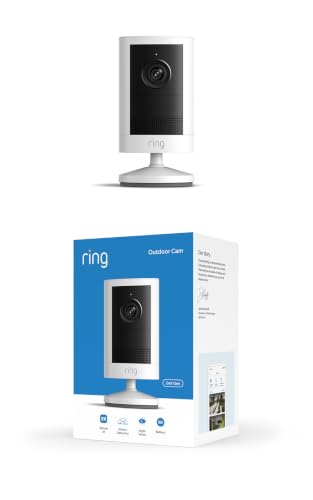
Ring Outdoor Cam 2K (newest model), Battery, Home or business security, Wide-Angle Retinal 2K Video, 6x Enhanced Zoom, Night Vision, White
Check price on Amazon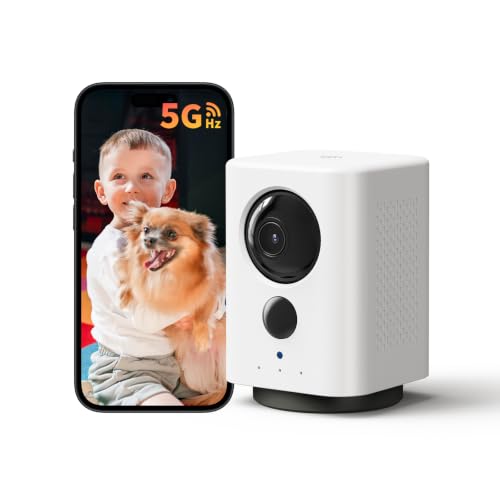
Indoor Camera Wireless, Battery Powered 5G/2.4G WiFi,2K Live View, Portable | Dog/Pet Camera, No Wires, Smart Detection, Instant Alerts, Night Vision, 2-Way Talk, Phone App Control Indoor Security Camera
Check price on AmazonFinal Thoughts
A battery operated indoor security camera offers unmatched flexibility for modern homes. Whether you're monitoring a nursery, keeping an eye on pets, or securing your apartment, these wire-free devices deliver peace of mind without complex installation. Focus on battery life, video quality, and smart features that match your lifestyle. With the right choice, you'll enjoy reliable surveillance that adapts to your needs.
Ready to explore more? Check out our recommendations above, and don't forget to review our security cameras without a monthly fee guide for cost-saving options.