
Security Cameras Without a Monthly Fee: The Complete Guide
Protect your home or business without recurring subscription costs. Learn how to choose the best no-fee security cameras with local storage, SD cards, and free cloud options.
Why Choose a Security Camera Without a Monthly Fee?
Security cameras have become an essential part of modern home and business protection. However, many popular brands lock their most useful features—like cloud recording, person detection, and video history—behind a monthly subscription. Over time, these fees can add up to hundreds of dollars per year, making the total cost of ownership far higher than the initial purchase price.
Fortunately, there is a growing market for security cameras without a monthly fee. These cameras store footage locally on microSD cards, USB drives, or network video recorders (NVRs), giving you full control over your data without any recurring charges. Some even offer limited free cloud storage or free remote viewing through a mobile app.
In this comprehensive guide, we will explain everything you need to know about no-subscription security cameras, including how they work, what features to look for, and how to choose the right model for your needs. Whether you are looking for an indoor wireless security camera without subscription or a robust outdoor wireless security camera system solar powered, this guide will help you make an informed decision.
💡 Quick Tip: A security camera without a monthly fee typically records to a local microSD card (up to 256GB), a USB hard drive, or an NVR. You can access the footage remotely through a free app, as long as the camera is connected to your Wi-Fi network.
How Do Security Cameras Without a Monthly Fee Work?
Understanding the technology behind no-fee security cameras will help you choose the right system for your property. Here are the main recording and storage methods:
1. Local Storage via MicroSD Card
Many standalone security cameras have a built-in microSD card slot. The camera continuously records to the card, and you can review footage through a mobile app or by removing the card and inserting it into a computer. This is the simplest and most affordable option. A security camera that records to SD card can store days or even weeks of footage depending on the resolution and card capacity.
2. Network Video Recorder (NVR) or DVR
For multi-camera setups, an NVR or DVR acts as a central hub that stores footage from all connected cameras. These systems typically use a built-in hard drive (1TB to 4TB or more) and do not require any subscription. A 4K wireless security camera system with DVR is an excellent choice for comprehensive coverage.
3. Free Cloud Storage (Limited)
Some brands offer a limited amount of free cloud storage, such as 24 hours of motion-triggered clips. While this is not a full substitute for local storage, it can be a useful backup for critical events. However, most free cloud plans are limited in duration and features.
4. Local Network Storage (NAS)
Advanced users can set up a network-attached storage (NAS) device to receive and store footage from compatible cameras. This requires some technical knowledge but offers complete control and no recurring fees.
If you want to avoid Wi-Fi entirely, you can explore options for security systems that don't require WiFi or security cameras not connected to internet.
Key Features to Look for in a No-Subscription Security Camera
Not all security cameras without a monthly fee are created equal. Here are the most important features to consider:
- Local Storage Options: Look for a microSD card slot (supporting at least 128GB, ideally 256GB) or compatibility with an NVR/DVR. A battery operated CCTV camera with SD card is a great example of a flexible, no-fee option.
- Resolution: 1080p is the minimum for clear identification. 2K or 4K provides sharper details, which is crucial for reading license plates or identifying faces.
- Night Vision: Infrared (IR) LEDs provide black-and-white night vision. Color night vision is available on some higher-end models. You can also add an infrared light bulb for security camera or an infrared spotlight for security camera to enhance night performance.
- Motion Detection: Look for cameras with customizable motion zones and sensitivity settings to reduce false alerts. Outdoor security cameras with motion detection are particularly useful.
- Two-Way Audio: This allows you to communicate with visitors or deter intruders. An outdoor security camera with 2-way audio is a valuable feature.
- Weather Resistance: For outdoor use, ensure the camera has an IP65 or IP66 rating. Outdoor use home camera system wireless models should be durable.
- Power Source: Options include wired (AC power), battery-powered, and solar-powered. A solar security camera without subscription is ideal for locations without easy access to power.
- Remote Viewing: Most no-fee cameras offer free remote viewing through a mobile app, as long as the camera is online. Look for a security cameras I can watch from my phone.
Comparison of No-Fee Security Camera Types
The table below compares the most common types of security cameras without a monthly fee, helping you choose the best fit for your situation.
| Camera Type | Storage Method | Power Source | Best For | Typical Price Range |
|---|---|---|---|---|
| Indoor Wireless Camera | MicroSD (up to 256GB) | AC Adapter | Home interiors, pet monitoring | $30–$80 |
| Outdoor Battery Camera | MicroSD or Base Station | Rechargeable Battery | Rentals, easy installation | $80–$200 |
| Solar-Powered Camera | MicroSD or NVR | Solar Panel + Battery | Remote locations, continuous power | $100–$250 |
| PoE Camera System | NVR (1TB–4TB HDD) | Power over Ethernet | Businesses, comprehensive coverage | $300–$800 |
| Doorbell Camera | MicroSD or Local Hub | Battery or Wired | Front door monitoring | $60–$150 |
For a complete home security setup, consider a wireless home security systems with doorbell camera or a smart professional surveillance system.
Pros and Cons of Security Cameras Without a Monthly Fee
✅ Pros
- No recurring costs—pay once and own it
- Full control over your video data
- Works without internet (local recording)
- No risk of price increases or service shutdowns
- Privacy—footage stays on your property
- Many options available at various price points
❌ Cons
- Limited or no cloud backup (risk of theft/damage)
- Remote viewing requires a stable internet connection
- Storage capacity limited by SD card or HDD size
- Some advanced AI features may require subscription
- Initial setup can be more complex for NVR systems
Top Recommendations for Every Scenario
Best for Indoor Use
If you need to monitor the inside of your home, an indoor use wireless surveillance cameras with a microSD card slot is a great choice. These cameras are easy to set up, often support two-way audio, and can be placed on a shelf or mounted on a wall. For pet owners, an indoor pet camera without subscription offers peace of mind without ongoing fees.
Best for Outdoor Use
Outdoor cameras need to withstand the elements. Look for a outdoor WiFi security camera no subscription with IP66 weatherproofing and night vision. If you don't have Wi-Fi coverage outdoors, consider a outdoor surveillance cameras without WiFi or a outdoor security camera that doesn't need WiFi. For areas without power, a solar-powered surveillance cameras no WiFi is an excellent solution.
Best for Renters
Renters need cameras that are easy to install and remove without damaging property. A no WiFi battery operated security camera or a rechargeable battery powered security camera is ideal. You can also consider a light bulb security camera without subscription, which screws into a standard light socket.
Best Budget Option
If you're on a tight budget, there are still excellent no-fee options. A cheap outdoor security cameras that connect to your phone or a most affordable outdoor security camera can provide basic coverage without breaking the bank. For a complete kit, look for affordable wireless home security systems.
Best for Comprehensive Coverage
For full property protection, a multi-camera system with an NVR is the way to go. A 4K wireless security camera system with DVR or a hard wired security camera system with remote viewing provides reliable, high-resolution coverage. If you prefer a monitor-based system, a closed circuit camera system with monitor is a classic choice.
Installation Tips for No-Fee Security Cameras
Proper installation is key to getting the most out of your security camera. Here are some practical tips:
- Choose the Right Location: Place cameras at least 8–10 feet high to prevent tampering and to get a good viewing angle. For outdoor cameras, avoid pointing them directly at the sun or reflective surfaces.
- Optimize Wi-Fi Signal: If your camera relies on Wi-Fi, ensure a strong signal at the installation point. A security cameras that work with 5GHz WiFi may offer better performance in crowded areas.
- Secure the Power Source: For battery-powered cameras, consider a solar powered motion sensor light with camera to keep the battery charged. For wired cameras, use a flood light security camera installation guide if you're mounting near existing fixtures.
- Test Before Final Mounting: Temporarily place the camera and test the field of view, night vision, and motion detection before permanently mounting it.
- Secure Your Network: Use a strong, unique password for your camera's app and your Wi-Fi network. Enable two-factor authentication if available.
- Regular Maintenance: Clean the lens periodically and check the SD card or NVR storage to ensure it's recording properly.
If you're installing a camera at a construction site, consider construction site security cameras rentals for temporary coverage. For cost planning, you can estimate the cost to install video surveillance system.
Frequently Asked Questions (FAQ)
Can I get a security camera without Wi-Fi?
Yes. Many security cameras record locally to an SD card or NVR without needing an internet connection. However, you will need Wi-Fi if you want to view the footage remotely from your phone. For completely offline operation, look for a wireless security camera that doesn't need WiFi or a camera that doesn't need WiFi to record.
How long do no-fee security cameras record?
Recording time depends on the storage capacity and resolution. A 128GB microSD card can typically store 1–2 weeks of continuous 1080p footage or several months of motion-triggered clips. An NVR with a 2TB hard drive can store weeks or months of footage from multiple cameras.
Are security cameras without a monthly fee reliable?
Yes, many reputable brands offer high-quality no-fee cameras. The main trade-off is that you are responsible for managing storage and ensuring the camera has power and (optionally) an internet connection for remote viewing.
What happens if the camera is stolen?
If the camera is stolen, any footage stored on the local SD card will be lost. To mitigate this risk, some cameras offer a small amount of free cloud storage for motion events, or you can place the NVR in a secure location. For critical areas, consider a camera with cellular backup.
Can I use a no-fee camera for my business?
Absolutely. Many businesses use NVR-based systems with local storage to avoid monthly fees. A professional home surveillance systems or a security cameras for home without monthly fee can be scaled for business use.
Do I need a subscription for remote viewing?
Not necessarily. Most no-fee cameras include free remote viewing through their mobile app as long as the camera is connected to the internet. However, some advanced features like AI person detection or extended cloud storage may require a subscription.
What is the best storage option for a no-fee camera?
For a single camera, a high-endurance microSD card (128GB or 256GB) is the most cost-effective option. For multiple cameras, an NVR with a surveillance-grade hard drive (1TB–4TB) is more robust. You can also explore a wireless outdoor security camera with local storage for flexible setups.
Final Thoughts: Take Control of Your Security Without Recurring Fees
Choosing a security camera without a monthly fee is a smart financial decision that gives you full control over your video data. Whether you opt for a simple security camera that doesn't require subscription or a comprehensive NVR system, there is a solution for every budget and property type.
Before you buy, consider your specific needs: indoor vs. outdoor, power availability, Wi-Fi coverage, and desired storage capacity. Use the comparison table and recommendations above to narrow down your options. With the right no-fee security camera, you can enjoy peace of mind without the burden of ongoing costs.
Ready to protect your home or business? Explore our recommended products below and take the first step toward a subscription-free security setup.
Recommended Security Cameras Without Monthly Fee
⚠️ AFFILIATE DISCLOSURE: This website contains affiliate links. As an affiliate Associate, we earn from qualifying purchases. If you make a purchase through these links, we may receive a small commission at no additional cost to you. Read our full affiliate policy.

2026 Upgraded 2K Security Cameras Wireless Outdoor, Free Cloud Storage, 1-6 Months Battery Life, Waterproof, 2-Way Talk, AI Motion Detection Spotlight Siren Alarm Cameras for Home Security
Check price on Amazon
No Monthly Fee Solar Security Cameras Wireless Outdoor, home security systems,500GB HDD nvr security camera system No Subscription, 2.4G & 5G WiFi,2-Way Audio, 4MP, Color Night Vision, 360° View
Check price on Amazon
Lifetime Free Data & No Monthly Fee 4G LTE Solar Cellular Security Camera Outdoor Wireless,No WiFi Needed, 360° PTZ, 2K Full Color Night Vision, Human Tracking, 2-Way Audio, 32GB SD Card, IP66-White
Check price on Amazon
VSKY 4G Cellular Security Camera, Lifetime Free Unlimited Data, 2K Pan Tilt | No Monthly Subscription Fee, No WiFi LTE Solar Powered IP65 Outdoor Cam with SIM Card, Color Night Vision, 360 Live Feed
Check price on Amazon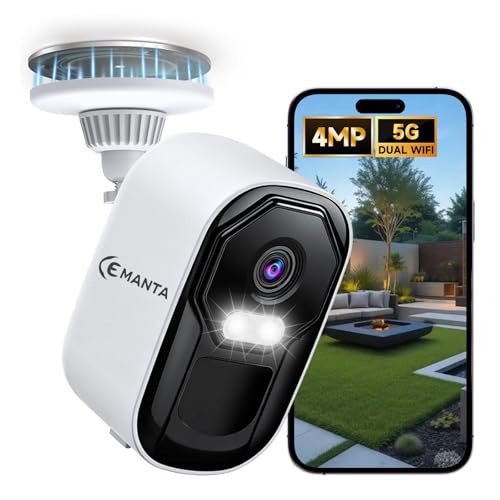
CEMANTA 2.5K Security Camera Wireless Outdoor,Cameras for Home Security | Free Cloud Storage,2.4G/5Ghz WiFi, AI Motion Detection with Spotlight & Siren Alarm, Color Night Vision, Weatherproof
Check price on Amazon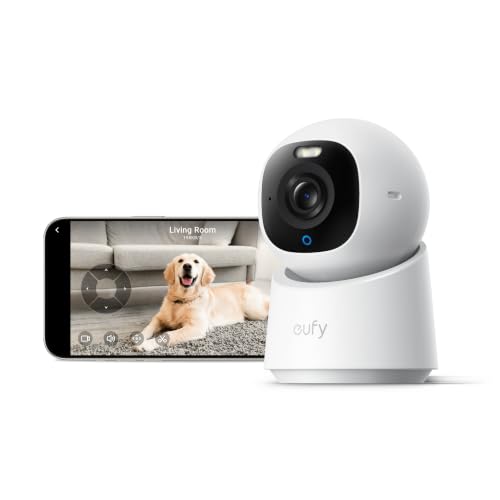
eufy Security 4K Indoor Camera E30, No Subscription, Work as Pet Camera | Nanny/Baby Camera, Pan&Tilt, AI Tracking, AI Detection, 24/7 Recording, Color Night Vision, Two-Way Audio,Works with HomeKit
Check price on Amazon
Carltec No Monthly Fee Solar Security Camera System with Home Hub, 2 Pack 4MP 360° PTZ Wireless Outdoor Cameras, Local Storage, Color Night Vision, 5GHz & 2.4GHz WiFi for Home Exterior, IP66
Check price on Amazon