
Security Cameras That Use Ethernet Cable
The complete guide to understanding PoE, NVR systems, and why wired Ethernet cameras remain the gold standard for reliable, high-performance surveillance.
Why Choose Ethernet? Unlike Wi-Fi cameras that can suffer from signal drops and interference, security cameras that use Ethernet cable deliver rock-solid reliability, higher bandwidth for 4K video, and consistent power delivery through a single cable. If you're serious about security, wired is the way to go.
Why Ethernet Security Cameras Are the Top Choice
When it comes to protecting your home or business, reliability is everything. Security cameras that use Ethernet cable, also known as PoE (Power over Ethernet) cameras, have become the preferred solution for professionals and DIY installers alike. They offer a level of performance and dependability that wireless systems simply can't match.
The key advantage is the single-cable solution. A standard Cat5e or Cat6 Ethernet cable carries both data and power to the camera, eliminating the need for separate power outlets near each camera location. This simplifies installation and reduces the number of components that can fail. For those comparing this to other systems, understanding the difference between DVR and NVR security cameras is crucial, as Ethernet cameras typically connect to an NVR.
How Ethernet Security Cameras Work
Power over Ethernet (PoE)
PoE technology transmits electrical power alongside data over the Ethernet cable. This means a single cable run from your NVR or a PoE switch is all you need to get a camera up and running. It's clean, efficient, and eliminates the hassle of finding a power outlet for every camera.
Network Video Recorder (NVR)
The NVR is the brain of the system. It receives the video feed from all connected cameras, manages recording, and provides remote viewing capabilities. Unlike a DVR that uses analog signals, an NVR works entirely with digital IP data over your network.
Direct-to-Router Connection
For a single camera or a small setup, you can connect the camera directly to your router. This allows you to view the feed from your phone or computer without a dedicated NVR. Many security cameras I can watch from my phone use this exact method for flexible monitoring.
Key Benefits of Wired Ethernet Cameras
- Unmatched Reliability: No Wi-Fi dropouts, no interference, and no lag. Your camera is always online and recording.
- Higher Bandwidth: Ethernet supports high-resolution 4K video without compression artifacts, ensuring clear identification of faces and license plates.
- Simplified Installation: One cable does it all. No need for electricians to install new power outlets.
- Better Security: A physical connection is much harder to jam or hack than a wireless signal. For maximum security, consider security cameras not connected to internet for a fully closed-loop system.
- Scalability: Easily add more cameras by connecting them to a larger PoE switch. This is ideal for growing systems, similar to what you'd find in professional home surveillance systems.
Ethernet vs. Wireless: A Quick Comparison
| Feature | Ethernet (PoE) Cameras | Wireless Cameras |
|---|---|---|
| Reliability | Excellent — no signal loss | Good — can suffer from interference |
| Video Quality | Up to 4K and beyond, uncompressed | Often compressed, can degrade |
| Installation | Requires cable runs, but no power outlet | Easy placement, but needs power |
| Security | Very high — physical connection | Moderate — vulnerable to jamming |
| Cost | $150–$400 per camera | $50–$200 per camera |
What to Look for in an Ethernet Security Camera
Not all wired cameras are created equal. Here are the critical specifications to consider before you buy:
- Resolution: Look for at least 1080p, but 4K (8MP) is becoming the standard for clear identification. If you need to monitor a large area, a high-resolution camera is essential.
- Night Vision: Infrared (IR) LEDs are standard, but consider cameras with Color Night Vision or smart IR for better low-light performance. You can also enhance existing setups with an infrared light bulb for security camera.
- PoE Standard: Ensure the camera supports PoE (IEEE 802.3af/at) and that your NVR or switch can provide enough power.
- Weatherproof Rating: For outdoor use, an IP66 or IP67 rating is a must. Check out our guide on wired outdoor security cameras for home for more details.
- Lens Type: A fixed lens is fine for general viewing, but a varifocal lens gives you the flexibility to adjust the field of view. For wide areas, consider a PTZ (Pan-Tilt-Zoom) system, though these are often wireless.
Recommended Ethernet Security Cameras
⚠️ AFFILIATE DISCLOSURE: This website contains affiliate links. As an affiliate Associate, we earn from qualifying purchases. If you make a purchase through these links, we may receive a small commission at no additional cost to you. Read our full affiliate policy.

Camcamp Wireless Security Camera System with 10 Inch Monitor, 8 PTZ Cameras | 1080P HD Outdoor, Works with No Internet, 500GB Locally Storage, No Monthly Fee, 24/7 Loop Recording, NVR Expandable to 10CH
Check price on Amazon
ANNKE 3K Lite Wired Security Camera System Outdoor, 8x 2MP Cameras, 1TB HDD | AI Human/Vehicle Detection, 8CH H.265+ Surveillance DVR and IP67-Rated Home CCTV Camera, IR Night Vision, 24/7 Recording
Check price on Amazon
VIMTAG 2.5K Pan/Tilt Wired Outdoor Security Camera for Home, Dual-Band WiFi | 360° Motion Tracking, AI Detection, 2-Way Audio&Siren, Color Night Vision, IP66, No Subscription, Works w/Alexa, Garage/Yard
Check price on Amazon
Arlo Essential Plug-In Security Camera 2K (3rd Gen) - 1-Cam | Wired surveillance camera, requires AC outlet; 16 ft cable; Color Night Vision; Intelligent Alerts; 1-mo Secure plan incl.
Check price on Amazon
POE ethernet Cable 100 ft+Power Siamese Gigabit Camera Wire cat5/cat6 Poe Cable Indoor Outdoor Internet LAN 100 ft ethernet Cable(30 Meter) for CCTV NVR Security Camera System Black 4 PCS
Check price on Amazon
TIGERSECU 5MP Metal Long Range Security Camera for TVI/CVI/AHD/CVBS DVRs | Hybrid 4-in-1 with OSD Switch, Weatherproof for Indoor and Outdoor Use, Power Supply and Coaxial Cable Sold Separately
Check price on Amazon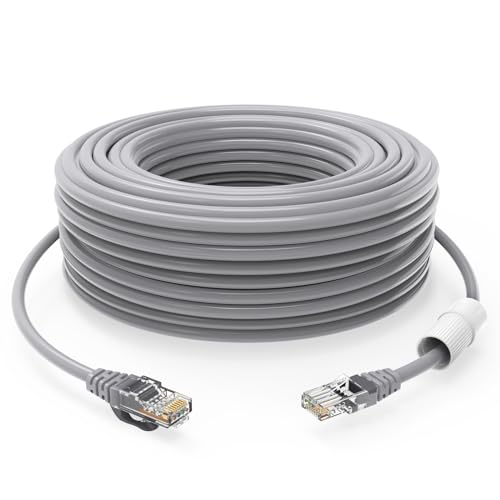
GWFIBER cat 5 ethernet Cable 100 ft Internet Cable (30 Meter) CAT5 poe Camera cat5 Indoor Outdoor ethernet Cable Network Cable(1 PCS Gray
Check price on Amazon
GWFIBER cat 5 ethernet Cable 100 ft Internet Cable (30 Meter) CAT5 poe Camera cat5 Indoor Outdoor ethernet Cable Network Cable(4 PCS Black
Check price on AmazonInstallation Tips for Wired Security Cameras
Installing a wired system is a bit more involved than sticking a wireless camera on a wall, but the results are worth it. Here are some tips to make the process smoother:
- Plan Your Cable Runs: Before you drill any holes, map out the path for each cable. Avoid running cables near power lines to prevent interference.
- Use the Right Cable: Cat5e is sufficient for most installations, but Cat6 offers better performance for longer runs and future-proofing.
- Consider a PoE Switch: If your NVR doesn't have enough PoE ports, a dedicated PoE switch is a cost-effective way to add more cameras.
- Test Before You Mount: Connect everything and test the camera feed before permanently mounting the camera. This saves you from having to redo work.
- Secure the Connections: Use waterproof connectors or junction boxes for outdoor connections to prevent corrosion and water damage.
Final Thoughts: Is a Wired Ethernet Camera Right for You?
If you prioritize reliability, video quality, and security above all else, then security cameras that use Ethernet cable are the clear winner. They are the backbone of professional surveillance systems and are increasingly accessible to DIY homeowners. While the initial installation requires a bit more effort, the peace of mind and performance you get in return are unmatched.
For those who need a simpler, temporary, or more flexible solution, a wireless system might be a better fit. You can explore options like an easy install wireless outdoor security camera or a solar security camera without subscription if running cables isn't feasible. However, for a permanent, dependable security setup, Ethernet is the professional's choice.