
Home Security Camera with Local Storage
Discover how local storage security cameras keep your footage private, eliminate monthly fees, and provide reliable 24/7 recording for your home.
Why Local Storage Matters: A home security camera with local storage saves footage directly to an SD card, NVR, or DVR inside your home. Unlike cloud-only cameras, you own your data, avoid subscription fees, and maintain full control over your privacy.
What Is a Home Security Camera with Local Storage?
A home security camera with local storage is a surveillance device that records and saves video directly onto a physical storage medium located within your home, rather than uploading footage to a remote cloud server. This approach gives homeowners complete ownership of their video data and eliminates the recurring costs typically associated with cloud-based security systems.
Local storage options include microSD cards, USB drives, internal hard drives, or dedicated network video recorders (NVRs) and digital video recorders (DVRs). Many modern cameras support hybrid setups, allowing you to record locally while simultaneously backing up to the cloud for redundancy.
If you are looking for a straightforward solution without recurring costs, a security camera system without subscription is an excellent starting point. Similarly, a home security camera system without subscription provides the same financial benefits with a focus on residential use.
Recommended Home Security Cameras with Local Storage
⚠️ AFFILIATE DISCLOSURE: This website contains affiliate links. As an affiliate Associate, we earn from qualifying purchases. If you make a purchase through these links, we may receive a small commission at no additional cost to you. Read our full affiliate policy.

4MP Security Cameras Wireless Outdoor, No Subscription 128GB Local Storage, Solar Powered Cameras For Home Security, PTZ Auto Tracking, 4Cam-Kit, Color Night Vision Home Security Camera System,5G&2.4G
Check price on Amazon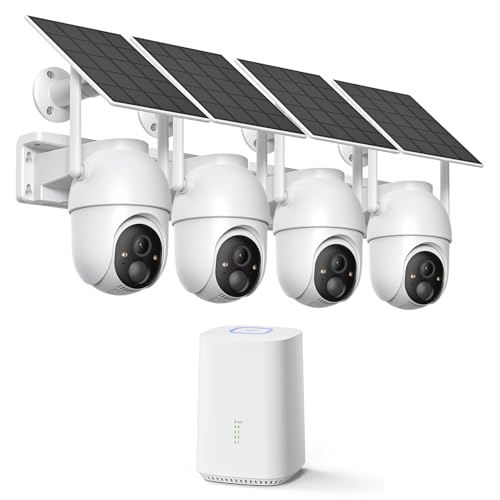
ELYSOO 2K/4MP Home Security Camera System, 2.4G & 5GHz Wi-Fi Connected | Local Storage Included, Solar Security Cameras Wireless Outdoor, IP65, Instant APP Alerts, Color Night Vision
Check price on Amazon
Tapo 2K+ Indoor/Outdoor Wired Security Camera, Baby Monitoring, C120 | 2024 PCMag Editors' Choice, Person/Pet/Vehicle Detection, Color Night Vision, Subscription-Free Local Storage or Cloud
Check price on Amazon
Hiseeu 5MP Home Security Camera System Outdoor, 2.4G/5G Wireless WiFi Pro | 24/7 Recording, 1TB HDD No Subscription, Wired Plug-in Powered Cameras, 4K NVR with 10.1" LCD Monitor, One-Way Audio, IP65
Check price on Amazon
Security Cameras Wireless Outdoor 5G& 2.4G, No Subscription, 2 Cam-Kit,4MP Solar Powered Home Security Cameras System With 360°PTZ,128GB Local Storage,Color Night Vision WiFi Cameras for Home Security
Check price on Amazon
5G&2.4GHz Indoor Security Camera, 2K, Free Cloud, 24/7 TF Recording, Wired | AI Motion Detection, Easy App Setup, 2-Way Audio, Cameras for Home Security, Dog, Cat, Elder, Nanny, Pet Camera
Check price on Amazon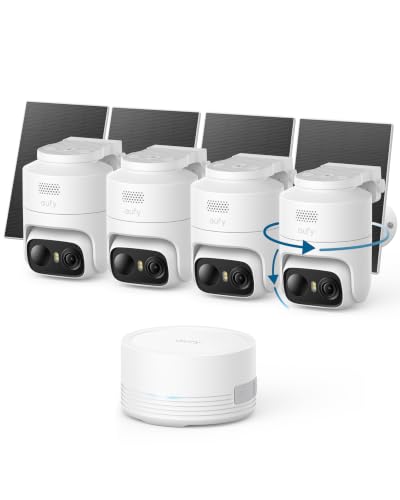
eufy Security eufyCam C37 4-Cam Kit, 360° Pan&Tilt Auto Tracking | Wireless Outdoor Camera, 2K Solar Powered, Human/Vehicle/Pet/Face AI Detection, No Subscription, Built-in 64GB Local Storage
Check price on Amazon
BOTSLAB 4K Security Camera Wireless Outdoor, 4 Cam-Kit, 32GB Local Storage | No Subscription, Full Color Night Vision, 360° PTZ, Solar Powered, AI Human&Motion Recognition, 2.4GHz WiFi
Check price on AmazonHow Local Storage Works on Security Cameras
Understanding the mechanics behind local storage helps you choose the right system. Here is how the process typically works:
- Capture: The camera captures video through its lens and image sensor, processing it into a digital format.
- Encoding: Video is compressed using codecs like H.264 or H.265 to reduce file size without sacrificing quality.
- Storage: The encoded footage is written to a local medium such as a microSD card, USB drive, or NVR hard drive.
- Playback: You access recordings through a mobile app, desktop software, or directly on a monitor connected to the NVR.
- Overwrite: When storage fills up, older footage is automatically overwritten to make room for new recordings.
Many systems also support 24/7 continuous recording, ensuring no moment is missed. For those who prefer motion-based recording, a stand-alone security camera with SD card offers a simple, self-contained solution.
Key Benefits of Local Storage Cameras
Choosing a camera with local storage comes with several compelling advantages:
- No Monthly Fees: Once you purchase the camera and storage medium, there are no recurring costs. This is ideal for budget-conscious homeowners.
- Privacy & Data Ownership: Your footage stays in your home, not on a third-party server. You control who accesses it.
- Reliable During Internet Outages: Recording continues even if your Wi-Fi goes down, as long as the camera has power.
- Faster Local Playback: Accessing footage from a local drive is typically faster than streaming from the cloud.
- Scalability: You can easily expand storage by adding larger drives or additional SD cards.
For users who want to avoid Wi-Fi dependency altogether, a security camera that doesn't require Wi-Fi paired with local storage is a powerful combination. Similarly, home security cameras that don't need Wi-Fi offer robust standalone operation.
Local Storage vs. Cloud Storage: A Detailed Comparison
| Feature | Local Storage | Cloud Storage |
|---|---|---|
| Monthly Cost | None (one-time purchase) | Typically $3–$15 per month |
| Privacy | High (data stays home) | Moderate (data on third-party servers) |
| Internet Dependency | Low (works offline) | High (requires constant connection) |
| Storage Capacity | Limited by physical media | Scalable (often unlimited tiers) |
| Accessibility | Local network or app | Anywhere with internet |
| Risk of Data Loss | If device is stolen or damaged | If subscription lapses |
Many homeowners choose a hybrid approach: local storage for primary recording and cloud backup for critical events. A wireless security camera with SD card can serve as an affordable entry point, while a DVR recorder for TV without subscription offers a more robust local solution.
Types of Local Storage for Security Cameras
1. MicroSD Cards
MicroSD cards are the most common and affordable local storage option. They are ideal for standalone cameras and typically range from 32GB to 512GB. A wireless security camera with SD card is easy to set up and perfect for renters or those who want a simple solution.
2. NVR (Network Video Recorder)
An NVR is a dedicated device that connects to IP cameras over a network and stores footage on an internal hard drive. NVRs are ideal for multi-camera setups and support features like wireless outdoor security cameras with DVR integration.
3. DVR (Digital Video Recorder)
DVRs work with analog cameras and store footage on an internal hard drive. They are a cost-effective option for existing analog systems. A wired security camera system with monitor often includes a DVR for local recording.
4. USB Drives and External Hard Drives
Some cameras support USB drives or external hard drives for storage. This is less common but can be useful for temporary setups or temporary construction security cameras.
How to Choose the Best Local Storage Security Camera
When selecting a home security camera with local storage, consider the following factors:
- Resolution: Look for at least 1080p; 4K offers superior detail. A 4K Ultra HD security camera with color night vision provides exceptional clarity.
- Night Vision: Ensure the camera has good low-light performance. Home security cameras with night vision are essential for 24/7 protection.
- Storage Capacity: Choose a camera that supports the storage size you need. Consider how many days of footage you want to retain.
- Power Source: Options include wired, battery-powered, and solar. A battery-powered security camera system offers flexibility in placement.
- Connectivity: Decide between Wi-Fi, Ethernet, or cellular. A battery-powered cellular security camera works where Wi-Fi is unavailable.
- Weather Resistance: For outdoor use, choose an IP65 or higher rating. Outdoor use security cameras for home should be durable and weatherproof.
- Smart Features: Motion detection, two-way audio, and AI alerts add convenience. A wireless security camera with two-way audio lets you communicate with visitors.
Installation Tips for Local Storage Cameras
Proper installation ensures optimal performance and security. Here are some best practices:
- Position Cameras Strategically: Cover entry points, driveways, and blind spots. For outdoor coverage, outdoor use security cameras wireless offer flexible placement.
- Secure the Storage Device: Keep NVRs and DVRs in a locked, hidden location to prevent tampering.
- Optimize Wi-Fi Signal: If using wireless cameras, ensure strong signal strength. Wireless outdoor security cameras with Wi-Fi need a reliable connection.
- Test Recording: Before finalizing installation, test recording and playback to ensure everything works.
- Consider Professional Help: For complex setups, professional security camera installation ensures everything is configured correctly.
If you prefer a DIY approach, many systems are designed for easy setup. An easiest outdoor security camera to install can be up and running in minutes.
Maintaining Your Local Storage Security System
To keep your system running smoothly, follow these maintenance tips:
- Regularly Check Storage: Ensure your SD card or hard drive has sufficient space and is functioning properly.
- Update Firmware: Manufacturers release updates that improve security and performance. Check for updates periodically.
- Clean Cameras: Dust and debris can affect image quality. Clean lenses gently with a microfiber cloth.
- Backup Critical Footage: If you capture something important, back it up to an external drive or cloud service.
- Monitor Health: Hard drives and SD cards can fail over time. Replace them proactively.
Ready to Secure Your Home with Local Storage?
Explore our top recommendations for home security cameras with local storage and take control of your home's safety today.
View Recommended CamerasFrequently Asked Questions
How long can a security camera record with local storage?
Recording duration depends on storage capacity, resolution, and frame rate. A 128GB microSD card can typically hold 7–14 days of continuous 1080p footage. Larger NVR drives (2TB–8TB) can store weeks or months of recordings.
Can I access my local storage camera remotely?
Yes, most modern cameras with local storage also offer remote access via a mobile app, allowing you to view live feeds and recordings from anywhere.
What happens if my camera is stolen?
If the camera itself is stolen, the local storage may be lost. To mitigate this, choose a system where the NVR is stored separately in a secure location, or use a camera that supports cloud backup as a secondary option.
Do local storage cameras need internet?
Not necessarily. Many cameras can record locally without an internet connection. However, internet is required for remote viewing and firmware updates. For fully offline operation, consider a security camera that works without Wi-Fi.
What is the best storage size for a home security camera?
For most homes, 128GB to 256GB is sufficient for a single camera. For multi-camera systems, a 2TB–4TB NVR drive is recommended.
Final Thoughts
A home security camera with local storage is an excellent choice for homeowners who value privacy, want to avoid recurring fees, and need reliable recording even during internet outages. By understanding your options and choosing the right system for your needs, you can build a robust security setup that protects your home without breaking the bank.
Whether you choose a simple wireless security camera with SD card or a comprehensive wireless security camera system with monitor, local storage ensures you stay in control of your surveillance data.