
Stand Alone Security Camera with SD Card: The Complete No-Fee Guide
Discover how a stand alone security camera with SD card can protect your home without monthly fees. Learn about local storage, key features, and how to choose the right model for your needs.
VIEW TOP PICKSWhy Go Stand Alone? A stand alone security camera with SD card records footage directly to a memory card inside the device. No cloud, no monthly subscription, and no internet required for recording. You own your footage, and you control your privacy.
What Is a Stand Alone Security Camera with SD Card?
A stand alone security camera with SD card is a self-contained surveillance device that stores video recordings locally on a removable memory card. Unlike cloud-based cameras that require a subscription for storage, these cameras operate independently. They record continuously or on motion detection, saving footage directly to the SD card inside the camera.
This type of camera is ideal for homeowners who want reliable security without recurring costs. It is also perfect for locations with unstable internet, such as remote cabins or temporary job sites. If you are looking for a security camera without subscription, a stand alone model with SD card is one of the most practical solutions available.
How Does Local SD Card Storage Work?
The camera captures video and writes it directly to a microSD card (typically 32GB to 256GB). When the card is full, most cameras automatically overwrite the oldest footage, ensuring continuous recording. You can remove the card anytime to review footage on your computer, or access it remotely if the camera supports an app.
Key benefits of local SD card storage include:
- No Monthly Fees: You pay once for the camera and the SD card, then nothing else.
- Privacy: Footage stays in your hands, not on a third-party server.
- Works Offline: Recording continues even if the internet goes down.
- Easy Playback: Remove the card and view files on any device with a card reader.
For a deeper comparison between local and cloud storage, see our guide on security camera with SD card.
Key Features to Look For
Resolution & Clarity
Look for at least 1080p Full HD. Many modern stand alone cameras offer 2K or 4K for sharper details. Higher resolution means you can zoom in on faces and license plates without pixelation.
Night Vision
Infrared (IR) LEDs provide clear footage in complete darkness. Check the night vision range, typically 20–30 feet for indoor models and up to 100 feet for outdoor cameras. See our guide on security cameras with night vision.
Motion Detection
Smart motion detection reduces false alerts. Some cameras use AI to distinguish between people, pets, and cars. This is especially useful for battery-operated security camera motion detection.
Weather Resistance
For outdoor use, choose an IP65 or IP66 rated camera. These are dust-tight and protected against water jets, making them suitable for rain and snow.
Power Options
Stand alone cameras can be battery-powered or wired. Battery models offer flexible placement, while wired models provide continuous power. Explore battery-operated security camera with SD card options.
Two-Way Audio
Built-in microphone and speaker let you listen and talk through the camera. This is useful for greeting visitors or warning intruders. See security cameras with 2-way audio.
Best Stand Alone Security Cameras with SD Card
⚠️ AFFILIATE DISCLOSURE: This website contains affiliate links. As an affiliate Associate, we earn from qualifying purchases. If you make a purchase through these links, we may receive a small commission at no additional cost to you. Read our full affiliate policy.

2026 Upgraded 2K Wireless Security Camera with 64G SD Card, Free Cloud Storage, 1-6 Month Battery Life, AI Motion Detection, Spotlight, Siren Alarm, 2-Way Audio, Waterproof WiFi Surveillance Camera
Check price on Amazon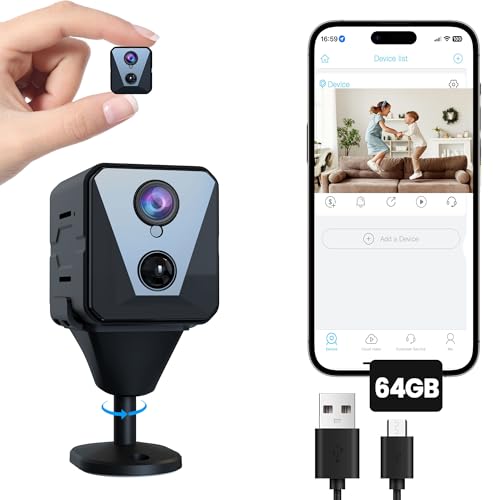
Funstorm 4K Security Camera with 64GB SD Card, Battery Powered Security Cam, 100-Day Standby, AI Human Detection, Night Vision, Real-Time Alert, Baby Monitor, Pet Cam for Home or Office
Check price on Amazon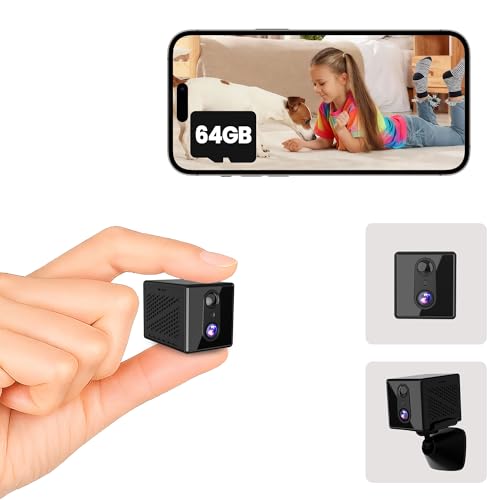
javiscam 4K Security Camera with 64GB SD Card, Battery Powered Security Cam, 100-Day Standby, AI Human Detection, Night Vision, Real-Time Alert, Baby Monitor, Pet Cam for Home or Office
Check price on Amazon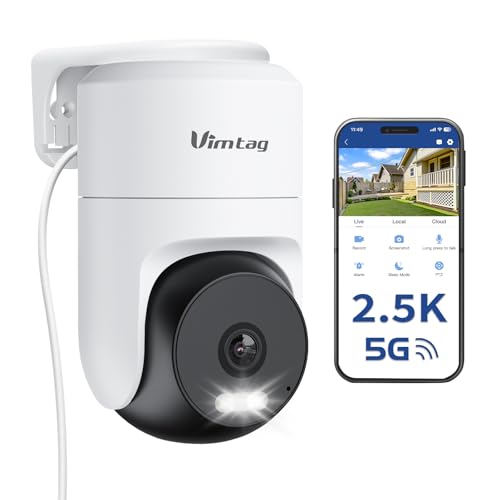
VIMTAG 2.5K Pan/Tilt Wired Outdoor Security Camera for Home, Dual-Band WiFi | 360° Motion Tracking, AI Detection, 2-Way Audio&Siren, Color Night Vision, IP66, No Subscription, Works w/Alexa, Garage/Yard
Check price on Amazon
REOLINK RLC-520A 5MP PoE Security Camera, Outdoor Dome with IR Night Vision | Smart Human/Vehicle/Animal Detection,100ft HD IR Night Vision, Work with Smart Home, Up to 512GB microSD Card, Time-Lapse
Check price on AmazonStand Alone vs. Cloud Security Cameras
| Feature | Stand Alone (SD Card) | Cloud-Based |
|---|---|---|
| Monthly Fees | None | Typically $3–$15 per month |
| Storage Location | Local microSD card | Remote servers |
| Internet Required | No (for recording) | Yes |
| Privacy | High (you own footage) | Depends on provider |
| Remote Access | Optional (via app) | Yes |
| Best For | Budget-conscious, privacy-focused users | Users wanting advanced AI and unlimited storage |
If you prefer a system that never charges you monthly, a stand alone camera is the clear winner. For homes with multiple cameras, consider a wireless outdoor security camera system that supports local storage.
Installation Tips for Stand Alone Cameras
Setting up a stand alone security camera with SD card is straightforward. Here are key steps:
- Choose the Right Location: Mount the camera 8–10 feet high, angled slightly downward. Avoid pointing directly at the sun or reflective surfaces.
- Insert the SD Card: Format the card in the camera before first use. Use a high-endurance microSD card designed for continuous writing.
- Connect to Power: If battery-powered, charge fully before mounting. If wired, ensure the cable is protected from weather.
- Set Up the App (Optional): Many stand alone cameras offer an app for remote viewing. This requires Wi-Fi, but recording continues even without it.
- Test Motion Detection: Walk in front of the camera to confirm alerts and recording triggers correctly.
For a full walkthrough, see our guide on home security camera system installation.
Who Needs a Stand Alone Security Camera?
Renters
No permanent wiring or monthly contracts. Easy to install and remove without damaging property. Check out easiest security camera system to install.
Remote Properties
Cabins, farms, and construction sites often lack reliable internet. A stand alone camera records locally without needing a connection. See temporary construction security camera.
Privacy-Conscious Users
Keep footage entirely offline. No data leaves your property unless you choose to access it. Learn about security camera that doesn't need internet.
Budget-Conscious Homeowners
Avoid monthly fees that add up over years. Pay once and own your security system. Explore security cameras without monthly fee.
Frequently Asked Questions
Final Thoughts
A stand alone security camera with SD card is one of the smartest investments for anyone who wants reliable, private, and cost-effective surveillance. With no monthly fees and the ability to record without internet, these cameras put you in full control. Whether you are protecting a home, a rental property, or a remote job site, a stand alone camera delivers peace of mind without the strings attached.
Ready to choose your camera? Explore our top recommendations above, or dive deeper into related topics like security camera with 24/7 recording and security camera with continuous recording.