
Security Camera That Doesn't Need Internet
Discover how offline security cameras work, why they are ideal for remote locations and privacy-focused users, and how to choose the perfect model with local storage and no monthly fees.
VIEW TOP PICKSWhy Go Offline? A security camera that doesn't need internet is the ultimate solution for property owners who want reliable surveillance without relying on Wi-Fi, cellular data, or cloud subscriptions. These cameras record directly to a local SD card or DVR/NVR system, ensuring your footage stays private and accessible even when your internet goes down.
Whether you're securing a remote cabin, a construction site, or simply want to avoid monthly fees, understanding how offline cameras work will help you make an informed purchase decision. This guide covers everything you need to know before buying.
Why Choose a Security Camera Without Internet?
Traditional security cameras often require a stable internet connection to stream footage, send alerts, and store recordings in the cloud. However, an offline security camera offers distinct advantages that make it a superior choice for many situations. Here are the key benefits:
🔒 Complete Privacy
Footage never leaves your property. No cloud servers, no third-party access, and no risk of data breaches. Your recordings stay on your local storage device, giving you full control over your privacy.
💰 No Monthly Fees
Eliminate recurring subscription costs entirely. Unlike cloud-based cameras that charge $5–$15 per month per camera, an offline system requires a one-time purchase with no hidden costs. Explore security camera without subscription options for more details.
📡 Works Anywhere
Perfect for remote locations with unreliable or no internet access. Whether it's a farm, vacation home, or construction site, these cameras keep recording 24/7 without connectivity concerns. See security camera that works without internet for remote use cases.
⚡ Reliable Recording
No buffering, no dropped connections, and no downtime. Local recording ensures continuous surveillance even during internet outages or network failures.
🔋 Low Power Consumption
Many offline cameras are battery-powered or solar-powered, making them easy to install without wiring. Check out battery operated security camera with SD card for wire-free options.
🛡️ Hacker-Resistant
Since they're not connected to the internet, they can't be hacked remotely. This makes them ideal for security-sensitive environments where cyber threats are a concern.
Types of Security Cameras That Don't Need Internet
Not all offline cameras are the same. Understanding the different types will help you choose the right one for your specific needs. Here are the main categories:
SD Card Cameras
These cameras record directly to an internal or external SD card. They are simple to set up and ideal for small-scale surveillance.
- No additional hardware required
- Easy playback via app or card reader
- Storage capacity typically 32GB–256GB
- Best for: Renters, small homes, temporary setups
DVR/NVR Systems
These systems use a central recorder (DVR for analog, NVR for IP cameras) with a built-in hard drive to store footage from multiple cameras.
- Supports 4–16+ cameras
- Large storage capacity (1TB–8TB+)
- Centralized management
- Best for: Businesses, large properties, multi-camera setups
Battery-Powered Offline Cameras
These wire-free cameras run on rechargeable batteries and record to local storage. They're perfect for locations without power outlets.
- No wiring needed
- Weatherproof designs available
- Motion-activated recording saves battery
- Best for: Outdoor areas, remote locations, rentals
Solar-Powered Offline Cameras
Combining solar charging with local storage, these cameras offer continuous operation without any electrical wiring or internet connection.
- Eco-friendly and cost-effective
- Ideal for remote and off-grid locations
- Requires adequate sunlight exposure
- Best for: Farms, construction sites, remote cabins
Offline Security Camera Comparison
Use this quick comparison table to understand the key differences between popular offline camera types and find the best fit for your needs:
| Feature | SD Card Camera | DVR/NVR System | Battery-Powered | Solar-Powered |
|---|---|---|---|---|
| Internet Required | No | No | No | No |
| Storage Type | SD Card (32GB–256GB) | Hard Drive (1TB–8TB+) | SD Card or Internal | SD Card or Internal |
| Number of Cameras | 1–2 | 4–16+ | 1–4 | 1–4 |
| Power Source | Wired or Battery | Wired | Battery | Solar + Battery |
| Installation Difficulty | Easy | Moderate | Very Easy | Easy |
| Best For | Small homes, renters | Businesses, large properties | Rentals, outdoor areas | Remote locations, off-grid |
| Price Range | $50–$200 | $200–$800+ | $80–$250 | $100–$300 |
Key Features to Look For
When shopping for a security camera that doesn't need internet, pay attention to these critical features to ensure you get the best value and performance:
- Local Storage Capacity: Look for cameras that support high-capacity SD cards (128GB or more) or hard drives (1TB+). More storage means longer recording history before overwriting. For continuous recording, check security camera with 24/7 recording options.
- Night Vision: Ensure the camera has infrared or color night vision for 24-hour surveillance. See security cameras with night vision for top picks.
- Motion Detection: Built-in motion sensors trigger recording only when movement is detected, saving storage and battery life. Learn about battery operated security camera motion detection.
- Weatherproof Rating: For outdoor use, choose cameras with IP65 or IP66 ratings to withstand rain, dust, and extreme temperatures.
- Resolution: At least 1080p HD is recommended; 2K or 4K provides clearer details for identifying faces and license plates.
- Two-Way Audio: Some offline cameras include microphones and speakers for communication. Check security cameras with 2-way audio.
- Battery Life: For wireless models, look for batteries lasting 3–6 months per charge. See hidden cameras with long battery life for discreet options.
- Easy Playback: Ensure the camera offers simple ways to view and export footage, either via a mobile app, built-in screen, or card reader.
How to Set Up a Security Camera Without Internet
Setting up an offline security camera is straightforward and typically takes less than 30 minutes. Here's a step-by-step guide:
Step 1: Choose Your Location
Mount the camera at least 8–10 feet high, angled downward to cover entry points. Ensure it's within range of your Wi-Fi for initial setup (if needed) or completely offline for standalone models.
Step 2: Insert Storage
Install a high-quality SD card (Class 10 or U3) or connect your DVR/NVR hard drive. Format the storage according to the manufacturer's instructions before first use.
Step 3: Power the Camera
Connect to a power source or insert batteries. For solar models, ensure the panel receives direct sunlight for optimal charging. See solar panel charger for security camera for additional charging options.
Step 4: Configure Settings
Use the camera's app (via local Wi-Fi) or on-device menu to set motion detection zones, recording schedules, and resolution. Once configured, the camera can operate fully offline.
Step 5: Test and Monitor
Walk in front of the camera to trigger recording. Play back the footage to confirm everything works. For remote monitoring without internet, consider security camera with cellular connectivity.
Step 6: Maintain Regularly
Check storage levels, clean the lens, and replace batteries as needed. For comprehensive maintenance tips, see our camera care and maintenance hub.
Recommended Security Cameras That Don't Need Internet
⚠️ AFFILIATE DISCLOSURE: This website contains affiliate links. As an affiliate Associate, we earn from qualifying purchases. If you make a purchase through these links, we may receive a small commission at no additional cost to you. Read our full affiliate policy.

4G LTE Security Camera No Internet Needed, Free Cloud Storage, 2K HD Video | 360° PTZ Outdoor Camera, Solar Camera Outdoor Wireless, PIR Motion Detection, 2-Way Talk, Wall/Ceiling Mount, Waterproof
Check price on Amazon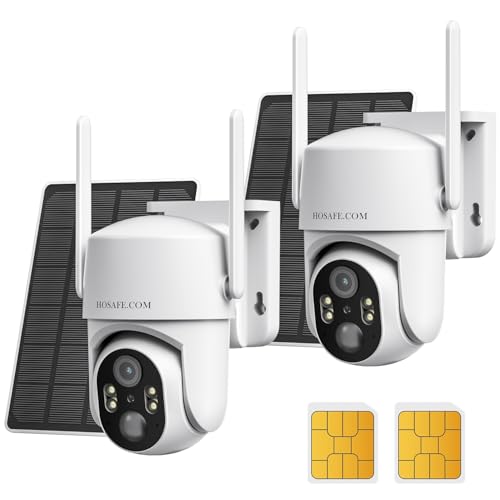
No WIFI Security Camera No Internet Needed, 2Packs, 2K Color Night Vision | 4G LTE Cellular Security Camera Outdoor Wireless Solar, PIR Motion Detection, Phone Alerts, Two Way Talk, IP66
Check price on Amazon
4G LTE Cellular Solar Security Cameras Wireless Outdoor, Built in SIM Card | No Wi-Fi 2K Camera, 24/7 Recording, Color Night Vision, 360°Pan Tilt, 2-Way Audio, AI Motion Detection, Ultra Solar Panel
Check price on Amazon
AOQEE 5G Cameras for Home Security Indoor, Pet Monitor w/Phone APP G5 2Pcs | Dual-Band Wi-Fi Indoor Camera with 24/7 TF Card Storage, 360 PTZ Auto-Tracking Pet/Dog/Cat/Puppy/Nanny, Motion Alert, Plug-in
Check price on Amazon
ZEEPORTE 2K Indoor Cameras for Home Security - Baby Monitor and Dog Pet Camera with Motion Detection, Night Vision, 2-Way Audio, Siren, Wired Security Camera
Check price on Amazon
VIMTAG 5G/2.4G 4MP Cameras for Home Security-Outdoor/Indoor Camera for Dog/Cat/Pet/Nanny/Baby, Wired, Color Night Vision, Free AI Detection, 2-Way Audio, 24/7 SD Recording,Support Alexa Cloud SD Card
Check price on Amazon
GNCC 2K Indoor Camera for Home Security with Phone App 5G/2.4G WiFi Pet Cam | Mini Pet Cam w/Human/Motion/Sound Detection, Compatible with Alexa, Cloud Storage Optional, Fixed View, Plug-in, 2 Pack
Check price on AmazonFrequently Asked Questions
Here are answers to the most common questions about security cameras that don't require internet:
Yes, absolutely. Many security cameras are designed to work entirely offline. They record footage to a local SD card or a DVR/NVR hard drive without needing any internet connection. You can view the footage later by accessing the storage device directly or through a local network connection. This makes them ideal for remote locations or users who prioritize privacy.
There are several ways to view footage from an offline camera. You can remove the SD card and insert it into a computer or card reader to view recordings. Some cameras have a built-in screen for direct playback. For DVR/NVR systems, you can connect a monitor directly to the recorder. Many offline cameras also create a local Wi-Fi hotspot that lets you connect your phone to view footage without an internet connection.
The best storage depends on your needs. For single cameras, a high-capacity SD card (128GB–256GB) is convenient and easy to manage. For multi-camera setups, a DVR or NVR with a 1TB–8TB hard drive offers centralized storage and longer recording history. Some cameras support both SD card and cloud storage, but for a true offline experience, local storage is the way to go.
Yes, most modern offline security cameras come with infrared (IR) night vision, allowing them to record in complete darkness. Some higher-end models offer color night vision using advanced sensors and LED lights. The night vision range typically varies from 30 to 100 feet, depending on the model. Check the specifications to ensure adequate coverage for your space.
True offline cameras cannot be accessed remotely over the internet. However, some models offer cellular connectivity (using a SIM card) that allows remote access without Wi-Fi. If remote access is important to you, look for a security camera with cellular capability. Alternatively, you can set up a local network where the camera connects to a router, allowing you to view footage when you're on the same network.
While the upfront cost of an offline camera may be similar to or slightly higher than a cloud-based camera, you save significantly in the long run because there are no monthly subscription fees. Cloud cameras typically cost $5–$15 per month per camera, which adds up to hundreds of dollars over a few years. An offline camera is a one-time purchase with no recurring costs.
Ready to Secure Your Property Without Internet?
Explore our top-rated offline security cameras and find the perfect solution for your home, business, or remote location. No monthly fees, no privacy concerns, just reliable surveillance.
SHOP TOP PICKS NOWFinal Thoughts
A security camera that doesn't need internet is an excellent choice for anyone who values privacy, reliability, and cost savings. Whether you're protecting a remote cabin, a construction site, or simply want to avoid monthly fees, offline cameras offer a dependable solution that works regardless of your internet situation.
When choosing your camera, consider your specific needs: How many cameras do you need? What's your budget? Do you need night vision, motion detection, or two-way audio? For multi-camera setups, a DVR/NVR system with a hard drive is ideal. For single-camera or temporary installations, an SD card camera or battery-powered model may be more suitable. For outdoor and off-grid locations, solar-powered options provide continuous operation without wiring.
By understanding the different types of offline cameras and their features, you can make an informed decision that ensures your property stays protected—no internet required. For more help choosing the right security setup, explore our guides on home camera system without subscription and security cameras without monthly fee.