
Security Camera System with Hard Drive: The Complete Guide
Everything you need to know about local storage surveillance systems. Learn how DVR and NVR setups with hard drives provide reliable, subscription-free recording for your home or business.
When it comes to protecting your property, a security camera system with hard drive offers one of the most reliable and cost-effective solutions available. Unlike cloud-based systems that require monthly fees, a local hard drive setup records footage directly to a physical storage device, giving you complete control over your data. Whether you're a homeowner looking for peace of mind or a business owner needing comprehensive surveillance, understanding how hard drive-based systems work is essential for making the right investment.
In this comprehensive guide, we'll walk you through everything you need to know about choosing, setting up, and maintaining a security camera system with a built-in hard drive. From understanding the difference between DVR and NVR systems to calculating the right storage capacity for your needs, this article will equip you with the knowledge to make an informed decision.
Quick Tip: A security camera system with a hard drive is ideal if you want to avoid recurring monthly fees and prefer keeping your footage private and secure on your own premises.
Why Choose a Security Camera System with Hard Drive?
Before diving into the technical details, it's worth understanding why local storage systems have remained so popular despite the rise of cloud-based alternatives. Here are the primary advantages:
- No Monthly Fees: Once you purchase the system, you own it. There are no subscription costs, making it a one-time investment that pays off over time.
- Data Privacy: Your footage stays on your property. You don't have to worry about third-party access or data breaches in the cloud.
- Reliable Recording: Local recording continues even if your internet connection goes down. This is especially important for areas with unstable connectivity.
- High-Quality Continuous Recording: Hard drive systems can support continuous 24/7 recording without the bandwidth limitations of cloud storage.
- Scalability: You can easily expand your system by adding more cameras or increasing storage capacity as your needs grow.
For those who prefer a system that doesn't rely on the internet, a security camera that doesn't need WiFi to record paired with a hard drive offers the ultimate in reliability and independence.
DVR vs NVR: Which Hard Drive System Is Right for You?
When shopping for a security camera system with hard drive, you'll encounter two main types: DVR (Digital Video Recorder) and NVR (Network Video Recorder). Understanding the difference is crucial for selecting the right system.
| Feature | DVR System | NVR System |
|---|---|---|
| Camera Type | Analog or HD-TVI cameras | IP (Internet Protocol) cameras |
| Connection | Coaxial cables (BNC) | Ethernet (Cat5e/Cat6) |
| Video Quality | Up to 4K (HD-TVI) | Up to 4K or higher |
| Installation | Often easier for retrofitting | Requires network setup |
| Cost | Typically more affordable | Slightly higher upfront cost |
| Best For | Basic home systems, budget setups | Advanced features, higher resolution |
For most homeowners, a DVR system with a hard drive provides an excellent balance of affordability and performance. However, if you're looking for advanced features like motion detection zones, two-way audio, or higher resolution, an NVR system may be worth the extra investment. Many modern systems also support continuous recording, ensuring you never miss a moment.
How Much Hard Drive Storage Do You Need?
One of the most common questions about security camera systems with hard drives is: "How much storage do I need?" The answer depends on several factors, including the number of cameras, resolution, frame rate, and how long you want to retain footage.
Factors Affecting Storage Requirements
- Number of Cameras: More cameras mean more data. A 4-camera system will use roughly half the storage of an 8-camera system at the same settings.
- Resolution: Higher resolution (e.g., 4K) consumes significantly more space than 1080p.
- Frame Rate: Recording at 30fps uses more storage than 15fps.
- Compression: H.265 compression is much more efficient than H.264, effectively doubling your storage capacity.
- Recording Mode: Continuous recording uses the most space, while motion-activated recording can dramatically reduce storage needs.
Storage Estimation Guide
As a general rule, here's how much storage you might need for a 4-camera system recording 24/7:
| Resolution | Compression | Storage for 7 Days | Storage for 30 Days |
|---|---|---|---|
| 1080p (2MP) | H.264 | ~500 GB | ~2 TB |
| 1080p (2MP) | H.265 | ~250 GB | ~1 TB |
| 4K (8MP) | H.264 | ~2 TB | ~8 TB |
| 4K (8MP) | H.265 | ~1 TB | ~4 TB |
For most residential applications, a 2TB to 4TB hard drive provides ample storage for 1-2 weeks of continuous recording. If you need longer retention, consider a larger drive or enable motion-activated recording to conserve space. For business installations, you may want to explore security cameras for business installation that support larger storage arrays.
Key Features to Look For in a Hard Drive Security System
Not all security camera systems with hard drives are created equal. Here are the features that matter most:
1. Hard Drive Type and Capacity
Look for systems that use surveillance-grade hard drives (like WD Purple or Seagate SkyHawk) designed for 24/7 operation. These drives are more durable and reliable than standard desktop drives. Most systems come with a pre-installed drive, but some allow you to add your own.
2. Camera Resolution
1080p is the minimum standard today, but 4K systems are becoming increasingly affordable. Higher resolution means you can zoom in on details like license plates or faces. If night vision is important, look for systems with security cameras with night vision.
3. Expandability
Choose a system that allows you to add more cameras or upgrade the hard drive later. A system with 8 channels but only 4 cameras gives you room to grow. For larger properties, consider a 16-channel security camera system with audio.
4. Remote Viewing
Even though recording is local, most modern systems let you view live feeds and playback footage remotely via a smartphone app. This is a convenient feature that doesn't require cloud storage. Look for security cameras you can watch on your phone for easy access.
5. Power Over Ethernet (PoE)
If you choose an NVR system, PoE cameras simplify installation by transmitting both power and data over a single Ethernet cable. This is especially useful for wireless outdoor security camera systems where running power cables is difficult.
Installation Tips for Your Hard Drive Security System
Installing a security camera system with hard drive can be a DIY project for handy homeowners, but professional installation ensures optimal performance. Here are some key considerations:
- Choose the Right Location: Mount cameras at least 8-10 feet high, angled slightly downward to capture faces and avoid glare.
- Secure the DVR/NVR: Place the recorder in a secure, climate-controlled area away from potential intruders. A locked cabinet is ideal.
- Cable Management: Use cable conduits or clips to protect wires from weather and tampering.
- Test Everything: Before finalizing the installation, test each camera's field of view, night vision, and recording quality.
- Set Up Remote Access: Configure the mobile app and test remote viewing to ensure you can access footage from anywhere.
If you're not comfortable running cables or configuring network settings, consider hiring a professional. The cost to have security cameras installed varies depending on the complexity of the job, but it's often worth the investment for a flawless setup. For larger projects, professional security camera installation cost can be estimated based on the number of cameras and building layout.
Maintaining Your Hard Drive Security System
To ensure your system continues to perform reliably, regular maintenance is essential:
- Check Hard Drive Health: Most systems have a built-in health monitor. Replace the drive if you notice errors or slowdowns.
- Clean Cameras: Dust and cobwebs can obscure the lens. Clean them gently with a microfiber cloth.
- Update Firmware: Manufacturers release firmware updates that improve security and add features. Check periodically.
- Review Footage: Periodically review recorded footage to ensure cameras are capturing what you expect.
- Backup Important Footage: If you capture something important, export it to an external drive or cloud storage before it's overwritten.
For systems that don't rely on the internet, a stand-alone security camera with SD card can serve as a backup recording method. Alternatively, a security camera with 24/7 recording capability ensures you never miss a moment.
Alternatives to Hard Drive Security Systems
While hard drive systems are excellent, they're not the only option. Depending on your needs, you might consider:
- SD Card Systems: A security camera with SD card stores footage locally on a memory card. These are great for single-camera setups but lack the capacity of a multi-terabyte hard drive.
- Cloud-Based Systems: These offer off-site storage but usually require a subscription. If you want to avoid fees, look for security cameras without subscriptions.
- Hybrid Systems: Some systems support both local hard drive recording and cloud backup, giving you the best of both worlds.
- Wireless Systems: If running cables is a challenge, a wireless outdoor security camera system with a local base station that includes a hard drive might be ideal.
For those who want a completely self-contained solution, a home camera system without subscription that records to a hard drive is often the best choice.
Top Security Camera Systems with Hard Drive
Based on our research and user feedback, here are some of the best security camera systems with hard drives available today:
- Reolink RLK8-800B4: A 4-camera 4K PoE NVR system with an 8-channel NVR and 2TB hard drive. Excellent value for money. Price: $450–$550
- Amcrest 4K Security Camera System: 8-channel DVR with 8 cameras and a 2TB hard drive. Features H.265 compression and smart motion detection. Price: $600–$800
- Swann Master Series 4K: 8-camera NVR system with 2TB hard drive, color night vision, and heat/motion detection. Price: $800–$1,000
- Lorex 4K Fusion NVR: 8-channel NVR with 4 cameras and a 2TB hard drive. Supports both PoE and Wi-Fi cameras. Price: $700–$900
- ZOSI H.265+ 8CH: Budget-friendly 8-channel DVR with 4 cameras and 1TB hard drive. Price: $300–$400
For a more comprehensive comparison, check out our guide to what is a good wireless security camera and easiest security camera system to install.
Recommended Security Camera Systems with Hard Drive
⚠️ AFFILIATE DISCLOSURE: This website contains affiliate links. As an affiliate Associate, we earn from qualifying purchases. If you make a purchase through these links, we may receive a small commission at no additional cost to you. Read our full affiliate policy.

ANNKE 3K Lite Wired Security Camera System Outdoor, 8x 2MP Cameras, 1TB HDD | AI Human/Vehicle Detection, 8CH H.265+ Surveillance DVR and IP67-Rated Home CCTV Camera, IR Night Vision, 24/7 Recording
Check price on Amazon
ANNKE 8CH H.265+ 3K Lite Wired Security Camera System, 4X 2MP Cam, 1TB HDD | 8 Channel DVR with AI Human/Vehicle Detection, Outdoor CCTV Cameras, IP67 Weatherproof, IR Night Vision, No Monthly Fees
Check price on Amazon
ANNKE 8CH 3K Lite Wired Security Camera System, 8X CCTV Cam, 1TB Hard Drive | H.265+ 8 Channel Surveillance DVR, AI Human/Vehicle Detection, 1080P HD Outdoor Cameras, IR Night Vision, 24/7 Recording
Check price on Amazon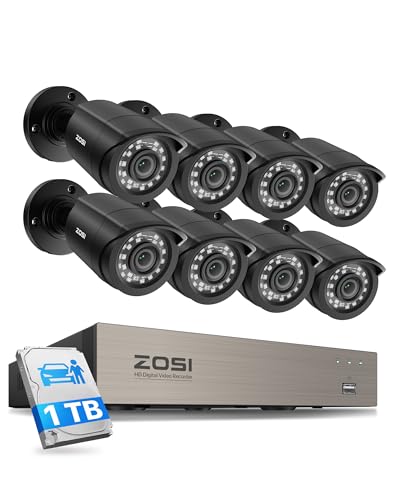
ZOSI 3K Lite 8CH Security Camera System Outdoor with 1TB Hard Drive,AI Human/Vehicle Detection,Night Vision,H.265+ 8 Channel 5MP Lite Video DVR Recorder,8X 1080P HD 1920TVL Weatherproof CCTV Cameras
Check price on Amazon
ANNKE 8CH 3K Lite H.265+ Security Digital Video Recorder, 1TB Hard Drive | Hybrid 5-in-1 Surveillance DVR, Human & Vehicle Detection, Supports 8CH Analog and 2 IP Cameras for 24/7 Home Business CCTV
Check price on Amazon
Hiseeu Wireless Security Camera, 5MP WiFi Security Camera System, 500GB HDD | Expandable 10CH 8MP NVR, Spotlight, 2 Way Audio, IP66 Waterproof, Motion Alert, DC Power Plug-in, 24/7 Recording
Check price on Amazon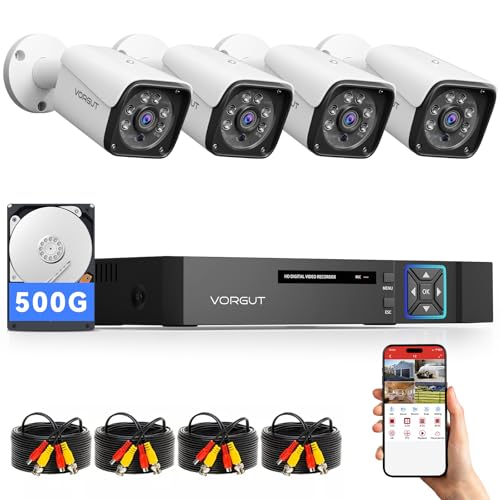
VORGUT Wired Security Camera System Outdoor, 4X 3MP CCTV Camera, 500G HDD | 4CH 5MP Lite AHD Surveillance DVR Kit, IP66 Waterproof Metal Shell, Remote Access,Smart Detection,24/7 Record, Night Vision
Check price on Amazon
ANNKE 8CH 3K Lite 2MP CCTV Wired Security Camera System Outdoor, 1TB HDD | AI Human/Vehicle Detection, 4pcs 1080P Analog Cams, 3.6mm Lens, Home & Business Surveillance, IP67, Outdoor Surveillance
Check price on AmazonFrequently Asked Questions
Can I use any hard drive in a security camera system?
It's best to use a surveillance-grade hard drive designed for 24/7 operation. Standard desktop drives may fail prematurely under continuous write cycles. Brands like WD Purple and Seagate SkyHawk are specifically engineered for this purpose.
How long will a 2TB hard drive last for security cameras?
For a 4-camera 1080p system using H.265 compression, a 2TB drive can store approximately 14-20 days of continuous recording. For 4K cameras, expect about 3-5 days. Motion-activated recording extends this significantly.
Can I access my hard drive security system remotely?
Yes, most modern systems allow remote viewing via a smartphone app or web browser. The hard drive stores footage locally, but you can stream live video and playback over the internet.
What happens if the hard drive fails?
If the hard drive fails, the system will stop recording. Some systems support RAID configurations for redundancy, but most home systems use a single drive. It's wise to periodically back up important footage and monitor drive health.
Do hard drive security systems require internet?
No, recording continues without internet. However, internet is needed for remote viewing and firmware updates. For a completely offline system, look for a security camera that doesn't need internet or a security system that does not require internet.
Final Thoughts
Investing in a security camera system with hard drive is a smart choice for anyone who values reliability, privacy, and cost-effectiveness. With no monthly fees and the ability to record continuously, these systems provide peace of mind knowing your property is being monitored around the clock.
When choosing a system, consider your storage needs, camera resolution, and whether you prefer DVR or NVR technology. Don't forget to factor in installation costs if you're not comfortable with DIY. And remember, while hard drive systems are excellent, alternatives like security cameras without subscription or battery-operated security cameras with SD cards may suit certain situations better.
Whichever system you choose, the key is to do your research, understand your requirements, and select a setup that will serve you well for years to come. Your security is an investment worth making.
Ready to protect your home or business with a reliable hard drive security system?
View Recommended Systems