
Professional Security Camera Installation Cost
Get a transparent breakdown of what you'll pay for professional security camera installation. Understand labor rates, equipment costs, and the factors that influence your final quote.
See Cost BreakdownWhy Professional Installation Matters: While DIY security camera setups are more accessible than ever, professional installation ensures optimal placement, proper wiring, reliable network configuration, and ongoing support. The cost of professional installation varies based on system complexity, property type, and your specific security requirements. This guide breaks down every cost component so you can budget with confidence.
Average Professional Installation Costs
Professional security camera installation costs typically range from $800 to $2,500 for a standard residential system with 4-8 cameras. Commercial installations and complex setups can exceed $5,000. Below is a detailed breakdown by system type and scope.
Basic Residential Package
$800 – $1,500Includes 4 wireless cameras, basic mounting, and mobile app setup. Ideal for single-family homes with straightforward layouts. Learn about residential installation.
Advanced Residential Package
$1,500 – $2,500Includes 6-8 cameras, wired or PoE setup, NVR configuration, and custom cable routing. Suitable for larger homes with multiple entry points.
Small Business Package
$2,000 – $4,000Includes 8-12 cameras, commercial-grade NVR, remote access configuration, and employee training. See business installation options.
Enterprise / Multi-Site
$5,000+Includes 16+ cameras, advanced analytics, redundant storage, and integration with existing security systems. Custom quote required.
Key Factors That Affect Installation Cost
Several variables determine your final installation quote. Understanding these factors helps you anticipate costs and make informed decisions about your security investment.
- Number of Cameras: More cameras mean more labor, cabling, and configuration time. Each additional camera typically adds $150–$400 to the installation cost, depending on whether it's wired or wireless.
- Wired vs. Wireless: Wired systems require running cables through walls, attics, or conduits, which increases labor costs. Wireless systems are faster to install but may need additional access points for reliable coverage. If you prefer a no-subscription setup, explore security cameras without monthly subscription.
- Property Type & Size: Single-story homes are easier to install than multi-story buildings or commercial spaces with high ceilings. Complex rooflines, brick walls, and finished interiors add labor hours.
- System Complexity: Basic recording setups cost less to install than systems with advanced features like AI analytics, license plate recognition, or integration with alarm systems. For continuous recording needs, consider security cameras with 24/7 recording.
- Night Vision & Special Features: Cameras with advanced night vision, motion lights, or 4K resolution may require more precise placement and calibration. Check out security cameras with night vision for options.
- Network Infrastructure: If your property lacks adequate Wi-Fi coverage or Ethernet wiring, additional networking equipment and setup will increase costs. For properties without internet, consider security cameras that don't need internet.
- Labor Rates by Region: Installation labor rates vary significantly by location. Urban areas with higher cost of living typically see rates of $75–$150 per hour, while rural areas may be $50–$100 per hour.
- Permits & Compliance: Some municipalities require permits for security camera installation, especially in commercial settings. Permit fees can range from $50 to $500 depending on local regulations.
Additional Costs to Budget For
Beyond the basic installation fee, consider these potential expenses when planning your security camera project:
Equipment Costs
$300 – $2,000+Cameras, NVR/DVR, cables, connectors, and mounting hardware. Quality varies widely—budget $50–$200 per camera for reliable performance.
Networking Gear
$100 – $500Routers, switches, PoE injectors, and range extenders. Essential for reliable wireless or IP camera performance.
Cable & Conduit
$50 – $300Ethernet cables, power cables, and protective conduit for outdoor runs. Longer cable runs and buried lines cost more.
Maintenance & Support
$100 – $500/yearOptional service plans for system health checks, firmware updates, and troubleshooting. Some installers offer annual maintenance packages.
How to Save on Professional Installation
You don't have to sacrifice quality to stay within budget. These strategies help reduce installation costs without compromising security:
- Bundle Equipment & Installation: Many installers offer discounted rates when you purchase cameras and installation as a package. This also ensures compatibility and simplifies warranty coverage. Explore easiest security camera systems to install for options that minimize labor.
- Choose Wireless Where Possible: Wireless cameras eliminate cable runs, reducing labor time. They're ideal for renters or homes where drilling is limited. Check out wireless outdoor security camera systems.
- Install During Off-Peak Season: Security installers are busiest during summer and holiday seasons. Scheduling in spring or fall can sometimes get you better rates or faster service.
- Do Prep Work Yourself: If you're handy, you can pre-run cables or mount brackets before the installer arrives. This reduces billable labor hours. For DIY-friendly options, see home security camera system installation.
- Opt for Subscription-Free Systems: Avoid ongoing cloud storage fees by choosing systems with local storage. Learn about security cameras with SD card or systems with a hard drive.
- Get Multiple Quotes: Always obtain at least three quotes from licensed installers. Compare not just price, but also warranty terms, equipment quality, and customer reviews.
Is Professional Installation Worth the Cost?
For many homeowners and business owners, professional installation is a worthwhile investment. Here's why:
- Optimal Camera Placement: Professionals know how to position cameras to eliminate blind spots and capture usable footage. Poor placement is the most common reason security cameras fail to identify intruders.
- Proper Wiring & Weatherproofing: Incorrect wiring can lead to system failures, fire hazards, or water damage. Professionals ensure all connections are secure and weatherproof.
- Network Security: IP cameras and NVRs need proper network configuration to prevent hacking. Installers set up secure passwords, encryption, and firmware updates. For cellular-based systems, see security cameras with cellular.
- Warranty & Support: Professional installation often comes with a workmanship warranty. If something goes wrong, you have recourse. DIY installations typically void equipment warranties.
- Time Savings: Installing a security system yourself can take days, especially if you're unfamiliar with networking or electrical work. Professionals complete most residential installations in 4–8 hours.
Ready to Secure Your Property?
Now that you understand the costs, explore our recommended security camera systems and find the perfect setup for your budget. Whether you need a simple DIY solution or a full professional installation, we've got you covered.
Browse Security CamerasRecommended Security Camera Systems
⚠️ AFFILIATE DISCLOSURE: This website contains affiliate links. As an affiliate Associate, we earn from qualifying purchases. If you make a purchase through these links, we may receive a small commission at no additional cost to you. Read our full affiliate policy.
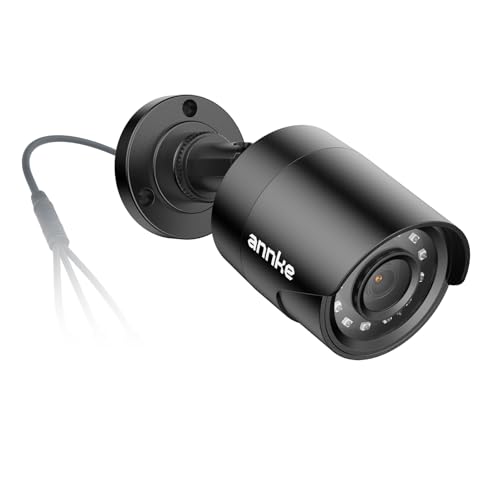
ANNKE 1080p Security Camera 4-in-1 CCTV Bullet Wired Cam, AHD/TVI/CVI/CVBS | Analog Surveillance Video Add-On Black Camera for Outdoor Use, 100ft Clear Night Vision (Power Adapter Not Included) - E200
Check price on Amazon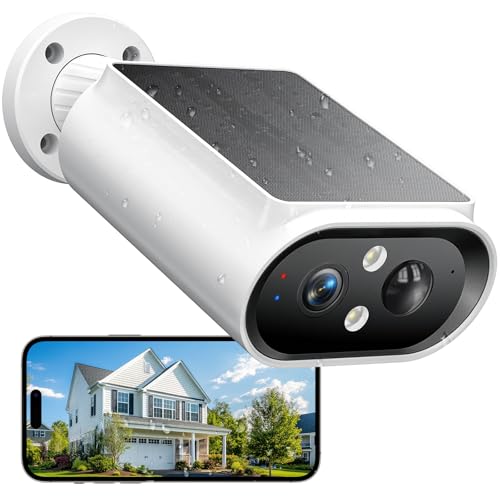
AlkiVision Solar Security Cameras Wireless Outdoor - 2K Night Color Vision Cameras for Home Security, AI Motion Detection, 360° View, Spotlight, 2-Way Audio, Siren, IP67 Waterproof, SD/Cloud Storage
Check price on Amazon
VideoSecu Fake Dummy Imitation Dome Security Camera with Flashing Light LED Cost-Effective Security CCTV Simulated Dome Camera 3PZ
Check price on Amazon
Hsylvanix Realistic Fake Security Camera Easy Installation, White
Check price on Amazon
BNT Dummy Fake Camera, Surveillance Security CCTV Dome Camera, with One LED Light, Security Alarm Sticker Label (TC-W2), Security Camera Suitable for Indoor/Outdoor (2 Pack, White)
Check price on Amazon
VIMTAG 2.5K Cameras for Home Security Outdoor/Indoor, Color Night Vision Security Camera for Baby/Pet/Dog/Nanny, Light/Siren, Motion Detection, 2-Way Audio, Work with Alexa, Cloud/Card Storage, 2Pcs
Check price on Amazon